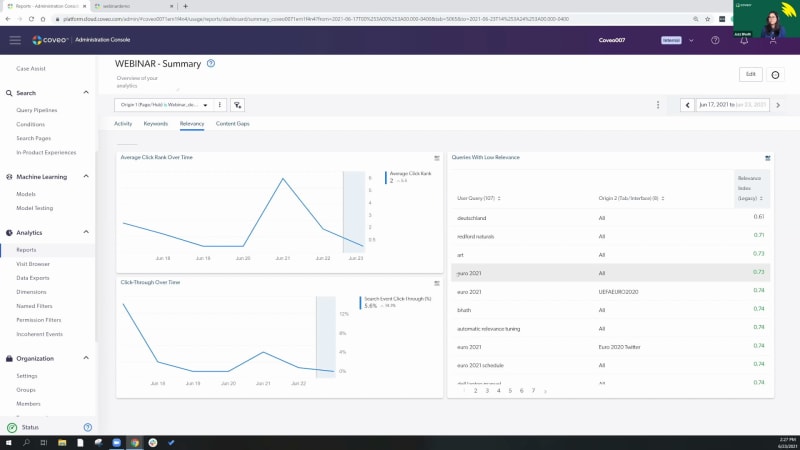
Hello, everyone. Welcome to this month's learning series webinar. My name is Claudine Ting, and I work on the global marketing team here at Coveo. For those who are attending a learning series webinar for the first time, this monthly webinar program is where we get more hands on with how to enable Coveo's features that can help you create more relevant experiences. Today is the final session in our three part series on search performance. For this session, we'll have a focus on relevance tuning. Before we get started, I have a few housekeeping items to cover quickly. Just for this webinar, we encourage you to type your questions on the q and a box and the chat box as we go along. At the halfway point and at the end of the presentation, we'll also provide a short recap of the questions being asked. Lastly, today's session is being recorded, and you'll receive the presentation within the next few days. Today, we're welcoming back Jasbeth and Jesse Just Costa, our onboarding specialists here at Coveo. We also have Jason Melnick, director of customer onboarding, and Hamid Jiricci, onboarding manager, providing support with answering questions. Feel free to send them our way even if they're specific to your use case. So let's get started. Jesse, Jazz, take it away. Alright. So hello, and welcome to part three of our webinar series. If you've been to one of our previous sessions, then welcome back. Today, we're gonna be talking about relevance tuning. So, specifically, we'll go over a quick overview, some of the main tools that you can use to tune your relevance, and then my colleague, Jazz, is gonna show you a few ways of tuning relevance on the spot with a live demo. Finally, we'll go ahead and wrap up with a q and a section. I wanna go ahead and preface this webinar with a couple of resources that you can use afterwards to get a bit further in your understanding of what we're gonna cover, specifically connect our Coveo community, the Coveo Academy, and a plethora of resources that we expand on constantly. Just before we dive in, let's do a quick recap. So in past learning clinics, we've used reporting and analytics to identify gaps in our search performance. Once we've identified the issue, ideally also identifying the queries that caused the issue, we looked at what we can do to improve on relevance and the search experience, say, by adding a query pipeline rule. So then when you might ask the question, well, what is relevance tuning anyways, we've actually already answered that. Relevance tuning is the process of identifying issues, gaps in search performance, and taking measures to improve them. So let's go a bit further, and let's break this down into three aspects, diagnosing issues as they come in, taking steps to troubleshoot the issue, And lastly, what I really wanna emphasize on is the third point, evaluation and revision. Relevance tuning isn't just set it and forget it. This is an ongoing process where we're constantly revising, seeing if the changes that we made actually improve the search experience and adjusting as needed. So you might ask the question, with that being said, well, when should I tune relevance? The simple answer is when you're sure that there's a relevance problem. Specifically, when you're certain there's a query or group of queries that are causing an issue and you have an actionable solution to improve on the search experience. What I'm trying to say is that I would advise against trying to tune relevance proactively or say if you have a hunch that if I do x, it might improve my relevance down the line. Now the reason why I'm advising against this is because over time, machine learning is gonna be able to understand these nuances, and, ultimately, it'll get way more proficient than you and I at understanding relevance. The less we can get in the way of machine learning, the more room that we can give it to work its magic and essentially become extremely effective at delivering relevant experiences. That being said, there are always edge cases that do require us to step in and adjust relevancy manually. So let's get into a few of the tools that we can use to impact relevance as needed. So let's start off with query parameters. Within the Coveo cloud, we have and essentially support a query correction feature. So this can suggest substitutes for a search term or even automatically correct, say, a keyword that might not have been spelled properly. So the two that we'll focus on here is auto correction and enable did you mean. So let's take this example here. We're here on the Cavio connect search page, and we can see that pipeline was written in with two e's. There's essentially no results. So with the enable auto correction feature, not only is this feature telling you that it's working by automatically correcting the query to pipeline, but you can see that the results being displayed are also for the properly spelled keyword and the query itself was actually changed. So not only does this improve the chance of finding a relevant item for your end user to click on, but it actually directly eliminates content gap associated to misspellings. Really powerful. Moving along to enable did you mean. So here, we can see that a client created a q and a thread in our community that was spelled pip line. Now I've never heard of a pip line, but autocorrection wasn't activated because we actually have content that matches the query, which was this thread right here. Now if autocorrect was at play, if somebody was actually looking for this result, they wouldn't be able to find it because the query would have been automatically corrected and adjusted. So because we have content that matches it, you can see enable did you mean comes into play. So we can see if it was a mistake, then we can ask did you mean pipeline. You can click into that result, and you can move on. Or if you were actually looking for this keyword in your use case or whatever the case may be, you also have that option. Now moving on, there's a lot of different things that play into relevance. But what's interesting about ranking weights is that we can actually influence relevance based on a couple of different ranking factors. You can see this is based on a scoring system, and you can see each different factor is assigned a number from zero to nine starting with the default of five. Let's take an actual example. Let's say that my content, say, help center documentation is constantly changing. As a result, the older articles become a lot more obsolete faster. So we can actually adapt to this by increasing the item last modification ranking factor. This would give a slight boost to items that were created or modified recently, which would then give more relevance to the newer items, which are more relevant because they've been changing quicker. Two things that I wanna focus on here. When it comes to this use case or relevance tuning in general, keep your use case in mind. This example makes perfect sense for a self-service, say, community, use case. But ecommerce, for example, works very differently and actually has its own set of ranking weights. If you're an ecommerce client, I would suggest reaching out to your CSM for any additional questions on that kind of setup. The second thing that I wanna focus on is that for a use case like this, again, I strongly encourage you to diagnose and really prove that you have a relevancy issue from older content before going ahead and implementing a rule like this. This is one example, but as you can see, you actually have a few different ranking factors at your disposal as needed. Next. So what happens if we've diagnosed a relevancy issue or, say, we've added a query pipeline rule, like the ranking weight, but after testing it and after testing the problem query, we're not getting the results that we were expecting? Happens more often than you think. And in this case, we can use a tool called the debug panel to get a behind the scenes view of what's actually happening with the query. So taking a look at the screenshot, you can actually see some of the ranking weights that were added and that are weighing in to what kind of results, this item would get. So keep in mind that this comes to a total weight and to a score. And as we move forward, machine learning would play a bigger part in this weight as it becomes more adept and has more queries to work from. Now the final tool that I wanna talk about is, let's say we've diagnosed an issue and we wanna take measures to troubleshoot it. Let's say, again, let's use a ranking weight to try and tune our relevance here. But relevance can be a tricky thing and we're worried that there's a chance that we might compromise our relevance by adding this rule. This is where our AB testing feature can come in. Extremely valuable and essentially what happens here is we can create a test scenario. Within the test scenario, have a duplicate pipeline that contains that new ranking weight, so that contains that new rule. And not only that, but we can actually adjust the percentage split. So let's say, for example, you wanna send more traffic to one side or another, you can do that without compromising too much relevancy in the original pipeline. I don't wanna talk too much about this because my colleague, Jazz, is actually gonna go ahead and show a little bit of this functionality within the live demo. And now that we've covered some of the tools that you can use to tune your relevance, let me go ahead and pass it over to Jazz who's gonna go ahead and show us some live examples of relevance tuning. Thank you, JC. So so far, don't see any questions. You guys are pretty quiet. Again, we have Hamid and Jason and Claudine present in the chat for the questions, so really don't be shy. This is the time, even if it's, you're particular to your own use case, just ask them. You have really expert, people present on this webinar to help you out with the questions. And, with the demo, you should be able to see my screen at the moment. Just could you just confirm that? Mhmm. I can confirm. So, in terms of demo, I wanted to start with, the relevancy issues, but we talked about a b learning and a b testing, to start with. So let's let's start with this. It it happens in the query pipeline. Again, if you're older users, you will see that, before the interface was a little bit different, we used to do, a copy of the query pipeline, so you had to have a duplicate and then do the a b testing. Now things have changed with the new interface. This is what it looks like, and now you don't need to duplicate anything. You can run your a b test right directly on the query pipeline here. So as you can see on top here, there's a couple of different rules. Some of the rules that you already know, and AB testing is included in this. Like Jesse just mentioned, you simply click on it. AB testing will allow you to, test some of the rules that you want to implement, test if actually you are having irrelevancy issues or is it actually solving the issue, with the rules that you're trying to implement. So what I'm gonna do is I will create one, and we can test it out together. So let me just, stop this one because I had already one running. Sorry about that. So this is the page you would be seeing. If you click on a b testing, it takes you to this and it's simple. You click on configure your a b testing. When you get to that page, this is the scenario that, Jussi was mentioning. So you can actually send your traffic to the correct pipeline and, really decide what percentage of the track traffic you wanna test the scenario on. Now, most of the users don't want to overwhelm, their users in particular, so what they will do, is send a less percent percentage of the traffic to the test scenario and still keep going the the big average of the the traffic going to the original pipeline. So I will kind of do the same thing here. So we we will, decide that we're just sending, you know, thirty percent of, the traffic today to the test scenario here, and the original pipeline will have seventy percent of their traffic. So not a lot of users will be overwhelmed or, distracted with with all the changes that we're trying to test. So thirty percent seems fine. Again, it's really up to you. If you want to go a little bit lower, it's totally fine. Just keep in mind that if you have a low percentage of, test scenario related to the traffic, you might need a longer period to test, the test scenario in particular. So once this is done, the next step is to add the rules. So here is the portion that is super important. Test scenario, edit the rules in the test scenario. You click on edit and it will take you to the page that is very similar to our rules in the query pipeline. So as you can see, it's the same terms on top here and what we'll do here today is test one of the ranking expression, rules. So it is under result ranking. It should appear in a second. There you go. And add the rule on top, and I will be testing ranking expressions. So add rule. And what I'm trying to do is you guys know it's year twenty twenty happening at the moment. I'm fully following it. I hope some of you follow. If not, I suggest that you do because it's pretty fun. And what I want to do is in my page that I have created for today's demo, this page here, I have added some content related to Euro twenty twenty. I've also created a tab here that is, the indexing comes directly from the page of UEFA Euro, twenty twenty. So all the content from UEFA is indexed in this tab, and same goes for Twitter. So this is their Twitter page, indexed here, under this tab. So we already have content related to the Euro, twenty twenty happening at the moment. So what I want to do is I know that I've also indexed a YouTube page. As you can see, if I go directly on this page, I don't see any videos on top, and I would like to test this out and promote the YouTube videos, because it contains some highlight. It could can be super interesting for the users to see those. So I want to boost that. Now what I can do is, if I want to have this, ranking result and ranking expression rule, related to a particular query, I can add it here. I could add euro twenty twenty here, if I want people to type in euro twenty twenty and the rule will apply. Now I do not necessarily want this to be applying to a query in particular. I want to apply it to the tab. So I will not be adding a query here, but the important portion for me is to add a condition. So what I will do is add a condition, create one, which will be the tab. So the tab that I want to promote and test today, in my AB testing is here, the euro, twenty twenty tab, which includes pretty much everything related to the euro matches happening. And I know that the tab is called UEFA euro twenty twenty. I see selected. Tab is. Added the condition, and this is where it is. And now the other thing that I need to, take in consideration is content matching these expressions. So two things that you need to do in particular if you want to boost ranking expression is, add a matching expression here. So we're simply gonna open this. We've reviewed this in the previous, webinars. If you want to learn more about it, please, find more documentation or review the webinars, about this. And what I'm going to do here, source name is equal to I'm gonna go with file type and just go with u e f a because that is the oh, that is not it. So YouTube page should be here. Add a value, u v a. This is what the the source is. So this is your filter expression. And as you can see, these are all YouTube, files here. And I will simply click on done. Source is, the YouTube page of UEFA. And then what do I want to boost? So again, you guys know you can boost it or decrease it, but I want to boost the YouTube content. So I will simply give it a hundred points. You also know that this is the portion where you test things out, but we're just gonna go simply on the page and see what happens. So I've added a tab, a condition. I've added, my expression. I've added the boosting here and simply add the rule. So this is the rule. This is what it looks like, and that is what is going to be in our test scenario. So once you've added the rule, you simply close it, and you will see things changing. And then don't forget to press start on your right side here. So start the test scenario. You let it run for whatever time that you need. And once you're ready to either, modify the rules, you can edit the AB testing here. It will take you back to the same page I was, at in, previously. And then when you stop the AB testing, this is where it gets interesting. So you see, either you can stop the AB test completely and keep the original configuration. This case would be in particular where the AB test and the test scenario didn't do well. You didn't see in particular, like, enough result or enough clicks or enough, the users were just not responding to the test scenario well. So you don't need it. You're simply disregard it and you can stop it and keep the original configuration, and that would that will be it. Now the other thing that you can do is override the original. This, in this case here, is the test scenario went super well. Users were responding at it. In my case, it means that people were actually clicking on my YouTube videos. They were super popular. I saw that in my reports, and I want to keep that going on. So what I will do is I will stop the AB test and use the test scenario. This means that your new original query pipeline will be including the test scenario that you put in. So my test scenario was ranking expression with the YouTube videos, and that will be included in my new query pipeline. So my previous rules will be there. And on top of it, the new rule that I was testing will be added and that hole will become your new query pipeline. The third scenario that you can, decide if you want to is, you keep the AB testing, but you also keep the original, test the original query pipeline. This means that you will have two query pipelines, a little bit like it used to be before we changed the interface. So, you will have one query pipeline, and I kind of want to show you guys what it looks like. So I will just stop the test scenario. It will ask me what do I want to do with the the a b test, and I will go with create a new pipe pipeline with the test scenario while it keeps my original pipeline as well. So this pipeline is named, webinar demo on top. I will simply confirm it. This is it. My test is done. You can review the different, reports if you want to relate it to the AB testing. Now if I go back to my query pipeline page and I go to the bottom, you see webinar demo. This is my original, query pipeline I was working in. And you see a second one that is AB testing test mirror. So this is what it does when you want to keep both. As you can see, there's no conditions added here, meaning that this particular, query pipeline is not running. If you want to and you change your mind about the test you were doing and it's actually accurate, you can simply decide to change, the search hub from here to this one, and this pipeline will start running as your, new query pipeline. So that is pretty much it when it comes to AB testing. Please feel free to add, and ask your questions in the chat. Again, my team is there. The onboarding team is there to help you out with, those questions. So that was pretty much it for AB testing. Now let's go on to our relevancy and, content gap issues. So today's, demo is a little bit, about one report in particular, and it's one of my favorite ones. It's called summary. So the summary report should be already in your reports by default. The other report that you get get from your template is called detailed summary that also includes all the tabs that I have here. But on top of it, you will have some extra tabs, extra content and extra, metrics and dimensions that you can follow through the detailed summary. But this is the one that should be already there in your orgs. If you want to test things, out and, you want to test the detailed summary reports, feel please feel free you to do it and you can also ask your CSMs or onboarding, team to help you out with those reports, but this is our focus today. So detailed summary, the two tabs we'll be focusing on is relevancy and content gap. Again, this is all related to this page in particular that I have created, with the help of my team to show you guys what is happening, when we do some of the tests and some troubleshooting. So to start, with, the page and the report in particular, as you can see on top, I have added a filter. So the filter is, origin one and it directs this, report in particular to my page. So if you don't see any kind of filter on top of your reports and you have multiple tabs, you have multiple interfaces or hubs, make sure that you add a filter here so you can actually see what is happening on, the page that you want to review in particular. So for me, it's this page, and this is why I've added a filter on top. The second thing that is super important to do so is select the dates. So for me, I don't need to go, super further because it's a it's a test demo. So I'm gonna just start from the seventeen to the twenty three and see what is happening during the past week and apply the date. And it's gonna give me the the details and, analytics related to that period. And the cards, as you can see, there's different kind of cards. And the ones that interests me today is queries with low relevancy here. Now normally in this card, you will only see users query and relevance index. So what is the relevance index? We've seen it in our previous webinar. This score should be close to it's zero to one. So the closer you are to one, the better it it is. The closest you are to zero, that means you really have a a relevancy issue. So as you can see, it's our our content is doing not so bad, but we still have some issues. Right? And the other, filter that I have added, to this, queries with low relevancy card is the origin two tab. So it's called tab. Basically, allows me to see if my relevancy issues are happening in one tab in particular because we can see it in general, but it's always, good to pinpoint where that relevancy issues are coming from. So origin tab, you can add it, if you want to. You simply click on edit and then edit your card. Again, if you need assistance with those, please feel free to reach out to your CSMs. So I have a couple of queries here that are having a low relevancy. So how do we fix this? The ones that I would really like to focus on today are Dutschland. For some of you, you guys already know. Dutschland is a synonym of Germany. So it's another way to call Germany. It also could be a family name, but in this case, because my demo is kind of built around the Euro twenty twenty, for us, it it's around Germany. And we see that origin is, all. So the tab that people were looking for generally is all content. We'll troubleshoot it, test what is happening here, and we have Euro twenty twenty a couple of times. Euro twenty twenty one in all tabs, Euro twenty twenty one in our Euro twenty, tab here. You see Euro twenty twenty again in Twitter, and then, a couple of other queries related to Euro twenty twenty one. Now if you're following Euro twenty twenty, you know that this is, not accurate at all because the title of the actual Euro, cup is Euro twenty twenty. The reason being, the Euro cup was supposed to happen last year, but then COVID happened, and it was postponed to this year. So it get confusing and I was one of the first one to confuse this title. I was tapping in for Euro twenty twenty not getting anything, relevant to what I was looking for because it is actually called Euro twenty twenty. So we see that, you know, people did a couple of searches on different tabs and they were not able to find what they were looking, for. This is why it's in my lower relevancy and we can test it out. Let's go see what is happening with those two queries in our, test page before we jump into the content gap. So we saw that euro twenty twenty won, and let's just see what happens in terms of content. So we see euro twenty twenty. It's already being fixed. So do I have a rule in place here? Twitter, it's being fixed. So I think I've already added a rule. We're gonna go check it out. Give me one second. And I'll create the rule with you guys to make sure that you understand how you can create those rules. I'm gonna just delete those and how you can leverage those for your own self. So let's go back to our page. I've deleted the the rules that I just created and see what happens. So now we are back to our, original report that was telling me the query euro twenty twenty one is having a low relevancy issue. So as you can see, it is right. If I'm on the top of, top of Twitter, I only get eleven results, which doesn't make sense because this tab comes all the content for this tab comes from their actual Twitter page, which means I should definitely have more than eleven, results here. So it doesn't make sense. And then they were also on the Euro twenty twenty page. Let's see what is happening here if we just do a test. So always do, test. Do what the scenario of your, users were doing, kind of do their steps to see, you know, where they are, what they were doing, to kind of recreate the issues they were having. So that's what we're doing here. And as you can see in my results, have six thousand. It makes sense, but what is highlighted is not what I was looking for. So it's just euro and twenty twenty one here. I don't see anything related to the games of twenty twenty in particular, so this is not really good. Especially in the Twitter tab, eleven con that is not good. So we are having a relevancy issue here. How do we fix this? We will use the rules in the query pipeline. Before I go there, let's test out, Dirichlet. What was happening with this? So if I type in Dirichlet oops. Dirichlet what is happening? We'll see. Oh, there. So I'm in all content. So this tab includes all of the content that is indexed, on this page. And I see only six three three document. That does not make sense. We know that Deutschland is Germany. Germany is actually playing in the Euro. They're doing good, and, we should be seeing more results here. So, this is not okay as well. Let's go see in our Euro tab, see what is happening there. If we get any results or not, one result that is really not good. And then if we go to Twitter, no results at all. So this is a content gap, in Twitter and that would be an actual content gap because, Twitter is coming again from directly the page of Euro twenty twenty. We should be seeing documents related to Germany. So we know that Dutschland means Germany. How do we fix this to make sure that when people are tapping in Dutschland, they also see the content related to Germany. We will be leveraging, what we call the thesaurus rule in our query pipeline. So, again, you go on your query pipeline. For me, it's a demo web page that I've created for you guys. Search terms on top here, these are its rules, and you can add the rules either from here on the top here, we'll go from here, and you have four different rules. So if you wanna learn a little bit more about those two rules, we have a webinar number one that covers it, and you can also click on, the little question mark on top that will take you to the documentation related to all of those rules. And let's start with euro twenty twenty one. So we know that is it is not the correct spelling. It is not the correct title. And what we can use to change that is the rule replace. So what I will do is take the original expression, what is which is the wrong query in our case, which is zero twenty twenty one. We know that that's not it, and change that for zero twenty twenty. Now I see that it was pretty much happening on all of the tabs and in particular, the tab euro and Twitter. So what I can do is I can add a condition and add that I just want to have this rule applied to the euro tab and the Twitter tab. But in this case, I will not add any condition and have this applied on all of the pages because euro twenty twenty one does not exist. It is not the correct title, so we will simply add the rule. It is here. So replace Euro twenty twenty one with Euro twenty twenty. Let's go test it out now. So we're gonna close this and type in Euro twenty twenty one and see what happens. And as you can see, the result are just going higher. So the number of results changed. If I go into my things that are highlighted, we see euro twenty twenty, which is really good. This is what we wanted. We want the correct title to appear. We want all the content that is related to Euro twenty twenty to pop up, when somebody is mistakenly typing in twenty twenty one. Let's go on the twenty twenty tab and same thing. As you can see, numbers went up and what is highlighted is Euro twenty twenty here. So this is perfect in terms of solving irrelevant issues. We are correcting a query that was wrong, that was wrongly added by our user and used by our users. So we just simply correct the results that they're saying to the correct query and correct result. So this is one of the ways. Now let's go back and see what we can do with Dirichlet. Again, same thing, this Aris rule. Add the rules. And what we will use here is the expand any rule. Why we're using the expand annual? Because Deutschland is actually the name of Germany. We do have content that exists. We saw that when we were doing the troubleshooting, and we also have content that exists for Germany. How do we see this? If I go back to Twitter, we saw that when I was tapping in Deutschland, we had no result at all. But if I tap in Germany, what do we get? Give it a second. Sorry for being a little bit slow, but here you go. So we do have results. We have eighty four, results that exist for Germany, and that should be appearing if people are tapping in for Deutschland because it means the exact same thing. So what we do is use the expand annual to have those two queries share their content. So no matter, the number of results that exist for both of them, they will share their results, share their content in the result list together. So if somebody's tapping in for Deutschland, they will be able to see the content related to Germany and vice versa. So I'm typing in Germany. These both queries are sharing content. I can add a condition here. Let's say, again, you know, I can decide to apply to Twitter only, but it doesn't make sense because if I was to type Deutschland alone, Twitter does not have any content. So I will not add any condition. I have this rule applied everywhere on my website and add the rule. So I've created the expand any rule. Let's go see what it looks like. So Germany is eighty eight for, eighty four content, result list here. And if I tap in Deutschland again, we saw that I had no content at all previously. And now if I look for it, and eighty four. So now even though I'm searching for Deutschland, I get Germany highlighted because that is what I've added in, my rule. So my rule said, share the content no matter what query this is, and same for euro. As you can see, two thousand. If I go to all content, I think we had, not a lot of results list and now it's boosted up to seven thousand. So this is another way for you to solve, one of the issues that you can have is using those thesaurus rules. So in terms of relevancy issues, thesaurus rules is, one of the most popular one that you can use, but again, you have multiple other rules that you can use. If you wanna learn a little bit more about it, Callwheel Connect is your best friend. Leverage your CSMs for it. And now let's move on to our content gap. So everybody is super excited with the content gap. We will go back to our reports, summary, and check on my content gap, tab here. And the card that is interesting me today is queries without result. So as you can see, I have a couple of one, but the most popular one seems to be Hamid. Hamid is part of my team here, in onboarding, team. So we shouldn't be having a query with that result for Hamid. Why is it happening? So let's just go test it out. Okay? Just test Hamid and see what is happening. If I'm all in my all content tab on top here and I tap in Hamid, let's see what happens just in particular. Sorry. Again oh, there you go. There's actually content. I have hundred eighty eight, results related to Hamid, which is totally normal because he is part of my team, and he does a lot of work and there should be content related to this. So why am I getting, Hamid in my list of content gap? And this is where it's super important for you to pay attention because this is one of the things that we call fake content gap. So one of the things that you can leverage is having, extra tabs, added to your query with that result, card here. The one, that we use is origin two. So again, pretty much pinpointing and kind of narrowing down what the users were doing. So did they click on in, something particular that led them to having no results? In this case, origin two, again, is our tab on top here. So did they click on a tab? And we can see that, yes, they did. They were clicking on a blog. For some reason, someone was looking for Hamid and a blog post from Hamid. And the second thing that we have is, facets here. So facets are filters. If somebody's, selecting a a filter in particular, why, it might kind of alternate or, add a blockage when it comes to your content, it's because it pinpoints where they're kind of looking for their search and it would be the same thing. Now in this case, Hamid and blog, it is totally normal. I will show you guys what it looks like. So we're gonna retrace what our users do. We went on all contact. We do have content related to Hamid, but they were on blog. So I'm gonna go back to blog and see what is going on and see what happens. Again, takes a second. Sorry about that. Oh, no content. So no result for Hamid under blog. So this is actually true, but it is also normal. And this is where I cannot emphasize, enough, fake content gap is related to, the fact that it is it's totally normal that there's no content related to Hamid in blog because Hamid has not created or written any blogs at all. So it's normal that we don't have any content related to this. So with the page of, queries without results, you can actually trace and narrow down what your users were doing to find that content gap and, fix it. So before deciding that you need to create new content or, you have some content that exists and that is not being sent out to the right place, make sure that you follow these steps. And the other thing that you can leverage to, kind of really pin point what the visitor was doing, before they got this kind of, query with that results of this content gap is visit browser. So we saw visit browser, we talked about it in our previous webinar. It can do a lot. It trace traces down pretty much all the steps that a visitor has taken on your page. So it will really allow you to pinpoint what did they actually do, to get here and get, a content gap. So in this case, again, it is a fake content gap because, you know, Hamid has no, blogs and it's totally normal. And now if that was to become popular here, I can see that only five people, had five visits. It was searched nine times in blog. Now if that was like related to thousand and, you know, I don't know, hundred people were looking for Hamid in blog, I might go ask Hamid and, ask him to create a blog post because he seems to be popular and people are looking for his blog posts. So these are the type of things that you need to keep in mind when it comes to fake content gap. And, I think that was pretty much it when it comes to the demo. We've covered, So relevancy issues, you can use the rules in the query pipelines. You can test the rules in the query pipelines with a b testing. And when it comes to content gap, you need to be careful. Make sure that you're really, kind of narrowing down if it it's a natural content gap or if it's a fake content gap. So you don't wanna overwhelm your teams and create new content that you didn't need. So that was pretty much it. Jesse, I'll let you take over. Alright. Perfect. So thank you so much for that, Jas. Honestly, really cool things, and I love the soccer analogy through and through. So just before we wrap up, let's go ahead and leave the room for leave the room open for any question. Okay. Perfect. So let's go ahead and leave it for any questions. So the first question being, should we include synonyms and acronyms as thesaurus rules specific to our industry before we run into relevancy issues? So that's a great question. And the simple answer is that, yes. Adding thesaurus rules so specific to your organization, maybe keywords that are really common that are often spelled as acronyms, is fairly common and used as a best practice. That being said, it would be best to prove that those specific queries are actually causing relevancy issues or that they're backed up by analytic metrics. The good news here is that we actually do have report templates that can help you identify these queries. Even within the part two of our learning series clinic, we've gone ahead and covered analytics and some of these report questions that, address these. Okay. So let's just see for any other questions. I can see one that popped up. So in Jazz's Euro twenty twenty to twenty twenty one example, if we chose to not create a pipeline rule, approximately how long would we wanna wait before we could start to expect machine learning to impact the results? Or because there was no Euro twenty twenty one content, is there essentially no ground for machine learning to learn from this? And would machine learning ever fix this specific relevancy gap on its own? So I'll actually go ahead and pass this off, to my colleague, Hamid, who had gone ahead and addressed this within the chat. We can hear you. You can hear me? Yeah. Yeah. Oh, perfect. Sorry about that. So, this customer was from Brandon, actually. So, so, so, essentially, in the long run first of all, machine learning looks at trends and looks at journeys rather than looking at one search at a time. That being said, so in the long run, yes, it will be able to to basically correlate, euro twenty twenty, one with euro twenty twenty. But the the users have to search for for the first one and then the second one as part of their same journey. So and and so short answer, it will help in the long run. But, honestly, in in such use case where it's it's very time sensitive and, you know, it's only one monthly euro, it's definitely better to to to to create a thesaurus entry and and make sure, you know, you expand your euro twenty twenty one, etcetera. If I might might add here. So while I was creating the demo, for you guys today, I was actually trying to test these things out. And the funny thing that happened is that Coveo corrected my Euro twenty twenty issues automatically, and it took, I think three days. And it was already popping, the right answer. So the results were including Euro twenty twenty already when I was tapping in euro twenty twenty one. So I had to recreate another content gap and relevancy issues for this demo. But, yeah, it's to tell you guys that, you know, machine learning models are working. COVID is working very well. Even for my demo, I had to recreate more issues to show you guys what it looks like. Okay. Perfect. I can see just one or two more questions that have popped up. So in this case, given relevancy tuning, can we essentially use thesaurus rules, to go ahead and tune our relevance in any context? For the thesaurus rules I mean, you can use the Saris rule, but there's other rules as well. So, again, if you want to learn a little bit more about the different rules that you can leverage when it comes to relevancy, please watch the webinar number one that we have. It's really focused on the different, rules that we have. It explains in particular, what you can do with those rules. So, yeah, definitely leverage all the rules that you have, available, for you in the query pipelines, not just the desired rules. Okay. Perfect. And I can see another one that's come in. So in our Coveo search experience, we have hundreds of thousands of results, so relevancy numbers can appear really low even when the results are very relevant. So to address this point and looking at relevancy on a bigger scale, the index essentially combines indicators measuring relevance. So click through ratio is a really big indicator, average click rank, how frequently a query might be submitted or actually entered. And, really, with this, if you are noticing a a big root cause of a lot of low relevancy index to have this conversation, say, with the customer success manager assigned to your account to make sure that that can be addressed properly. Okay. And I believe that we have just one final question here. Is there an easy way to customize that no results and add a common searches or trending searches? Likewise, is there a way to do a popular results to show some of the more pages that are getting traffic? So, I'll go ahead and pass this over to Hameed one more time to speak a little bit more who would address this in the chat. Sure. Yes. So, there's there's two part to this. I'll speak to the first part, and then I'll have Jason come in on the next part, the second part. So, yes, we can we can definitely customize the no results found page. And I I and I added this small link from the Coveo Academy how to it's it's a bite sized learning, how to edit the no results page. And then the the second part, it's more, it was more on, is there a way to do popular results to show on the, to for some of the more popular pages that are getting traffic? Yes. But we need to discuss it a bit further and and see the context how can we achieve it. It's it's not straightforward, to be honest, and and I don't know, Jason, if you wanna add anything to that as well. Sure. Yeah. Thanks, Suniti, for this setup. I I think it's kinda like setting a a a Coveo search API at the Coveo cloud organization itself because, with our usage analytics, we're always capturing all of the queries as they're coming in. And, you know, you can look in there and see what the most popular queries are within our usage analytics platform. So we have some customers who have actually done this where they've taken the Coveo search API, pointed it back at the Coveo org, looking at, like, queries within a certain time frame, and then rendering, you know, those as popular queries that would show up in here. Popular results can be done as well. This one may be a little bit more straightforward because we have different machine learning models that that process these things. So, the automatic relevance tuning model basically just looks at, you know, whatever queries come in, whatever input you're sending, whether it's a query or context, and then the associated documents that are clicked. Well, you can create a variation of that model that kind of ignores the input and just focuses on the output and says these are the most popular documents. Or even like we talked about with queries, you could do a similar thing where you're pointing a search API at the Coveo Analytics platform, the particularly the document clicks and pulling back that. So, this has been done in several implementations. That's some examples of this. And I would say if you're looking for more information, you can talk with a Coveo partner or with our professional services team. Reach out to your your CSM, and we can, get you set up to, you know, dig into this one a little bit deeper. Okay. Perfect. And I can see that we had, one final question that's gone ahead and come in. And that was, I wanted to verify, some of the content matter, specifically, did you mean and the autocorrect. Are they the same feature, or are these different features that may be enabled? So the simple answer here is that did you mean and the autocorrection feature are essentially controlled by the same Caveo component, but they have a different output. And the difference here is that did you mean is presented when we actually have matches to the original query, where autocorrection is when we don't have an answer. So like I was speaking to before, if there's a chance that there is a match and we actually intended to click on something that may not have been spelled correctly, we don't wanna eliminate that chance. So we'll throw in a did you mean, and we'll give the end user the option to either click through to maybe a misspelled or a differently spelled keyword or to go to the suggested correction. This is also documentation, and you'd be able to find this kind of documentation on Cabello Connect, within our product documentation. Okay. I believe those are all of the questions as of right now. So I'll go ahead and pass it over to Claudine from here. Okay. Thank you so much everyone for your questions. Jesse, Jazz, thank you for that wonderful presentation. Jesse, do you mind just, sharing your screen to share some, event reminders that we have coming up? Absolutely. Give me just a moment. Can you see my screen? Yes. Yes. Awesome. Yes. So before we wrap up, I just wanted to send a reminder that next week, we have two new and Coveo webinars, coming up. We have we have one for service and workplace and one for ecommerce. We definitely recommend that you join. I'm gonna post the link in the chat. We're gonna be talking about the latest features and enhancements that we have for this quarter. So we hope to see you next week in both our new and Coveo webinars. Well, I think that's, that's pretty much what I have for reminders before we wrap up the event. Thank you so much for attending today. Again, we will be sending, a recording of this webinar. Art, thank you so much for the feedback. We really appreciate it. Kyle, thank you for the feedback as well. We hope to see you in the learning series, coming up next for, in the next month. I wanna give a big round of applause to Jazz and Jesse for putting together a great learning series on search performance. We hope you learn so much from them, and feel free to reach out to them if you have any questions. Well, that is it for me. Thank you again, everybody, and have a great have a great rest of your day. Bye for now.
Part 3: Search Performance That Gives You the Best Results Even Before the Search Is Made
Imagine your business being able to react proactively instead of reactively.
Being able to constantly measure user behavior and adjust your search strategy to the ever-changing search environment.
But how do you do this when there are thousands of small and large changes and behaviors occurring in real-time?
Our Part 3 webinar will show you how the Coveo Platform eliminates reactivity.
You will always be playing catch-up and chasing your competitors because you can’t manually react fast enough to changes in the market.
When businesses don’t take proactive steps they don’t reach the next level.
his results in lost revenue, inaccurate analysis, and siloed data.
Coveo AI allows you to constantly monitor user behavior and make moment-to-moment decisions to ensure maximum relevance and precision in your search.
Today consumers are far more informed than ever before. They’re also empowered in their ability to search for products and brands they like.
Part 3 is all about search performance, learning the basics of relevance tuning, and how to get the most out of Coveo’s reporting dashboard.
Information is power.
You’ll see what happens when you harness information to proactively engage your customers.
We will build on the foundations from Part 1 and Part 2 to assess and troubleshoot relevance issues so that you can deliver a relevant search experience.
You will learn:
- What relevance tuning will do for your business
- How to identify and troubleshoot content gaps
- Tips and tricks to tune your relevance with ease
Note: The first two sessions of this Learning Series explained the foundations of the Coveo cloud platform, with a focus on Query Pipelines and Usage Analytics. We also discussed how to provide information to your users based on their context and how to gather insights on the way they behave with your search solution.
If you missed Part 1, we talked about the basics of the Coveo Search Hub and creating Query Pipeline rules. Check out the recording here.
If you missed Part 2, we showed how to utilize the Coveo Relevance Cloud Usage Analytics Engine.
Check out the recording here.Make every experience relevant with Coveo