
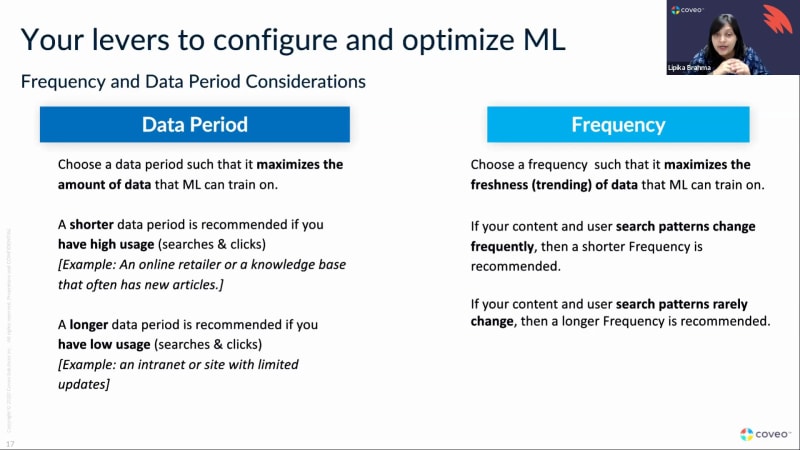
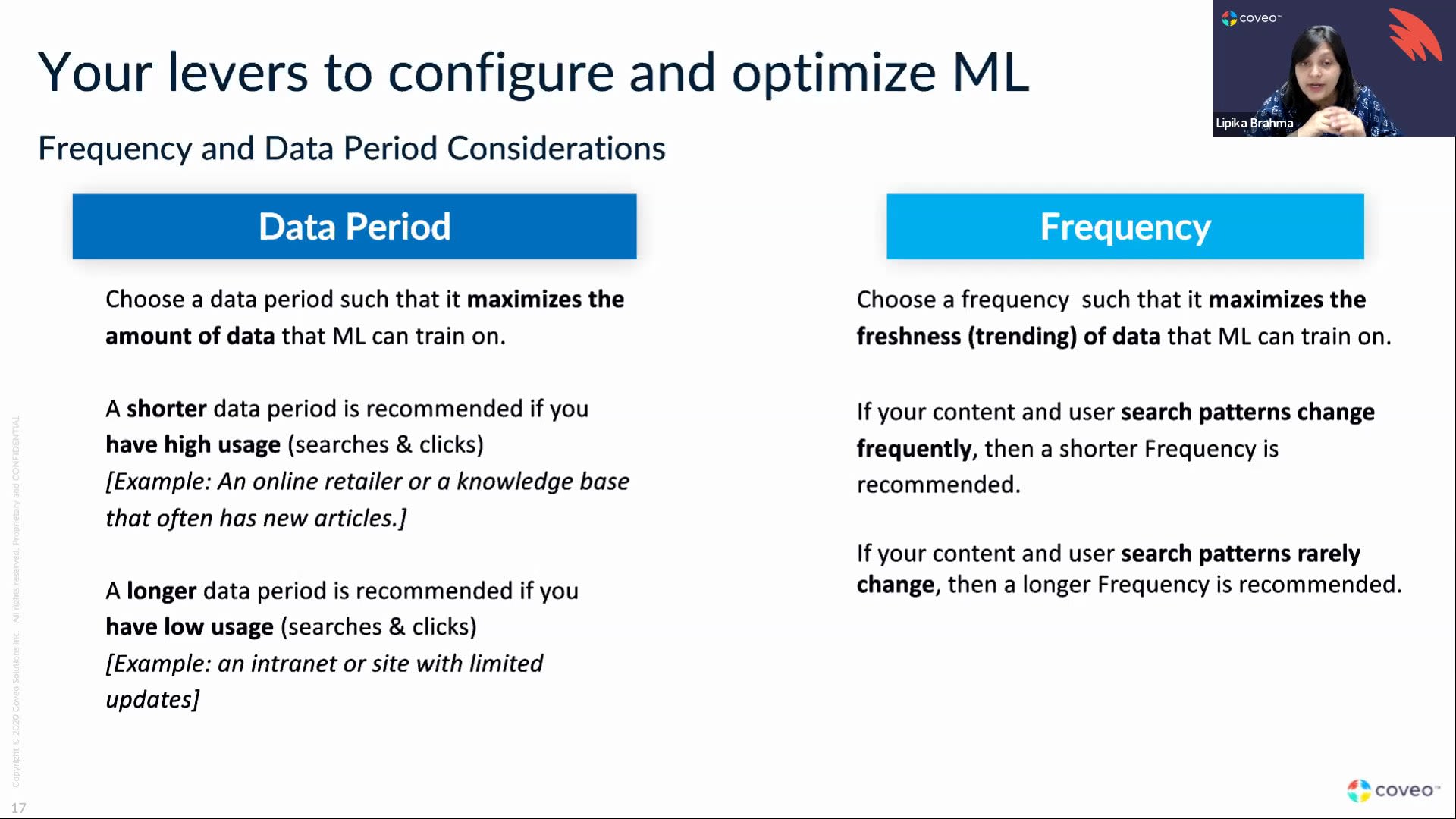
Nope. It is live. K. Good morning. Sorry. Good afternoon, everybody. Welcome to our webinar. So in today's webinar, we're gonna talk about relevance tuning for, for our commerce customers. With me today, I have, Mobin and Hamid. Mobin and Hamid are both part of the onboarding team. Hamid is a team lead in the onboarding team, and Mobin is an onboarding manager. Both of them work very closely with a lot of our commerce customers who are onboarding to the to the Coveo platform. So, in today's agenda, in today's agenda, we're gonna talk about the commerce setup. And, so basically talking about how the search hubs are set up, how the query pipelines are set up, and and so on and so forth. Then we are gonna talk about, you know, the relevance tuning aspect of it, how you can create ranking expressions, what you should be thinking about, when creating those ranking expressions, you know, what other features in the query pipeline you can take advantage of in terms of commerce. I'll be talking about machine learning. And then last but not the least, Morbin is gonna talk about data tracking, which is, you know, the most important aspect of any commerce setup over here. So, with that, just a few housekeeping items. If you have any questions during the webinar, please, make sure to use the, you know, question and answer section to ask your questions. Mobin and I will be answering questions while Hamid is presenting, so feel free to shoot your questions as and when you have them. So thank you very much, and handing it over to you, Hamid. Perfect. Hi, everyone. I see familiar names on the attendees, virtually you either before or or now. Allison, Tracy, Scott. Hey, guys. Hope everybody is doing well. Perfect. So, as Deepika said, we're gonna start, with how how Coveo commerce setup, typically is and how is it different from an actual regular website search setup. So a classical website search where, you know, we don't have products or we're not selling something, we're just providing information to customers, usually, Coveo interacts with three main, components or main main main components or or pages. Global search box where you have your main search box where customers key in what they want. You have your search page, which has also a search box and results including other subcomponents like facets, tabs, etcetera. So this is the typical website interface, global search box, search page, and the result templates, etcetera. When we look at it from a commerce standpoint, it's a bit different. Well, it's a lot different because the the customer journey does not have to start from a search box all the time. It could be starting from a navigation menu. So they could get go to the navigation menu on your on your main site, and then they could go to subsection of brands, etcetera. If you're selling shoes, maybe you have a part called Nike shoes, and then, you know, other types other types of shoes. So this search box still exists. It will still lead you to a search page. But at the same time, the same search box could actually lead you to a listing page. Same example, Nike. If I'm looking for Nike, perhaps you want to redirect the customers to their Nike, landing page, which has all the Nike products, etcetera. Not only that, from a from a search page perspective, instead of results, we have results mainly our products. Right? So those products, can you can get to an actual product listing page through either the search page or the listing page itself. Sorry. I said product listing page. I meant product detail page. Same thing. On the product detail page, we we have recommendations. Customers who viewed this also viewed that. Customer who actually added this to cart, added that to cart. So all these are actually recommend what we call copy of recommendation. Recommendation is a component. It's extremely essential and extremely, important to have in when when it comes to commerce. It still exists in noncommerce where if, you know, customers who viewed or looked at this article also looked at that Barca. But in commerce, it's just a whole continuation of the of the journey. Think Amazon. Amazon, it's all about recommendation. Customers viewed this. This is another add to cart. Customer who actually purchased this also saw that. The numbers you see here, this is the the interface example of an interface. So, essentially, you're gonna have one global search box, one search base, but you might have twenty or thirty or or ten listing pages. When it comes to recommendations, the number is even more because recommendations could be at every single product detail page, or they could be part of the the the cart. Once you add to cart and the you know, you're going to check out, you might have a pop up says customers who who added this to cart also added that. So keep that in mind as you're designing and you're thinking about your Coveo commerce, commerce, architecture. So now I'm I'm just gonna mention couple of things. This this is something you're really familiar with. This doesn't apply only to commerce, to everything, Coveo. But the point of this slide is to tell you the Coveo terminology that that you're gonna hear Lipika and myself and and what we'll talk about here. So the search hubs are basically the the the search pages. In this case, it could be search or listing pages. Other types of search has search hubs are recommendations. And you see every search hub or or group of search hub point to a pipeline. Pipeline is a in Coveo, the pipeline is basically the set of rules where we inject the source entry, where we inject ranking expressions, inject filters, and even specific machine learning models into it. So we might have different pipeline different different pipelines pointing to different search hubs. Keep that in mind. So when we say, can you add this boosting to the search page only, not to make it part of recommendations or not make it part of a listing page, we we would say, okay. Let's go to the search pipeline and inject this specific tool into that pipeline. In addition, we have the whole Coveo cloud platform, which has the machine learning, the Coveo index, usage analytics, cloud security, and the whole admin platform is in there. It was everything, which is a really good thing because Coveo is is I could I could use the same pro catalog. For example, if you have multiple multiple brands, I could use the same catalog for different types of brands. Right? As long as they live in the Coveo, one unified secure index. And, of course, we have a lot of native connectors need to name a few site for Salesforce, easier public ones like YouTube. But, of course, we also have a catalog connector that's very specific, for commerce. Once we have everything here, then we start to play around with the pipelines to make sure we have the most relevant information displayed. Now if I take it just give you a small a small example. I talked about pipelines, how different pipelines can point point to different, search hubs. This is some this is a typical commerce implementation. We usually have two or three pipelines to start with. If, of course, assuming we have we don't have multiple different completely separate brands. Let's say we have one main brand. I would look at it as pipeline number one, which is search, and the search hub, which is the condition we set in the pipeline equal to search page. Very similar to pipeline two, which is a recommendations, and then the search hub would be search hub or origin one. That's the conveyor terminology or on on these recommendations. And I could have a listing pipeline, which points to all the listing pages as origin one. And then let's say you have ten different listing pages. How do I differentiate between those? I'm gonna be scoping on origin two as listing page one, listing page two, listing page three. To be transparent, a lot of our customers actually have the listing pages live under the search pipeline, and then they use filters to to basically separate. The the upside to that is if you want a a thesaurus entry, let's say, instead of having to inject it here and here, you just inject it into one pipeline, and then you within the pipeline, you would filter out where where you wanna that's a bit of an upside. So think about different pipelines, different search hubs when you are when you are architecturing your, your pipeline. And that's how it would look like. And in case you're not familiar, this is the consumption dashboard. So another thing why we why we separate it and we track it differently, I'm gonna know what's going on in the system as well, not only in reporting, also in the dashboard. So in the dashboard, you're gonna see search hub one, which is search. I have all these normal queries. Right? Listing pages, I have all these normal queries. And then recommendations recommendations, we would measure them not as as a normal queries. We'd measure them as recommendation queries. This is also critical when you think about your license because, usually, the license comes with a set of, of actual, normal queries. And this normal queries is separate from the bucket of recommendation. Anyway, we can give you more details on it, but it's really important that we separate our search apps and our pipelines to make sure we are able to give basically our customers the optimum experience. Now I'm gonna switch gears now that we better understand, from an ecosystem perspective or a setup perspective, how Caviar commerce would look like. The essence of this is really relevant. So okay. I know I have, you know, I I set up the system, but what can I do to to optimize it specifically for commerce? So couple of things we need we need to we need to talk about. Everything in Coveo is based on a scoring system. This scoring system has three main components. Component number one is the out of the box Coveo algorithm. That is the the Cavayo algorithm, by the way, out of the box is built for regular search, not commerce search. So that's why we need to do some tweaks. This out of the box algorithm will for instance, any, item that was updated yesterday will get a bit more scoring than if it was updated ten years ago. Right? Same thing. The the we have stuff like sorry. I'm I'm losing my mind. Frequency and recency. Example, if I'm searching for Lipika's name on our Internet and Lipika's name is found in one document twenty times, it's gonna be get more scoring if Lipica's name is found only one or two times. So there's a set of rules that that already applies, and this will create good search to start with. Is it enough for commerce? Not really. In commerce, we need to take into consideration other aspects. Thus, we have what we call query ranking expressions. Those are manual rules we inject or ranking weights we play with to optimize the solution. One example would be recency or what I talked about at the beginning. If an item was updated yesterday or ten years ago or maybe five days ago, it's not as important in commerce as it is in a in a more of a knowledge, a knowledge platform. This is just example. I'll give you more details in a bit. So now I have the algorithm. I added some rules to take it to the next level, personalize the experience. This is where Kavya machine learning comes in, which learns from the whole journey, learns from clicks, learns from page views, and inject more scoring into certain products to make sure they are boosted on top. So that being said, let me just go a bit deeper. So if I start with the out of the box algorithm I talked about, in a default setting, when you get your org as is, the default algorithm is based it's all neutral, so we don't have any factor affecting relevancy more or less. And the factors that I gave as an example at the beginning, last modification, frequency, concept, title, summary, proximity, they're all very neutral in the middle. In commerce and that's a sample sample what we're showing you. What what we usually do, and this also all already comes down during your AT and during testing, we for example, item last modification, I don't want it to have that much effect. But on the other hand, if the keyword is in the summary of the product, I want it to have way more way more relevancy there, which that's why you see we move the needle to the right to give it nine, which is the most, and and keyword summary while we completely removed it in in item last modification. And to get to the, ranking weights, they'll be in the query pipeline that you you you want. Then you go into advanced, and then you go into ranking weights. You can see those. So even if you're not if if your existing use case is not commerce, you can actually go and see those right now in in your org. So now we know the out of the box algorithm. Let's dig a bit deeper into QRE. So why why would I why would I when would I play with the QREs? To be honest, it it all comes down to two main things, business rules and your existing top queries. If you have business rules that are telling you, you know what? I have three brands. Brand a, we have a censorship agreement with them. I want, no matter what the search is, brand a to get a bit more promotion than anything else. So even before machine learning intervenes. This is one example of a business rule. Or something like, margin. Right? If if you want all the all the products that have higher margins to be on top, we can create a rule saying whatever the margin you know, if the margin is that high, make the product on top. So think about business rules that already exist, and this is agreed by leadership team and the whole marketing team and the content team. Then the top queries. Why is this important? We give example here of our top fifty queries. Depending on the use case and and and the number of actually queries you get per per per month, this could be top ten, top twenty, or even we could go up to top fifty. We take those queries. Once we have the business rules in place and out of the box, out of the box algorithm, we're gonna go and test them out. If, for instance, somebody searching for MacBook Pro, if you're saying, electronics, searching for MacBook Pro, and the top two results are actually MacBook Pro accessories, then we have a problem. Right? So we need to add more with saying when the exact name is in the title boosted a bit more. So those those queries, your top queries that yield your most conversion rates or most sales, that's what we're gonna play with. And, of course, last but not least, we're gonna use machine learning, which Lipik is gonna dig deep into it, in a bit to to to basically configure machine learning way above and beyond the regular machine the machine learning you have. So we can play in the configurations a bit instead of just having it as in point to click next next next as we used. Let me give you some examples now about the business rules high level, but and how it would actually look like in in the in the, in conveyor on in the pipeline. So, I'll look at couple of examples here. This one is pretty interesting. So if one of boost boost certain categories when the query matches that field, very possible because instead of creating a static rule where the rule says whenever the category equal Nike boost, something like that, I'm able to dynamically using this, this expression to extract from the actual query itself. I'm gonna extract the keywords that match category, and then I will boost it automatically, for example, by fifty five points. Very, very powerful. And it doesn't apply to category only. It could apply to brand. It could apply to color. It could apply to sub brands, literally accessories, anything that we have in the system. So let me just remind you that we need to have a good content. We need to have good, tagging and good catalog to be able to have that. Because if the categories are not really well tagged on on on products, then this is really not gonna work. So keep that in mind as you're thinking about it. Same thing. For example, you can demote or deboost products on sale. Something we see sometimes where where the profit margin is is low, we can say this is more static as you could see because I'm not extracting any keywords from the from the static query from the, sorry, the query itself. Here, I'm saying whenever the batch is sale, demote that that product. If I say minus twenty five or promote it, if you wanna get rid of it, which we've seen a lot of customers do, we've boosted it on top. So when there's a search, that when there's a search and I'm giving back results that have the Barca saved, they will be a bit more on top. Very similar, value similar, the last one here, we've seen also a lot that we we we want to basically promote stuff that has no tags or stuff that is laptop specific or whatnot. So anything that we have a tag, we can, like this this example is is also super interesting because it combines several, several query ranking exception. The business rule here is when Quay is shoes, advertise Nike and Puma, shoes that have a higher price price margin. So this is a multilayered thing. My first rule is gonna be which is my first condition is gonna be ad brand equal equal Nike, and then ad brand equal equal Puma. I still gave Nike one point more. And then where the price, the price is between or the margin is between hundred and fifty and five hundred dollars. So that's another thing that you that you can think about. By the way, for for you for for any of you who's wondering the difference between double equals and one equal, double equal is an exact match. One equal is contains. So just keep that in mind as well. I I went through this path. So if there if you wanna take any questions, Lipika now, or do you want until the end before I hand this over to you? Let's see if there are any questions over here. So, maybe we just continue. And then after I finish, maybe we'll do another round of question answering. Perfect. Okay. Let me share my screen really quickly. K. So, thank you, Hamid. So Hamid just spoke about all the manual tuning that is available to you when it comes to bearing or boosting, you know, products on your product listing page or on your search pages. What I'm gonna talk about is very specific to machine learning. So if we look at, you know, machine learning, there are different machine learning models that Coveo provides that you can use on your ecommerce site. We use the term machine learning very generically, but each of these models has a very specific purpose and why they are there. Right? So for example, the first model that a lot of our customers use is query suggestions. We also have, you know, product suggestions. You know, here it's called query suggestions, but basically, we're suggesting different products. We can also customize this model such that customers can see, like, a preview of the product that, you know, in the drop down, they see a preview of the product that they are trying to search for. So query suggestions, ART, all of these models learn from user behavior. So they learn from the searches, the clicks, and the page views in terms of, you know, the product views that are happening on your site. And based on that behavior, they will present, you know, different, they will start suggesting different things. So query suggestions is a very simple model. It'll it'll look at the queries that are happening on your site. It'll look at successful events. In this term, it'll be clicks. And then it'll suggest, you know, queries based on related queries based on that. The automatic relevance tuning model, what it does is, you know, based on user behavior or your customer behavior, based on, you know, what they are searching on, what they are clicking on, what they're browsing, We will boost items that get a lot of clicks to the top. So if you remember, you know, Hamid was talking about, you know, giving scores to different products. So each of the items or the products on the page, be it a search page or a listing page, it's there in that position because of a score. And machine learning, by default, if machine learning picks up a product and thinks that, okay, this product has been clicked on a lot of times, I should boost these products, then it will give it a score of two hundred and fifty points by default. So any of the examples that, you know, Hamid was showing you when he was looking at ranking expressions, We always advise customers to give boosting of less than two fifty points. Do not go beyond that because then we are in danger of, you know, overriding what machine learning is doing for you. Because machine learning is doing exactly what your users are doing in your site. It's what what they're searching for, what they're clicking on. That's what machine learning is helping you, helping you do. Then comes we have two different types of, recommendation model. So I'll talk first about the content recommendation model. So the content recommendation model is very useful for for sites that have both products as well as text as in, you know, say for example, I I go on a on a site where I can buy, you know, tools and then I have also, you know, DIY project pages for customers so they can learn about these DIY projects and then buy these tools along with that. So the content recommendation really acts as complimentary to your product. So say, for example, I'm buying a nail gun. I and it shows me, you know, articles or DIY, articles that will show me how to use that nail gun, where I can use it, or even manuals or or to how to use it properly, and so on and so forth. So that is content recommendations. Then we also have what we call as product recommendations. And product recommendations really are, you know, very, very versatile because they can be used at any part in your site. So we have a lot of customers that use product recommendation models right on their home page. Or sometimes, you know, the typical people, you know, customers who have bought this have also bought this, of customers who have viewed this have also viewed this. So there are different strategies available when it comes to product recommendation models. So, you know, frequently bought, frequently viewed, frequently bought in the same category, frequently bought in the different category. And this goes back to what Hamid was saying that you you need to have those categories defined. And once you have them defined, then, you know, we can suggest either complimentary items or similar items to what the customer is trying to buy or what the customer is trying to purchase. So these are the different, you know, machine learning models that are available for your commerce site. There are a couple of things you need to consider when you're setting up the machine learning model. For each of these machine learning models, these models are created from usage analytics information. Right? So we are looking at analytics. So the two things that play a may you know, a very important or crucial role is the data period that you're looking for and the frequency. So the data period basically means how much of data you're looking for. So are you looking at a month? Are you looking at three months? Are you looking at two months? And then comes frequency is, you know, when I'm building the model, how how frequently am I going back and refreshing my model to look at fresh, analytics. So if you have a site, you know, and most commerce sites, you know, when you're selling products, they can be seasonal products. Right? So you want machine learning to be able to pick up those queues as fast as possible. So typically, a lot of our commerce customers have data period that look for, you know, one month data period, and they are usually refreshing every week or even every day at some point. So it depends on the kind of products you're selling. If there is a lot of seasonality involved to it, then I would say, you know, choose a smaller data period and choose a, you know, smaller frequency as well. So then you're always getting fresh information. But if your product doesn't have a lot of seasonality component, then you don't necessarily have to choose a smaller data period. You can still look at a larger time frame. You can look at a two months, three months time frame. You can still update it and frequently update it every week or every month. But that's those are the things you need to consider because we wanna make sure that we're learning from fresh interactions right away. The other considerations you should have when it comes to machine learning is, you know, inside the machine learning model, there are different aspects of the machine learning model that you can tune. So, when you're creating, an ART model, for example, which is our automatic group, relevance tuning model, by default, machine learning works in a way that it injects results. So what that means is that, say for example, the customer is looking for, you know, a particular type of mail or a screw. And for whatever reason, they don't remember the right name, and they're entering a wrong name and the wrong brand name or or whatever it is. Right? But which means that they might not see results, which means you'll have a gap. We call it the content gap where there is a query, but there are no results generated. But then the customer goes on to, you know, say, oh, maybe I misspelled it or maybe I don't know the brand. Goes back, corrects the query, and then finally lands up in the right product. Machine learning learns from this behavior and understands that, you know, when the customer is entering this query, they're actually looking at this product. So when the same interaction happens again, if the customer, you know, in the first time, if you remember the when the customer entered that query, we didn't see any results. But because machine learning has picked that up now, the second time, they will see see results and they will see the results that the customer has clicked on. So we have a setting called and this is by default. We have a setting called match the query. So a lot of our commerce customers and this this goes both ways. Some some customers, want to use this aspect. Some customers don't want to use this aspect. So we say you match the query, which means that if I'm looking for and especially if you have a very wide catalog where you're selling different types of products. If I'm looking for an umbrella, I will want umbrellas to come, you know, I would want to see umbrella pictures and I would want to buy an umbrella. I wouldn't want to see a bucket when I'm searching for an umbrella, which is why for a lot of our commerce customers who have really wide catalogs, you know, different types of products they're selling because it can happen that in the same session, I can buy an umbrella, I can buy a bucket, I can buy a nail or a screwdriver. Right? So but I still want to show relevant content to my users. So I there is a checkbox that you can, that you can pick and you can say match the query. Then comes ranking modifier, and we discussed a little bit of this already. By default, we give a boost of two hundred and fifty points. This can be increased or decreased based on what you're seeing, based on the kind of relevance you're seeing on your on on your on your site. And based on the kind of, you know, how your conversion rate is going for for which queries you're getting a maximum a maximum conversion rate. How's your average average order value? All of that considered. You can make sure that you you can increase the effect that machine learning has on your products. And any of these can be AB tested. So you don't have to turn it off or turn it on, right away. You can AB test them. You can say, okay, fifty percent of my traffic goes through a pipeline where I'm matching the query, and I'm giving more score to machine learning, you know, machine learning generated results versus in a pipeline where that same thing isn't happening. Then you can look at the conversion rates on both pipeline and you can decide what setting works best for you. And the last thing I wanted to say over here in the machine learning configuration is the number of results. By default, if you don't make any modifications, machine learning models generate maximum five results. So they inject five results. But we suggest that if you have listing pages or search page, you you should do more than that. So you can increase that, number to ten, fifteen. A lot of our customers, you know, especially for the listing pages, depending on how many results you're showing in one page. Say if you're showing twenty twenty products in the listing page, you can say ml to boost up to fifteen products in that page or up to ten products in that page. It's it's really up to you. But five is too little. So anything more than five, twenty, thirty is what we have seen a lot of our customers use. The so the other thing you can do with machine learning is give us more context. Give us more context about your business. The example I have on screen is a very, very simple example. But what machine learning does is it builds what we call as sub models. So when we say sub models, what does that mean? It means that it is learning from user behavior, but now we are telling, you know, this is what happens in in the mobile device and this is what happens in PCs. And that's like I said, it's a very simplistic example, but a lot of you will have customers who are logging in to your site to purchase an item. In that case, you have more information about them. You could be tagging them by a diff by a specific profile. You could be, you know, using an external system to kind of, you know, build a profile based on what they're buying, what they're liking, or what they're favoriting. Right? So you can send that information back to Coveo, and Coveo's machine learning is going to build what we call a sub models. And these models are kind of, you know, very specific models. So this is kind of your first layer of personalization. So you are trying to be very cognitive of who this user is, what they typically have bought, and what I should suggest them to buy. So based on that machine learning, you know, the IT model, the recommendation models, the query suggestions model, all of those models look at context. And context is more a softer boost. It's not a filter. So it doesn't mean that, you know, if something happened on the mobile device, we wouldn't learn from it and we wouldn't apply it. We would still apply it, but it's a softer boost on on product, on product items. So those are all the slides I had on on machine learning and how you can optimize machine learning for your commerce, environment. But I'm gonna take a quick pause before we go into the next section and see if there are any questions. Okay. It looks like there is one question over here. So the question is from Allison who says for noncommerce sites, do you recommend keeping the default number of five results suggested from ARTML model? I would say it depends, but it depends on, for non commerce customers, where I have seen them increase the default number of results is when they have a lot of generic queries. Like, for example, you know, if you have a security site, and you're selling security products, the word security is there in all of your documents. Right? And if someone comes if customers come on your side and search for the word security, it's a very, very, very generic search, which means that customers are clicking on all different kinds of documents. So in those kind of scenarios, I would say you can increase the number of results to more than five. Even a non commerce site, you you can increase the increase the number by more than five. And when I say the default number is more than, you know, five, it doesn't mean that we will always have five. It means that we can have up to five, which means if we have enough learning, then we can have up to five results. If we don't have enough learning, we have less than five results. But you can increase that number for generic queries, like I said. But, yeah, it's it's up to you. Again, you can AB test this as well to see what works better for you. Also, Lipika, we have another question from, from Jess. So Jess Moore is asking, can we talk about how we send contacts and tell, tell us, what to do with it? So I guess the first question, how do we send this context to Kavail, Vivek? Yeah. For sure. So sending the context, you know, custom context, we can send you documentation on it. And maybe while I'm talking about it, Hamid, if you can send the link to the documentation, that'll be very helpful. But custom context can be can be anything. A lot of our customers, you know, they grab things from the URL, and they would send that as custom context. It could be so we have two different types of context. One is user context when when we are talking about what information can we send about the user. And one is field context where we are, you know, we are capturing metadata from different areas of the site or from different analytics aspects. How we do this is something that we definitely have, you know, full documentation on. And once this custom context is sent, there's really nothing you have to do. Once custom context comes through with analytics, so just like, you know, you're sending search events, click events, and whatnot. And you can send custom context along with your search and click events. So they're kind of like you know, when we were talking about origin one, origin two, these are dimensions or metadata that come along with your your searches and clicks. Custom dimension, think of it as metadata that you're sending with your searches and clicks. Different customers do it differently, but there are a couple of best practices on how you can send custom context. And once you send them, you really have nothing to do. Machine learning automatically will look at them. It also we also have something called as cardinality. So think of cardinality when you're sending your custom context, which means that any, any custom context or any value, any key that you're sending shouldn't have more than ten values. If it has more than ten, it still might be useful, but not very, very useful because we want to take context from fields that'll help us build these profiles. Right? So which means that and I'll give you an example of a good context versus a bad context. A good context will be customer type. If you're sending, you know, what type of customer this is, whether, you know, they're interested in browsing or they they like to purchase this or their favorite, categories, whether I like to buy children's products or I like to buy, you know, women's products. What are those different types of things you can send? Bad context, not exactly bad, but not so useful context would be, like, a client ID or a customer ID or a session ID. So these are things that will be different for different customers, so not very helpful when building out these machinery models. I I hope that was helpful. Yes. And I wanna add one more thing, which is complimentary to what we said, Lipika, concerning the second part of the question, how do you use it? As you said, machine learning. But, also, if we have the contact, like like Lipika said, said, we can create as dimensions, and then we can report in them. So we can say this, customer type, let's say, interested in this in this or that. We can create reports saying, okay. Those guys are behaving better than another, group. What can we do to make it better? So this is also some something really important, for us to manage. Nice. Thank you, Hamid. So moving on, you know, everything that me and Hamid have spoken about so far, we have been stressing on the point that data. Data is important. Metadata. Everything is important for us. We are learning from analytics. So data tracking in commerce is a very, very crucial aspect to making sure you get the outcomes that you're expecting. And our, you know, our data tracking expert, Momin, is gonna tell us what it is all about. Over to you, Momin. Thank you. Thank you, Lukika, and thank you, Hamid. So, yes, as, all the amazing benefits of relevant tuning for ecommerce that my colleagues were talking about is indeed not possible with that good quality, data. Data is actually what fuels this. So if you're a business looking to get good quality insights into your customer behavior, you need good quality data to to to be used. A typical commerce tracking system, we have this diagram that we went over in the past. But from, in terms of data tracking in commerce, we have to look at multiple different touch points. So you might have a global box that has the redirection. You can measure the analytics from there. If you have the search page, you have your searches and clicks. If you have a listing pages, you can have searches and clicks. And if you have a product page right there, you'll have things that you can look at, like, you know, product viewed and add to cart and remove from cart and all of those things that analytics, can be measured from. And from these, we can provide you contextually good recommendation, but even the recommendations itself has searches and clicks, which helps even provide even better recommendations. So all of these analytic touchpoints have to be measured, to provide even better, insights and other benefits, which I'll be talking about in the next slide. So if you can, the next slide, please, Nipika. Don't mind. Thank you. So what exactly is is ecommerce data tracking and and and why we should do it? So in ecommerce, the the ecommerce essentially is like the journey of your customer through your web page. You know, what, what page did they look at, what part they were looking at in detail, what product they were adding to a cart, what they were taking off from a cart, and at the end, what did they end up purchasing. We we we have to track all of these analytics and find a way to transmit that to Coveo. Most of the interactions actually happens after the third page. You know, in the checkout page, you have you have, models that shows you what viewed together, what purchased together. All of this has to be transmitted to Coveo to provide, the benefits that we talked about. Now why? Why do we need to transmit that? Well, data tracking is fundamental to provide what Covideo does. It's not an it's not an it's not an optional, thing. It's actually something that we need to do. And the reasons are, a, the machine learning models that Lipica talked about where our models learn from periods or buckets of time need are are reliant on good quality data coming in. If you have poor data coming in, there's not much the machine learning models are learning. And in that case, the results that it provides, the recommendations, or the product are not gonna be as contextually relevant. So for that to happen, for good machine learning, recommendations or results, good quality data is important. The second benefit is analytics. If you want good reporting on your performance of your site, what exactly is happening, you need proper, data coming in to provide you accurate analytics. We've seen instances sometimes where poor or bad analytics actually leads to bad business decisions because you're you're sort of, like, stabbing in the dark. So you really, really wanna have good quality data coming in to make sure that we can provide you analytics as well. The next slide, please, Latika. Thank you. So how does all this tracking of data happen? So in the implementation phase, we have our professional in house professional services team, or if you have, partners that implement our, technology, we'll undertake the setup with with the customer side technical team to implement those components. Usually, what that looks like is taking your data layer, which rely which lives on the top of your web page, and configuring those using a tag manager. The most popular tag manager out there is Google Tag Manager, which, is used by a majority of our customers that we have seen. We actually have a Copayo template built into it to make it really easy to configure. Of course, you might have other, tag managers like Adobe Adobe or Telium, and it is just as, easy to to configure them using our documentation that we have. Once all of that work is done, data validation needs to take place to configure to make sure that all the configurations are sending the data in the right format, in the right, instances. And so make once once that is done, then we can know that we're having proper data flow. Most of the time, there's a few fixes needed, and the and the recommendation from our side is to make sure that they are all done going done before going live. Most of the time, we have this question, can we go live and then do the data piece at the end? Afterwards, we go live. Yes. You could, but you're you're not gonna get good machine learning out of it. You're not gonna get good analytics out of it. So we recommend you to, get all your data tracking done before you go live. But if you are already live right now, it's not too late. We can go back and and and and do a test and to fix any further issues that there are so we can have better quality data going forward. Some of the events that we check on your web pages are, like, page views, product detail views, clicks, add to cart, increase, decrease, remove from cart, and purchase events. So all of these, events have their own specific, buckets, so to speak. So, for example, a purchase would have things like breakdown of taxes and breakdown of shipping and breakdowns of revenue, sale price, and all of that stuff. So these are all need to be done in the in the proper, buckets because then they will provide you better analytics at the end of the, of the day. The next, page, please, Levitha. And good quality data provides allows us to provide you with good quality analytics. So this is a example of our commerce dashboard. A lot of customers usually will have a dashboard of their own either through Google Analytics or Adobe or whatnot. This is just something that Coveo provides a bit more unique. This is what we call a multi touch attribution, dashboard where we can not only provide you an overview of all your metrics that are pretty popular in the commerce world, like conversion rates and average order values, you know, average click throughs and and so forth. We can actually provide you a granular look at the different components that Coveo powers. So if your site is powered by Coveo search, Coveo listing, or Coveo recommendation, we can provide you transaction based on each of these different components. So you can actually look into a very granular level. Same with conversion rate. You don't have to look at the overall conversion rate. You can actually look at conversion rate on searches, even your listing pages, and even through recommendations. How much of the machine learning recommendations are providing? What what kind of conversion rate? So as you can see, good quality data leads to better recommendations and can also provide you better analytics on that. So to provide this dashboard to you, that is a very, very, crucial crucial, step. So just to, recap, because one takeaway I want everybody to take from here is that data tracking is not optional. It is absolutely fundamental to everything we do. And, with this, this brings us to the end of our, session here. I'll pass it over to Lipika, if there's any other questions to follow. Thank you, Mobin. So, so this is kind of the end of all the content we had for you guys today. There is one question in the audience and I will put it out there is, you know, it's a question about setting up query pipelines and, and search hubs. So how do I do it if I have different brands, and how does machine learning, work with these different brand solutions? So, Hamid, do you wanna take this up, or do you Sure. Yeah. Sure. Yeah. So first of all, Kofeo's ecosystem is created to to host multiple not just multiple brands, also multiple use cases. And, also, there there there's a lot of questions around okay. So I have Coveo for Salesforce, and I'm using it as in my my knowledge base, repo. What do I do if I want if I have a commerce side b two b or b two c? Do I need a new Corvejo, or do I need to purchase a new, or do I need to purchase another license? From a license perspective, we'll we'll get into details, you know, if need be because, of course, there's different types of licenses. But the same conveyor can be leveraged for multiple use cases. This gives us a lot of strength because I'm able the example that that Lipica said, if you want to show to show content recognition and product recommendation, they all already live in the same one. So that'd be super easy to do. And then from a brand different brands perspective, absolutely. It depends how the brands are connected. If you have one global site and then the brands are more of listing pages subsides, it's gonna be completely different if you have seven different sites. Each site is a brand. Still, they will all live in the same covere or but then our pipeline architecture will be a bit different. If it's one site living under, you know, one one, one page, we might want to use one pipeline and then add filters within the pipeline for origin one, origin two, etcetera. If it's completely different and you even you don't want them to learn from each other or whatnot, then we might have a different, pipeline for each of the sub trends. So this architecture, we can also definitely help you help you out with it. But that's critical because at the end of the day, I want to know, basically machine learning. It's learning from where, from which different apps, and providing what kind of information. And the audience could be very, very different. Right? Some brand some brands are would be targeted for, you know, younger audience. Some Some brands are targeted for older audience, and their behavior is different. Right? So we need to make sure we architect that way as well. Thank you, Hamid. I don't see any more questions on the panel over here. So, I just wanted to let you know that this webinar was recorded. And within the next forty eight hours, you should have the recording and the slide deck with you. Typically, in the slide deck, we will put the resources that we have shared during the webinar as well. Thank you very much, for joining us today. And if you have any questions, feel free to connect with us on LinkedIn as well. Thank you, everybody. Thank you, everyone. Bye bye.
Optimizing Relevance Tuning: Part 3
Take a deep dive on how to tune your Coveo solutions to deliver optimal performance and drive engaging and end-user experiences from the moment you take your solution live.
Part 3: Relevance Tuning for Commerce Solutions
In this session, you will learn how to:
- Utilize specialized Ranking Expressions, Ranking Factors, and Query Parameter configurations
- Generate time-based campaigns in the Coveo platform
- Maximize your commerce reporting and analytics visibility
Learn from Coveo relevance experts!
Missed the previous sessions?
In Part 1, we talked about Relevance Tuning for Advanced Enterprise Search. Watch the recording here.
In Part 2, we talked about Tuning your Insight Panel and Case Creation Interface. Watch the recording here.



Make every experience relevant with Coveo
