
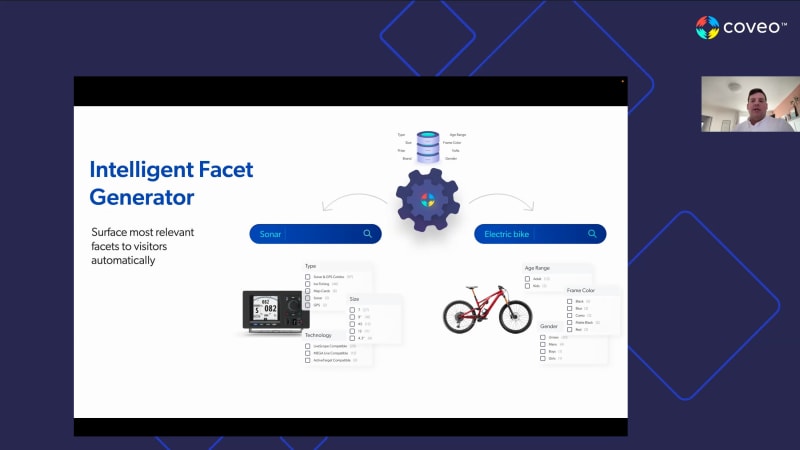
Welcome, everyone. We will give everyone a bit of time to join in, and start in a couple of minutes. Thank you. Hi, everyone. Thanks for joining us at the year in Caveo twenty twenty two, celebrating innovation. I'm Elaine Cobb, SVP of customer success. Today, we'll be looking back on a very innovative year. New features and releases all built to help you achieve your goals, reach your KPIs, drive results, and be more efficient while delivering incredible digital experiences. For over fifteen years, we've been committed to your success. And in November of twenty twenty one, we hit a major milestone by going public. We couldn't have done this without the trust and support from our growing community of partners and customers. It was great to be back in person and meet with our customers and partners in twenty twenty two. We connected with so many of you at Salesforce Dreamforce and Dreamforce World Tour, Adobe Summit, TSIA World, Kilometers World, NRF, and SAP events with more to come. In the spring, we held Relevance three sixty. You learned not just the latest releases in ecommerce and service, but you also heard from customers just like you. I also wanna share a really special word of gratitude to our powerful partner alliances. You support not just us, but our customers too. You help them get the most out of Kaveo every day. You're a foundational part of everything we do. And thanks to the many innovative contributions from our Kaveo community, we've been named a Gartner Magic Quadrant leader, a Forrester Wave leader, Infotech ES Barca report leader, and a software reviews enterprise search champion, to name a few. And we're so excited to share in that success together. So excited, in fact, we'd love to turn the spotlight on you, our pioneering and impressive customers. And now the moment many of you have been waiting for, we would like to announce the winners of the Caveo Relevance Awards twenty twenty two. Winners of this year's innovators award are Athena Health, Project Management Institute, Synopsys, and Xero. This award celebrates teams, organizations, and trailblazers who deliver unprecedented end to end experiences. From customers to employees, they find innovative, creative ways to use Caveo's AI powered relevance platform. Winners of this year's Impact Award are Caleras, Commvault, Forcepoint, and Informatica. This award recognizes a company whose efforts and successes have made a clear impact on business outcomes. With tangible results and impressive metrics, each of these leaders has achieved the highest impact on revenue or profitability by deploying Caveo. Winners of this year's industry leader award are FleetPride and two other companies who wish to remain private, including a leading travel and expense management company, as well as a leading financial services company. This award honors a customer who's driven organizational change with Kaveo. This transformation has distinguished them as the best of the best in their industry. Winners of this year's pinnacle award are Adobe, NetApp, Workday, and Salesforce. This award celebrates companies with the broadest deployment of Kaveo. They have amplified the impact of our relevance platform across their enterprise in multiple use cases, delivering clear results with both customers and employees. Congratulations to all. It's really been a privilege to see your success. Alright. That's all for me. Let's hand it over to Nick and Sahair to walk you through the amazing innovations we're driving for you, your team, and your company. Hello, everyone. Welcome. Thanks again, Elaine, for this great introduction. It's really been an amazing year for sure. Today, we have Nicolas Baudelot, our VP of products. Welcome, Nick. Hi. If you're here. And my name is Sarah Samnani, product marketing manager here at Coveo. Together, we'll walk you through some of the amazing innovations we've done this year at Coveo on our platform. Nick, ready to jump in? I'm ready. Let's get started. Alright. Before we start, talking about all of the amazing features, we at Coveo do wanna acknowledge that these are disruptive times. There is disruption not just in political, technological, social, but also in economical environments. Everything is impacting our ability to do what we need to do to operate operationalize and also the investments being made into digital transformation. But we have to remember that even during these disruptive times, there has been a lot of digital transformation. We need to ensure that we're efficient and we're able to provide the stakeholders and the customers the experience that they expect. We at Coveo have been around for about seventeen years as you may know. If you're newer to Coveo, you might have heard us talk about our different support areas of website, commerce, service. But we do wanna talk about also the fact that we provide these experiences. We help you provide these experiences to your customers, to your stakeholders, not just on one area like the website, but also the ecommerce store or your support agents or your workplace and provide a holistic three six g experience to everyone. We also understand that the SaaS world has changed. The expectations of users like yourself who are working very hard to provide experiences, are expecting composable architectures. We've heard the word headless this year a lot in a lot of different companies, and headless is becoming the the new it thing. But Coveo has always been there providing you composable architecture, providing you flexible templated APIs and libraries for you to be able to build experiences that your customers are expecting. We also have been in we know and we have been investing into the user friendliness of our products. We understand that it needs to be quick, efficient, and you need to get to market fast with simplified journeys of setup. Our cloud infrastructure has always been robust. Security of your customers' data has always been important to us, and we continue to invest into those areas. And lastly, the business capabilities. As much as digital transformation and the customer journey has to be a full, flow, we understand that certain areas of businesses require certain use cases and certain platform features that we also invest into, like for service, for ecommerce, etcetera. And before I jump in and hand over to Nick, to walk us through all of the innovations, The five key areas that we have invested are pillars of our platform that help you build on is the connectivity and the indexing, the search experience, the UI, the front end piece, as well as the machine learning and the business rules where you can get to market really quickly and provide automated experiences and personalized recommendations to your customers, as well as getting insights into how these experiences are performing for your customers. So analytics and reporting is also very important piece of our platform. And lastly, the infrastructure, the developer toolings that we offer so that you can build faster. You can build it the way you like to. Alright, Nick. That's all for me. Let's start with connectivity. Let us know what's under the hood. Awesome. Thank you, Sahir. So around connectivity, all of you guys know that we have a really strong posture in terms of connectivity connectivity. We already have more than forty connectors, but we were not stopping there. We're always adding, always improving. This year, we did a lot around that around that topic. We basically added two new connector, and we improved greatly and then major changes around two other that we already had in the in the in the platform. First one, Slack. No need for introduction. Everybody knows Slack. There's a lot of content in Slack. There's a lot of discussion happening around other piece of content that exists in the enterprise. Being able to get this content out of Slack, bringing it into the into the unified, unified index of Coveo makes it available then to share that knowledge across the enterprise. Obviously, when you get more content into the index, the index get bigger. You can show you can share that content in various, interfaces. But, also, there's more and more model in Coveo that are learning from the content of the index. So the more you have knowledge inside the index, the more the index becomes smarter and the the more it the the more relevant it become to your users. The other one, we added this year is SAP, SAP Commerce Commerce Cloud. So this one is also I don't think it needs any introduction. Commerce Cloud, from SAP is a big platform for large enterprise. We see that a lot of our customer were using that platform, so we decided to, to build a connector for it. Basically, so no need to reinvent the wheel each and every time. If you want to stream content from SAP to Coveo, it's now much more easier. You can go in Coveo and just configure it versus building something that pushed to Coveo much, much much more efficient. On the on the existing connector that we've improved, the there's a database one that was before it was only available on premises through the crawling module. So it mean that you were able to connect the database, but you had to deploy something on premise. We are bringing that connector to the cloud, meaning that now you can connect, the Coveo cloud to any other databases that are exposed to the cloud. They can reside in the cloud. They can be on premise as long as they are exposed to the cloud, making it much more, much more, faster to to connect to those databases. There's one less piece that you need to manage, so much simpler to index those database. This connector for now supports Oracle database, MySQL, SQL server, but we're working to add more database sources, to be able to be crawled with that generic connector. The last one that we greatly improved this year is the RAS connector. The REST connector is the opposite of the database. It was only available in the cloud. We're bringing this one to the crawling module. So if you have any private REST API inside of your business that you don't wanna expose to the cloud, you can now use the REST the rest connector through the crawling module to be able to connect to those sources, and you don't need to expose that data to publicly. It's only exposed to Coveo, and then Coveo is exposed publicly to be able to push to the to our cloud platform. So that's, those are four great improvement that we've did that we've done around the the connectivity in the crawler part of of Coveo. Another part we did around connectivity is is simplifying the metadata discovery and extraction. Because we have all of those connectors, those crawler that are responsible to extract information from from your systems, they they extract everything that is that there is to extract. But a a good practice is to keep your index lean and mean, and you wanna only index the content that you know you'll need to to render, to to to play with ranking, to do faceting or sorting or whatever. But if you don't need some content in the Coveo, the good practice is to keep it out. This task was a bit a bit complex, to be honest, so we decided to have this UI here. It's basically a a a cache in between, your content and the index of Coveo. Anything that goes out of the crawler is is now stored in a temporary, environment, and you can go there to see what is what what is sorry. What is mapped, what is not mapped, see some distribution of the value, see some sample value. So it's now way easier to be able to understand what the crawler is getting out of your system, what you're pushing to Coveo, what you're missing, what should I create as a facet, why should I what should I create as a sorting, what should I index just to be able to display or or or fine tune the ranking. So you're able to transfer to to, to, to create those mapping much more easier with, with that UI. Speed and performance. We've also greatly improved the speed of of indexing, not to be confused with the speed of crawling. Speed of crawling is oftentimes limited by the system we are crawling. Let's say for a crawling Salesforce, the rate at which we can extract from one source from Salesforce is limited by by the system we are crawling. But on the other side, on the Coveo side, if there's multiple crawler, sending content or you're rebuilding or if you're pushing a lot of content, this content can stack up, and we need to process this content to put it in the into the index. And nowadays, adding fresh content that is as soon as a change is available to be searchable is extremely important. So now the index is able to ingest content twice as fast. Actually, a bit a bit faster than twice, but to be conservative, we go with twice. It depend on the size of documents, size of the indexes. But your content that is in the Coveo platform waiting to be indexed is now much faster to be to to go into the index. This one is a quality of life, but we think it's still important, still innovation. The the source permission were a bit a bit harder to configure when you wanted to add some specific users and group directly into your sources. It used to be a a JSON, a JSON task. Now there's UI for that. We have a a pretty simple UI to be able to specify for this source, this source, this source. I don't want it to be open to everyone. I don't wanna respect the ACL that are coming from the system. I wanna precise my own ACL so and my own users who have access to to some piece of piece of content. So now it's really easy to do through the UI. And because we have that, we're also able to let you know before you finalize the creation of a source or before you finalize the the security of your content. We can also let you know, and warn you. Are you really sure you wanna make that content available? And then you can take informed decision versus just, just creating content and risking exposing that content if it's not secured properly. Another area of of investment, search experiences. So we've, I've shown you before that we created the Slack connector. We also created a Slack application. So the Slack connector is responsible of getting the content out of Slack to be able to bring it back into the index and the unified index and then expose it somewhere else. This one here is responsible of doing the opposite, bringing all the content from your COVID unified index into Slack. We spend a lot of time in Slack. I personally spend a lot of lot of time in Slack. I'm always there chatting with colleagues, trying to solve issues, discussing about problem, progressing on some on some key projects. So there's a lot of things that are happening in Slack. And when you wanna perform a search, find a document, try to see if something exists around a topic, you typically need to get out of Slack and go either in the IPX or open a browser to be able to search and find the content that you need to have to. So with this, it's fairly easy. You just need to go, you just need to open Slack. And, actually, I'll I'll show you how it works. So I'll stop this from here. Switching to this, this, Coveo test environment. To install the Slack application, you just go to Slack, the Slack app store. You go there. You get the application. Very simple to integrate. You just need need to connect it to your org, provide an API key, provide a query pipeline. Once that is done, in Slack, you can pretty easily use the the the the the well known slash command to find out whatever application are integrated. There's now one for search Coveo, and then I can search for any any top any topic that I have in mind. Just add that, and now I have a search performed on the popular not so popular COVID topic, that I that I picked. I have option to do faceting. If I wanna search on specific document type, specific source, that can be customizable, and the results, good old good old results are there. So you can from the from your flow of work, from where you're currently discussing with colleagues, you can you can perform search right away and get the information at your fingertips. And if you want to consume the information, just like before you click on results, they open in a browser. If they are a browser, they open in the app if they're from an app. But, but the the search itself can be performed within Slack. Going back to slides, another great thing that can be done, within the Slack app is is agents forming. So we've seen that, in in service scenarios when agents are working and trying to solve an issue. At some point, they might need to work with some colleagues. So the the concept here is that you can click on this warm button that transfer you to the Slack application. It looks in the index, from the topic of the of the of the support case, from the description, from whatever you have on that support case. We extract the information from there. Look into the into your business. Try to find the right expert. Invite them into a channel. That channel now become the the the swarming environment to for all these people to try to solve the issue. And because we're also indexing Slack, the results of those swarm can also be presented to users who to to actually to support agent who are trying to, to help customers. So if if a swarming ended up being success successful in closing a case, those swarm can also be brought back to other case, future case when people are trying to so it's basically closing the loop and and making it easier for people to collaborate with COVID content. Another another thing we did, this year was to, was to bring basically, atomic UI into, into hosted search pages, talking about local, no code search UI. So if you want to build a quick, prototype, a quick search interface, that is leveraging Coveo and Coveo atomic, you can now go into the Coveo platform and build a an interface, that can actually, get you access to your content really fast. And you can iterate on that interface to to fine tune a couple of, couple of things. Let me find my my browser. It's right here. I just wanna show you briefly how that look like. So from, from the Covio organization, if you go into search page, you have the simple builder, which is the new one I'm I'm talking about. So that's that's creating me basically a new search interface. By default, that interface is is by default configured to have results, facets, search box, query suggestion. Everything is configured there by default. So already, I'm able to search in the content of that organization. It's a trial organization with with, with, with the default content. But if I would like to filter out, what source should be in there, I can go there. I can do manual selection. If I want also to, to to change the result layout, grids, going from grids to list, if I want to have different way to render those results, maybe I wanna have something more with larger images or something more more condensed. I can go there. I can play with what's gonna be rendered in there as well. Faceting, sorting, everything can be configured. Everything can be added, removed, and you can also go as far as playing with the style of, of of that UI. That's currently at the moment, it's it's really interesting for for two reason. It's interesting for prototyping because as you've seen, it's really fast to be able to build some new interface. If let's say you wanna try a new source, you wanna show to your colleagues how it work, you can really quickly build that interface and and share it with them. One thing I haven't showed yet is the option to share those interfaces. You can basically propagate it to to your colleagues to see what what you've done, to see if if it worked. The other benefit of that interface is, because it's low code, no code, if you have limited access to developers, if you have limited access to development resource, once that page is created, it's also into Coveo. And if you do any changes, if you change the behavior, if you change anything, you don't need to republish or you don't need to to propagate that from the dev to QA environment. As soon as you hit save, those change are live and they are effective. So you can create different copy of the page, and then one is live, one is your staging environment. But you don't need anymore to have a developer that does all the job for you of configuring the interface, transferring from an environment to another, and you can do much more. You can also download the the actually, there's a lot of thing that can be done with with those with those new interfaces. I'll, I'll stick it to, to that short intro for now in a matter of, of keeping track of time. Another thing we did this year, which is quite interesting is in the intelligent facet generator. That feature is part of the dynamic navigation experience set up feature. So the index has always been able, to provide the right facet to the right user based on interaction on that on the data. So, basically, if you have a, let's say, an ecommerce shop like we have here, as people navigate through your content, as they click on different facet, as they click on different results, the index becomes smart, and it it's now able to provide the right facet for the right queries. The problem is that before you have enough traffic, the facets you need to create them to curate them manually, or you need to have a set of generic facet that that fit with all of your all of your users. With that feature, the initial the initial, training of the of the feature is done basically based on the index. So based on what's returning, from a specific query, the index is gonna be able to to search and and get the right facet right away for you. So that's that's, that's much more efficient for for the time that your index is ramping up, learning about the behaviors, and also for queries that are less frequent. If nobody is searching for those terms, if nobody is searching for those type of product or those type of, those type of document, the index cannot know what are the right facet. With that feature, we're kind of bridging the gap and making sure that, that we always have the right facet. That facet definitely blend in the dynamic navigation experience. As soon as we have data from actual users, they will take over, and and that data will will will be permanent. Another fast another another feature we released this year is enhancement to the Salesforce user action. User action are actually used in a service environment, service scenario. So that's basically, if a I'm a customer. I come to to the website of my of my provider, I try to find information about the problem I am having. So I'll probably be I'll probably go there. I'll do a couple of actions. I'll do a couple of queries, click on a few documents. And at some point, if I'm not able to get the answer I'm looking for, I'll create a ticket. So at that stage, the all the and the take that you've done are are collected. They are used to improve the the relevance of the index for visitor after you and also to improve your own session. But that data is actually quite important and quite useful for the agent that's gonna be helping you. So that that's what that's what user action are, basically. There's a lot of improvement that have been done this year, mostly around the the way we presenting and the and where do we put the the context. So from now on, the ticket created is actually the the starting point of the timeline. Timeline has been reversed. We're showing you really what was performed before you created that ticket. We know what document you've consumed. We know what the query that you that you've performed. So and as an agent, I now have a lot of context about what you've done before contacting me, and I can pick it up from here versus asking you to do a lot more thing that you've already done, on the website. Another another, another addition we're doing this year is the Quantic Insight panel. So for those of you who know about Salesforce, Salesforce is all about Salesforce lightning web component. That's the that's the set of component that are available to build those interfaces inside Salesforce. So Coveo offer headless, Coveo offer of of Atomic. Now there's Quantic. Quantic is basically a wrapper on top of the Coveo UI library, and we're offering you the an easy way to be able to deploy inside panel and also other type of search interface directly within within within Salesforce. So if you want to deploy a a a full search page, if you wanna deploy an inside panel, if you wanna do any interaction related to Coveo inside a inside, inside Salesforce, it's now way easier. You just have to drag and drop those component. Those component can be can also configured to, to be to to be to behave the way you want them to behave inside Salesforce. That feature is currently in in early access. If you want to try it out, if you wanna get your hands on it, please contact your CSM. They'll be able to get you in touch with the right product manager or maybe there's even a program already that where they can get you in in the inside and and get and get to try the the Quantic inside panel component. Next section, machine learning and business rules. We did a lot around that too. So we we worked a lot on the case classification and smart snippet model. Those are two model for our service on the business. Case classification for those who don't know, case classification is basically when you land on a on a support site. As I was saying before, I'm searching I'm searching at some point. I wanna create a support case. That support case, it the the more information I provide, the most relevant information I provide, the better chances the agent is gonna be able to help me with that support case. So that the case classification is basically helping you to find out what else should you provide in that support case. Maybe you should provide a product version. Maybe you should provide a a category of of problem that you're having. So we're we're proposing you action to take and information to provide and classification to add on your support case to make sure that the information is treated the the right way on the other side. And smart snippet is basically what you, what you what we know and learn and what we know and love from, from Google. Basically, you go to you go to a search engine, you type in a query, and then you get the results. You get the procedure. How do I reset my iPhone? You don't wanna click on on a link to be able to dip then go to a website and then consume the procedure. You do this. You do that. You do that. You do those two buttons at the same time, and they'll reset. That that's the feature. So those feature were were released last year. There was a lot of improvement done on the on the models themselves this this year to make them more efficient. And the UI you're seeing here is basically a UI that we're providing now on top of those model to make it less of a black box. You wanna understand what those model are doing. So we have, the the good old way to understand when the model was last built, when the model, how the model is hosted, how is it performing. But now there's more information about the the these precise model to let you know how good are the prediction. When we did we say case specification, we're we're we're predicting case specification for users. Are they good? Are they not good? Do I have enough training data set? What's the size of that of that data set? So we're we're giving you much more information to be able to have to make informed decision about about those model in the future. And then aware ranking, this one is also quite interesting. This one is precisely for, for commerce. So when you're browsing a commerce site, you you you probably don't have just one intent. You probably you come to the site. You have you have, yes, one intent at the moment, but this intent might might change over time. If I'm browsing for a a a, I don't know, a a snowboard, I might, at some point, wanna search for gloves as we have here, or maybe you wanna search for bindings to complete my product or whatever. But the intent is is not just the the list, the completeness of action that you've done in the session and what you've done previously on the site. Your intent is actually limited to a set of action that you've done recently. So that model is basically aware to find out what are those action that make your intent, what is this intent, providing it to you as as context to your query, and then the the whole ranking of the index has now changed. We we know in the example we have here two people searching for gloves. One is it one is into skiing. The other one is into golfing. You're gonna have different product, obviously, based on what you've done before. The particularity of that model is that it's able to fine tune to the to the precise intent that you have at that moment. It was previously available for query suggestion. So we had query suggestion that were intent aware. Now that feature is going deeper, and it's it's now available to change the whole ranking of the index based on the current intent that you have at that precise moment. Groups and campaign. Groups and campaign are a nice way to to to group, rules together. If you if you, if you wanna create some rules to influence the ranking, ML can do a lot, but you oftentimes, people wanna have their own set of rule, business rule, or maybe maybe there's an event coming next week and you wanna have some specific rules that are gonna boost some content at the top, boost some specific topic. So and you want those to be time box or you want those to be targeting some specific users. So now you can group, those roles together in a group and in in a campaign, basically. You can time box them. You can do AB testing on them. It's a really a nice way to be able to provide more flexibility around managing those roles. Roles before that were just a big list of roles, and it was kind of hard to be able to navigate those. And now with groups and campaign, it's it's much easier to group them together, associate them with a purpose, and then, maybe associate condition or time box them or or tag them to precise audiences. Similar to groups and campaign, audience specific recommendation, that's basically a way to, to to create a decision tree, when you do recommendation. So recommendation, we have multiple model that can do recommendation at different phase of a of a buying journey or of of a browsing on a on a on an ecommerce, on a on a website or on a support portal. All of those model actually are providing good, good recommendation. But if you as a as a product merchandiser, I wanna be able to associate those model with precise with precise condition. Before it was one one set of audience, one model. Now we're offering you the option to queue multiple, multiple decision, multiple condition one after another associating those to precise model, making it much easier for, for non developer to control what's happening on their on their recommendation placement placement on the site. The example here is that returning visitor, we should we should focus recommendation on on larger price ticket items, versus new visitors or all visitors that will get that will get more basic recommendation. So to be able to do those and stack those, those condition, those different, those different model one to another, there's now a way to to do it into into into copy of a qubit darkly. Around analytics and reporting, we did some change around the consumption dashboard. We're actually finalizing the and and releasing those as we speak. So, consumption, before, it was a big bucket. So you've purchased multiple skews. You've purchased multiple, product from Coveo. You have queries. You have users. You have recommendation. You have a lot of entitlement. They were all con all computed together. We wanted to provide more granularity to our users so that they know where they're consuming, where they are overconsuming, where they are under consuming. So now it's it's really easy to be able to see all those queues, associate Search Hub with different queues that you've purchased, and be able to, to see yourself the consumption that you're doing, on on those, on those queries without having to to to ask Coveo for the for the monthly dashboard or your CSM for the monthly dashboard. You can now consume it directly within within the platform. Another great improvement we did to the platform is, is around Coveo Analytics. So, Coveo uses Snowflake to store the analytics on the background. Snowflake is a great platform where you can do lots of thing. Because the analytics are in there, we decided to offer it and and to our customer and offer and offer the our customer the option to be able to see the data directly from Snowflake. There's a couple of benefits. You can go there and merge Snowflake, so it takes data with other data sources. In commerce, we often see people who wants to see if there's a relationship between the, the the weather and and and and buying trends on the website, on the on the commerce site. So that's one possibility. You can merge multiple source together to have a better understanding, and you can also simply create a plug another tool, another BI tool on top of, Kubernetes to be able to do different analysis of the same of the same data. On the platform infrastructure, so we had we already had the option to do snapshots into Coveo. We we improved the the way to manage those those snapshot from from a UI perspective. We're now providing you much more information about what's the content of a snapshot, much more information about how to create that snapshot, how to transfer it from one environment to another. Just a quick backup. Snapshots are basically a way to create a a a snapshot of an organization and transfer it to another one. So if you have your sandbox, you wanna push it to prod, you go through your sandbox organization, create a snapshot, transfer it to the prod organization without this this means that you don't have to remember what change needs to be done in one organization and keep them in sync. You just need to transfer the configuration from one to another. So now there's a UI that guides you toward that. And we also, also had the option to do it through through the CLI. CLI, the command line information command line, tool to interact with Coveo. You probably already have a a deployment pipeline that take all of your commerce or website or or whatever integration where Coveo is in that takes it from one environment, migrate it to the other where Coveo is a part of it. So with that tool, you can you can add scripts to talk with Coveo, grab a specific snapshot, transfer it to a specific organization, and automate the full deployment of your of your site, not just, not just your site, and then have to do manually for Coveo. So that's quite powerful for the blockers. Another feature we added, for for for product listing pages. Product listing pages are basically, category page that you have on on a website. We're adding a merchandising hub in there, and it's basically an easy way for merchandiser to go and see those all of those category pages because there's a lot, to be honest, of of category pages, and basically create a set of rules that are applied specifically for those category pages. We're kind of bypassing or creating a new UI on top of the query pipeline, making it easier to go and say for that page, that's what I wanna boost. I wanna pin those things at the top and that's drag and drop, that's really easy to to play with. I I wanna boost those thing. I wanna bury those. I wanna have that that feature result at the top. I wanna exclude those product. I wanna include those. So that's really easy to go and play with the with the merchandising of a listing page, directly within the within the the merchandising hub. So here, we also have lots of new things in terms of learning and development. Thanks so much, Nick. This definitely was a lot of innovation that we've done, but we also are very committed to helping our customers learn and self serve. So last year in twenty twenty one, we had released our developer certification on our LevelUp platform. This year, we're coming up with a newer version where we have four new skill paths. We have about forty courses that you can take so that you can learn about Coveo, get a very deep dive into it, and build a solid Coveo implementation. The other things that we've also done is we've helped create courses not just for the new features that we've released, not just for the technical users, but also for business users. We want you to understand the different concepts. We want you to be able to really grasp what every feature can give you and then help you build over it. So about fifty new courses and training materials have been created. Highly recommend you checking them out and going your path, the skill sets you wanna build for Coveo. And lastly, let's just take a really quick sneak peek into twenty twenty three. Nick, do you wanna run us through I'm very excited for twenty twenty three. This is just a really quick sneak peek. Yeah. Quick sneak peek. We only I'm I'm gonna cover mostly what's, what's in the in in the beginning of the year. And as she said, really quick sneak peek. If you wanna learn more about those feature or the the full roadmap, you can contact Coveo to get more and more detailed roadmap for for next year. The first thing we were gonna release, next year actually, the first thing I'm talking about, not the first thing next year we're releasing, but the first thing I'll cover today is, is the infrastructure. So we are actively working on an active active environment to be able to replicate, replicate the index from one environment to the other, making it much more resilient if there ever something that happened that shut down a whole a whole data center, a whole region. That mean that we'll have a copy, an active copy, replicated up to up to date, ready to take queries from another region. We'll deploy that in US, in the in the US, continent first, and we might do something later after that for other region, but we're we're deploying it we'll be deploying it for for the US at first. This also had the benefit to be to be much more performing in terms of queries because we have two index, available at the same time with the same replication. If you're closer to US west, you're gonna query on that index much more faster. If you're closer to US east, it's also it's also there to respond, and it's also faster. Next thing we're doing around the around the infrastructure is we are adding a new region for Canada. So if you have a legislation that require you to keep your data on Canada soil, that'll be possible this year, and and and all and all the benefits of having a a new that there are a new region primary region in Canada are gonna be available. We are also investing heavily into into the models. What you see here is an interface that we'll be releasing next year that makes it easier to understand what are what are the models. We basically want to to to encourage our customers to deploy more machine learning model. Those model exist. It's up to you to create them. It's up to you to understand what they do. So we we're adding more information on the UI to let you know what are those model, what are they gonna be doing, what's the impact, visual representation of those model also in action. It's also linked to to to to the demo environment if you wanna see them in action. For you to create those model to make really take the the benefit of, of the of the whole Coveo platform. We are also investing to make those model, easier to be created by adding them to the flow of the service and commerce and workplace and and website scenario. So when you do, let's say, a case classification, the model will be created automatically, and then things like that will will automate the creation of those model for you when it's time to create those model, making sure that you have those model deployed in your environment. We are also working heavily on the on the web source. The web source is actually a source that pretty much all of our customer is using. Pretty much all our customer have some sort of content that they wanna index that is coming from a from a website. The current UI is a bit cryptic, quite powerful, to be honest. Probably the most powerful out there, but but a bit a bit hard to understand, a bit hard to configure at first. So we're changing the whole the whole UI, keeping the same feature, but just changing the way to configure, changing the way to interact with the crawler to make it easier to deploy, deploy those web sources. Another improvement we're doing is around security. We're always, working to improve our security and maintain our security, position. The next one we'll be adding is idle ISO twenty seven zero one, a certification around that. So if you if you are looking to deploy Coveo to other department, to other use cases, that should probably help you, to alleviate those discussion those security discussion with, your security department around around Coveo. Coveo will be twenty seven zero one. We're already SOC one, SOC two type two, and then things like that, but we're adding one more, for the European region mostly, but it'll also it'll also support the the the US region as well. And, that's what I have for today. Thanks so much, Nick. Definitely a lot of information. If anyone has any questions, please put it in the chat. We do have a couple of questions in the chat. One of the first questions, Nick, we have is, are you planning on integration with Cisco Webex and not just Slack? Honestly, it's not planned yet. The fact that we don't have an integration plan, doesn't mean that it cannot be done. If you wanna integrate with, actually, we Kobioke can integrate with multiple systems because we offer multiple libraries, because we offer multiple things to integrate Coveo. It's fairly easy to integrate. We're not planning to build one for for for that precisely. But if you would, if you would like to explore the integration, please contact Coveo. Can help you. R and d can help you to to look at how those integration could be built. Amazing. The other question also we have is, how do we test for ML changes? Example, boosting rules. Sandbox usually doesn't have a lot of clicks, and production is for all users. Is there a way to create group of users, potentially push changes that are specific to groups in a pod? That's that's a good question. I don't have an answer on on this webinar, but I know, I know some team are looking at ways to be able to replicate data from one environment and bringing it back to other environments. So, basically, taking your prod environment and Nautics, bringing them back to your to your QA environment where you could run and build new models. I think that that should be that should be a discussion between us. I'm I'm I don't know who asked the question, but I invite them to contact us and and have a discussion with our team. I know some discussions are around that topic, but nothing is planned in the road map. And maybe there's best practices that could be shared with that with that person to help them do the testing as best as as as it's possible today. One more question, Nick, and it's very similar to the Slack, of the previous question about Cisco Webex. Are we planning on integration with MS Teams? Still same answer. Nothing is planned, but, but, but similar answer. It's fairly easy to integrate Coveo. The the Slack integration was was not a big a big endeavor, honestly. Those platform wants to have integration. They just like us, we want people to integrate. So there's always API. There's always sample. There's always a lot of things to be able to create those integration. And Coveo is really composable. So if you wanna take the the the the small UI that we have for for Slack, if you wanna bring in into Teams or into Cisco Webex, it's it's it's typically relatively easy to do it. So if, if if you wanna try it, let us know. We can help you. And what I would also say, our community is quite local sometimes when they want a specific feature. So anyone who do like, if we don't have any features planned and if you do want a feature for a specific, integration, I would highly recommend post it in the community. If the feature gets boosted enough, we can prioritize it and move it forward as well. Yep. That's all from us today. If you are not a customer of us just yet and are ready to kick start your digital transformation, I highly recommend just book a demo with us, and we can walk you through all of the amazing things we can do to help you transform the digital experience. We'll put the the, book a link in the chat right away. Thanks, everyone. Thanks, Ahir. Yeah. Have a good day. Bye bye. Have a good day. Bye.

Year in Coveo 2022: Celebrating Innovation
Join us for this special edition of Year in Coveo, as we look back at the most exciting innovations that came to our platform in 2022. We’ll also share an exclusive sneak peek of our roadmap for 2023 and share the winners of our very first Relevance Awards.
Whether you’re offering intuitive site search, a personalized online shopping journey or seamless self-service: providing users with the right digital experience can be difficult.
Businesses also need to increase revenue and efficiency while delivering the best digital experiences possible. Fortunately, Coveo has been helping companies achieve these goals with its scalable, secure and robust AI platform for over 15 years.
This session is for tech leaders, administrators, innovators and problem solvers who collaborate on the web properties that form the foundation of digital experiences.
It doesn’t matter if you’re just getting started with Coveo or consider yourself a seasoned vet! We’ll take a closer look at some of the capabilities that help you power composable, scalable, secure ecommerce, service and support, as well as website and workplace experiences - in the most user friendly way.
Key takeaways from this session:
- Discover the top areas of investments for Coveo in 2022 - and beyond!
- See our top features released in 2022 for content search, ecommerce as well as service and support.
- Hear about the outstanding winners of the 2022 Relevance Awards
- Get an exclusive glimpse into some of the exciting new features to come in 2023 (you won’t be disappointed)!
