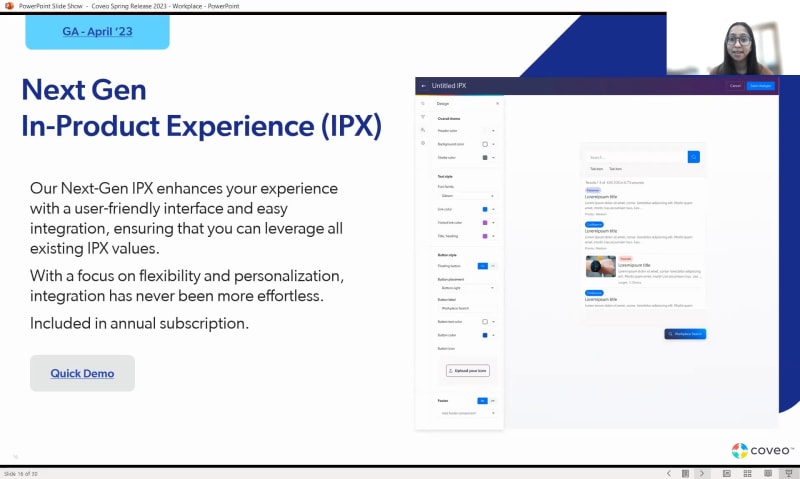
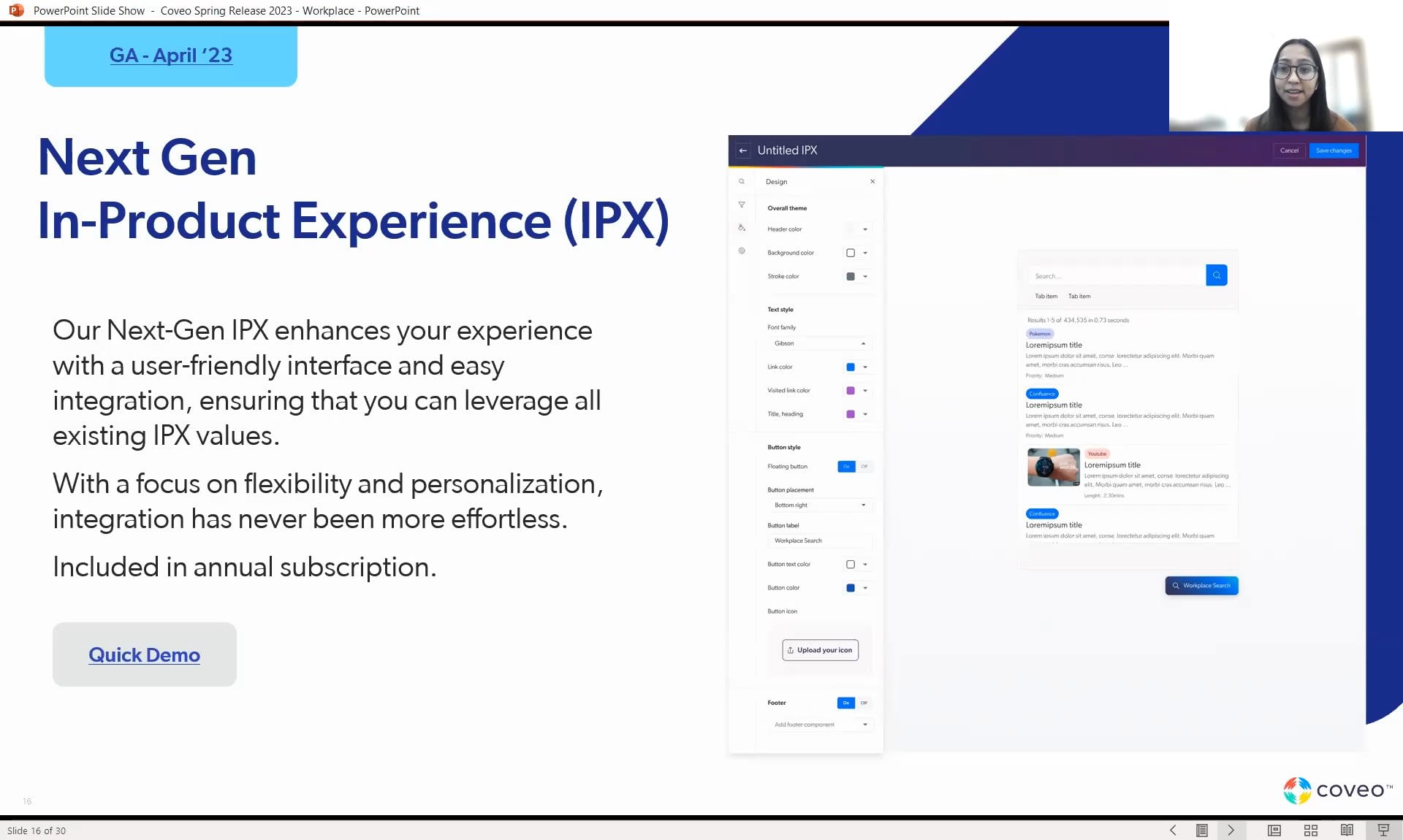
Welcome, everyone. We are gonna get started in a couple of minutes. Thank you, for joining us. We'll get started in just a minute. Good morning. Good afternoon wherever you are. Okay. We're gonna get started because we only have thirty minutes with you today, and we'll probably use all of that time. So, I wanted to welcome you all. Thank you from where you're joining. We will be recording this session today, and, hopefully, you can either see a chat or a q and a button, where you can submit your questions today as Luca and I go through the presentation. My name is Juanita Oguin. I'm senior director of our platform marketing group, which means I get to work across sales, marketing, product, and, of course, with our customers. And I'm joined by my colleague, Muko Lika Day, who's a product manager here at Coveo. So, hopefully, you've been able to join some of our Relevance three sixty events, our other session yesterday with service. Today, Mukul and I are gonna talk to you about our new features for this spring, and we're gonna talk about it from a digital workplace perspective. If you're here today, I think it's because you agree and are hopefully working on some, projects and initiatives that are all around empowering employees rather than slowing them down from tech stack. So, we'll jump right in here. Our agenda for today is we'll go over, Coveo and talk about workplace. We'll go through our spring release, and then we'll talk about a new and exciting, feature and capability that Coveo is working on, our generative answering. Lastly, we'll cover some next steps in q and a with you. So I did wanna get started by just reminding everyone that Coveo is essentially one platform that we call the Coveo Relevance Cloud, and we do provide capabilities that you see on the bottom here to four major lines of business. That's commerce, service, websites, and the lens we're gonna talk about today, workplace. And it's important to understand that a lot of the features and capabilities that you see today are going to be available for any of our, users. But, of course, we also have more specialized capabilities for things like commerce and service. So just wanna remind you, you know, our goal is to provide one platform to help deliver relevant digital experiences across your enterprise. So I'm always excited to talk about Workplace because, without employees, there essentially is no company. And what I wanted to show you were some stats that hopefully you've seen before, but if not, really highlight why it's important to focus on the digital workplace. Also, I'm sure many of you have heard about the consumerization of IT, which is essentially that we, as, you know, consumers and in our personal lives, have great digital experiences, but we also now expect that to be available within the companies and the organizations that we work for. And so what we're essentially seeing, and this is a a an external report, based off of input from over four thousand users, is that findability is still a problem within organizations. We can see that three point six hours are wasted each day searching for information and that employees are largely finding irrelevant information, forty four percent here related to their role. That's making them less confident about the quality of their work overall. And lastly, my favorite point is that sixteen percent of, survey takers said that their data finding frustrations makes them wanna quit. So, hopefully, these numbers highlight that focusing on the digital workplace and providing employees just as good as or better of an experience that you provide to your customers is critical. And our goal is to help you improve these metrics, help you improve your ESAT and productivity, and we do that by taking a holistic approach. So we really understand that every company and organization is essentially a collection of different departments. So what you see here is, a a layout or diagram on how we think about it, which we have our front office, departments and and teams, middle office, and back office. And so our vision is to help empower your workforce with a unified and personalized experience that crosses not only the general information they need, such as HR and IT policies, but also role specific information as well. And we're we do that by providing our unified index. Those over fifty out of the box connectors, some of the logos and examples you see here. But I think what's also critical is the fact that we provide flexible UI options so you can use our AI powered, you know, search and knowledge, in your existing applications, whether that's, Salesforce, Sitecore, within a Slack app, within your products themselves, so in app, product support. You can also use this as a standalone search page, use our headless or atomic out of the box library components as well as APIs. And so, again, here, we are really trying to drive a unified workplace, and you can get started one department at a time. And just as a disclaimer, we are a publicly traded company in Canada, so do please make your purchasing decisions on the latest features and capabilities available today. So for our actual spring, release and features, I wanted to summarize them by saying there's sort of three major themes that they follow. So a focus on scalability and democratizing AI, a focus on composability, moving towards headless and agnostic technology, a focus on citizen development, which is more around low code, no code, user friendly features to help teams innovate faster. And so what Mukul is gonna take over and go in through into more detail with you today are our different features and capabilities. And the way that we have them bucketed here, so connectivity and data, search and discovery, merchandising hub, machine learning and infrastructure, that's more of our, bucketing, and what you'd actually see or where you'd see them in our product itself. And so as Muku go goes through to describe these, just keep our, you know, macro major things in mind. I did wanna call out that I have Merchandising Hub here. It's grayed out. And the reason for that is, that's more, oriented towards our commerce line of business and capabilities, but we did wanna show you that our full kind of suite of innovations, that you you'll be able to use here shortly. So, Moku, I'm gonna pass it over to you, and I'll be in the background to fill out any questions. Awesome. Thank you so much, Juanita, for the introduction. So let's start off, with the first theme. We can go to the next slide. Starting off with all things related to connectivity and data. So if we go to the next slide, let's begin by talking about our improved website connector. So the website connector has been around since the beginning of time, since the early days of Caveo, and it was long overdue for a revamp. It is currently adopted by many customers, and we're hoping with this improved version, our customers will enjoy this new design of a connector that they're very familiar with. For a workplace use case, the website source is great for exposing public content into intranet sites to help with any internal communication within a company. With this new revamp, new users can have a very simple and intuitive configuration while existing customers and developers can continue enjoying the familiar feature rich capabilities of this connector. Another powerful feature that is actually already available to use, but I just want to highlight, is the source permission configuration that you can use to have added security on your web source or any other source of your choice. So if you, for example, want to prevent certain index documents being visible to specific employees in the company, then using source permission is the way to go. With that said, the revamp of the website connector is currently in closed beta, and we expect to have this in GA before the end of q two of this year. But I just wanna say that we actually have an upcoming session where we will do a deep dive of our website's line of business in the coming days. So I highly encourage everyone to attend that session if you want to learn more details about it. Let's go to the next feature. Enhanced metadata insights. So one of the main challenges that customers were facing was that they had no insight as to what their metadata looked like. So in the first phase of this feature, which was released end of twenty twenty two, we provided customers the ability to actually see their metadata. Prior to that, seeing what metadata was available required a lot of effort, so we just wanted to make sure that it was exposed to them so that they can easily do their mapping. And then finally, in the latest phase of this feature, we added support on metadata may mapping for our push API sources so that we're able to cover all streams of content. For a workplace use case, this feature is very powerful for knowledge managers who want to have a deeper understanding of what their data looks like so that you can improve the performance and health of your indexed content. This enhanced metadata insights feature is actually currently in GA, and it's available to use today on our Coveo administration console. Moving on to the next feature, the data health panel event browser. So another challenge that implementation teams were experiencing is understanding what events were being sent to Coveo and how they were being sent. The reason that this is important is because it can lead to delays in implementation, issues in reporting, as well as performance in your machine learning models. So to solve this, we built a data health event browser dashboard to help our customers see what events are being sent, whether those events are valid or invalid, the type of event that is being sent, the search hub to see where the event is coming from, and much more. This new dashboard is available in GA, and it's ready to be used by all customers on our admin platform. Now let's walk through our search and discovery theme and look at the features that fit in this theme. Let's start off with Coveo Builders. Right? So the Coveo Builder is a tool on our administration console that allows our customers to use out of the box components to build any service experience such as the hosted inside panel, the next gen IPX, or even just a simple search page. This is a very powerful tool for any workplace customer who wish to integrate a service or search experience to their solution without needing to do any coding and just use a drag and drop functionality. The Coveo builder is currently offering the hosted inside panel for Salesforce integration and soon the next gen IPX, which we will talk about in the upcoming slides. But later this year, we are also working on having a complete search page builder, which will also be offered, so be on the lookout for that. Now let's go and talk about the hosted insight panel. The hosted insight panel is essentially when a customer can build their insight panel right from within our Coveo admin platform by using the Coveo builder that we just spoke about. Historically, in the past, you needed to go inside your Salesforce admin, add your insight panel, pull it back into Coveo, and do a lot of back and forth. But now with this new hosted insight panel, you can create your insight panel right inside Coveo, which can directly be pulled into Salesforce. And for workplace users, this is great for a sales sales, use case or even a contact center service use case. Next, another feature that, it's an added on feature for the hosted inside panel, which is the full search experience. The full search experience of the inside panel is essentially an expanded view of the inside panel. As you can see in the screenshot, on the right hand side, the insight panel is quite small to work with. So let's say if a service agent wants to see it on a full screen, they will now have a new pop up that allows them to get a full search experience by allowing them to query easily, access facets, all within this expanded view. This experience can be easily accessed with an on and off switch for the hosted insight panel. It's in GA, so it's ready to be used by all Salesforce users. So for you, Salesforce workplace users, such as for your sales use case, your Internet use case, or any other workplace use case, this would apply to you. Next, the next gen in product experience. So about a year ago, we came out with a first version of the in product experience. And in that, first version, we introduced a one line code approach that allowed you to add your, experience in your web application and provide your search experience to your end users. However, we received feedback that it wasn't as easy to customize in that search experience with that one line of code of IPX. So now with this next gen IPX, we integrated it into our Coveo builder that we just spoke about so that our users have the option on making further customizations like branding, colors, theming, etcetera. This is great for companies who'd like to have AI powered search experience within their SaaS or web based applications. And a quick small note that we no longer charge for this extra capability as it is included in your annual licensing agreement. The next gen IPX is currently in beta, but we expect to have this available in GA, very soon in April of twenty twenty three. Next, we have the relevance inspector. So the relevance inspector is actually a new tool that we recently worked on that allows administrators of organizations to inspect their search queries so that they can troubleshoot the relevance of their search results. What does this mean? So let's say you make a query, say, company holidays, and your top returned result is finance report. Now you'll be able to use this tool to debug why exactly you received those results for the query that you just made. So when inspecting your query, you will be able to inspect things like your query pipelines in which your query was routed, the rules that affected the query, the search results that were returned for those queries, the ranking scores, and much more. This tool is currently in closed beta, but we are right now working on the final enhancements and fixes, and we expect to have our GA release for late spring or early summer of twenty twenty three. Next, the atomic accessibility. So accessibility is something that Coveo has always kept in mind. And given the number of questions and feedback that we get regarding accessibility, we actually decided to go ahead and complete a third party evaluation of our accessibility compliance for our atomic library. Through this evaluation, we actually received a VPAT certification that highlights the details of this evaluation. So this is more of a reminder that we do take accessibility seriously, and we give a lot of importance to it. And we are always open to making improvements in our UI libraries like Atomic. Now let's go to the next theme on machine learning. So the the feature that I'd like to highlight here is the enhanced smart snippets that we've been working on. So as many of you may already know, smart snippets provide users with answers to their queries directly on this results page by displaying a snippet of the most relevant result item. Today, this is actually one of our machine learning models that leverages LLMs, which stand for large language models. With this enhanced smart snippets version, we actually wanted to improve the machine learning models to provide our users with an even higher performance and higher quality of relevant answers. This feature is currently in beta, but we're expecting GA of, this feature to be available before the end of q two of twenty twenty three. Now moving on to our last theme, infrastructure that helps us have all of these features that we just talked about. Starting off with the first feature, active active. So as a platform company who gives their customers a guaranteed uptime of ninety nine point nine plus percent of uptime, customers expect to always have that uptime and not have their search go down. So to strengthen our position even more, active active essentially allows us to have that uptime that our customers expect, but also helps them have that improved performance in their search results. This was done by having a customer's replicated index in two different regions instead of a single one. So with this huge geographical separation, let's say if one of the regions were to fail completely, we would still be able to serve our customers' search queries. So this is currently in open beta, but we expect to have this available in GA sometime in mid q two. And finally, the last feature that I'd like to quickly highlight is our new AWS Canada region. So many of our Canadian customers essentially prefer not to have their data routed through the US. So for that reason, we are now supporting a new AWS region in Canada. This would allow our Canadian customers to have their data based in Canada, which brings many performance benefits. So this is actually currently in GA, and it's ready to be used by all customers who are interested. And now if we go to the next slide, I'm going to hand it back to you, Anita, to talk about the Coveo generative answering. Thank you. So I'm sure many of you have been asked by your own leadership, what are you doing with generative AI, chat, GPT, all of that exciting, innovation that we're hearing in the news. And so, for our existing customers and many of you, maybe you've heard a little bit about what our plans are here, but I'll cover a little bit deeper, in terms of what we're planning to release, in the summer months. To do this, I think it's important to just remind everyone about our existing AI models and, specifically smart snippets, which is a sort of question answering capability. So for those of you not familiar with smart snippets or not using it today, this is an example of what it looks like. Our machine learning model, allows you to provide a direct answer to users' queries. And what you can see on the top is that smart snippet, right, the the summary answer, that that is, related to their question. And just below that, we also offer the ability to show additional related documents. So the people asked section here that you see below. And so with our existing model, this is essentially kind of surfacing one data source, one answer, using our machine learning models. And so that's you know, we Muku talked about our enhancements on the back end, to make that machine learning model more efficient. So for us, generative AI, I think it's it follows the same kind of model approach. However, obviously, it's a lot more advanced and using more of the, innovative LLMs that we see in the market today. So what we're working on is Coveo's relevance generative answering capability, which will be focused more on that self-service experience, that is being solved for in many different ways. And what will be different about our use of it is that rather than just only surfacing, you know, one kind of, direct answer that comes from one data source that exists, within your index, we'll be able to use multiple sources. So maybe it's a knowledge base article and a product PDF. With our generative AI that's coming in the summer, we'll be able to actually generate an answer based off of multiple documents. And, obviously, this is exciting because it's, generating the answers going through multiple data sources, you know, reducing the steps and need to have eight browsers open to find the answer and to have that one generated summary. But in addition to that, we know that some of the bigger concerns with these types of technologies is that they're not, essentially, very secure. The information's not always accurate. And because, you know, you're using Kaleo today, you know, this is all based off of your enterprise knowledge, your documents. So it's respecting your permissions on your sources today, and it's creating information based off of your content and information across the enterprise. And our view is that, you know, we're in a really good position to be able to do this because we already have a very end to end platform. So we have our index. We have our connectors. We have the enterprise grade security. And now we're adding on, you know, additional LLMs, generative answering capabilities. And so you'll essentially see more of this in the future. And what we wanted to just, highlight is that our phase one for this is gonna be coming this summer. We do have a beta program, which I think many of you have already signed up for. But if you'd like to learn more, here's, additional information for you. So with that, we'd like to just call out a few next steps. You know, our service and workplace sessions have essentially ended, but we do have a couple of more e commerce and website next week that you can join. In addition to that, we will share links so you can learn more about our generative answering capabilities, join that beta program. And if you wanna learn more and you're an existing customer, you can always reach out to your CSMs. If you're new to Coveo, we've we'll include a link here so that you can connect with us directly to learn a little bit more. With that, we'd like to open it up for any questions. So I will go through the ones I see in the chat to start. So the first one is how is generative answering different than smart snippets? What I would say is today, smart snippets is a specific machine learning model that is offered, and it's returning one answer based off of your existing documents and text. Whereas in the future, generative answering will be based on more than just one data source and more than one set of text, and we'll be able to understand and pull information from multiple data sources to come up with the appropriate answer. From Chris, I see these new features will be available to other products, not just Workplace. That's correct. Everything we covered today, is available to any of our Coveo relevance cloud or platform users. We do have some limitations for, like, commerce and service, but everything we cover today will be available to you as end users. I see a question from Allison. Yes. Generative answering will only use your data sources. We're we're using LLMs in some of our models today, but it's always based off of your own enterprise data sources. So it's leveraging your security and permissions there. Muko, I have one question for you here. Yes. Do you see the relevance inspector question? Yeah. I was just about to answer it. So will the relevance inspector provide some context as query debug does in the JS UI interface with the alt double click feature? So, yes, as many of you are very familiar with probably in our JS UI interfaces, we had a feature where you could do alt double click to open up a debug panel, to troubleshoot your results. You'll have that same capability for our atomic hosted, atomic search pages on Coveo, where you'll be to you'll be able to do alt double click to open up this new relevance inspector tool. But the alt double click feature won't be available for any of the other types of search pages, like any API based or, headless based search pages. However, you can still use the tool by inputting the, search UID that you want to inspect right within the Covio administration tool. And, we'll definitely make sure that when the relevant inspector is out, we'll have the proper documentation and training available for you so that it'll help guide you to use that tool. Thank you. I see some questions here about smart snippets, versus generative answering. I don't have the, you know, don't quote me on this answer, but I do think Smart Snippets will continue to be its own specific machine learning model. A lot of time and effort went into that, so I think that will continue to operate independently of the capability we offer in the future. Anytime we are building these machine learning models, capabilities, or features, we really go deep to understand the use case, the right fit for these different, capabilities. So at this point, I do believe they will be separate, but don't quote me on that. Maybe we have time for one more question. I see one here, and maybe you can help me with this, Muku, around. There's a large volume of content on websites serving multiple countries, and one common problem is content not being available on the right language. Does this product offer solutions to generate context and translate automatically? If I'm not mistaken, if I captured the question correctly, we're talking about localization with the atomic library. So if that's the case, then with the atomic library, we do provide English and French languages out of the box translated for you. For any of the other languages, we have a configuration that you can use within the atomic library to do the translations yourselves. But unlike JS UI, we don't right now translate every single language that we did before, but it is something that we're looking into to see how we can improve that line. And if I did not capture your question correctly, please don't hesitate to reach out, but I think, that's what you meant. Yeah. And and the one thing I'll add is we our index can process over fifty different languages, so, that capability is there. So with that, I think we are a bit out of time. We're sorry if we didn't get to your questions, but we have them here, so we'll absolutely follow-up. Mukul and I would like to thank you for your time. Feel free to connect with us on LinkedIn. We hope you enjoy today's session. And, please, if you can catch the future new incovell sessions for commerce and service next week. Thank you very much, Mukul. Thank you. Thanks, everyone.
New In Workplace - Spring 2023
Employees should be empowered, not slowed down by tech stacks. A unified approach to enterprise architecture is just the first step. Join us as we showcase the new improvements to our platform that decrease content silos with minimal effort while increasing knowledge sharing and efficiency across your enterprise.
New and Enhanced features include:
- Enhanced Metadata Insights
- Data Health Panel - Event Browser
- Next Gen IPX
- Relevance Inspector


Find out what’s working now – straight from the experts