
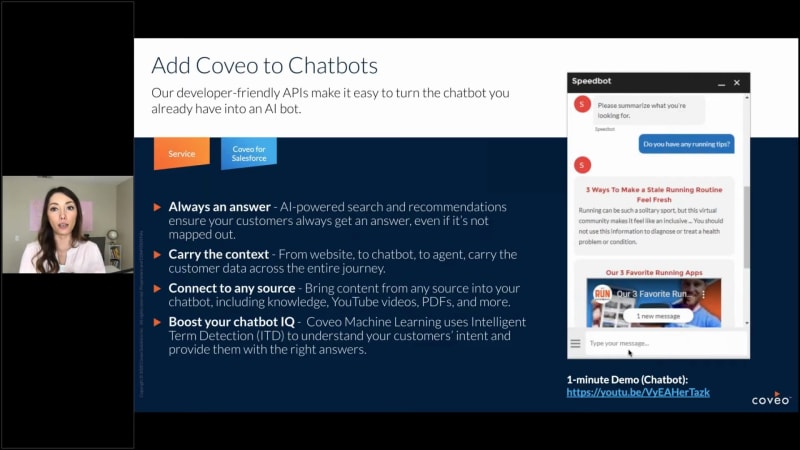
For release. First, a few housekeeping items. I'm your host, Bonnie, and I will be joined by Esme and Max who will be sharing, some of those exciting features with you today. This call is being recorded, so you should expect to receive the recording within twenty four hours after the call ends. And everyone is in listen only mode, but we do wanna hear from you. So if you have any questions, please feel free to drop them in the q and a portion of your screen. And finally, at the end of the call, we'll be putting out a survey asking for your feedback on the content and experience of this webinar. So, we would love to to hear from you so that we can continue to improve. With that, let's get started. So I have a lot to cover today. Really just to to give you an idea of of new and Coveo and what we're talking about when we say service release. And then we'll get into the release details, and then provide some resources for you to follow-up with. First of all, as you know, if you've attended these webinars before, we've, we've we've typically had them as Coveo for Salesforce releases, and, that's still the case. We still continue to provide sales Coveo for Salesforce releases three times a year, in line with the way that Salesforce releases. But one thing that's different this time around is that we are expanding this beyond Salesforce to to share with you some of the capabilities that we offer for for you if you don't happen to be a Salesforce user. So, with this webinar today, we will be covering a little bit more than what we typically do. When we mean service, when we talk about service, there's really two areas that we consider. One is customer self-service and one is agent assisted service. So everything that we do and all the things that we're building is really to help you ensure that you're providing that exceptional self-service, experience no matter the channel and, providing that exceptional agent assisted service as well to make sure that your agents are always having the best information at the at their fingertips. I wanted to share this customer service journey just so that you get in a picture of what it is that we really think about when we're building out these new features. You know, when we say service, it can mean many things. And this kind of breaks up what we're talking about from a customer self-service perspective and an agent assisted perspective. We know that the customer service journey is not linear. We know that customers jump around. You know, they may enter your your service experience at different points in their journey. So they may start at a chatbot. They may start in product, your community, or your knowledge base. And so it's very important to ensure that your experiences are seamless and effortless in all of these areas. So when we think about customer self-service, we're making sure that we're providing you with the greatest features to help you in all of these areas. On the agent assisted side, it's just as important. And so you see this little diamond here under case submission. We see this as a critical point when a customer will submit an issue. Most of what we've talked about has been, case deflection. But we know that there are times when customers do need to submit a case, and so it's important for us to build features that allow you to not only deflect the case if it's a known issue that has content, but also enable it to, seamlessly be sent over to the agent with, complete information, for those new issues that do need to be provided to the agent. So as we move forward and we're talking about our service releases, just know that we're considering all of these areas in our development. So exciting stuff. I've got a few things to highlight for you today. The first one, I'll talk a little bit about Coveo for Salesforce and what we're offering in community cloud and service cloud. I'll share a little bit of details around how you can power your chatbot and and then share some some feature, an exciting new feature case assist, which is available, in Salesforce as well as outside of it. Plus, we'll mention early access to Coveo for Zendesk. So for the Coveo for Salesforce summer twenty release, I wanted to include a few tidbits here about what's included in this package. And so the first feature intelligent case assist, we're going to drill in a little bit more on the next slide. So I won't talk about that one just yet. But as part of it, there is a new service section in the Coveo cloud admin console. So if you do, take the latest version, then you will see this new section appear in your admin console. And this is really to help set up that intelligent case assist that we'll talk about in a couple slides. We've also made some enhancements to Coveo for for Salesforce Einstein bot. So if you're using Einstein bot right now, we've we've we're now providing support for lightning web components. You have the ability to register UA events inside that bot, and we've updated the developer toolkit and landing page to make it easier for you to set up your bot implementation. And finally, we have, the modify all data permission is no longer required. So if you've had issues with permissions in the past because of that, it's no longer an issue. And then, the next thing that I'll talk about, and this will actually dig in a little bit more, is insight panel enhancements. So we've made some adjustments to the insight panel to make it easier to use. Going into the insight panel, and so this this does apply to Coveo for Salesforce only. We've enhanced the interface to make it more intuitive, and to to help agents, you know, make it easier to use. Right? And so there there are some things that maybe weren't so clear before in the UI, and and we've we've added some things to make it easier. So, for example, you know, we've added an insight query summary, which really helps an agent understand what they're seeing in the panel. And then we've made adjustments to the UI, taking advantage of the space that we have here, and removing some of those labels and tabs. This we will show you in the demo, coming up here shortly. Intelligent case assist. So this this feature is really exciting, and this is not only available in Coveo for Salesforce, but if you do have a system outside of that, you can definitely implement this as well. Intelligent case assist is really to help with that that critical point that I I mentioned in that customer journey, which is, case submission. And so when a customer submits a case, and let's say in this case is a complex issue, we know that they need agent assisted support. It is a new issue that we don't have documented. Well, what happens? Right? So typically, in a cuss in the customer journey, they start out with self-service. They try to find the content themselves and and solve their own problem. But if they don't find that, you know, then they're jumping through hoops, to till they finally get to this point to submit a case. By the time they get to the case submission form, customers are already frustrated. And so why make it more difficult for them when they're already here? So what we've done is we've made a way to streamline case creation so that based on the details that the customer provides, our machine learning model will actually take a look at that content and provide recommendations for the categories that should be selected. So let's let's imagine that you have multiple options that your customer has to choose before they're allowed to submit the ticket. Maybe there's a product, a version, a specific type of category. But what if they don't know what all of those are? Well, Coveo machine learning can help by, taking that information that's in the case details, pointing out, you know, where we need more information and then offering suggestions of what those categories should be. In addition to that, as more people submit cases, the machine learning model continues to learn and improve those recommendations, as time goes on. And so this this new experience really aims at making sure that cast cases are classified properly on the first try because not only does that make the experience more effortless for the customer, but you're actually helping your agent get more information correctly so that they don't have to go back and ask the customer more details, and they don't have to route it across, different agents to till until they find the right one. So this is really a benefit to both sides. And if your customer starts to submit some information, we still have case deflection there as well. With that, I wanna go ahead and, pass this over to Esme. And what she'll do is she'll show you, really what are the the these what do these features look like and how you can, take advantage of them. Let me pass those controls over. No. Okay. Great. So thanks a lot, Bonnie, for for that intro. So now I am I think it's time to actually take a look at this live. What does this look like? So, hopefully, everyone can see my screen. I believe so. Just moving back to, the the insight panel, that we recently redesigned, I just want to just show you what this actually looks like, in in, in the console. So as Bonnie mentioned and, I just want to point out the the differences here. We've we've made UX enhancements to the insight panel. So essentially, we, we went to our users, gathered feedback, ran a few tests, and and made some, some improvements here. First of all, what we wanted to do is, manage real estate. What we really wanna show in the insight panel is content. So we've made the search box a little bit slimmer, we've made buttons a little bit smaller, and, we, took away, tabs out of the box. So if we wanna compare with what the inside panel looked like before, Here's, an example of that. So previously, we we had tabs, a little bit of a bigger search box, and, these, buttons took up a lot more space. So, we've we've managed that a little bit. The buttons, used to be a labels. It wasn't always obvious exactly, whether these were buttons or filters, so we changed them to to icons. And then, the most exciting feature here and Bonnie mentioned this is the query a summary component which makes it a lot easier to understand what an agent is seeing. So, our insight panel, the Quilio insight panel listens to a case, has a look at the subject, the description, and then is able to automatically offer contextual, recommendations, content recommendations to help solve that case. And when that happens, we, we will tell the agent these are insights related to your case. But when, an agent searches for something more specific and they're now seeing explicit search results, that will change to, you're now seeing results one to five of these two thousand results for for your query. So it makes it a lot clearer what context we're in, and so that we hope will make it, easier, for agents to to realize the value that this brings and understand exactly what's being shown to them. So I just wanted to cover that quickly. And then moving on to, the the biggest piece of our release this summer, which is the Acovio case assist experience. So I just wanna walk you through what we, what we're imagining as as an experience for for customers using this. So, imagine you're a user on a community, and you land on this page. You want to create a case to submit a ticket to customer support. So we'd provide you with just a simple form. You know, give us a, a subject and description of your issues. So So something like right. And a description here. Now Coveo is going to be able to we we will send that information over to Coveo as context and use that to help our user, refine exactly what this issue is about. So typically, you might have different fields that you'd want your user to to select to help categorize this particular case. For this the purposes of this demo here we've decided, we want to know exactly what product this issue is about and exactly what kind of issue it is and typically we'll have pick lists for this with several, possibilities, a lot of them that are completely irrelevant to this particular case. So Kovea is going to kind of preanalyze this description and suggest what we think is the most, what we think is, the the the correct value to to add to the pick list. So the user can simply click, and that confirms and fills in the pick list. When, in this case, we know we're pretty sure that this is exactly the right value. And then for the type of issue, again, we might have several values, but we're going to scope down the options for the user to avoid them having to go through that entire list and and, pick from there. So once they've properly categorized their case, then we'd have them move on to a separate step. And so once, at this point, we have all the information we need about the case. We have the description. We have our user categorize it accurately with Coveo's help. Now we can make relevant content recommendations to our user. This is where we integrate what probably some of you know as Coveo case deflection. So we've really separated this step as a as a an exclusive step in the case creation process, to kind of force our users to have a look at this content, instead of having it as a side panel where it's really easy to ignore. So we're hoping to have, to see case deflection increase, by having it as a separate step like this. We also think that we're able to recommend more, more relevant results, having it based on the entire case, details that have been filled out last time. Then we'd have our user submit their case. There might be a wrap up step, but they they, could successfully submit their case or, inform us that they that they've canceled, and that could be, recorded as a successful case deflection there as well. So that's, that's the experience that that we want to build with this new Coveo solution. This is a solution that is entirely built on, hi, Bonnie. So built on a, actually, a platform feature. So I just wanna walk you through how easy it is going to be to configure an experience like this. So what you're seeing now is the Coveo administration console. Hopefully, a lot of you are familiar with this. This is where, you could come to configure all sorts of things for Coveo where you index your content, set up your rules. And what we've just recently released is this new service section here in the menu, which in which it's a section in which you'll be able to really configure very specific experiences for your users. This first one is called Kaleo case assist, and you you'll be able to set up everything in one place. So when, when you land here, you can pick a case assist experience. You can create a new one. You can create actually as many as you want, and then you can come and, configure those features that we just, saw in the demo all in one place. So here, you'll configure, case classification, and it's just a matter of identifying what are your reference cases that you want Coveo to learn from, to to categorize future cases and then identify what fields you want to predict in, that experience for your users. And for, case deflection or document suggestions, same thing, all configured from this, same place. Simply pick the pipeline that, you'd like to have, use for this particular experience and then add the filter to filter down what documents and content you want to make available in this particular experience. So really easy to set up, really straightforward. The goal here is to make sure that it's it's, an easy experience to, to configure, and we wanna do more of this, down the road. So, stay tuned for that. And, that's it. That covers, my piece. I'll I'll leave it to you, Bonnie. Great. Thank you so much, Esme. Alright. So as a reminder, we will be answering questions at the end of this call. So if you have any questions about anything that has been presented, please feel free to enter that in the q and a portion of your screen. Alright. So what's next? So this is really exciting as well. We're able to now add Coveo Intelligence to your chatbots. So, yes, we we do already fit in nicely with Salesforce Einstein bot, but we have found that there is a need for others to add intelligence to their chatbots as well. So our developer friendly APIs make it easy to turn an existing chatbot that you have into an AI bot. So what do we mean by that? Well, there are a few benefits to adding Coveo to your chatbot. One is, there's always an answer. So not all chatbots have AI powered search and recommendations built into them. And so when you think about the chatbot experience and your and and what it takes to build that out, there's, a lot of mapping that happens with identifying the questions that your customers may ask and the articles to map to those. But it's impossible to predict every question a customer has. And so what ends up happening is maybe, you know, if if a customer asks something that you haven't mapped out, they may not get any results, at all. And so to avoid that dead ends, you know, adding Coveo to a chatbot, allows you to always have an answer for those questions. In addition to that, just as we do in your community and your knowledge base, we carry the context all the way to the agent. And so if your customer is jumping from, you know, your website to your community to your chatbot Barca then submit a ticket, we carry all of that information all the way back to the agent, which if you you didn't have Coveo in your chatbot may not be possible. We also connect to any source. So, this allows you to bring in content outside of your knowledge base such as, YouTube videos that you may have, content that doesn't live inside of your CRM or your knowledge base. And really making sure that you're giving them the right information that they need all in one place. And then finally, boosting your chatbot IQ. And so we use machine learning, you know, intelligent term detection to understand intent and provide them with the right answers. And so this is just something that that comes standard with Coveo is, you know, we can make that experience a lot smarter. So that being said, just to clarify, we do not have a chatbot, but we do add intelligence to your existing chatbot. With that, I'm going to pass this over to Max so that you can see what this looks like in action. Thanks, Bonnie. Yeah. I really like how you described the value of AI powered search for chatbots, and I'm really excited to show that in our new, in our latest product, demo. So, that's really exciting. And, again, even more excited because, we know that chatbots right now are super popular, and, we hear that from customers all the time. Like, how can we help you guys, with, Coveo? So this is what we're gonna see today. So I think everyone can see my screen right now. So I'm just gonna jump in into the demo. So you could see at the bottom right here of my screen, there's a chatbot window. And in this case, it's a customer support, use case for the chatbot. So, typically, for a customer support use case, this is your, in this case, it's an Einstein bot. You're presented with a menu of options. So the most frequent, questions that you might have for, the customer support. So I forgot my password, etcetera. And here, what we recommend as a best practice is really to have an option for, answering all of those questions that Bonnie mentioned. So, having an option that says, I have a question and it could be anything or search for anything. So really having that menu option that would capture, all of these questions and really help you answering at scale. And with that menu option, the key is to power it with Coveo's AI powered search. So basically, what we're doing is we're transforming that query and then we're, that message into a query, and we're bringing that search results for the chatbot. So we're gonna see how it looks like. So I click on I have a question, and I'm being asked to summarize what I'm looking for. So I'm just gonna go ahead and ask a question. So how to track my heart rate with my smartwatch? I'm gonna go ahead and hit enter. So as I just mentioned, the key concept here is that the I have a question menu is triggering the Coveo flow, and the question is being transformed into a search query, and we're returning results from your Coveo index. So we know that you have all that rich content in the Coveo index, so you can index content from YouTube, from Salesforce, knowledge base, really from multiple different, type of sources, and then you can bring that into your chatbot. So as you can see here, I'm answering the question with a YouTube video, and then we have knowledge articles. And then what's really key also with Coveo is that you can customize, the UI of these results to really fit the chatbot window screen, which is a much smaller screen and really make it native and seamless for your chatbot. So as you can see here, I can watch the YouTube video even within the chatbot, and that's really key when you wanna, connect all the the usage analytics and all the information about your user. Because, with Coveo, we track all of these clicks. We track the videos that your, chatbot users are watching and the knowledge article that they're clicking on, and then you can view that in our dashboards and our reports. But not only that, but you can bring that into the agent view. So as as me shown a little bit earlier in the inside panel, there's a user action, section where you can really see, all the user actions that are happening, whether it's in the community or in the chatbot. So, so this is really important when you're trying to first provide a full self-service experience. So bringing that rich content into your chatbot and then also giving a full three six customer three sixty view for your customer service agent. And finally, as Bonnie mentioned, the results are powered by Coveo's machine learning model. So it definitely learns based on the click, and then, the most relevant results are going to show, in your chatbot. So that's really the core on how we can really help to scale your chatbot with AI powered search. And here, I'm just gonna go back to the main menu, and I wanted to show you also a road map feature. So this is something that will be coming up later this year, or maybe early two thousand twenty, twenty one. And then, so this feature is called, so I'm just gonna click yes. Can I help you with anything else? I'm just gonna go back to the main menu. And here again, click on I have a question. And here, the feature that I'm gonna show is called question answering. And, basically, here, we're leveraging machine learning to extract the most relevant information from a knowledge article to really go ahead and answer questions. So we're gonna take a look at what it looks like. So I'm gonna go ahead and ask a question. How do I work out with my new smartwatch? And then here you can see we're not showing just the knowledge article, but we're really showing the snippet of text that answers specifically that question within the knowledge article. So with our machine learning model, we're able to extract that text and really make the conversation really seamless, conversational, and, and really more intelligent for the user. So, so this is this is a feature that is coming up later this year as a road map. So it's a a little tease of what's coming up. But as I mentioned earlier, chatbots are very popular right now, so we're definitely investing in it. And, so that was it for today, and I'm really excited. If you have any questions regarding chatbot, please put it in the in the webinar platform, and I'll answer them at the end of the webinar. So I'll pass it back to Bonnie. Hey. Great. Thank you so much, Max. Let me get my slide back up here. One moment. Alright. Perfect. So as Max mentioned, if you have any questions about chatbots, feel free to drop those in, as well as any questions about our Coveo for Salesforce integration or or case assist. So the next exciting thing I'd like to talk to you about is we are offering early access to Coveo for Zendesk. And so, this is our newest product integration where we're bringing our AI powered search and intelligence to Zendesk support and guides. So with this, you know, really, what I'm wanting to share is that this is now available. And if anyone is interested in learning more about this integration, we do have an email address here. Really wanting to make sure that, we're offering you the the best experience that we can with these integrations. So if you have any questions about that, feel free to drop that in as well. So what should we do next? I have included some resources here for you, information about installing the latest version, links to documentation. You can join our release readiness program. And then before we wrap, I did want to mention that we have an upcoming, webinar, for measuring self-service success. So we do have, Coveo Academy Accelerator Learning Series. And this is really, you know, a very popular topic on on how we can measure self-service success in our org. So, do keep in mind that we we have that presentation coming up soon. With that, I'd like to take a few minutes to go ahead and answer some questions. So here here's the the service team here. Would love to see if if any of you have any questions. So let's see. What what I'll do here is I will stop sharing my screen so that you can see the presenters, and we'll take some questions. Alright. The first question, this is from Subhash. How different is Coveo case assist from Salesforce flows? Did I hear it does not support lightning components? Please confirm. Yep. I love your question, Subhash. Thanks for bringing that up. So it's, Koeo case assist actually works together with Salesforce flows, and and I'm glad that you actually brought up that, that topic because, it is actually, an experience if you want to have it set up in Salesforce that requires to set up a Salesforce flow. So to have a case creation process that is progressive like that and that happens in in several steps it does require to to have to build a flow and and then integrate Coveo into that flow. So, so you're correct if if you heard or or interpreted that that it wouldn't support lightning components, It might be possible to to support it in a different way, but, typically, to be able to submit a case in that way, it it used to work hand in hand with, with Lightning Components. For for other integrations, it'll be a a different solution, but, in Salesforce communities, that is how, we'll do it. I hope that answers the question. Great. And and if that didn't answer your question, feel free to comment again. Let's see here. Next question. What are the key differentiators for Coveo versus Einstein for service cloud? No. Do either of you wanna take that one? So is it, I'm wondering if it's a question about Einstein bots, most likely. Yeah. I think I mean, if it's we can, kind of answer a little bit of both. But, regarding Einstein bot, it's really an integration with Einstein bot. So we have, we have an integration where you can use, either lightning web component or, invocable Apex to really bring Coveo inside your Einstein bot. So you're still setting up your main dialogues in Einstein bot, so your main menu, And then you can create a menu option for Coveo. And in this menu option, you're going to call the Coveo search API and the Coveo usage analytics API and then return, those results into your Einstein bot. So it's very complimentary. And right now in Einstein bot, you don't have this ability to, have really an AI powered search that would also search across documents that are not only within Salesforce, but also documents that would come from external sources like YouTube. So I hope this I I I guess it probably the question was around Einstein bot. Yeah. It makes sense. I, I I reread the question, and I'm I'm gonna I I'll answer as well just because he's talking about Einstein for service cloud. So you might be referring to, Einstein case classification, which can seem to have similar similarities with a Coveo case assist. And, again, this is, again, something that works together with, with what Salesforce offers natively. So, Coveo case assist is really a solution, for to help users categorize their cases accurately and, easily. So to make that experience, seamless for them and even tailor it to them in their particular issue, while they're creating their case, versus Einstein case classification, which is more, to help agents classify cases and make sure that, once the case is created, it gets it gets classified accurately. So they can work hand in hand. We could actually, use both in in the full end to end process. So, hopefully, we've covered your question with both those answers. Great. Thank you. The next question, we have Coveo search with Salesforce. Is Coveo case assist an add on? How can I get more details or link to doc? So I have included a link in, in this slide presentation that is going out to everyone today. Unless, I don't know, Esme, if you wanna drop drop in a link, there now, but, that will be included in this in this slide deck that we send out. Okay. Next question. With the integration between Coveo in a chatbot and Einstein in a chatbot? Do the functional features of both work equally? So I'm going to rephrase rephrase this question. If, Marcus, if I rephrase it incorrectly, feel free to correct me. But if we have Coveo in Einstein, is the functionality there is that the same as if we did Coveo in another chatbot? I think it's the question. Yeah. Perhaps. I I think Marcus also said on the next question that we've answered the question, when I was talking about Einstein Pub. But maybe just to clarify for everyone, so at its core, we're leveraging the Coville platform, like the Coville search API. So this is really, accessible, in within any chatbot framework. So you can also use Google Dialog flows, Bold three sixty. So you can use other platforms, but we have a a more, we've built an integration for, Salesforce Einstein bots. So for the Einstein Einstein bot, then, we have a few options, and we have documentation to help you get started so you can really have access to the to the Coveo search API and, and and really have access to Coveo within your Einstein bot. So, again, very complimentary. Yeah. Great. We currently have limitations because our crawling user didn't have mad access. How would we go about configuring our source now that it's no longer required to index permissions? Right. So this was something that was mentioned at the at the beginning of the webinar. So this related to the Salesforce connector. Just for those just to put everyone in context for that question. So the question is, you never had mad access for, for your Salesforce source to index a Salesforce content, and now it's no longer required. So, actually what that's going to allow you to do is, is now, you know, probably if you didn't have mad access, we could index your content but we couldn't replicate, your security model inside Coveo. So now it will be possible to do that without requiring the mad access permission. So what you'll be able to do is is on top of indexing Salesforce content, you can add, security that'll be early binding inside inside Coveo. So hopefully that that covers that piece. K. That's a good question. Okay. Another one. If we want to use case assist and aren't using Salesforce, how do we get started? Right. So, it's the same, same for everyone no matter where you're integrating the experience. It is a platform feature so you right now, you you have to reach out to us so via a support ticket. We'll we have the feature or the service, enabled on, your org or the several orgs that you'd like to, have it enabled on, and then you can, you can use the service and integrate it wherever you want. So whether it's in Salesforce, ServiceNow, or another environment. Great. Alright. Let's see. Do we have any more questions from the audience? Give it a minute to come through. Right. Looks like that's all we have for today. I want to thank you, Esme, and Max for joining us and presenting these new features, and thank you to everyone who attended. As a reminder, we have that survey at the end of of, the session. So if you could give us feedback back on how to improve moving forward, we would greatly appreciate it. And you'll receive the deck in twenty four hours, and feel free to reach out if you have any questions. Thanks so much. Have a good day.

New in Coveo: Service Solutions That Read And Sort All Interactions
Kickstart your business with the ability to meet consumer demands and expectations. In this webinar, you’ll see the new capabilities to help your business create more relevant Commerce, Service, and Workplace experiences.
Managing a website's ‘customer experience' used to be complicated.
With the new capabilities of Coveo’s Service solutions, you can improve your website's customer experience like never before with unified chatbot intelligence, improved agent experience, and streamlined case creations.
Imagine AI that can keep your data up-to-date and actionable. Now imagine what you could do if that AI works for you, creating an amazing customer service experience?
Join our Product Management team to get a demo of the new features, and ask your questions directly to them. You’ll get to witness first-hand the new capabilities, including:- Coveo for Salesforce: The Summer 2020 release of Coveo for Salesforce includes an upgraded agent experience and new functionality to make the customer service experience more effortless.
- Chatbots: Make your chatbot smarter, and more likely to solve cases, by accessing content from anywhere through Coveo.
- Intelligent Case Assist: Simplify the case creation process with less effort from your customers, and less work for your agents. Get smart with your Case Assist with the new enhancements in Salesforce Einstein Bot.


Make every experience relevant with Coveo
