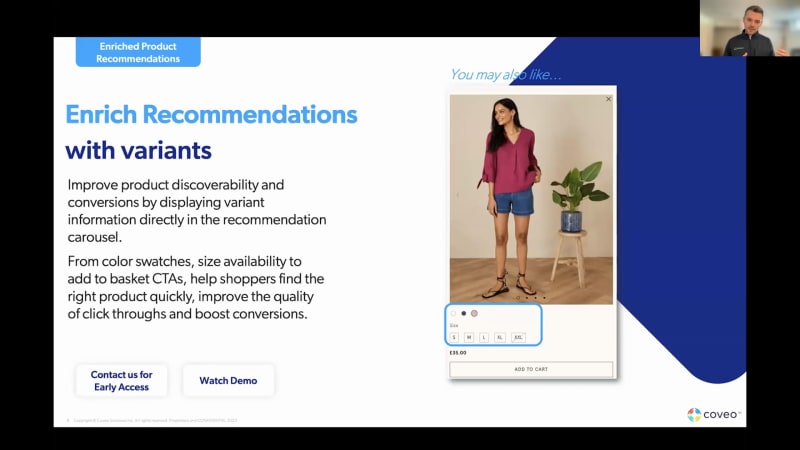
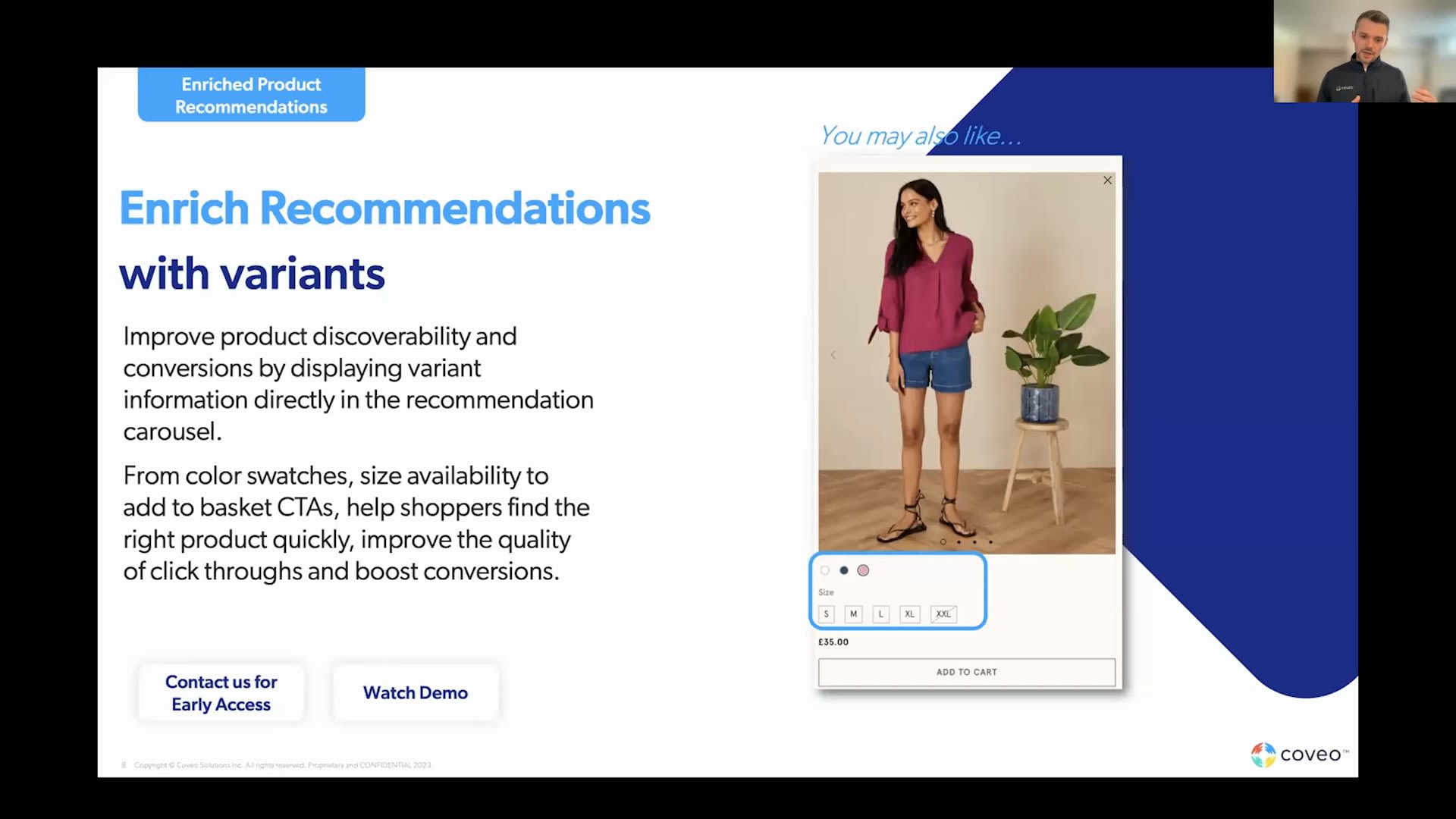
Good morning and good afternoon to those joining us from Europe today. This is the new in Coveo Commerce spring release session. My name is Sherine Reid. I work on the product marketing team here at Coveo, and I'm joined by my colleagues from the product management team, Olivier Tetu and Anthony Delage, aka AD. And they'll both be walking you through some of, the newest functionality for commerce during the next thirty minutes. First, of course, I have a few housekeeping items to cover quickly before we get started. Everyone, as you know, is in listen only mode. However, this session is really designed for you, and we want you to get the most out of it. So please send in your questions, using the q and a section on your screen. And we do have some time reserved at the end of the session for Olivia and Ade to answer those. Today's webinar is being recorded, always a popular question, and you will receive the presentation, recording about twenty four hours or so after the conclusion of the event. Okay? So, before, we jump into today's agenda, I just wanted to highlight, the fact that Coveo is an AI AI platform, and it's being used across many use cases, not just commerce. So in this session, we will focus on some of the newest enhancements that impact commerce. However, if you are interested, there are also some other, on demand session recordings available for service, workplace, website, and you can watch those at your discretion. So now on to the agenda for today. So first, Adi will cover the latest functionality in our merchandising hub around our product listing manager, some expanded product badging features, and enhancements to the recommendation capabilities that we have in the merchandising hub. Then Olivier will walk through a more automated way to generate facets, especially handy when you have a large and diverse catalog, and, also some of the latest in terms of data health and analytics. We're then gonna touch on some upcoming features and functionality and how you can get involved in, some of our early access and data programs as well. K? So before we dive in, I just wanted to take a quick minute, to highlight that with the acquisition of Kyubit a little over a year ago now, Coveo really has an expanded set of functionality that covers the spectrum of shopper intentions as they come to your ecommerce site. So either for those who come and they want their browsing, they need kind of inspiration, they want personalized content, maybe some recommendations, to those who need to be persuaded with some social proof or badging or urgency badges, to those who know exactly what they want. So think of, you know, especially in a b to b use case comes to mind, where seventy to ninety percent of people will come and and they just hit that search box. They wanna see the most relevant filter options to add to cart and checkout. Alright. So with that, I will stop my share, and I will hand it over to AD to walk you through some of the newest. Perfect. Thank you, Shereen. Let's jump right in. Thank you, everybody, for your time. So, as Shereen alluded to, we're gonna kick off with, the the improvements we've made to product listings. So, you know, this is something we've been talking about for for a while here, and it's a huge part of of of what we're, building with our with our product. Huge area of investment. And and our intention here is to give, merchandisers a very tactile experience when it comes to managing product listings in our merchandising hub. And so we're happy to announce this is an early access. We've got kinda customers on board of this right now using this. And so, effectively, at at a base level, we made it very easy to manage the content and ranking of your product list pages, and and that's been done through a visual editor. And, and rather than just speaking to it, I'll jump right into the product. And And so you can see here on the left hand, left hand side, we've got our listings manager. I'm gonna go look for one of my promotional pages that I've that I've created, and we're gonna jump in. And we're gonna first be before even going into editing it, we could kinda look at some of the reporting improvements we've made. So this is stuff that we wouldn't have shown before. And you can see here that we're getting very granular analytics at the product listing page level. We can always go all the way down to the rankings of specific products, to better understand how these things are performing. So if you're a merchandiser and and you care about your listing pages, you need this kind of information. This is what make takes you from good to great. And so we've tried to make this make this very easy and accessible. Now, obviously, there there's there's a there's a side that that's just, interpreting and analyzing, but the next step is to actually improve things. And so you can see that I don't have any rules or I have a rule here boosting, red products. I'm gonna go ahead and create a new one. So we discussed the idea of a an intuitive visual editor here. What I'm gonna do here is I'm gonna add a new one. So maybe the this this week, we're we're pushing surfboards. You know, summer's coming up. Surfboards are are a big part of our our USPs. So go right away. Make it really easy here. We're gonna boost the name, contains surfboards, and we're gonna apply a pretty significant boost here all the way up to seven hundred. Save that. And, what we can do here as well is we can actually look at how AI is affecting my products in the in the product testing manager. So if I double click on a product, I can now actually see, and this is new as well, how, you know, boost rules, the AI, Barca rules are moving my product around. Feedback we constantly get from our users, whether it's on listings, recommendations, anywhere the AI would affect the the the the user journey is that they wanna understand what's happening kinda. They don't wanna black box. They wanna be able to work with the AI. Well, this is what our intent is right here, and I think we've made it really easy. So this is how I'd set up a rule. We'll cancel this. We'll bury it. So those that's some of the changes we make to the product listing manager. If you want early access, reach out to us. We're looking for customers to kinda get involved and and and, and and use every day and give us feedback and then help us kind of work in lockstep to make this work for you. Second thing I wanna talk about is, deploying product badging across your site. And so, the the the history of product badging and Merchandising Hub has been that up until this point, we our customers have had tons of success deploying badging on product detail pages. Product detail pages where you want to print a product badge or put in some kind of product related message, they're they're quite nice in the sense that there's only one product to consider. But what we've done here with our expanded product badging is actually, taken the same mental models, and I'll show you guys in a demo in a second, but we expanded this to what we call multi product badging. So a product listing page, a basket, a recommendations carousel, a search results page. Anywhere there are multiple products, you can now kind of manage all of that with one product listing campaign. And slowly, I'll show you what this looks like. So here, we're gonna launch a product badging campaign, and you can see here that I I previously had my image my PDP image badging, but now I also have my PLP image badging. So I'm gonna pick this placement, and now I'm gonna start adding badges as I would have done previously. And so I might say that all my visitors are gonna get a social proof badge. I'm gonna say any product that's been purchased more than twenty times in the last twenty four hours. That's a hot product. Now one of the key additions here that we've made for multiproduct badging cases is that we've added these density controls. So we can limit the number of badges shown or limit the percentage of products badged. And this means that when you have a listing page, a reps carousel, a basket, if even if many products fit the badging criteria, you can still restrict so that you're not overwhelming your users, that you're not creating a noisy experience. So here, we want one hot product. We're really gonna keep this, quite restrictive, and we'll say here, there's a hot product. I wanna spell that properly, and we'll give it a little emoji here. Here we go. I'll I'll change my text color here. I want it to really pop. So I'm gonna make it white on red, create the badge, and that's how I create my hot product badge. I might also wanna badge some other products. So maybe my wax products, for example. So product category. It's wax. It turns out that these products, there's a specific USP. We don't use them petrochemicals here. They're sustainable. So here again, we'll limit this to twenty percent of the page. So we want to badge all our wax in case there's a lot of it. Say this is sustainable, and we'll upload an image. And here in this case, we'll leave the default colors for the badge. Create this. Now, obviously, our our goal here is always, like I said, to give that tactile experience. We can go preview this on our site, and we could see that, we're probably gonna end up with a a hot product on this page. Maybe, this one doesn't have much. But if I go to, let's say, my promotion page, I should have some wax that gets badged and should also have, some hot product. It's fun. Love a good live demo. Well, I can promise you that, whatever's happening right now, it doesn't actually work this way in life. So, again, the goal here, very simple management, of the social proof foils, category based targeting, and and and kinda right through to to how it works on the site. So that's, how we would kind of apply badging to multiproduct badging cases. Again, it's a very similar flow for baskets, recommendations, carousels. And so we're really expecting our customers to do now with broaden this out. And so as as with other things, you can contact us for early access. We already have, probably a dozen customers in the early access program, already launching campaigns. We're starting to see early results. What we're gonna be able to do next time we have one of these sessions is show you probably some of the finishing touches we put on the product, why it's in general availability by then, and also, kind of some of the the the the learnings we've had from the early access program so we can actually start, giving you guys advice on what kind of configurations work and don't work. A second thing that we released in January that's a bit, a smaller but important touch is this idea of, controlling the design of your badging recommendations. Badging recommendations in the merchandising hub, we're always, very, focused on the actual content. So what what are the recommendations? How do I kind of create business rules, pick an algorithm, put in that? How do I set up my social proof rules? But we didn't really focus so much on the design, and we have this paradigm in the merchandising pub that we call placement schemas. And we well, I always like to speak to them as as kind of a contract between the developer and the business user. And so what that schema defines is, you know, I'm gonna configure something in a campaign, and as a developer, that's gonna get rendered in the place. And so by creating custom schemas for badging and recommendations, they're based very extensible schemas. And now what that means is that as long as the developer built the placement and the business user was gonna use it every day, agree on what these use cases are, we can now have more kind of rich behavior, more rich design control in these placements. So that's very theoretical. Here's some examples. For badging, the the color controls that I showed you before, those leverage custom schemas. Fade in and fade out times for for for badges, those can be leveraged with, with custom schemas. For recommendations, we've seen customers kinda editorialize their carousels where they might have, a video, an image, some some copy that really kinda describes, the recommendations the user's about to see. Those are also kinda good usages of of of of custom. So, it's a very rich tool. It allows you to really kind of take your recommendations, carousels, your badges to the next level, get a lot more control on the design. And so we've seen our really interesting stuff with this, and we're excited to see it, carry forward. Another thing that we're we're we're kinda pretty happy to to be kinda moving forward is this idea of enriching recommendations with variant level data. And what this means specifically is that we're using a variant level catalog with you know, to to to customers who've been used to convey o commerce. They've used this for a while. To customers from the qubit side, this is novel. But in the in the merchandising hub, what we're now able to do is take that variant level data and actually pass it in the recommendations response. And what that allows us to do, by having in the recommendations response is to create much richer carousels. So you can have a carousel with color swatches, with size availabilities, with an add to cart button. And so your end user experience becomes a lot richer because, the carousel now can kind of support a lot more features. This is a common thing that we see across the spectrum of kind of brands, retailers, etcetera, that that that are really trying to kinda create a more elevated, experience. And so, this is something that we brought into the merchandising hub. It's in early access if you'd like to if you have use cases in mind, if you'd like to adopt this, we're we're very keen to kinda work with people to make this work as as well as possible. Last thing I'll mention is a a short note. The Merchandising Hub has for a long time had an integration with Google Analytics. Google Analytics always kinda had nice APIs where you could send data out to, allowing you to analyze the the in in interaction with the Merchandising Hub campaigns and placements, in your familiar environment. Well, we now integrate with GA four. And, there's, you know, a lot of familiarity here. We're still sending very similar events. But there's also some some nice new features about GA four, called custom dimensions that allow us to basically kind of provide richer context to GA about what's happening. And, hopefully, ex we were expecting customers, especially as Google Analytics four adoption increases as people gain experience with the tool to to to cut down on some of the repetitive analysis pair patterns and and really just kinda set up more standardized reports that they can go into and and kind of dive deep on their on their campaigns with without the team. So we're pretty excited about this. Again, this this this one's pretty available. This one's available. You can read our docs. So we're keen to get everyone on this. I'm gonna hand over to Ollie who's gonna talk about generating relevant facets without the manual effort. Thanks, Eddie. So, let me just share my screen on the exact same thing. So can you guys see my screen? Yeah. Okay. Thank you. So thanks, Eddie. So, essentially, another feature that we put out recently was, the automatic facet generator. So when you're initially implementing search, right, you always have to define all the facets that you want to render for each UI. Well, that's no longer the case. So with the Coveo index, we can now actually return automatically all the relevant facets for every given chord. And then we have, you know, our DNE, dynamic navigation experience suite of models that can take care of, you know, reranking these facets as well as the facet values to make sure that we always display the most relevant filters for for users. You can see this as very being very useful for very large catalogs, which contain a lot of filtering options. Sometimes we see over a hundred thousand filtering options. So you can imagine, you know, that being able to generate them automatically is really a a great thing, for for a Quilio implementation. Heading on to the next slide. We're gonna now talk about some platform infrastructure, you know, improvements that we've made over the past quarter. First one being our new data health panel. So when you're implementing Coveo, we wanted to give users the ability to validate their events really quickly and to know right away what issues might arise in those events to make sure the data tracking is on is on point. So for any developer that wants to leverage this, this is now available today in the platform. And, you know, within fifteen minutes, we will, do a full semantic and synthetic synthetic validation of all your events to make sure, you know, that you're sending the data in the right way as well as providing you with, you know, guidelines and and walk throughs on how to fix the issues that we're we're spotting. Afterwards, you know, we've launched a new a net new region in Canada, so it's now, readily available for any customer who may want to use it. So the Canada region is really, an infrastructure improvement that we've made to allow for, data residency compliance. And, you know, we also provide proximity based performance contract for Canada based customers as well as any customers who want to leverage, our multi region, you know, infrastructure. In the upcoming list of features now. So we have a few active active, right, which speaks directly to, you know, the Canada region that we just deployed. So, essentially, we are offering now redundancy on the query path, essentially, to redo, to to improve traffic performance and guarantee uptime. What that means is that we're gonna duplicate your Coveo instance across multiple regions, meaning that if one region were to fail, we would automatically fit transfer over to to another. And we can also improve performance for large scale deployments, by ensuring that we always route queries to the nearest region to to whatever customer is querying your interface. Afterwards, this is just more of a reminder. We have launched personalization as you go, a few quarters back. So our our suite of features to personalize one to one in session. We do this by building behavioral vectors essentially based on the behavior that we see on your site. Now, you know, while that's great, we're noticing that, you know, we only cover the top products of your catalog because we do require traffic on products, essentially, to be able to position users, in it. So what we do is that we create a behavioral map of all the products, essentially, that we see. We cluster products together, and in session, we'll generate a session vector that's updated in real time based on users' immediate actions on-site. And then we position that user against products to be able to recommend the most relevant products. What we're seeing is that, you know, this works great for all products with a lot of traffic, but for the long tail, they're not new products. This this means that they're not positioned on the map. We're working on a feature right now that's currently in early access to solve for this problem. So, you know, we call it the cold start, feature and functionality, essentially. This essentially takes your catalog coverage from thirty to forty percent from what we've seen so far to almost a hundred percent. Meaning that, you know, we can use the existing product space to position the net new end products with low traffic on it to make sure that, you know, whenever you're viewing a product, we can recommend accordingly, and that all products can get ranked in search to make sure that we always show users the most relevant product. So this means that, you know, we no longer just show products that are popular or that, you know, a lot of users clicked or viewed. We also show products essentially that we believe to be relevant based on their criterias, that match existing popular products that we that they would currently show users. So, So, you know, if you're interested in this, please reach out to us. It's currently in early access. Next, you know, we're also working on a generative suite of AI models. So right now, you know, this is really focusing on a self-service use case, but we're essentially gonna use the power of the Coveo search and combine it with an NLM to ensure that we can, you know, answer questions and large queries at scale. Meaning, you know, that we're gonna be looking to essentially add to our query path LLMs, but still keep the security and recall of the Coveo index to make sure that we generate the most relevant answers and that we can generate the best prompts possible to reduce hallucinations from those generative models. So now, I'm gonna be handing it back over to AD, for, you know, to speak about COVID recommendations in the merchandising hub. So, AD. Thank you, Ollie. Alright. So, as Ollie alluded to, we're gonna bring conveyor recommendations in the merchandising hub. This is really exciting because we we spoke about these kind of product vectors. We spoke about, you know, to an extent the the the generative answering capabilities. Conveyor is obviously an AI company first and foremost, and and bringing that to the merchandising hub is is a huge milestone for us, on the recommendations front. And so what we're gonna be able to do is take all the the machine learning models that that if you use Coveo Commerce today, you're used to using, in in the admin UI. And then if you are an XCupid customer or a prospect, this will just kinda come come natively into the merchandising hub, and we'll be able to use from these vector based models, in session personalization, etcetera, in the merchandising hub. And so we're expecting this to lead to great recommendations experiences, great recommendations outcome. If you'd like to get involved, get it get reach out to us for early access. This is this is something where we're keen to work with customers who are both on the fair commerce side and are looking for more merchandising control as well as Kiwi customers who wanna adopt these new models. So there's really there's really no, no no cap on on who we're targeting with this. Second thing we're doing is is is obviously a continuation of the product listings manager. This is, again, a huge area of investment. So, I I spoke really about kinda understanding the impact of AI on your rankings and reporting on your listing page performance. These are areas that are gonna continue to improve. We're also looking to kinda add, kind of kinda campaign management, more control of kinda AB tests, and, ultimately, to kinda give a lot of the same features that users are are used to with recommendations, badging, and content, on top of those things. So, again, an area with some really exciting new things coming, in the coming, months and quarters. So, again, if you wanna get involved here, reach out. We're we're really happy to kinda work with with with our customers to make this a fantastic product. And with that, we're gonna hand we're we're gonna move over to some q and a. Any questions in the chat? Hey. Great stuff, guys. Thanks for covering that very quickly and efficiently. One question that did come in, I guess there's some cons concerns around this. So we have the Coveo admin console, which I think, ODV, you mentioned earlier on. But, someone wanted to know that in the future, will everything be migrated to the merchandising hub? Because we put a lot of focus on that, and we've seen a lot of, kind of the the migration towards that. So or will there still be the admin console in parallel with the merchandising hub? Like, how will that work? I could take that one. So the the the the question there is is one, partly a timeline and partly of of kind of which problems we're solving. Our goal here is that any problem that's relevant to a merchandiser, both at a surface level, like what campaigns you wanna launch, and even kind of slightly underneath the hood of, like, do I have the right implementation here to make sure that my my merchandising will work? Those kinds of questions, we will progressively answer more and more in the merchandising hub. And so for a certain set of users, that will be a hundred percent of where they work. We still think that there's gonna be administrative tasks that will be done in the admin UI. And and this isn't a one day to the next kind of transition either. You know, for customers who've invested heavily into their their setups today, their great pipelines, that isn't going away. And then we're gonna we're gonna make sure that we're fantastic partners through the the this evolution of the product to make sure that, you know, you're not losing performance, as we kind of create features on the other side. So, hopefully, that that kind of paints a picture of where we're headed and and how these two products are gonna coexist. Okay. Perfect. Thank you. And a question came in around the the long tail vectors, Olivier, and and how what does it take for them to work? So what does it take on, I guess, the the customer side for for this to work well? Yeah. For sure. So yeah. So as I said, right, we build the current vector spaces, if you will, the product the product space, if you how we like to call it, using behavioral data. So we looked at what users view, add it to cart, purchase, etcetera, to really find relationships between all these products. And then we rely on the catalog data as well as behavioral data to be able to position the rest. So for products that have low traffic, we'll still consider that traffic, but use catalog data to confirm our our hypothesis, if you will, in terms of position of that product in the vector space. And for net new products, we'll rely solely on catalog data, meaning categorization, brands, and different product attributes essentially that we can find that correlate with the existing product space. Okay. Perfect. Alright. I don't know if there are any more questions that came in. Again, if you are a current customer and wanna understand more about the features and how to apply them in your specific instance, then I suggest you reach out to your customer success manager. If you're not a Koyo customer, but you happen to be on the webinar today and you wanna find out more, then just simply head to our website. You can fill out a demo request, and we'd be happy to dive into some of these features, on a more one to one basis and see how it would impact you and your your current deployment that you have. And with that, I think we're done early. So thank you for all of those who joined us today for this new Encoveo session, and I look forward to talking to you again soon. Thank you very much. Thanks, everyone.
New In ECommerce - Spring 2023
Our latest AI innovations can now power even more relevant shopper and buyer experiences for your site. Join us as we showcase how you can flexibly deploy badging strategies across any listing page, cart page or recommendation carousel and modify all aspects of the placement design and behavior - right within the merchandising hub.
New and Enhanced features include:
- New Product Listing Management Visual Editor
- Expanded Recommendation Configurations
- Recommendations and Badging - Custom schemas
- Variant Enriched Product Recommendation
"Learn how to win more customers, keep more customers, & increase their satisfaction by personalizing their experience.” Coveo Relevance 360° attendee



Find out what’s working now – straight from the experts