
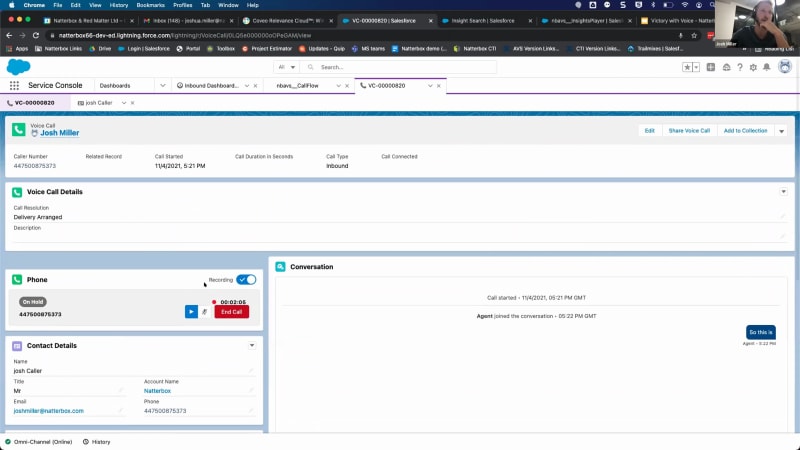
Seeing some people about to or starting to trickle in. We're gonna go ahead and give it a couple minutes so everyone can sign on, and then we'll go ahead and get started. Alright. I think we're gonna go ahead and get started. This session will be recorded so we can share it with you all afterwards. But hello, everyone. My name is Elise Squirek. I'm head of North American Alliances here at NatterBox, and I will be your moderator for this session. And on behalf of NatterBox and Coveo, I wanted to thank you all for joining today's webinar around how to maximize service cloud voice with analytics and search. So first, let's just jump right in and meet some of our speakers today. We'll go ahead and get it kicked off with the Coveo team if we wanna jump into the next slide. Hey, folks. My name is Luke Sanders. Over at Coveo, I help manage the Salesforce alliance, so working with many of our Salesforce partners and stakeholders. And then there's me, Neil Kostecki, director product management for our service line of business. So I oversee our Salesforce integration. And, again, Elise Squire, head of North American Alliance is at NatterBox, really in charge of making sure all of our customers and prospects' vision are aligned well with Salesforce and voice. Good morning. Good afternoon, everyone. My name is James Radford. I head up product here at NatterBox. Barca my primary role just encompassing, all of our Salesforce integration products here at Nazarbox. Hey, guys. I'm Josh. So I'm a solutions engineer here at Nazarbox. So I basically work on new voice opportunities kind of as a technical contact on them, and I'll be running a demo for you today as well. Awesome. Thank you, speakers. Alright. Let's go ahead and jump into our agenda for today. So today we'll be covering the following. First, quick introduction of NauterBox and Coveo. I'm sure you're wondering all about us, what we do and the value that we bring to the Salesforce platform. Then, of course, we'll be diving more into a service cloud voice demo or, explanation and how it's amplified by our two solutions. Then finally, you will get to see an actual live demo, service cloud voice powered by NatterBox moving into search and analytics capabilities by Coveo. And then, of course, we will leave time at the end for questions. But, no, if you do have any questions throughout the presentation, please do feel free to leave them in the chat, and we can answer those during and after our session today. Alright. Let's jump right in. So we'll go first here at NauterBox. So just so you're all aware, NauterBox is a complete business phone system, a hundred percent embedded and managed within the Salesforce platform. So we focus on all things voice within Salesforce. We're also a summit partner of Salesforce, which means we're the top one percent of ISD partners within the AppExchange. This is quite a big accomplishment, and it ranks from our level of integration, the engagement that we have with Salesforce, and the success that we've seen together as well. So I think we can all relate to that experience when we called into a company who at some point we bought something from or had a service provided to us, and they had no idea who we were, what we were calling about. And it really led to kind of a frustrating experience. Right? So they asked, who are you? Why are you calling in? What's your order number? And then you spend I don't even know how long searching through your email trying to find that order number or when you got emailed months ago. And it just it it doesn't make sense. It doesn't make sense that if an organization has all this information about you, they can't support you more efficiently. So this experience could be made so much easier with a three hundred and sixty review of the customer when they call into the organization. And not only does it that create a better end user experience, but it also allows for better internal efficiencies as an organization. Right? So leading to cost reduction, cross sells, upsell opportunities, and, ultimately, better visibility within the Salesforce platform by capturing data on each one of those calls. So another really unique selling point of NanterBox is that we are a global telco. So we can provide integration of your existing phone system into the platform. So say you have Avaya, Mitel, Cisco. I've already made this investment in my infrastructure. How do I create that three sixty degree view of our voice system into Salesforce? NatterBox can be that connector. We can connect that phone system into Salesforce creating that visibility. Additionally, another huge differentiator for NatterBox is we are our own global telco. So we can actually be voice be the voice provider from end to end. We're also a hundred percent on the platform. So everything from your calls to your reports and dashboards to your actual building out the solution is all within Salesforce, that single source of truth. And, additionally, it's easier to manage because you can actually do it within Salesforce and throughout process builder, which you'll actually see when we get to the demo portion. So just make sure when you're thinking voice and you're thinking Salesforce, additionally, you're thinking NatterBox. So now I'll pass that over to Fayeo. Cool. Awesome. Thanks. Thank you very much, Lisa. I'm just gonna, give everybody a quick introduction to Service Cloud Voice, before we move on, and look at both only what Natabox can offer in conjunction with Service Cloud Voice, but also what the conveyor system can also offer, when you kind of bring all these systems together. So just to kinda, expand on Elise's point from just a just a moment ago, as a Salesforce enabled embedded voice platform, with Global Reach, when Salesforce came out, to the various product teams with this vision statement here, what they wanted to do with voice, of course, if you can measure it, it's kind of music to our ears. It's absolutely fantastic. And the whole reason for for service powered voice to exist is to absolutely make that, voice, on the contact center, totally totally seamless. Do you want me to go back to the, other slides? Okay. Thanks, guys. So both agents and supervisors need to have a seamless experience. And this is all about making sure that, no matter what channel a customer comes in on, the agent is able to handle it in the same way. So Salesforce, for available time, have had Salesforce on the channel, which many of you may may well have used in the past. It's great for text based platforms, and you can plug in your WhatsApp and your SMS and things like that. And then they had another voice stream over here, which was kind of kind of separate. And a lot of work that NetBox has been doing already was to actually embed that voice stream further inside inside Salesforce. So when Salesforce said, well, look. You know what? Currently, we're writing a, a dedicated connector that allows you to get all of this voice data in front of the agents in exactly the same way as all of this other textual data with a whole lot links to all of your Salesforce customer data. We went, well, you know what? We'd, we'd very much enjoy being your partner in order to do that. So this is a journey that's been going on for a couple years, and it actually consists of two parts. If we can have the next slide, please. So Salesforce own the agent interface. So it allows that it means that Salesforce have, an omnichannel embedded interface for voice mail. So anybody who's already using contact center within within the Salesforce, already using omnichannel, already using their communication methods, even if you're just doing email to case today, yeah, which is the most common thing that people use Salesforce omnichannel for, it will fit in completely natively with that with that experience that you're doing today. So we have that unified interface. And then what that allows us to do is then add all of our voice value adds on top. If we can have the next slide, please. So Natabox can really now bring to bear its global telco network in conjunction with service Salesforce ServicePower Voice. So ServicePower Voice itself doesn't do any voice routing. So Salesforce is not particularly in the game of building out its own global voice PBX. It works live on a partner, and that partner is Natabox to actually provide the voice features that go with the agent and supervisor interface. And there's some really cool USPs that we offer here, at Natabox. So first off, every single voice feature add on that we offer is embedded directly inside Salesforce. There's no third party port that you gotta log in to. Everything you're seeing here, things like our wall boards, our, customer journey platform, where you decide how you want course to put the platform, all done inside Salesforce. As Elise said at the beginning, we make this work with any phone system that you already have. Yes. Here at sales here at NatFox, we are a full telco in our own right. You can have NatFox phones, all over the, all over your offices if you want. Or if you've invested half a million dollars into your Cisco platform, then that's totally fine. You can bring that along and integrate it with ServiceNow Voice using using NetFox. And another thing that we're very excited about, which is a new addition to us, we have a dedicated connector between ServiceNow Voice and Microsoft Teams as well. So you get all of the NetBox functionality, voice functionality, all the benefits of ServiceNow Voice, and you also still be using Microsoft Teams as well. So in a nutshell, that's what that's what Service Cloud Voice, offers. To summarize, it's a completely unified, voice experience within Salesforce, allowing NetBox to offer all of its value add features embedded directly inside Salesforce and for agents and supervisors to be a completely seamless interface against not just for it, but all of the other communication channels they're dealing with your dealing with your customers on. Fantastic. And on that, Evli, I will hand over to the Conveco team. Thanks very much. Thanks, James. I'll pick it up from here. So I'll spend a few minutes introducing Caveo, and then as mentioned in the agenda, we'll move on to the demo and show you how this all works in action. So Caveo technology provides search recommendations and stitches together the entire service journey end to end. If you follow the screens across the bottom, you can see a quick example of this that we'll talk through in a little more detail. Following a service interaction from a community or web page through to a bot or a mobile experience and then ending in an agent console where video search is accessible, help agents do their jobs better. We're also honored to be a Summit ISV partner, five star rating app exchange just like NatterBox, so keeping them good company there. So to address kind of how search is important to the service experience and how we help augment what service thought voice and Matterbox do. You know how important search is to you as a consumer. Like Elise mentioned, you're having a bad experience with the phone system. It's not hard to think of a bad experience you had on the website. You probably were annoyed, abandoned that website. What we think is underrated is how expensive that can be for business leaders. It can be costly because of disjointed experiences, because of lack of productivity, time spent looking for solutions. These are all things that affect the bottom line. So where what we do becomes important is across two main sort of axes, content and context. Content is provided by a variety of enterprise connectors, pulling that into the experience to be served up in search and recommendations. And the context is provided because by capturing searches, we gain a great deal of information about what individuals are using your properties to do, what they're trying to fix by the types of problems they're having. So on the next slide, this is a visual just to speak briefly about how it works. So, again, content from everywhere, context to anywhere. If you're already familiar with us, you may know us as Federated Search. This is kind of a whole next generation of the platform. Just like Salesforce isn't just CRM anymore, there's much more to it. So what Conveyo is doing is we're creating a a single secure unified index here in the middle that ties together all these disparate content sources and gives you one experience that can be queried from anywhere. So we're looking at experiences in a service context today, but these experiences can be embedded in marketing, commerce, sales context, just about anywhere. So the the people here, that the experiences that people expect are again, it can be anyone. Employees, dealers, distributors will focus on a service case coming through to an agent today, but that ability to create a secure unified index can be transferable to a lot of different, applications. The second part, Caveo AI, is what we're saying there is that this is a continuous cycle and a virtuous cycle that learns the more you use it, the more inputs there are to our learning models. So these experiences that you're delivering are improved by a cycle of feedback, and they get more effective over time. The connectors here at the bottom, just to spend a moment on that. So there are a number of prebuilt connectors out of the box, including for Salesforce, but many others can be accessed via API or by on premise crawlers. We know that enterprises are complex and have content in many, many different places. One I'll I'll pull your attention to in particular is the Slack connector. So we today have the ability to index Slack threads and messages as results in search. We see this being really useful for teams who use swarming to solve complex problems. And, coming out sometime next year, we're also planning a Slack app Slack app integration, to help customers get better use of Slack and through a unified search index. So on the next slide, I'll give you a a quick example of a conversational experience, the type we're talking about today. Neil will show more on this in a moment. This is just to prime the pump. So So the first box on the left, you're seeing a featured snippet. This is a special block at the top of the page, which contains the answer to your query, so you don't have to click through any content. This is a great example of the number one request we get from customers, which is, yeah, that's cool, but can you make it look more like Google? And this is important too because even for Google, this is not an easy thing to do. Again, example, our product team uses quite a bit. So if you Google who built the Eiffel Tower, you'll get a few names. You'll get an architect. You'll get people who designed it. You're probably not gonna get Gustave Eiffel, which is what you're expecting. So I think that's important as a competitive differentiator of of the type of search experiences we can deliver. The second piece is using Kubeo in a chatbot context, which is the box in the lower right. So we can deploy a search call in another experience to answer questions that might not have already been considered in the decision tree. So on the next slide, we've followed this quick example, through from the community through the chatbot to land in the agent console. In this case, our customer here wants to talk to an agent, so we pass the service cloud view. On the left, we can see the transcript stored on the case object, and this is where the machine learning comes into place. We'll talk more about this in a moment, but this is the key piece that kinda multiplies the value of Coveo search in our analytics when combined with applications like Matterbox. So what we're doing here is we're crawling any amount of content, including the unstructured content in a conversation like the transcript here. And our machine learning is extracting key terms such as product names, problem statements, you know, where if there's some chitchat about what we had for breakfast and what the weather's like, that's not likely gonna be surfaced to the agent in the case. So when the agent opens this case, they're able to see insights coming right from the important parts of the transcript before they've even engaged in conversation. So we'll talk more about it in a moment, but for now, I will pass it back to Josh to show you these solutions live in action. Brilliant. Thanks so much. Alright, guys. I'll just briefly stop showing the slides here and hop into Salesforce so we can look at things from a demo point of view. So, hopefully, yeah, everyone can now see my screen with Salesforce on it. And, what I've jumped into here is just service cloud, and we're gonna be talking about service cloud voice for the next fifteen minutes or so, specifically with Nasivox. So anyone familiar with service cloud and omnichannel will recognize the omnichannel widget down here in the left hand corner just sitting in the utility bar. What's different or unique now with service cloud voice is traditionally where you just receive workflows through his things like basically cases, emails, live chat, that kind of thing. You'll notice now we also have a phone tab. So, essentially, what this is allowing me to do is receive calls through omnichannel and basically use the omnichannel widget as my phone to make and receive these calls. So really nicely ties everything together. And it also means when, it comes to things like logging into a particular call queue or logging into a particular workflow, I'm doing that from one central location. So I can see here I've got some example statuses on screen. So things like available for cases, available for chat, and now phone is an additional status there. So if you think from an Omni supervisor point of view or a team manager, it's really nice and easy to manage what workflows people are a part of because you're changing those statuses all from one central location and kind of omnichannel. It's basically your single source of truth when it comes to distributing what work people are online for. But, anyway, what I'm gonna do quite quickly, guys, is jump into an actual demo scenario. So show you how a little bit how it would look a customer dialing in to someone receiving call in Service Cloud Voice and then what that call actually looks like on screen. So what I'm gonna do for this call in a minute is just put myself on speaker, and I'm gonna be dialing in basically as the customer, And then you'll also see on my screen as the agent receiving the call. And for this call, let's say I'm Chris dialing in. And because my details exist already in Salesforce where my customer record is stored, what we can do is we can recognize this caller. So we can give them things like a personalized greeting, and then we can actually decide as well who we want to essentially route this call to. So rather than sending the call out to a wider call queue, we can say, okay. This is James. So this is Chris calling. Let's send the call through to Josh because he's spoken to them before. So what I'll do now, guys, I'm just gonna put myself on speaker, put my phone close to my mic, and hopefully you'll be able to hear my phone ringing when I dial in. Hi, Josh. Thanks for calling. Please wait while we try and connect you with your account manager, Josh. And I'll just take myself a speaker, and there we go. That call has come through to me in Salesforce. So I'm gonna answer that call now on omnichannel. Like, quite a few things have happened on screen here, so I'm just gonna pause to slowly talk you through a little bit what's going on. So first off, what we've actually launched automatically is what we call a voice record. So this is basically a record that's created every single call in Salesforce that is then associated with the caller. So what we can see, for example, here, first off, we have basically our live call metrics. So anything that's relevant to the call. So we can see the caller number, the actual contact dialing in, when the call has happened, kind of all basically your key metrics are captured off to the side. Then at the same time, we've also recognized who the caller is. So we can see their details there. And in a separate tab, we've actually popped up their caller record. So the customer here is myself, Josh Kula. I can click into that and straight away, I've got their contact information in front of me. Now you'll notice off to the side here, this is where we actually keep the voice calls, the voice record. So every time a call is, completed or every time a call is made, these voice records here are associated against the contact. So if you just think when I'm clicking into this voice record, that's traditionally where it's gonna live in your Salesforce, so associated against your different contacts or different accounts. Another thing to actually mention here is the fact that we've got live transcription straight away. So you can see it in this, basically, this conversation box. So I've muted myself now just to stop an echo so the the transcription stopped very quickly. But the idea here is this is where the transcription is being tracked when we actually do that live call. And then also this is something that as a supervisor, you have access to. So if you want to basically have a look and see how your different team members are getting on live without actually listening to that call, you've got access to the transcription also. The other thing I'd point out too is you can basically drop in notes or, categorization codes directly into this voice record. So let's say this call has arrived, and I wanna quickly write down, what the customer's calling in about or what the result of this call was. Well, with things like pick list in Salesforce or drop downs, you can basically, put these in here. So let's say the customer's dialed into me about a delivery. I can select that on the voice record, save that, and it's gonna be saved automatically. So really nice, easy stuff there. The other thing I point out too is omnichannel really is your phone. So you can now basically have your core call controls all directly from the omnichannel widget. So you can see here I basically pause the call, so put the customer on hold briefly. And then you have all the other controls you typically expect. So access to the keypad here. There we go. The live transcription's catching up, because I unmuted that call very briefly. You can also pause and resume the recording if you wanted to. Mute the call as I mentioned and then also transfer callers in here. So say I wanted to send this call somewhere else off in the business, transfer the call to Elise, I can do that as well from omnichannel. So what I'll do, I'll actually hang up this call now. And the final thing I'll point out on the voice records is the fact that you actually have the recording on them as well. So if I just go on to my contact record and open up another voice record, you'll see straight away down the bottom here, we've got access to the call recording. So I can play that and listen to it. So the idea is when you're coming in to actually look at call your call history with a contact or your recent interactions, you've automatically got these voice calls saved. And each time you click into one, you're getting a really good picture basically as to what's happened during that call. So what I'm gonna change gear a little bit now, so that's sort of what you'd expect from a customer and agent point of view in an interaction. What I wanna talk about very briefly is actually how we configure the logic behind where these calls go. So you'll notice on that call there, I was answered by first name. So they said, hey, Josh, and they knew where to send my call. And the reason that we can do that is because we have a routing system or a call, intelligence system, however you wanna call it, that's completely built within Salesforce. So I'm just going into our our routing policy section here, which is basically where we can design a call flow, and I'm gonna open up an example one and put that on screen there. I'll zoom in a little bit too. Hopefully, that's, large enough for you guys to see, but if not, just shout. And what I've got on screen here This is literally controlling the core routing, within the business. So it's essentially a little bit like a workflow model or similar to Process builder or kind of any any sort of flow system you have in Salesforce as Alyce mentioned and the idea is we're basically adding in different components or different actions within this call flow to control what happens when a customer starts dialing in. Now in order to make this really nice and easy to do and kind of to prevent the need for having loads of code written or taking absolutely years to learn the platform, what we've done is we basically split out all the key features or key events that can happen in a call flow into individual apps. So it's really nice and easy basically to decide what you would like to have happen in a call flow. So let's say I want a call queue. I'm just clicking on the call queue component, and then it's a case of selecting, okay, which team would I like to have, included in this call call queue, I should say, so we can see who we're routing, the call to essentially. And then you can do things like welcome messages. So, again, when I dialed in earlier, you heard that greeting that I got or it could be a standard IVR switchboard where you're given the option to speak to different teams. The idea is any sort of standard PBX routing that you're used to, it's now controlled in Salesforce. And then the other side of the coin worth mentioning is, obviously, this is controlling the core routing, but this system is interacting with Salesforce at the same time. So you'll see a few different, components I've got on screen here without going into crazy detail. Essentially, what this is allowing me to do is interact with Salesforce records whilst the call flow is happening. So some of the quite cool things we can actually do from this system is automatically create a Salesforce record. So say you've got a new caller dialing in, they don't exist in the system, well, we can just create them automatically as a contact or a lead, and then we can also update Salesforce records on the fly. So we have lots of customers that will, introduce elements of case deflection where based on the information that they input in the IVR, we take that and then we update a case or their contact record accordingly. So I think I'll pause there just on on the routing stuff, guys, but really the key takeaway from this is you have full control of your call flows within the Salesforce platform, and that's where you're building out the intelligence behind that call routing. So the final thing, I'm gonna show for today, again, changing gear a little bit, is just diving into what we can do from an analytics point of view. So what sentiment analysis, what insights can we provide to these calls that we're recording in the background every time? So quite aptly named, this is what we call our our insight offering. Basically, but we really get under the hood of what's happening during each call. So, obviously, I've mentioned that every call is automatically recorded if you'd like it to be, and then they can also be automatically transcribed as well. So you have the live transcription and then you can look back at them historically and and really go under the hood and look at those transcriptions in a bit more detail. So what I've got on screen at the moment is just our insight search menu. So this is essentially where, you can filter for specific calls and be really targeted in terms of which calls you want to review. So it works a little bit like Salesforce list views where you obviously have a set of different results, so different calls here on screen, and then I can add in filters, depending on which one I want to see. So it could start quite simple. We could look at the date and time of the call. We could look at whether it was an inbound and outbound. We could look at the people involved. But then where it gets quite interesting is because we have the transcription, we can really start to refine that search process and really pick out the key calls that we want to, maybe review or do some coaching on. Because let's say you have two thousand calls within a a week period and you only want to review five, well, you're gonna wanna make sure that there are five good calls. So this is where something like insights is really useful to help you pick out those calls. So what I'm gonna do here is just show you how you can add in different filters. So we could do things like search by keyword. For example, let's say I would like to see all the calls within this time period here where the keyword Salesforce was mentioned. So I'll apply that filter, and now that will run a search for me. And if we scroll up here, we can see, okay, there were seventeen calls that actually, where where Salesforce was mentioned that have been returned. So what I can do then, if I actually were to click on this blue button, that will open up for me what we call the insight player. And this is where you actually get the live trans not live transcription, I should say, post call transcription because this call has now been completed. So you have that transcription on screen. So you can scroll through it, really review it at your own pace, and see whatever you want. At the same time too, we've also highlighted keywords. So going back to the example of Sales Force, I can now see where the word Salesforce was spent because all I need to literally do is click there on Salesforce, and straightaway, two things have happened. I've been taken to the part in the call recording where Salesforce was mentioned. So playing there, I can hear the word Salesforce. And then at the same time, we've also highlighted that on the call transcription too. So I know exactly where I need to go to find a part of the call that interests me. Because, again, going back to the idea of saving time, let's say you've got a half an hour call of which you only want to spend two minutes reviewing or you're only interested when a certain, product was mentioned or a certain outcome happens. Well, now that you have the keywords, now you have the transcription, you can very quickly navigate to that part of the call, and it's an absolute massive time saver when it comes to reviewing or doing team sessions. The other thing you can do as well is you could funnel up these keywords into categories. So let's say you want to know whether your, team members are giving greetings, whether they're saying hello or goodbye at the end of the call, whatever it might be. Well, because we can funnel up hundreds of these keywords to create certain categories, you can actually very quickly search for calls based on categories also. So I could actually run a filter, show me all the calls where goodbye was mentioned or show me all the, the calls where there was a farewell greeting, all that kind of thing, and you can start to extend that logic further. So moving into the realm of was it a positive call, was it a negative call, was there a good outcome here? So essentially what we're doing is by recognizing the words, we're funneling those up into bespoke categories that give you, a lot more information as to the subject of your calls. So I think, guys, that probably brings me to the end of what I wanted to show today. So, hopefully, a nice short demo, but an informative one nonetheless. So, I'll stop sharing my screen at this point and pass over to Kubert who, will, yeah, run you through their things. So thanks so much for watching. See if I can stop sharing. There we go. Should be done. Great. Thanks, Josh. Let me share my screen here. Perfect. Let me know once you see it. Good to go. Perfect. So, yes, thanks again. Really cool stuff. You know, voice and conversational is definitely something that we hear more and more, and that is something that's reality, you know, in a kind of very virtual world. We need to be able to provide, you know, answers, insights. We need to be very proactive at at how we solve solutions. So what I'm gonna show you here is how Coveo interacts in a a number of different ways and conversational. I'm gonna start through a a chat here. So you see I've got a community on the left. I've got a, console on the right, and I'm already active on omnichannel. So I'm gonna go ahead and just start a chat here and show you how Kaveo starts in a chatbot scenario where we actually can provide answers, instead of results, you know, links that you typically see in a normal search page. So in a chatbot, you know, you're asking questions. You have a specific thing that you're looking for an answer for, and that might not exist in, the chatbot flows. It might not exist in even the knowledge articles in the community. And so, you know, one of the key things, and I'm just gonna hop back and show you here, is around content and connecting to that content. And Lucas sort of alluded to this, but, you know, in this demo, we have content from a number of different sources, tons of different content types. As mentioned, you know, Slack, YouTube, Confluence, kind of across the board. And I think the other key part is security. Right? We're actually able to index that content with the security. So any Salesforce content that I have access to as a user or the customer has access to, we're able to respect those those permissions and the security around it. And if we're adding content as an administrator, again, productized connectors, generic rest, we have kind of a, you know, a big broad stream of how we can connect the content. It's either simple and click, you know, interfaces to be able to add a URL and specify some options, or you can go as deep as building your own custom connector using a a kind of a crawling module in a database. So we have a lot of options available. I'm gonna hop back over to the demo here. And so I'm I'm looking for a question. I'm gonna say, so how how do I track my heart rate? And so what Coveo does is it reaches into that deep index and is able to pull back content like YouTube, like other content from all those different sources, be able to provide it to the the user immediately in the chat here. So I can, you know, actually watch this video or I can open the content, solve my issue, and and, you know, be on with my day. But let's just say that I wanna interact and get some help from an agent. So I can actually request to speak with an agent. Now I'm gonna accept this chat here, and you'll see Caveo comes up immediately. I'm just gonna move my cameras. It comes up immediately with recommendations. So this is on the right, the Kaveo insight panel. So, again, very similar to kind of that that, you know, that voice live transcription that you're seeing there. So Kaveo can not only do this on live transcription, on chat, on cases, or any other objects, whether standard or custom. We're able to provide insights. And how we do this is we use machine learning. And this demo widget kinda help you see what we're doing is we're taking all of this context, all the information from the conversation, distilling it down, and finding the high value keywords that identify what content is useful, what have other users, other agents been able to use that has been helpful, and servicing that to them immediately. So I'm getting recommended content about how to how to track heart rate. I can even share this content directly into that conversation. So one click, and now my user has access to that that link. I can also post to Slack, copy the link, a number of different actions that are available to me. Let's say my customer has another issue around pairing their phone, and it's an iPhone eleven. So number one, we're able to automatically give intelligent suggestions. So, again, machine learning, agents that have typed this before, they've been looking not just for pair my phone, but how to pair an iPhone eleven. I can go ahead and click that, and you'll see Caveo is able to extract answers out of the content and serve it up using what we call smart snippets. So this is an answer from within the knowledge article extracted out surface surfaced so the agent has the steps, and they can really just guide the customer through it. They can even just grab these steps and pop them into the chat. So now my customer has access to that information. The other thing we do with smart snippets is we suggest other questions. So maybe other questions that have been similar in relation to this problem have been around signing up in the app or how to download the the Speedbit app. So, again, leading the agent to the answers, being able to find that information very quickly, and even knowing what the customers viewed, along their journey, whether it was in the community, it was in their in product experience, it was on the dot com website, anywhere that they viewed that content and interacted with Kaveo, we're able to stitch that information together across devices, across sessions even, and bring that to the agent so that they know that, number one, their customer has already viewed this content. They can speak to them proactively about that, but they can ask questions, point in questions, knowing that the customers consume that content. So it's a really personalized support experience. Again, all the options to be able to send it to the customer, to preview the content, and do this all in a very unified and simplified way. All that content, as you can see here, can be organized by type or by theme. Very easy to group content. So if I wanna see Slack content, you know, across the board, Conversations around heart rate monitor, I can see that, and I can see it in a threaded view. Also, you know, videos, again, being able to see rich content and and preview that in the console, keeping the agent in Salesforce, making Salesforce the window to the enterprise. Beyond just interacting with content, sharing with the customer, they can also see that customer's full timeline of activity. So what content did they view, what other queries did they perform along their journey, and the full the full steps all the way to the case, or chat or conversation, being able to have all that activity surfaced invisible so that you can really understand the the user's charting. The other thing too is once the conversation's over, being able to look at another transcript that you previous you know, pulling up that that old transcript from a previous call, from a previous chat, previous case, being able to get recommendations against that. So you need to go back and revisit and find content that might be relevant. Again, we're able to do that very easily. I'm gonna hop back into this the Caveo platform and just show you a few other things around, you know, how we connect content, how we provide a relevant experience. So, again, you've got your sources. But once you have that content, you need to kind of build an experience and tune it. This is what we call query pipeline. So I'll show you an example where you can control the entire experience, provide AB testing to test, you know, different, you know, metrics on on changes that you've made within a pipeline, things like groups and campaigns, search terms where you have similar search terms that are are maybe common, acronyms that are specific to your business. Being able to have that information to help guide the user to the right content, the right time, including result ranking. You know, you have specific context where you wanna boost a certain type of content. You wanna rank certain content when there's a a query that matches a certain set of terms. You have a ton of flexibility to do this as well as just setting it on autopilot. So we have various machine learning models. You see there's a bunch here already. They're active. Query suggestions, smart snippets. And adding new models is literally as as easy as going to the model section and just adding a new model from our list. So we have automatic tuning, query suggestions, which I I both showed you. We have those smart snippets, but we also have things like classification. So being able to intelligently identify what is the problem based on a subject and description or any kind of, large block of text to be able to say, you know, this is what the issue is. Be able to classify that and make sure that now we're able to recommend good content because we have the right context of the issue type, the product, or any other information that helps classify that issue. And, again, these are really simple to to set up. It's literally just a matter of choosing it, giving it a name, and following through on a a very basic, you know, admin friendly setup. You don't need a data scientist to do this. It's literally create a model and set it and forget it. One last thing I'll show you here is just around how we you know, how you know that the solution is working. So being able to look at your conversational experiences and know that, you know, the top questions that are being asked and the documents that are serving those answers, knowing what questions don't have results and being able to see, you know, what's the activity on those. And maybe I need to create content or update my content to be able to better serve those answers, to better provide solutions for customers and agents, being able to identify where, you know, queries are are basically not serving up the right content at the right time. On top of that, you know, going broader than just the conversational answers is, how is this impacting my business? What are the what's the impact of machine learning on the relevance on query suggestions? What's the cost savings in, you know, cases that are being deflected, issues that are being solved faster by agents? And where are people interacting with with my solution, you know, across my community, with agents through live chat. Being able to see that split and understand the usage is incredibly powerful. And, again, these dashboards are completely flexible. So, you know, this is an example of where you could have all the different types of experiences ready even into chatbot or in product help to be able to understand, you know, what is the the top issue, what is, what is the top keywords that are happening in chat, Where are people interacting? Where is my where where are my customers? And being able to filter that even, you know, going further into something like if you want to filter by product or a product family. So you can take all those same insights and then completely flip them on their head with a different facet or dimension of information. So super powerful and really helps you understand the value that you're getting out of the platform. So that's all I wanted to show today. I don't know if there's any questions at all, but happy to answer. Otherwise, I'll I'll pass it back to, our next presenter. Great. So now I believe we're gonna go into some questions for our panelists if you wanna throw that back up. And, Jordan, I believe that you also have some questions as well from your end that we can answer. Absolutely. So we have, first of all, a question for Kaveo. You mentioned that machine learning does the kind of ordering of the results, but can you manually change the order or fine tune those results yourselves? Yes. Absolutely. So being able to not only tune, you know, to specific results, but also broadly. So we have what we call featured results, which allows you to say, for this query, in this specific scenario, I want this exact result to be the top thing. But you can also do stuff like, you know, knowledge articles are the most important content that should be served or videos or whatever it is for your business or for the context of the situation. There is, you know, an unlimited amount of, you know, conditions and filtering that you can do to be able to serve the right content at the right time. We do caution, though, that you don't go too far down that road because machine learning is really there to help take away that need. It's there to do the work for you. So what's important is to have a really good base relevance and then let machine learning take it from there. Great. Thanks, Neil. And for NauterBox, what would you say is the main differentiator between NauterBox and other CTI providers that work with Salesforce? Yep. Absolutely. Oh, sorry. They still wanna go for it? No. You go for it. Cool. Okay. So I think one of the main ones is the fact that everything is completely embedded within Salesforce. So where you want to onboard a user, provision a phone number, create a call flow with other BYOC providers that's outside of Salesforce, for us, it's completely inside. So thinking about the routing policy system that we showed, that is very specific to Nasivox as one of our key USPs because with no other providers, can you build out a call flow, a, with the same complexity or this level of integration we have into Salesforce and do it from within Salesforce. So I'd I'd say that's our biggest one, and then sort of below that would be some of the other integrations we can offer, with MS Teams and things like that. Awesome. Thank you. We don't seem to have any other questions in the chat or the q and a. At least, I think we have a final call to action for the group. Yeah. Absolutely. Let's jump into the next slide here. So, of course, if you guys have any questions that come up, if you're interested in hearing more about Coveo, NatterBox, and and how we can support your existing Salesforce investment, please don't hesitate to reach out to the following emails. Myself or Lucas would be more than happy to support you moving forward. Additionally, please keep an eye out for an email from the both of us. We would love the chance to connect with you and better understand where you're at currently in your service cloud voice search analytics journey. And then lastly, again, we really do appreciate you all joining today. We will again go ahead and send you an email with the recording and additional content, but we hope you have a tremendous rest of your week, and thank you again for joining.

How Natterbox Enhanced Their Customer Experience with Voice Analytics and AI Search
In a world where 5-star service is not only a desire but a requirement from some businesses, it’s crucial to ensure that every customer interaction delivers value. With Service Cloud Voice, customers are brought into an omnichannel experience across all the service touchpoints.
After the first call is made, what then?
Most companies have limited insight into what happens after the first call. They also have little visibility into follow-up activity or how well everyday tasks are aligned with the company’s overall goals.
With Coveo, Natterbox delivers a consistent omnichannel customer experience across all service touchpoints, throughout the entire customer lifecycle.
Watch this demo-led webinar to learn how Natterbox, a cloud telephony app that’s 100% integrated and managed exclusively in Salesforce, leverages the full power of voice to increase sales productivity.
Gain insight into how your business can transform the customer experience with the power of AI and telephony.
You will discover the benefits:
- Natterbox brings voice seamlessly into Salesforce, allowing cohesion amongst employees like never before.
- How Coveo delivers machine learning to employees, helping them streamline their work and create a better work environment for them.
- How Coveo and Natterbox mesh to work together to ease the stress of running a business while maintaining personalized connectivity between your employees and customers.
Make every experience relevant with Coveo
