
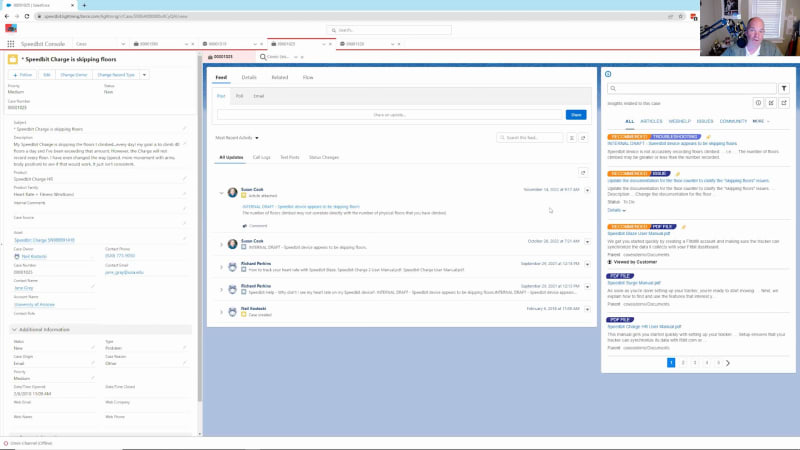
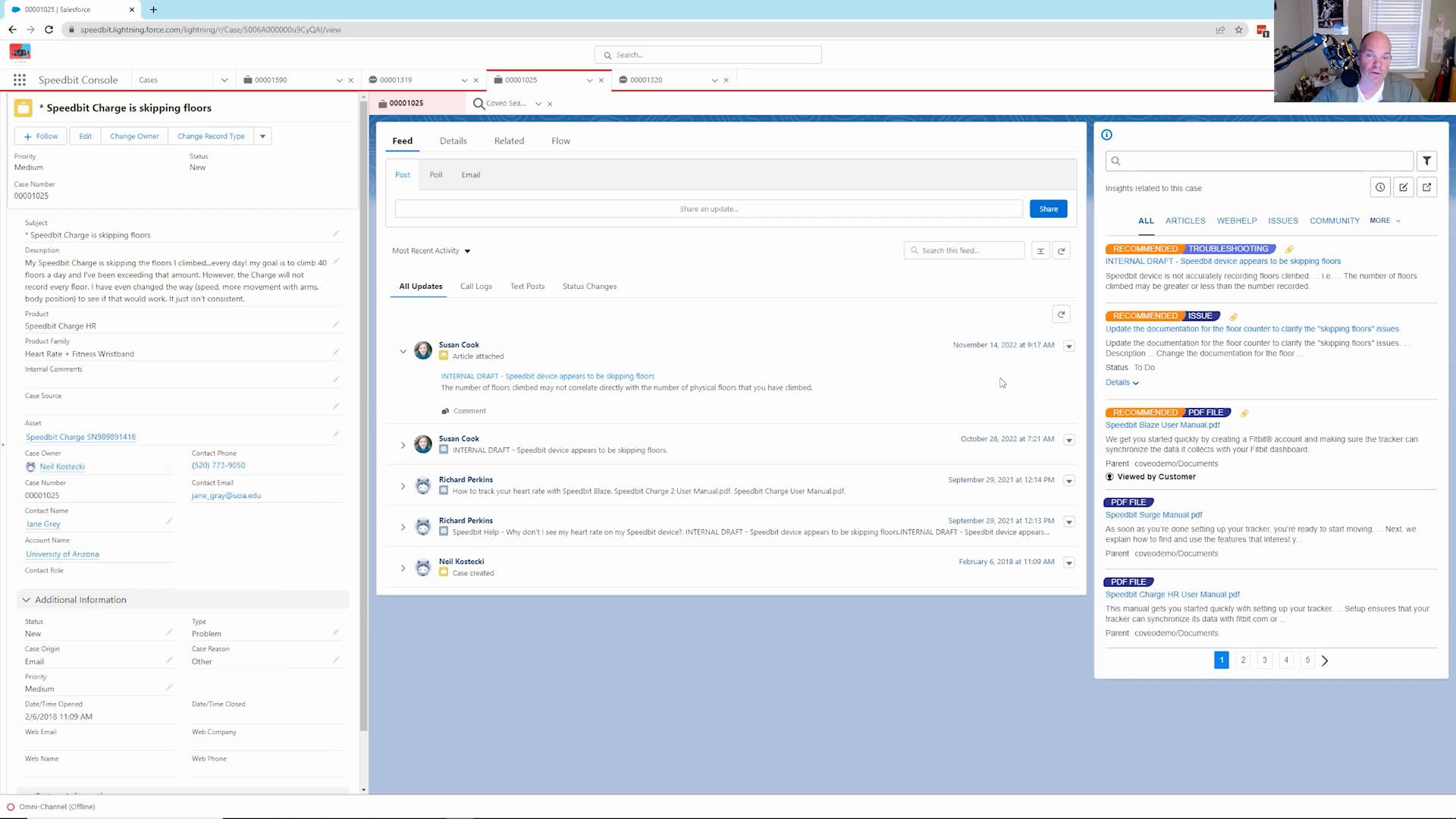
Good morning, everybody. Today, welcome. My name is Kevin Clepp. I am a solutions engineer here at Coveo. Today's session, we're going to be talking about customer service and website. During our time today, we're going to be showing you what a customer service experience looks like from a website side of things, you know, using a community, search experience, and how to introduce machine learning, to make a more much more relevant experience for your customers. We'll we'll also be talking about how do we from a customer service side of things, how do we deflect cases? How do we allow the customer to self serve? And even at that instance, when they're trying to submit a case, providing them with some additional content where your customers can look at and say, oh, great. This allowed me to be able to find what I was looking for and don't have to open up a case. In the event that they do open up a case, how do we arm your customer service agents that are responding to that case to be able to arm them with the content that they need to see to be able to efficiently and quickly respond in kind to that case, as well as give them some analytic data as far as what that customer had been doing prior to opening up that case to give them an idea as far as where they were, what their journey looked like, and potentially the level of frustration that they may be having, and that allowing the agent to take that into consideration when they're responding in kind. And then on the final the backside of things, what we'll be looking at from an administrator, how do we get your content in? Right? I'm gonna be talking a lot about content today. How do we get your content in? And that could be your knowledge base. It could be your public faith publicly facing website. It could be information that you have, if you're indexing your cases for your agents to be able to look at, but you don't want your customers to be able to see. So a lot of the content that we're going to be looking at today is coming from different areas within your your, ecosystem. How do we get it in into that, make it searchable, make it protected so that your customers are able to see what they need to see, and your agents are able to see what they need to see as well? So come with me on this, journey that we have here. Let's, open this up. I'll start sharing my screen and just give you an idea of what a customer service experience looks like within Caveo. So when your customers come out to your website for the very first time, you don't know too much about them. Right? But through the course of their interactions with the website, Coveo starts to pick up on different things that they're doing, their searches, the documents that they're clicking on, how they're interacting with the search experience to be able to start making some recommendations. Even on that first visit that they have like we have here, we don't know much about this customer. What we do know about that customer, we can leverage this information to make for a much more relevant experience for them, is their geographic location, approximately. We're able to pick up on the technology that they're using, the browser. Are they using a cell phone? Are they using a laptop? That type of information may not personally identify the people, but it'll give you an idea, especially from a customer service perspective. If you have products that are available in one country and not the other, that are available for a specific platform or not. Now that makes a difference, and we'll be able to start making recommendations based upon what we do know about them. And then as that user continues that journey, we'll be able to build upon that as well. So starting off very new, we're looking at the people like you as off have also viewed. Your digital citizens, your digital digital soulmates, people like you that are using similar technology. Now a lot of this is or not all. A lot of this. All of this is being curated by machine learning. It's not gonna be incumbent curate this information. The machine learning is doing the heavy lifting for you, unbeknownst to the end user. Right? Now as the users start to engage and maybe they come in and they click on some of these articles here, and you'll notice the different icons and different, file types of, you know, the PDF document versus community post versus a blog post versus a video. That's all part of the content that you have within your index. Now in machine learning is also introduced from within the query box. What we're looking at here in the drop down is a listing of successful queries in the past that other people, again, those digital soulmates of mine that have found value. And then as I go ahead and I start typing in, how do I pair? And let's say I'm a bad typer, which in reality, I am. As I start to type in my typos, Coveo is saying, hey. Wait a second. Based upon what you've typed so far, the machine learning is saying this is equal to a the specific query that has been asked in the past. And I can continue going on with this, or I can make the selection to what's listed down here. And that also makes the user experience that much richer. Between the recommendations on that home page, the hopes are that you're going to be able to show them content that they were actually coming out to be able to show to be able to see when they came out to your website. Early on, that may not be the the case, but as they start to develop a history in looking at your site, yes, they will start to see much more relevant content that's meaningful to them themselves versus to the larger crowd that we were looking at. Also from the machine learning perspective on the query suggestion side of things, it's just that helper. It's really you know, a lot of folks will come out to your site with an idea of what they're looking to type in. But if they see something within that drop down list, they're going to give that more credence to the search experience and more off more often than not, click on that versus what they have in their brain to be able to, search for because it's coming from you. You're making the suggestion. They're gonna buy into it. Now as we get into the search results page, on within the page here, what we're able to see is things that we've been become familiar with with Google, with Amazon, with Netflix, and all the other platforms that we use in our daily life that have been extended into Coveo as part of the our Coveo platform, our customer service platform. Now on the page in front of us, like I mentioned before, we've become so accustomed to Google in in many ways. Right? That how often do we have to scroll down to the very bottom of the page or onto the second page to be able to look at look for content, look for the answers to the questions that we have? Not very often. And that same machine learning is in play here within Coveo. It's called our automatic relevance tuning. And what the automatic relevance tuning does, it looks at the query that's been asked. It then takes all of the results and pushes the most relevant content, the most relevant results for that towards the very top. So the same way we don't scroll down to the bottom of the page often within Google, the expectation here is that your customers do not have to scroll down to the very bottom of the page or go on to page two, page three, page four because the most relevant content for them is going to be at the very top. Now so far, I've talked a lot about machine learning. Right? That machine learning is going to do a lot of the heavy lifting for you. We understand that your business is consumed by humans. Your business is run by humans. Right? There's gonna be opportunities where people within your organization are going to come and say, we just had a product release. We need to get this specific content up towards the very top for all queries or for specific queries. And from an administrative side of things, you'll have the power to be able to do that through what we call our promoted results. And those promoted results allow the humans to say, you know what? Machine learning, you're doing a great job of prioritizing the content, But we always need to have this article at the very top when they start when someone queries for an iPhone eleven or this specific query or every query that's being asked. So keep in mind, we talk a lot about machine learning, but, ultimately, we wanna also ensure that you have the power to be able to craft the search experience to your needs and while leveraging the machine learning. So your customers are not going to know about the automatic relevance tuning by name, but they're going to appreciate the fact that they're going to be seeing the search results that are meaningful to them at the very top. What they're also going to appreciate is what we call our smart snippets. Again, machine learning at play, where you have content that may reside on your website, in your knowledge base, in a Google Drive, wherever it may be, where Coveo is able to go out as that content is being indexed into into Coveo, and then determine, is there a net is there a question being asked within the query? And if so, how do we go about crafting that so your customers don't have to read the summary here or don't have to click on the document to be able to look at the article? If we have an answer to the question that's being asked, in this case, how to pair with an iPhone eleven, let's just put it on the screen. Right? Let's put that out in front of the user so that they're able to follow along with their iPhone or whatever device or whatever they're doing for this question. Allow them to get the answer to the question, and then just move on. But that's machine learning at play as well. So outside of machine learning, you know, from the query suggestion, the recommendations from the automatic relevance tuning, there's a couple of other machine learning models that we have in place that affect and work with the facets themselves that we can discuss at a later time and any demos that you would want, you want us to continue to have as we move down the road together. But there's also some customer service functionality on this page here that make for a much more pleasant experience. So the tabbing at the very top allowing you to organize your content in a way that is meaningfully meaningful to your customers. The facet values. All the facet values that we're looking at over here on the left hand side are very easy to be able to pull onto the screen when you're designing your search page, but it's also nice because it's all of your metadata content. And when we think about metadata, we think about the name of the article. We think about the content the author of the content. We think about the creation date, the up last update date. All of that information is considered metadata, including metadata that you associate that is unique to your company for that specific article, that specific content type of being able to then have that information come over into Coveo, into the index, make it facetable so it's filterable by your customers. But then also that same metadata can then also be incorporated into the, into the templates that we see for the different file types, a knowledge base article versus a Salesforce guided flow versus a PDF document. So it gives you that Amazon experience. Actually, I think it's better than the Amazon experience because the search is much more meaningful, and it's a lot easier to get to the content that you're looking for within the Coveo, search experience than it is with Amazon. And being the holidays, I've been spending much more time than I'd like to on, on Amazon. But let's take that experience a step further now. When we think about the smart snippets here of being able to present answers, well, we also have content that we may not have the best answer for within the, on the screen in front of us, but may intrigue some of your customers. Like, if they click on this, they're going to move off to that knowledge base article. If they click on this this video, they're gonna move off to YouTube to be able to watch it. What if we were to keep your customers engaged on the search experience so you don't lose them? If they have a question and they go to YouTube, they may be looking at puppy videos or baseball videos, whatever their interest, drive them towards once they hit YouTube. They lose focus of as far as what they're maybe, looking for on your site. So from a knowledge perspective or guided flow perspective, let's click on the click quick view button here, and it'll pull over the query that we're that we've asked and color code those words. And this becomes a lot more helpful on lengthier documents, but we color code it and put together a heat map for them on with so they have an understanding as far as where those words are within the document over on the right hand side. It also determines where those document the words are within the document. So the answer typically is going to be where those highlighted words are going to be clumped up. Better example here may be within this knowledge base and pulling that information over and seeing that same process of this, you know, the words being highlighted, but then also seeing as we get a little bit deeper into the document where we see some more clumping of the, of the words. Now that same thing holds true regardless of the type type of document it may be. In this case, we've been looking at some text documents, PDF documents. Same thing holds true. And from a video perspective, well, we're certainly not able to pull over the words of the doc. We have customers that have done that in past and taken the transcript and and incorporated that into as metadata. That's not out of the box functionality. But from a QuickView perspective, what we're able to do is to go out, pull that video, allow them to consume that video within YouTube. And then when they go ahead and click out of it, they're not in YouTube anymore. They're still on your site. So it's these efficiencies that we're seeing here that allow your customers to come out with questions that they may have for your product about your products, questions that they may have about new products that they may be looking at, or maybe looking to investigate in a part of a project that they may be, looking at to find out what the next version or what the next how they should use your products better. Keep them on your site versus having them go out to Reddit or some other site on Google, within the Internet to be able to look for the answers. You know the answers to your questions about your product better than anybody else does. Try to keep them engaged within your site. Now there's gonna be instances where your customers don't find the answers to the question. Actually, before we go to the case deflection side of thing, I'm gonna go back to the home page and just kinda keep a mental image as far as what this page looks like, as far as people like you also viewed, and people like you are ask also asking. I'm going to authenticate now as a user in here. And from a user experience, once we authenticate, we can take that next step towards the improvement of the personalization experience for that user. Because now as they're authenticating, if it's into a CRM system or some other system, we're able to know who they are. Right? We know that the person logging in is Susan. We know a little bit more about them because we have information that sits in some of the systems that you have on your, within your enterprise. In this case here, we know that she purchased a Speedbit Blaze, which is just one of these, fitness tracking watches. We know that she loves running because she's volunteered that either to a customer service agent or through a form that has made its way into, into that the the CRM system. So it makes for a much more relevant personalized experience once you're able to authenticate. Now the same thing come holds true from the recommendations as they do for the query suggestion, the automatic relevance tuning, the smart snippet. All that machine learning can even be further pointed because now we have the context of this user. We may know not only know exactly what they enjoy from a a hobby perspective and what the products that they may own. We may know when their support ends. Are they a support level of gold, silver, or platinum? All that information can impact what the the search experience looks like for your authenticated users. And as I was going in before going down this path mentioning, for as great as your search is, there's always gonna be people that prefer to pick up the phone, that are going to look for a form to fill out to create a case. They're going to be looking for a a chatbot to be able to communicate with. In those instances, we still wanna be able to try to deflect that case. So from a case deflection perspective, when they find that form on your page and this is a rather simple form that we're looking at here. It has four four fields, asking them to fill in information about their, you know, the product family. And what you'll notice over on the right hand side is as I start to make selections to this, we're going to start to see the search results, pay the search results change a little bit. Now the beauty of this is that you can leverage your entire Coveo index, all of your content, or you can make this search results page or this case deflection page more pointed to specific article types. Maybe it's only for your knowledge base. Instead of your website, and your, blogs that you may have indexed, maybe you want to be able to focus the search results here only for your knowledge based articles that you have publicly available. So the product name, we know that Susan owns a a Speedbit Blaze. And from the subject, she's having issues with her heart rate tracking. So as she continues to fill this form out, Coveo is taking that last gasp effort of saying, hey, Susan. We think that this article may be what's best for you to be able to look at, in hopes that she clicks on it, and we've deflected a case. She doesn't need to submit the case. Well, in other instances, she's going to click the submit button, or she's gonna go look for a phone to be able to call somebody, or she may engage with the with the chat with the with the with the, within the chatbot. Now from within the chatbot side of things, we are pulling in the Covey we're Covey was not a chatbot, company. Right? We integrate into existing chatbots that you may have. In this case here, it's Einstein search or Einstein chatbot. Now from everything I've just clicked on, from Susan's information to also bringing in the the matching as far as questions that Susan may have, like, I forgot my password. I have I wanna talk with an agent, or I wanna track an order. All of that information are all tied within the chatbot specific to specific articles. It's already been mapped. That's part of the chatbot functionality. Where Coveo comes into play is with this I have a question. Because now when they click on this, it's not mapped to any we don't know what the question that they're going to be asking is. So they click on the I have a question, and the chatbot, you know, it, speaks with the, with the customer and says, alright. Please summarize what you're looking for. So I'm looking to pair, again, my phone with an I my watch with an iPhone eleven. So I'll just type in, I need to pair my phone with an I my my, phone with an iPhone, which isn't actually correct. It should be my watch with an iPhone, but it gets the idea. Right? It's making the suggestions of alright. We know the product that you have, taking that into context. It's then just the same way we saw within the search experience. It's saying this is the answer to your question. This is what you're looking for. If I come in and then ask another question to it and we'll just go ahead and say no here, and I'll just ask another question. We can also provide search results as well. Yes. And the same way that we're looking at multiple search results on the the case deflection form here and the the way that we looked at it within the search page, when I click on I have a question, and we'll just do, looking to track my heart rate. And as that comes up, we're going to see multiple examples here from the search experience. So it's just not one article for the question that, yes, we have an answer to what you're looking to do. Now there's different articles that meet the the criteria of that query, and now we're able to provide them with some options in hopes that they don't submit a ticket, in hopes that they don't click on and continue to speak with a live agent if that's a setup that you have, in hopes that they don't pick up the phone and call customer service. Not that you don't want them to, but every time I get a call with some essentially level zero type of support questions of how do I change my password or how do I turn my watch on, that's information that they should be able to answer on their own, and your websites and your support site should have content for that. Allow them to be that level zero of support and allow your your agents to work on some more of the significant, content or not significant, cases that need that are created. So from a user experience perspective, we talked about the recommendations. We talked about how those recommendations as we over time, would become much more valuable to that user because, one, they're authenticating. We start building the history as far as what they've done and what they've clicked on, what they've searched on to make for much more relevant experience. We talked about the ability to use machine learning from the query box to be able to find successful queries in the past, include the and including with that, typos that can be adjusted and spelled correct, autocorrect for that. The automatic relevance tuning, the prioritization of the search results, the smart snippets giving an answer when we when someone asks a question, putting that answer on the screen so they don't have to click into it. And some of the other machine learning models that we, have not really talked about, we can engage at a future date with you if you're interested. So now let's change gears a little bit. Let's put on the hat of the Coveo, of an agent, somebody that's actually going to be answering the questions that are coming in and handling those cases. So now I am an agent working for your company. And the environment that we're using here is Salesforce, but we integrate to other, case management tools as well. The cases themselves, we're looking at this from within the tools that you're using. From within the tools that you're using, if it's looking at it from a case perspective, we don't wanna create another window for your agents to have to look at. We don't wanna create another tab that they have to alt or control tab to be able to switch to. The case management tool that they're working with in in this case here, Salesforce, this is Salesforce. This is Salesforce error. Over here on the right hand side is where Coveo gets introduced. Now as it's being introduced into it, well, these are search results. What are these search results tied to? In this instance here, your search results are tied to the subject and the description. During an implementation or maybe going through your minds right now, let's just say, okay, Kevin. That's great. Subject and description is great. But you know what? We also wanna be able to know what Susan Cook or, in this case, Jane Gray, the, the contact, what products do they own? What level of support do they have? When does that support expire? Geographically, where they're located? There may be a whole bunch of other things that are running through your head saying, I would love to be able to have my agents, the search results here on right hand side, tied to not only the subject description, the product, or, location. And the answer to that is yes. Yes. We can. So you can tie the search results to any ticket based upon any field that you may have within your case management tool. The beauty of this is the content that they're looking for can be honed in specifically to the content sources that your custom that your agents need to be able to see to get their job done. Whereas your customers may be able to see blog content, YouTube content, knowledge based articles. In this case here, from an agent perspective, they'll be able to see maybe all the those that I had mentioned before, but maybe they're also able to see a special segment of knowledge based articles that are just internal. Maybe they're able to see only, other cases that have been opened as well. That'll help them because they have the solution for that case that may help them with this specific case as well. So even though it's a search, it's and it's leveraging the Coveo index, it's leveraging a specific part of that index and certain content types. And as with any of our, content that we have within Coveo, we are supporting the security of the document itself. So as Neil, who is the owner of this specific case, as he comes in here, he's only going to see content that he has the ability to see. If he's a level one, he's going to be able to look at what has been authorized for level one agents to be able to look at. If he's a level three, which expands and he has more access to some additional content potentially, he'll be able to see that, whereas a level one would not be able to see some of that content. So immediately, we're able to provide the customer service agent with the ability with high certainty that the answers to the question or the issue that they have for this con for this specific case is at that first, second, or third article here. But as you've been looking at this page, you probably also noticed a couple things. You probably have noticed this viewed by customer. Because we're tracking every instance that the customers are are taking, every step that they take from what their queries, what they click on, what facet values they change. Did they look at a quick view of a PDF or that YouTube video? We're tracking all that information. And so from a customer service perspective, it's good to know that this was actually viewed by the customer. It's unfortunate that they may didn't get find the answer to their question that they had to open up the, a ticket. But from a customer service perspective, I now know that they viewed this. And if this actually has the answer to it, the way I craft that answer to in my response to the customer may change. I may not say, hey. Check this article out and just send it on its way. I may have to say, check this article out on page two, third paragraph. This has the answer to your question, and this will solve your issue. So it makes a difference as far as knowing what the customers have seen in the past as far as how you handle and communicate to the customer. Now there are some communication methods that we have here. The ability to send any of these as an email, and clicking on this will engage the email functionality within your case management tool to include taking the subject from the case, taking the link from what I just clicked on, and then giving them the ability to type away on their keyboard as far as what the the response may be. From a case management perspective, we can also add this and attach this specific. It may not be appropriate to send it to the customer, but may maybe it does have some relevancy for others that may be looking at this case to be able to attach this specific article to the to the case itself. So it's little tools like that that make for a much easier experience in leveraging your case management tool with your Coveo index. Now we also wanna provide them with the same tools that your customers have, allowing them to perform that quick view that we looked at before and opening up that modal window with the content being populated from within the, within the content within the, that modal window. We We also wanna give them the ability to search and have that same machine learning experience that your customers have as well. Maybe it's modified a little bit because their job's a little different than what the customer's job may be. And then from a faceting perspective, give them the ability to kinda work through and find the the content that they may be looking for. And if they need to open that up within a larger search experience, they can certainly do that. It'll take up the full page and then allow them to close and get back to where they are. So I'd mentioned a little while ago about seeing what the customer has done. We know that this customer has viewed this specific article. Let's dive a little bit deeper now and see what did this customer do prior to opening up this ticket. What did they search for? What did they click on? Because now we are able to get some insight into the customer's head as far as how frustrated they may be. Has it has this been just a once and done where they just came out to the website, opened up a ticket, and they did nothing else? Or have they put a little sweat equity into the cert into their issue that they have to seeing what have they queried? Are the queries that they've asked relevant and they're consistent with just some different, verbiage to for the same issue, or is it completely different, the queries that they've asked? The documents that they've been clicking on, you know, what what about them? What are the the what types of documents have they been clicking on? And then, also, what do they actually do? We know the documents that they clicked and the, the queries that they've asked, but what is the timeline for that and getting an idea of when and where that customer has gone to be able to find the answers to the question? It's not gonna have the magic answer as far as what the customers need to see, but it gives you some insight as far as what the user had what their behavior has been in the past. So let's now put on the the third hat. You know, we talked about it from the customer perspective. We talked about it from the agent perspective and the tools that they have to be able to shorten the time to be able to respond of giving them that search experience and the automatic relevance tuning and being able to see what the customer has done in the past. Now let's take a look at things from the Coveo administrative side of things. So let me go ahead and log in and show you some of the functionality that the Coveo administrator will have to be able to craft that experience to what something that is akin to your existing customer service experience if you're looking for that. Knowing full well of what we're look what you currently have right now can also change based upon this project. Right? As you start to think about the customer search experience, we can then also talk about, what you want it to look like. How can you make improvements, to that? So let me go ahead and resume the share here as I'm authenticated in. And so let's talk a little bit before we get into the sources and how do we pull all this content in from that you have within your enterprise, meaning your knowledge base and your website, your blogs, and all your YouTube videos, how do we get that content in? Let's table that for a second here. And let's talk a little bit because we just came from the agent experience talking about what the customers have done in the past. From an analytics perspective and keep in mind, I'm logged in as an administrator, so I have some degree of power that they, you know, that they allow me to have within here. So in your real world, from a Coveo administrative perspective, we also support role based access control. So if somebody is responsible for just the content and does not work with the reports, they won't see the reports. Right? We have the levers to allow you to be able to define what that security looks like and how it's going to be used and who needs to see it. So from a reports perspective, the very granular level of reporting that we have is what we call our visit browser. And from within here, we're tracking, and this could also be anonymized as well For those of you that are concerned about PII, such as username or location, even IP address, that can all be hashed out. That is not a big deal for us. Now we're able to see geographically where people have come from, you know, what type of technology that they may be using, and then we have these events over here on the right hand side. And what are these events? Well, for somebody like Beverly, clicking on and diving a level deeper into Beverly's, session history reveals that she has done a couple searches. She's looked and clicked on a couple of documents in this instance. And what does she look for? Well, she's interested in pairing her Speedbit Blaze, to her her phone. And she's clicked on a couple of documents and opened a couple documents related to it. Well, that's good information. That'll certainly help from an analytics perspective. Let's dive a little bit deeper. And this is why I talk about this being a very granular report off of an individual user. But it's a sum of the parts that we're looking at of what Beverly has done and what Dawn has done and what all the other users on this page have done in the past that make for very robust reports. And some of the information that we capture from the search and what they're entering into the query box is the response time, the language, that was being populated, the number of results that came back for that, for that query, and, also, where did they come from? Did they come from we talked about a couple different search experiences. We talked about, you know, within your customer service page, your your community. We talked about from the agent side of things where they have the ability to search. We talked about from a case deflection, which also can be considered another search page. So there's a different just in our demo today, we've talked about at least three different types of, of search experience or search endpoints or or, origins. You may have quite a few. So this will give you an idea as far as where they came from, what page were they on. And then when they click on a document, well, tell me a little bit about that document. What language is that document in? Were they using mobile? Who is the author of that document? Where did it where where was it on the page when they clicked on? Was it number one? Was it one number one hundred? All this information works to be able and bubbles up to our analytics reports. So from an analytics reports, we're gonna be able to show your, folks that consume these reports and put these reports together the number of visits that you've had, the where people are coming from, the your click through rate, and things along those lines. A lot of that is akin to what you should be out of the box from a a Google Analytics type of application. Where Coveo gets further engaged is the ability to show what are the top sources. What are people looking at? Is it your blog? Are they searching for and finding results from your blog? Is it from your website? Is it from your knowledge base? All of that information at a very high level as you'd be able to determine how well you're doing, including being able to see what are your most popular searches. What are people looking for and that are popular on a day after day after day basis, and what are the most popular documents. And we can filter this based upon specific dates and date range and customize that if we need to. We can also add filters to this. So if I only wanted to run this off of, our customers that are using Chrome browser or our customers that are only you know, that reside in, the state of New Jersey, we can easily add those filters or any filters to that. Now the real value from our reports is the fact that these are templated reports. They're very visual. You don't need to know a a a reporting language to be able to put these reports together. Essentially, they drag and drop onto the page. You define what the filter may be, for it. You construct the page, including the tabs and the filters that open up with that report as you need to. As we take a look at another report and we'll do one on the unified interactions, and we'll quickly go into the to the case deflection one. We're able to look at information about the cost savings, what we have deflected from a cost from a case deflection perspective. What are the the important things on this page that I wanna show you is the queries with no results. When we talk about process improvement, we saw before on the previous report where we're doing well. Right? We saw the queries and the documents that have been clicked over and over again. Well, this is where we have content gaps. People are asking questions of us, but we're not able to provide them answers and and good content, meaning that they're going elsewhere. They're going to that aforementioned Reddit page that they are looking for information or going to Google to search for an answer to a question that you should probably have on your your, community site. So from within here, this becomes an opportunity to go to your content creators and say people are searching for this, and we're not giving them answers. And they're potentially going elsewhere or they're opening up tickets, and they're engaging with our agents. So this type of information becomes very important when we start talking about process improvement, from the, from the experience. Also knowing full well that we can change that and can filter that based upon different venues where they may be coming in, what who's coming in and who's having issues and content gaps from the your website compared to content gaps for the case deflection page. From the case deflection page report, we're also able to look at what people have what your agents have done in the past, how it relates, how are we deflecting based upon your products, based upon the country, based upon the entitlements that they your customers may have. And using that information that you have that may reside in other systems and pulling that into the Coveo reports to be able to make something meaningful, to be able to help from a case deflection perspective, get an idea of how can we improve that so we can continue to, deflect cases. And I apologize for the for the aggressive pace that I'm going here right now. I know that we only have about forty five minutes left. But I certainly do wanna talk about these sources. So I've been mentioning during our time today, the knowledge base, the blogs, your public facing website, your cases, YouTube, and being able to get that content into Coveo while also respecting the security of that content. Well, how easy is it to get your content in? You know, from a box, from a Chorus community to your SharePoint content to YouTube, we have about fifty ish, out of the box connectors, most of which are listed on the page in front of us here. If I need to pull in a site map, I wanna crawl a website. It's just a matter of me clicking on that connector, giving it a name, giving it the URL. And then once I populate that, it would say build source, and away it goes. It would then allow me it'll Coveo will go out to that URL, look at the pages that are listed on that site map URL that I provided, and push that con and get that content into into Coveo. In other instances, it may be something along the lines of getting information into Salesforce. And while I won't be able to go entirely through Salesforce, the process is a little bit different. It's going to ask for me if it's a a sandbox environment or production environment. I make the selection. And then once I make that selection, it's gonna ask me for my credentials. And then the credentials that we have here then open up provided that they're valid. It would open up and say, alright. What objects from within in Salesforce would you like to index? Do you wanna index your knowledge articles? Do you wanna index your case articles? Of that, what fields are you looking to pull in? So we talk about it from the object perspective and the cases and the, the the cases and the knowledge articles, but it can be any object, including those objects that you've created as part of your own Salesforce environment or those that you may have purchased from a third party and pulled that in. That can all be indexed into Caveo. So I would certainly urge you to go out to our website, take a look at the different content types that you that you may be interested in indexing, and then reading about the, the content and if we have a connector for it. If we do not have a specific connector for it, we have this what we call our generic REST API. So as long as there's a programmatic way to connect to that system, meaning that they have APIs that expose your content, we can get to that information. As well as being able to do a push, API to be able for your company to be able to push that content out into our Coveo index, and you proactively move it to to us. So let's finish up with our time here, just talking about how are we able to put machine learning into your process. And we do that through what we call our query pipeline. Essentially, it's work rules, that are around what we do. How do we get the machine learning into it? How do we introduce the automatic relevance tuning, the query suggestion? It's just a matter of coming up here, clicking on associate model, selecting that model, be it the query suggestion, be it the automatic relevance tuning, the smart snippets, that we had talked about. Those aforementioned machine learning models, you click on it, and then that's it. Right? It does all the heavy lifting for you. But I also mentioned at the beginning of our time where we also wanna make sure that you have the tools to be able to add your own rules to the to this, to the search experience. So from a featured result or ranking expression, but we'll spend some time in the the featured results here. If you have a new product that's coming out, and somebody is you wanna keep the the query to anything or that the query contains certain words or matches, and let's say that, they're looking for, your product. So you'd have your product name there. Then anytime somebody enters your product name, we are going to select a specific article. And in this case here, let's just do, I'll just call well, helps find we don't have the typing correction here, unfortunately. So as I type in speed bit blades, we're just gonna select this article here, and maybe I add a second article to it as well. We'll just arbitrarily select this one too. So as I add those items, what will happen is even though the machine learning is gonna continue to make its suggestion, these two articles are always going to be at the top two. This will be item number one. This will be item number two when somebody searches for your product. Again, another typo. So this is one of the tools that we have from within Coveo to be able to allow you to have that experience with machine learning, allow machine learning to curate the major overwhelming majority of that content. But when you need to put your thumbprint on the search experience or have content that you need to be able to put out there, Coveo is able to do that, as well as being able to have thesaurus and stop words and anything else that you would typically associate from a, a search experience. So let's talk about how we build these search pages. There's many ways to be able to build a search page starting from somebody that's expert in coding and development. You can certainly use tools such as Visual Studio to be able to build your own search page. But for someone like myself, I come into the search pages within the Caveo administrator, I click add search page. I do not have the the development shops to be able to do it, so I need something that's pretty easy for me to stand up a web page or a search page very quickly. I can either use our simple builder or our classic, interface editor, which is tagged with advanced. And let me go ahead and give that a name. And so I'll give it website search and a title and click add search page. It's then gonna ask me, alright. What content sources do you want to be able to pull into the search page? And it's gonna list some of those that I've I've already indexed. I'm gonna select all because we want YouTube, we want Slack, we want Salesforce, and all the other areas that other items that we've indexed within Caveo to be at our disposal for search. I can certainly limit that down afterwards if if necessary. So let me come into the edit functionality of it, and there's some fields on here just from a search experience that I think probably should be deleted. And the one, for example, the author. Your customers are not going to know, you know, who Kevin Clepp is or anybody else that's listed here. So let's go ahead and delete that facet value. And we can leave it as is, or let's go ahead and drag a new facet onto the canvas. And we think that our customers would be benefiting from being able to see the year that the content was brought on or created. So I can either come out here and scroll down, and as I scroll, this is all of the metadata that you have associated with the different source types that you have, some of which are gonna span across all of your content sources, like the create date, modification date, the author's name. And then there's others that are going to be unique to certain types of connectors, such as the s three buckets using Amazon connector, Salesforce that are gonna be abbreviated or prefixed with the s f, YouTube that's going to have the prefix of y t in front of it. But in this case here, I'm just going to use the year functionality and metadata. So I pull that over, make that selection, and then you'll see over on the left hand side here the years that'll populate. And I can then, you know, make changes to this as I need to, but for the time being, this is in a in a good shape. So the beauty of this is the fact that all this information that we're looking at from the different facet values is being curated by Coveo. It's being done automatically based upon the metadata that you have that's coming over when you create the index sources and bring that content into the system. And it can obviously be further massaged as that if necessary to also include what do these search results look like? What does content that's in Slack look like? What information do we wanna put out there? From a website page, what do we wanna put in? Do we want a description? Do we wanna list the source? Do we wanna list the language? These are decisions that you'll be able to make over time. And then certainly if I wanted to do something from a video side and add a YouTube video, which is already part of our content, it doesn't really look that good right now, you know, from a display perspective. Let's go ahead and change that. Let me go ahead and add the YouTube result template to the mix here. And so we add a little we'll add a little bit of color to the page, to the search results. So I'm going to select from content connected type. I'm going to select YouTube and click next, and it's going to present me with different options as far as what I want the search results for YouTube content to look like. So I go ahead and select this first one, click apply, and then we'll see when I go ahead and cancel out of here how that changed in real time to be able to show a little bit of a vignette, and clicking on that will show the quick view, within a modal window of the video itself. They can click out of it. They still remain at their search results. So hopefully this was helpful in being able to see what the search results page can be created and how easy it is to create it. Thanks.
Coveo AI-Powered Search for Customer Support in Salesforce
You’ll get a walkthrough of some of our customers' support sites such as those of Salesforce, Tableau and Xero, and see how they are going beyond search to deliver personalized content experiences using Coveo.
Watch and you’ll learn:
- Unify and rank the most relevant content from siloed repositories, within Salesforce
- Detect customer intent and use previous interaction data to predict what they’ll need next
- Measure case deflection, identify content gaps, and track cost savings
- Empower agents with insights on the full customer support journey across Salesforce Clouds
Make every experience relevant with Coveo
