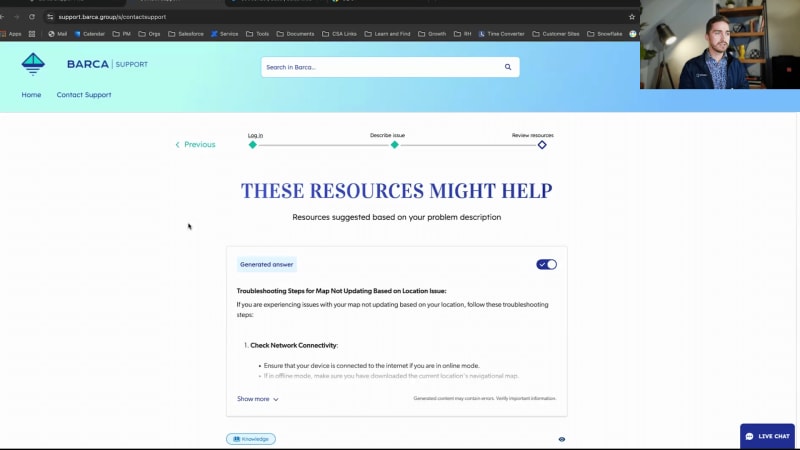
Amazing. We have a very a very tight path agenda for you today. We will be with you for the next thirty minutes or so. So I'm gonna go ahead and jump in for today's presentation. For those of you joining us, my name is Juanita Oguin. I lead product marketing here at Coveo. Today, I am joined by my amazing product manager colleague, Mathieu Lavoie Sabarin, and we're gonna talk to you about five ways AI and search can streamline your customer experience journey. Now before I dive in, I do wanna cover a few housekeeping items. The first is that this is being recorded, and we will get you a copy of the recording within the next twenty four to forty eight hours. You are in listen only mode, but we do wanna hear from you throughout this presentation. So do feel free to submit any questions on the q and a as well as send any chats to us along the way. We'll make sure to monitor that, and then we can answer any of your questions at the end of today's presentation. I'm going to now jump in, and start with, really a statement that I think we would all agree with since you're here joining us today. And that statement is that CX is really a competitive differentiator. Today, eighty nine percent of companies compete primarily on the basis of customer experience alone as we can see from Gartner. So, you know, I think you agree with us. This is really an important topic, but not easy to understand. So I wanted to unpack this a little bit more today and go deeper into what do we mean by this being a competitive differentiator. And I think that it's very clear for particular particular industry. So if we consider the degree of differentiation on certain products that we're all very familiar with in our personal lives, we can think of things like personal banking, buying a car, or even shopping for everyday products. If we think about each one of these, when it comes to banking and financial services, today, most companies have similar products. Right? They have personal loans, car loans, mostly the same interest rates. So what's really gonna set companies apart? Why do we choose the ones we choose? Same thing when it comes to buying a car. When it comes to the technology that underlies it, most of most of, you know, the cars and vehicles we have today are pretty much up to par with the same level of tech and preferences. And even thinking about our own everyday shopping experiences, most stores, offer the same products. Right? There's really not that much differentiation we see even off brand or white label a product these days. So what is really gonna set you apart and set us apart when we think about why customers and consumers choose to shop or buy with us? And it's really gonna be about what your brand represents, the experience you are providing, as well as the trust. And just to further support this, we see important stats like this. Seventy three percent of consumers would rather do business with a competitor after one bad experience. Seventy five percent of consumers, though, do say that they would be willing to do business again with the company if it was excellent customer service even after a mistake. And then we see things like three point eight trillion of revenue being at risk this year alone due to bad customer experiences. So we can see experience really is important. It is that make or break, and ensuring you're building those trusted, consistent experiences in person and on your digital sites is absolutely critical. But as you know, and the reason we're here is that delivering this world class experience is not that easy. And and we believe there's really five key factors, that are underlying this. The first is that different teams manage different parts of your customer experience, experience, and they each have their own goals. The second is these different teams have their own tech that they're purchasing, which result in more silos versus centralization. There's often also not a clear connection between your digital or online self-service than as a in it, being connected to your agent or assisted support. There's often a lack of personalization throughout the service experience. Right? Again, consumers want you and expect you to know them. Customers expect you to, you know, know who they are. And the last is really those immature content and knowledge management practices, especially if this is the business that you're in and if your sites are full of content and information. You know, this is an important thing and also not an easy one to manage. I did wanna just double down on a couple of the points I just mentioned. The first being that different teams manage different pieces of CX. So I'm sure even for those of you here on the call today, you're probably in different parts of the business at your own company. Those of you on the marketing side that are powering the websites, really concerned about lead gen, conversion, pipeline, those with transactional sites. Right? You're you're in commerce. You care about that average order value. If you're on the service and support side, you care about delivering great customer service to those customers that bought from you. And, of course, if you're on the workplace side, this could be your agent servicing end customer, but it could also be your knowledge workers, whether that's sales, product, and others engaging and interacting with your end customers. So lots of different goals, lots of different KPIs that you're concerned with. But what makes it worse is that, you know, as I mentioned, the teams are empowered to make their own buying decisions and end up buying technology that is, you know, focused on their particular Barca. These platforms typically are powering those sites or those experiences that your end users are engaging with. But, again, they're often siloed. They're not talking to one another. And this inevitably results in really fragmented and siloed experiences that lead to that three point eight trillion dollars of revenue at risk that I mentioned earlier. So this is what we're gonna unpack with you further today. I'm gonna pass it over to Mathieu to take us through a demo webinar of how you can improve this five real use cases you can actually apply today. So, Matthew, over to you. Awesome. Thank you. Thank you, Juanita. So, yeah, the the question really is how can you break down those silos to connect the experience and amplify all teams? Right? So as Juanita covered, our solution is essentially there to ensure that we're connecting the engagement layer with the core infrastructure of delivering relevance and search and retrieval at scale using secure connectivity and unified hybrid index, retrieval augmented generation as well to generate answers and resolutions, allowing our users and power users who want to influence and customize a search experience, the retrieval experience, and the answer experience to be properly set up and managed, combining all of that under one intent box. And, of course, we have a closed loop ecosystem that can bring all analytics understanding of the user behavior to make the experience better. So this is kind of the layer in the middle that Caveo takes care of, and then we're also there to ensure that we've gathered all of your data, all of your information that's available in your index to bring it through that central layer of of AI search into the different engagement layers that Juanita was referring to, whether it be on a website, a commerce service, and workplace. So really all about tying all the knowledge that you have in infrastructure, using the proper AI infrastructure layer in the middle to deliver it at scale relevantly to the right users at the right place at the right time, ensuring that they get the best outcomes, and that we then, of course, learn from different patterns and different behaviors to further enhance the experience of other users. So we have today essentially five ways, five examples that we wanted to present of using search and AI to streamline the customer service journey. Right? The first one is essentially within your product. Right? And this is where we hope your clients will spend most of their time. We don't want them to have to go to support all the times or have to request assistance. We want them to be happy, satisfied clients. So delivering AI and search within your product is the first experience that we'll look at today. We'll also look at self-service use cases because, of course, users and will have and clients will have questions. Rather they wanna learn more. They wanna learn more about your products, allowing them to self serve and find that information on their own as opposed to having to reach out to a customer success manager, an account manager, or attempt to get this sensor will allow them to be satisfied, happier customers, and to be able to continue using your product, you know, obviously elevating their satisfaction. We'll look also at issue resolution because, of course, some questions might just be looking for information while other questions might be really complex issues. Right? And helping users tackle them on their own will avoid those users having to open a support ticket and essentially take, you know, work of on your support teams and support organizations and having to help those users find the answers. So using I in search to get that resolution out to the user obviously will go a long way and can deliver significant ROI. We'll look at this use case. Of course, some issues that may not be documented or may not be documented publicly to clients, will have inevitably end up in the ends of a support agent, right, who may have access to additional content that's only internal and will be required to help the external user find an answer to their solution. So SearchNI can also help elevate and enhance that agent experience in order to make this agent more efficient and get them access to a resolution and an answer faster. Finally, we'll look at the, employee portals types of use cases, where, of course, other employees that are not support agents might also want to look for information, might also, as part of different tasks, need to find information that perhaps is outside of their small organization. So employee portals can really help, you know, break silos, foster collaboration efficiency across your entire organization. So we'll look at this use case as well. And these use cases, as I've, you know, as you can see on screen here, go from external use cases to internal use cases. The idea is to deliver accurate and coherent information while respecting the permissions and giving access to only what the respective users that will access your knowledge are allowed to see across all those different use cases, obviously keeping security at the top of our of our priorities. So I'll now go into a bit of a demo. I'll walk you through these different use case across a company of a company we've created essentially for demo purposes called Barca. Barca is essentially a hardware and software applications for navigation, for boats essentially, and sailing. So we built this new demo, where, we have a software for Barca called the the Skipper, software. And essentially, we will start the journey today because this is where your clients will likely be starting their journey inside your own product that they want to use on a daily basis. So when you're navigating the product or software product, Coveo can be deployed with search and AI within the product to provide answers and information to help the user navigate and adopt your product, help making their life easier and avoiding them having to go out of your product essentially and and potentially, go through forums or through search engines outside of your side, outside of your control to find the answer to their questions. So bringing this AI in search directly within your product is usually the best way to keep them far from having to go again to outward sources to get the source of truth as opposed to simply getting it from you within your product directly. So in this example here, if I go to the trip planner and I decide to add a travel location, we can see that there's an error popping up. Well, our software is able to recognize signals from within your product and use those to deliver accurate and relevant search results in order to be able to solve the issue here at hand. But what if I had another question? Right? And I was using the software. I'm about to travel from Quebec to Kingston through the Saint Lawrence River with my boat, and I'm I'm experiencing issues where I have a a weak or a dead signal. Well, you can, of course, ask more complex questions, and we'll then be able to provide an answer with troubleshooting steps to that question along the relevant search results that are, that our users are used to. Now going from here, users will sometimes have a little more complex questions, although they want additional assistance, and they may then navigate to your community. So we have an example here on the Barca support portal where as a a user lands there, to get support and get additional information and learn about your product, they'll be welcomed with recommendations that are tailored for them using AI, things that they've recently viewed, recommended videos to help them navigate and adopt your product, and then they may, of course, need to ask more complex questions. So, here using, you know, some of our models where we can recommend popular queries or recommend queries that are, or help the user complete the query and the question they're about to ask, which are query suggestions. So I will essentially use the one that I have here, which seems like quite a complex question, which is the depth sensors and terminally not reading water levels properly. Seems quite complex, but using the power and AI with proper retrieval, we're able here to fetch information and a relevant step by step solution for the user navigating through multiple pieces of content and bringing all that information together to provide an answer, provide a solution so the user can go on with their day and and, of course, self serve increasing their satisfaction. Apart from the generative answering and the relevant results here, you can also see additional features that can be things like recent queries. If I wanna navigate back to previous questions that I've asked or review documents that I've recently, reviewed, for example, here with the recent results. Now, of course, some users will perhaps have a more complex question that is not documented. Right? Where they need to go a step further and actually ask for assistance. So So if I go on to do this and contact support, I will be led to a, you know, a typical contact form where I can go and ask, you know, to open a case. So here we have a more complex problem at hand. You know, I have an issue where my map is not updating based on my location. As I start to write the description of that issue, we have a first law of language model that comes into play, which is to help classify the issue. And the reason for this is twofold. First and foremost, we wanna ensure that if the case does need to get created and the answer to the question perhaps is not documented or this is a new issue that is not part of your index, it's not part of your knowledge infrastructure, we're able to understand by the type of information we have in the case what type of issue is this, for which both is the issue in question, for what type of category of issue, and what type of division. So if the case does get submitted to your support organization, we can ensure that it gets routed to the right team, through the right agent, and that this agent, of course, has the right information, to answer the question. But in this case also, we're also wanting to ensure that we use this information to deliver an accurate resolution. So if I go and hit next in this scenario, we'll see that we're actually gonna be generating a solution for this user. So this was an issue that was documented. There is information available in in Barca index to answer this. So we'll actually be providing a step by step solution, changing this flow from a case creation flow into a case resolution flow so that the user can have the solution at hand without needing to open a support ticket and wait for an agent to get back to them. We also see, of course, that we'll have regular search results here as well that are tailored to the question. But the key here is the issue and the solution might not always be in one document. In this case, it is, but it can sometimes be in three or two or five documents altogether. So our solution will be able to aggregate, you know, different pieces of the solution and bring it together in one cohesive answer so the user can go on with their day, have the solution at hand, and solve the issue that they initially came for. So moving along now, of course, some cases will get created. Maybe, you know, the issue was not documented. It's a new issue, and then a support agent needs to help solve this issue. So we go here into a Salesforce, service console. And this example we're gonna show today is in Salesforce, but we are, it's a essentially integration agnostic. Meaning, we integrate with SAP service cloud, with Genesys for call center, ServiceNow. Any CRM where your support agents or support engineers might be helping and interacting with customers, we can integrate with to bring AI and search within those environments to help the agents be more efficient. In this scenario here, I have an issue with a poor Internet connection. And as you can see, I automatically get an answer generated for me based on the information that's provided in the case, which is that it's a poor Internet connection issue. I have a little more details here, and I know the issue is a software issue. If, for example, the issue happened to be for a different type of issue, it could be perhaps an antenna issue as opposed to a software issue, Then we'll be able to recognize this and generate an answer that is more accurate specifically to the fact that this is an antenna issue and not a software issue. Right? Again, ensuring that we gather all this information from the case and we provide an accurate resolution to the agent if it exists so the agent can then perhaps copy this, include it as part of the response to the client, facilitating resolution and helping agents be more efficient, do more in less time. Agents may also need to perhaps ask a more complex question. Right? Let's say they just wanna get informed in general about software connectivity issue. Connectivity issues. For example, maybe they're new to the company, and they're trying to learn a little more about different connectivity issue. Connectivity. So as you see here, I've been ask I'm asking now a more generic question. I wanna learn a little more as an agent. And as you see, we have a generated answer that's will specifically provide information about different types of, connectivity issues that might be experienced and will, of course, have relevant results to help the user find that solution. Those additional features we have with this insight panel, such as attach to case, for example, copy to clipboard. Maybe I wanna copy the answer and share with my client. Perhaps I wanna attach a specific document or or copy the link to that document and include it in my response. Again, facilitating the work of the agent, allowing them to be more efficient and do more with less time when the information to solve the issue exists, we'll provide it to them to making their their life easier. And then finally, the last use case I wanted to show is an intranet or an employee portal. Right? Obviously, there's other employees within your company that may require access to different information across different teams sometimes. And across large organizations that we work with, sometimes the information can be quite sparse and spread across different tools, different systems that different teams tend to use. So bringing all of this together in one cohesive employee portal with a unified search, a centralized source of truth, can help break those silos and bring overall employee efficiency across your organization. So here I'll use a bit of an example where, well, look, I've identified a security issue, and I need to contact the security team. Perhaps I was briefed when I joined the company a few years ago, but I don't exactly remember how I need to contact them. So instead of having to reach out to a colleague or ask some help from my manager, for example, I can go and ask this generic question. And using all the information that's available across my organization, I'll be provided with a accurate answer showing me all the different ways I can reach the security team. We've also, as part of this, demo here again using the Barca organization, added a people search. So let's say I'm looking for a copywriter, and I'm not exactly sure who's the copywriter within my company. While looking for this, I'll be able to be in con get in contact with Laura, who happens to be your copywriter so I can collaborate with her, and, of course, do more without having to reach out to people that may not be needed to achieve what I want to achieve and get directly to an answer to resolution or to the right person that can help me to do what I intend to do. So I'll go back now to the slides, and, essentially, just maybe to do a bit of recap and help explain the value of all those different use cases. Right? So what are we trying to achieve? What are do those use cases actually help to deliver in terms of ROI, in terms of real life results for our clients who've deployed AI and, search within those those use cases. So when we talk about in product, what we've seen our clients achieve is obviously better self-service success, users doing more on their own. But it also can help assist with product discovery, reduces the customer effort to use your product, and can in turn also reduce ticket volume. In self-service use case, again, we'll help increase self-service success, we'll help improve customer satisfaction by helping them find an answer faster, we'll reduce their effort to find such answer, and, of course, once again, reducing ticket volume. Issue resolution use cases, which in the example I've shown was in a case form, but can also be through a chatbot or through other an an agent in KI, for example, as we're seeing become more and more popular. These types of use case can help reduce cases. Right? We increase deflection, reduce ticket rerouting with our case classification capabilities, ensuring the case gets to the right agent, to the right team first time, and, of course, once again, reducing ticket volume. In the internal use cases with agent efficiency use case, we'll see typically enhanced agent efficiency, reduced agent attrition by allowing them to be more efficient, learn more, do more on their own. Also help them spend more time on, you know, higher value tasks as they'll be able to solve easier task and easier questions that are already documented faster, and, of course, reducing case resolution time, bringing significant efficiency improvement to your organization. And finally, with employee portals, we've typically seen our clients save a lot of tooling costs. Right? Bringing all different repositories of information, different toolings in one single place where our your employees can access all this information altogether, can result in tooling cost, can also foster and improve cross the mental cross departmental collaboration. I'm sorry. Employee efficiency and reduce employee attrition. These use cases from external use cases to internal use cases essentially help altogether to reduce cost to serve and improve efficiency across your organization, which can help drive significant ROI for your organization. So I'll now be passing it back to Juanita to actually share some of the ROIs and some of the great results we've seen our clients achieve by using our technology across, you know, these different use cases. Back to you, Juanita. Thank you, Matthew. What what an amazing end to end, demo coverage. And for those of you watching, hopefully, you can see that it there this as an art of the possible, we try to, you you know, replicate the real use cases that many of our enterprise customers use today. And while that was an art of the possible, we do want to show real results that we've been able to deliver to some of the most leading enterprises that are out there. Now this is just looking at the results from our generative answering capability. Of course, this is built on top of the Coveo platform. So just looking from left to right, we were able to help Xero, which is an accounting software firm, improve self-service success by twenty percent on their Xero central support site. Now, again, this is an addition to the ROI we've been able to deliver for them in the past, but note that a lot of these that we're showing here are publicly facing use cases and implementations of generative answering. Also with f five, again, an ability to improve self-service success, which is reducing the those cases being submitted to the contact center. At Forcepoint, through their own case deflection or case resolution form, we were able to reduce cases by sixty percent. And more recently, we were excited to hear from SAP Concur, which we all know, that they were able to reduce the cost to serve by eight million euros while reducing cases by thirty percent. So these are very tremendous, real, public, and external use cases that many of our customers are able to reap the benefits of today, and these are just a point in time. We we do AB testing. We look at a point in time to see what the value is that we're able to deliver. So we we anticipate this is only going to get better. Now we are nearing the end of our presentation. So if you have questions, please do submit them. I see a few coming in. But before we let you go, we do wanna highlight a couple of offers for you. The first is a limited time offer we're currently running. It's a ninety seven k package for you to test out generative answering on your public websites or your internal intranet or employee portal. This is something that is rather quick to set up and and get the value of. So, we highly encourage you to take advantage of that. Secondly, if you're interested in learning more about our capabilities, how we're helping on the search front, AI front, analytics side, we did recently complete our new incubator for the fall. So we cover a bunch of our innovations, with the spring one coming up next year. So we invite you to just watch that on demand to see a full slate of what you can do, with an AI search and generative answering platform. With that, we hope you've been able to, again, see a few ways to improve your different digital properties and your end to end customer experience, including for employees. So we're going to, now open it up to questions, and thank you for your time. Matthew, I do have a couple here that I can see that I, I'll go through. Sure. The first is, how quickly would it take to implement a system like Coveo? Very interesting question. We typically see clients being able to do, you know, end to end deployments within a few weeks. However, our sales engineer are typically capable of putting together POCs within a few days. Right? So with all the connectivity, and connectors we have already, to index different types of content from different repositories as well as the solutions we have to easily deploy and integrate within different experiences through hosted search pages, for example, that can be built with a builder with no code, or, you know, integrations with Salesforce like the one we showed or with ServiceNow, it can be quite easy to deploy Kavio end to end. Where typically will take more time is to ensure to properly assess and understand your needs, properly under assess and understand the content that you have available in your knowledge infrastructure to make sure we go out and index all this content that may be available across different repositories and normalize it so that it becomes easier to search within our index so you can get the best value out of the solution. So and this is why in the example that we need to show below, we're really talking about getting value from Coveo within four to six weeks typically from deploying. It's very fast. It can be very easy to deploy because of our technology. The time is typically to make sure that we're really understanding your needs and we're deploying a solution that's tailored to those needs so that, again, we maximize the value we get from our solution. Oh, great great question. Amazing. Thank you for that. I see another question here around generative answering. Is that included or an add on? And, can you share more there? Certainly. Well, with the package, Juanita just showed essentially, we're offering this as as really an entry point to be included to start with your solution. But generative answering is typically an additional solution. It's a it's a slide add on to the existing COVID infrastructure. But because it relies on the COVID infrastructure, it's very easy to access and to have deployed quite rapidly once your content is already in our index, that your search page is already deployed. It's typically very easy to turn it on and then have it accessible and deliver value. So although it is an add on, it will typically and the results that we need to have show show that just the Saab on the lawn typically can further increase the value and the ROI you'd be getting from Coveo. So, again, highly encourage you to try it or to go through a POC if you'd like to test it for yourself. And I invite you also to reach out to your account executive or account manager or CSM, to get more information and see how you can participate in the POC, how you can test this out, and see how you could benefit from our solution and and this technology. Amazing. Thank you. I think this will be the last question just based off of time. How do you work with chatbots? Great question. So our our technology and our our infrastructure and our index is meant to be agnostic in a way that it can be deployed across, of course, the integrations that we've seen, things like builders to build hosted search pages, but we also have a suite of APIs that you can use and call to get search results to get passages that can then be used with your own LLM, for example, to generate an answer or to get an answer directly. Right? So we essentially have the full suite of tools to either build an a search page with CRGA and generative answering to build this into your implementation or your systems or connect this to perhaps a custom integration, a custom chatbot. So the integ we've built those tools to facilitate the integration, and then our search capabilities, we're able to use and understand quite complex questions as we do a hybrid search where we understand, well, lexically, what are the words and the the key terms that we wanna search for within your query, but also semantically. What does the question mean? What is the meaning and, you know, how can we understand this question at a deeper level to be able to find the best answer for it? This addition to all the control we give, to our clients to refine the search experience and perhaps, you know, use their own terminology or their own, you know, names or or, you know, the the terminology that's unique perhaps to your enterprise. We're able to take very complex questions from chatbots in, you know, form the natural language and provide great search results as well as generated and accurate answers. Thank you. Answer the the question. Yeah. No. Great response. Great response. Thank you. Perfect. Those of you that we did not get, your questions answered, we will follow-up separately. We do wanna thank you for your time. We hope, again, you've been able to see an art of the possible and all that you can do with the platform like Coveo. Matthew, thank you for your time, and thank you guys for joining us over the last half an hour. Thanks, everyone.
6 Ways AI and Search Streamline the Customer Journey
Did you know that 42% of customers begin their search for product or service support on a brand's website? As AI and search technologies continue to reshape customer expectations, your website and support pages are increasingly vital for enabling effective self-service. This shift also plays a key role in transforming the perception of contact centers from a cost center to a growth driver.
Join our expert-led demo to discover how AI can enhance the entire customer journey, turning case submission into efficient, streamlined case resolution.
In this webinar, Coveo experts will explore:
- The importance of self-service on your website and support portals
- Key AI and search capabilities that elevate knowledge findability & discoverability
- 6 distinct use cases you can amplify to deliver a connected service experience


Make every experience relevant with Coveo