
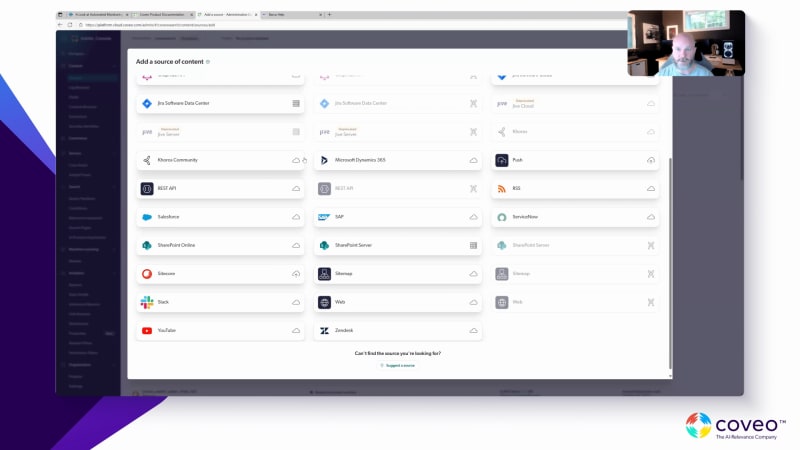
Hi, everyone. Hi, partners. I hope you guys are all doing well and having a happy Thursday, of is it fall yet? I believe it is. Welcome with the Coveo team. We're going to be taking a look at the chat for the first part of the webinar. Don't hesitate to chime in, ask questions. Mike and Scott have joined us today. I'll let them introduce themselves in a minute, but we'll be walking you through a bit what our team's been going through, in a positive way while that translated well. But what we've been going through on the market, what we've been going towards, and what's been successful for our team lately, and for our customers, of course. So I'll let I'll hand it over to Mike, and he can, kick things off. Hi, everyone. This is Mike Jepsen. Good to meet you all. I run sales for the service and knowledge line of business here at Coveo. I, I've been with Coveo for this is my eighth year, and so, seen a lot of, things happen in the last seven and a half years and most notably in the last few. And I'll I'll show you some of those things, and I'll talk about some of those things as part of this webinar. And in lieu of using a bunch of slides, I thought I'd share with you what we're seeing in the marketplace, what we're what we're doing in the marketplace, and what our expectations is for, for, websites in particular going forward. So as I said, no no slides, just some some proof live proof points. And so, again, I'm gonna gonna share with you what we're seeing in the marketplace, and I'm gonna start off with the most awkward, beginning. And that this is not a Coveo company. Southern Company is not a Coveo client. I stumbled across Southern Company a number of years ago. They issued an RFP to update their website search, and we competed for it, and nothing happened. To our knowledge, nothing happened. And the reason I I know that is because it looks pretty much AI the same as it did five years ago when I looked at it. And so I when I why I'm sharing this with you is this. This, to me, is emblematic of most cert website search experiences. I typed in a question before this meeting, and I and I just typed in, does Southern Company have coal plants? And so you AI, everyone in the, all the partners are probably connoisseurs of website search like we are. And first thing you notice is it's it's the results aren't terribly relevant. I'm not sure why this is the first result or this one or or plant Vogel units three and four would be the third result. But in our estimation, these aren't terribly relevant search results. You can't facet them. You can't sort them. You can't filter them. And in this day and age of CHAPPGPT and GROC and all the rest, the most glaring problem here is that it doesn't even have an answer. Our expectation is in the next few years, this is going to change. For every website AI every entity, public or private, they are gonna go from what you see here to something that looks more like this. And this is live, and this is a Coveo customer. We've been a search provider to United Airlines for an awfully long time. And a few years ago, the new CIO wanted to step into the answers Agentic challenged us to render Jenny AI on united dot com. And so you can go to to united dot com, and you can type in a question like, where can I fly with my pet? This is live. I I just type these in an advance because my typing skills are horrid, and it's easier for me to type them in in advance. So I typed in where can I fly with my pet? And a few years ago, you would have seen that right there. That's the search results you would have. And and, yes, Cavell is driving good relevance because that's the first result you would have seen. And there's no doubt if you clicked on that, you would find the answer to your question. But as I said earlier, everyone just wants the answer now. So here's the answer where you can fly with your pet. And most notably, here's here's where you cannot fly with your pet. So this is a modern experience. This is a this is very much what you see in the public LLMs AI Grock, like ChatGPT, and this is what United is doing. United has expanded from united dot com to a couple internal sites, but they also went to their digital magazine. Used it used not to be digital. Hemispheres was that magazine in the seat pack in front of you that was more or less a crossword puzzle and a gum repository. So they did go digital with it. And now we have we have indexed all of the many articles, travel articles, three days in Barbados or a week in in Thailand or what have you, and you can go to hemispheres and do a a search for travel inspiration. And so I typed in, what are the best restaurants in London? And this is not Yelp driving this search result right here. This is Coveo. This is pulled from some series of of travel articles in hemispheres magazine. So this is the modern experience. This is the modern experience for websites. We think this is the future. I think every single company is going to employ Gen AI to give this experience, and this is even more impressive because this is a support site. This is live. This is Dell's support site. We've been the source provider on Dell dot Dell support site for a long time. And, again, same thing. They wanted to employ Gen AI. So I typed in how to create and use the Dell recover restore USB AI. A question that, no doubt AI of you have. And a few years ago, you would have seen a set of search results that looked exactly like that. And, yes, Coveo is driving this, and that looks like the right search result. That would have been one you would click on, and you would follow the the the answers there. But now, thanks to Cameo and and great content from Dell, you get a step by step instruction on how to create and use the Dell recovery and restore USB drive pulled from that knowledge article, that knowledge article, and that knowledge article right there. So three knowledge articles were used. Three citations were used to create the step by step instruction. This has high ROI as does this right here. This is NVIDIA, probably the biggest name in artificial intelligence. No doubt NVIDIA could have built their own support portal. They did not. They went out to market. And so you can go to, NVIDIA's enterprise support portal and type in a question as I did. Like, what is BlueField DPU, and how do I activate? And you can get an answer. You can get the search results, like, right there, and you can you can do the old fashioned way and click on it. Or based on the three knowledge articles here, you get a step by step fancy schmancy set of instructions right here. So while this says powered by NVIDIA, it should say powered by NVIDIA and Coveo because we are we are doing a lot of the heavy lifting here. So that's what we're seeing. These are live sites. You can go to united dot com. You can go to hemispheres. You can go to Dell. You can go to NVIDIA support. Here's what we're doing for POCs. So you're probably wondering, okay. Great. So, like, how do how do we get involved in these things? So we go out to we go out to support portals and websites. Why? Because we can. We can't go to someone's Internet, but we can sure go to their website AI their and their support portal. And so we went out to JFrog. JFrog is a tech company. They have a help Agentic, and we indexed this content. But we first, we typed in a question like, how do I set up Frogbot? That's one of their products using GitHub actions. And we have all this all these knowledge articles here, but they're right there. It's pretty good search, by and large, pretty good search because my guess is that is, in fact, the right search result. But in advance of meeting with them, we created a a, foe, JFrog help center. We index the same content that's available on JFrog. This is our POC. So our POC was we went out, indexed the public content on JFrog, built a a replica of their site, put in the exact same query, got the same search results right there. But we also got a step by step set of instructions on how to set up Frogbot using GitHub actions. You tell me what's better. That experience, that's the live site. This is what customers of of JFrog are experiencing now or that. This one looks better. Went to Michigan State. Michigan State was, in the market to upgrade their their search experience. We went to their website, did the exact same thing. So typed in the question, what documents do international students need to provide? And here's the search results for m s u dot e d u. Probably, your answer is in there somewhere. We built a replica, typed in the same same again, we indexed all the content available on m s u dot e d u, typed in the same query, got the same search results. We got a step by step instruction about what documents international students need to provide. So, again, the world looks like this today. It looks like this is emblematic of just about every website that either doesn't use Coveo or doesn't use AI. And I think there's a world of opportunity to go from this to this to this to all these support portals. If you happen to be in health care, there's one other example, and that is AI care. And this is Yale New Haven. Good live example. So, again, in advance of this, since I'm a terrible typist, I typed in cardiologist and ZIP code zero six five zero one, which happens to be the ZIP code in Yale, New Haven New Haven, Connecticut. And I get a list of fifteen cardiologists sorted by ones that are accepting appointments at the top, and these are the ones that are not accepting newer patients. Kavehle's driving this experience. So this is a good modern use case for Kavehle as is all are all these AI ones that I that I showed as well. So I'll stop sharing, and we can move on. Mike, before we move on, we had a question in the chat on our POCs if they were built on well, the the frog and the MSU, if they were built on public off of the public site or if it's content that that was shared with us. Can you remember that? The content never left m s u dot e d u. We indexed it. We used the site map to index m s u dot e d u. We we indexed JFrog's help center content. Content numbers never left. We just used it. All the content. And we just rendered it here and there. But all we did was use a site map to index the content. Yep. Awesome. Scott, we have another question in the chat. Is there any documentation available to Agentic AI with RGA and Symantec ML models? Yeah. Actually, at the end of my demo, I'm gonna go through actually as we're making the evolution to the Agentic space and that AI, and we can show you different ways of where there are live use cases today with our PR API and how you can actually build your own hosted MCB server. So I'll dig that up and share it. Perfect. Thanks, Scott. Awesome. So, I think we're we're good to move to your demo, Scott, when you're you're ready. Great. Let me share my screen. Awesome. Wanna introduce yourself quickly, Scott? Hey, everyone. I'm Scott. Thanks, Mike. I've been with I'm Scott Ferguson. I'm part of the product team in the knowledge space. I've been with, Coveo for eight months. So Mike's got eight years. I've got eight months, looking to to get to where he is. And what I'd like to do is walk you through and share our, our experience. I'm gonna try not to to to replicate too much of what Mike just shared in terms of those user examples and use cases. He was showing you AI as an example. What I'd like to show you is Barca. Barca is our home brewed fictional brand, that helps us showcase our product. For example, what I'll do is I'll just talk about, select AI our GPS navigation history. Barca is a fictitious, like GPS navigating, nautical product. And right here, just similar to what you were seeing this site, it reflects a standard search site. So you've got your search box component, you've got your, your prominent search boxes above the fold, you've got your results that are listed underneath the generated response and your facets on the side. What I wanted to talk about is the fact that this is all built in, JavaScript based framework called Atomic, and it's also available in a TypeScript headless manner. It's also replicable, like you can duplicate and deploy this across multiple different interfaces that you have, be it a CRM, a CMS, that can be Sitecore, etcetera. But whatever you want that nurture face to be, it can be, reproducible. So the first thing you've noticed is when typing, like, you know, GPS get your navigation history, similar to what Mike was sharing, you get your generated response. How is this actually happening? What's happening is it starts by retrieving the best results. From those best results, it path takes the passages of that information and those best results, and it enables to send it to the LLM. And at that point, it can actually form the generation. You'll see that all the the standard, articles that we were mentioning that are, slated in response here, it uses that document to leverage it. He was showing you citations. Again, the other use case of the citation is the fact that we're never gonna get away to a point of having a zero percent hallucination, but in it being grounded, retrievaled information in your own knowledge, in your in your customer's knowledge base, it's greatly mitigated. And not only is it greatly mitigated, but you're actually providing, whoever the end user is, the ability to click on that citation and actually validate that it actually comes from a trusted source. I started with something that was from a drop down. But let me actually clear that out. And actually just I'll I'll I'll type, like, more naturally in a natural fashion. So you can actually see that it actually when I start to type, I was AI to type environment, and it came up with environment or, what are Barca's environmental policies, that's the one I want. That's called Query Suggestion. And it's powered by previous queries that we've actually seen that have yielded some successful results and answered. And it's similar to anyone that's used Google's, Typeahead feature that's been around for a while. From here, it's similar. I'm getting my responses. I'm getting, answers that are generated. I have something that's a feature in the top left hand navigation bar, and it's actually a toggle that if I turn it on, it's called Smart Snippets. So if I turn that feature on, what you're going to see is instead of it being, the standard result that was generated, it's more of an authored response. For this instance, if you're working in an industry that maybe is more governed by compliance and you work with, you know, that kind of level of compliance that requires your semantic regulation of your search capabilities, you can have this predetermined and defined of what it would, what it would respond to in specific use cases. Below that, we have this section here that's called people also ask. A good example of what people also ask is is it's gonna capture anything that correlates with other documentation within your ecosystem. So here AI clicked on the top one that was about the inclusion strategy because if potentially if someone was searching what was the AI, strategy, it AI been related to, for instance, like ESG interest, and then it would make the calls, to make those links to the inclusion strategy because it's very much easily discoverable within, the topical relevance of this conversation. If I scroll down further, I'm provided with those links. If I wanted to click I see the first few are related to YouTube. I don't wanna leave this. So I'll click on one of these articles. And once I've clicked on one of these articles, I'm seeing it's just a a standard page that it's been referenced to. This was written by someone named Aaron. And what I can see on the bottom is that it actually has some recommended, articles, to suggest here. These recommendations really showcase the fact that it goes into contributing to that fully engaged AI experience. So we started with our search, we got our query suggest when needed, we got our search results, it generated an answer, it gave us citations if we wanted, to validate where they come from, the ability to use a smart snippets. If in this scenario, I wanted it to be a more structured response, I've given people also ask if I wanted to have something that was topical, and then even those recommendation. And this could even be personalized further if you, it was based on one of your different c CMS personalization engines that you have. For example, if you were using Optimizely, you could actually target that profile and then have it be an even more, targeted experience. But now that we've seen, like, how this is made, and that was the fictional one, similar to what Mike was showing with, how it works in United and others. If I go to Coveo Docs, that's, the way Amazon have that term of, like, eat your own dog food, we practice what we preach, and we use Coveo Docs to be our customer zero. So this is actually on prod. This is, this is living when we first rolled out our generative AI experience, we used it on docs dot kovio dot com and, to demonstrate how things look and are built. And the reason I'm sharing this is because then I'm gonna go and show you how next it's built behind the scene. So if I wanted to show you and check out how this actual feedback loop works, so I'll just click something like how do our passage retrieval work for our PR API and you're seeing it's responding, it's giving us something very, it's doing something that's very, more advanced than what we were just seeing before. And I'll go to something else AI think that's even more, a better example. I'll ask about how it can explain about how our permissions work. It'll generate a response. And right here, what it's done is it saves some screen real estate. It's still above the fold, but I can actually click on show more and, see that I still have the citations that we were looking at earlier. It's also built in markup or with markup. And so for that reason, you're seeing, a bold AI. You're seeing the bullet points. Sometimes it might be, like, numerically, sequenced. And as well as when necessary, it could even do, tables if that was the use case. I'll click onto our admin console. So when you land on the admin console, you'll be showing up on the section that has the sources, That'll be your starting point where you can actually start to add all different types of content. And from here, you'll see we have, a long list of connectors that are available so that it's not a complicated configuration. Here, it doesn't matter where your content is actually housed and coming from. It can be in SharePoint. It can be in ServiceNow, SAP, Salesforce, Sitecore. It doesn't matter in that sense that we have access to it, and we have the connectors that can grab your content and bring it into the Coveo cloud. And when I say bring it in, just to be clear what Mike was saying, we can index it. It's gonna live still in your knowledge, repository. We're not, taking your information and changing it. We're properly indexing it with the appropriate, like, access permissions that you have. Once I'm finished, doing that, I actually wanna get to the point where that content now that I have it, the next step is to build a machine learning model. So I'll leave this, and I'll go to that section of the models, and I will add a model. So once I've clicked on adding a model right here, I'm seeing that we have, dozens of different, like, ML models that can be burnt can be built. At this point, we were speaking about the topic of, where was I? Relevance Generative Answering. So I wanna kinda stay on that topic right here, and I will click on that one. And from here at this point, I'm brought to to this stage. Now if you're, a developer, this really help or an engineer, this really helps save time. It informs me it's an informative UI. It explains to me that once I start to make these changes to the standard, search index list, it's gonna be a more, involved response, and it's gonna change the way by presenting me with that generative component. I'll click next. And from here, I have my section where I can select anything from the the drop down. I will select one of the sites that Mike was kind of referencing, in terms that I want the site core the AI map. Yeah. So I'll grab Kogyo doc AI map. I'm given the data volume, and that just shows me I have an indication of how many items are actually being, indexed. If I wanted to filter it further, AI for instance, if I wanted some metadata to be included in the scope, I can whittle it down so it's just a section of the section instead of the whole site being added. I'll delete that. I clicked on the production environment, so I'm not gonna click next. But if I click next, what I would next see is that it's starting to build the process. We'll get a modal. It'll pop up, letting you know this has been, properly, created, and then you'll see the status. The status will give you a little indication and warning. It'll probably say something like it'll take approximately several hours to rebuild the model. That's in the case of you having, millions of documents index. Here, we're looking at, you know, several thousand. It's gonna take a few minutes if I was to do it. And then afterwards, it would just be about associating it with, whatever site index you're looking to do. That's how it works today. I'd like to spend just a few minutes of explaining, I saw a question earlier about the, how we're making our ways into the agenda paradigm. I see there's some questions. Are there any that need to be answered before I move into this part of the demo? I think I got it pretty covered hopefully with the chat, but I think you'll also answer a lot of them going into the agenda parts. Great. And I'll circle back as well. Oh, some of them. Yeah. Smart snippets at some point, Scott. Thank you. We'll go back to it. There you go. So this is still we're using Barca just for the case of using the example. I've come to here, and this is, where I would come into the Barca site for the help. And I would type something like, I need some help finding my registration number to download, like, map updates. And this is using our, RGA the way it is today. And it gives me a nice comprehensive answer as I would expect. It found it how I get the registration number, very helpful in terms of explaining exactly where I'd find it, what I'm looking for, to get that information. However, to show you the the changes and the improvements we're making, I'm gonna feed that exact same question and prompt into, this is our search agent. So what the search agent does is it will AI, this is again a non complex answer. It knows that we have the documentation for that. It's just gonna be a more involved process. So right here, I can see what's happening in terms of it's going through the query planning. It's going finding out, you know, was it malicious? No. It was a very straightforward question. There's no, malicious path. No one's trying to hack the system or jailbreak it. And understanding, okay, I have that access to that information. I'm gonna find it. So what I've gotten is I've gotten the confidence rate. I've gotten a more involved response, very similar. It gives me access to all the different passages. We're just doing it in a AI format since now the interface is a lot more, involved. You don't want it to be analysis paralysis by overloading people with a lot of distracting information. I can actually go and actually see the reasoning steps. And this is only because that information kind of flies through, quite quickly. And this way AI can know whether it was response was complicated or straightforward. And this is, again, not necessary to display, but for those that are, want some insights into how things are being handled from an orchestration standpoint, we can see that it went into the orchestration. It got the documentation, which is how it got that in that that image. It went and got the passage, and then it went and generated the response. It had a high confidence, so it was able to actually generate a response and do some follow ups. The follow ups are below where if I would click on any of these, it would, it would actually generate another response that's associated with what I just asked. The reason I was explaining this in the land chain here is that if it didn't have the information, if it was a complicated question or it was ambiguous and vague, and it was like I just wrote something like, my map is broken and that or no. If I just wrote the word broken and it doesn't know where to go, it probably would do a clarification check, and it wouldn't just answer a question. It would actually ask me a few more details before proceeding. What I'll do is I'll show you an example. If I go and ask it a question about a specific boat type that I have and the incorrect location since this is related to, like, a GPS type product, it's gonna go and show, some information. It's gonna present, the answer. It might be a little more complex. It might actually have a high confidence rate in terms of what it can respond. We have some links that are being provided. What I'm gonna do is I'm actually gonna go to the follow-up button down here and actually have a conversation with it where I'm gonna type more specific information because I realized that the answer it gave me was good, but maybe not exactly where I was going. And that's how we can help train end users how to, be able to have better interactions with the information they're trying to get. A lot of questions are still one to two word, queries, but this way, sometimes when you get into not dead ends, but you're going away, it can bring you back to where you're trying to get. Also, if I wanted to, try and, let's say, jailbreak the system, I got the information by just asking it about the, the boat cruiser. I could, you know, get a get a nice response from it, but then I wanted to ask it something malicious. Like, I'm gonna ask it, k. That's great that you're gonna give me information about my location. I'm gonna now type in something AI, that's great that you've given me the information, but how do you, like, store your API keys or anything that would be flagged? It immediately kills the transaction and, reports it and flags it as to to why it's become that way. When it comes to how this helps you get a more involved response, The last experience I wanna share is just if I was to ask a more complicated question about, my warranty on saltwater coverage, I might ask a question that's very, about how do AI get saltwater? It has low confidence, and that's what I was relating to earlier about when it needs me to do some clarifications. I'll try and select some of the facets that hopefully AI applying those can whittle it down. It might not. It might still hit a dead end. It's beginning to generate the response. It has to go through a more complicated orchestration. And at this way, it's AI an information that it has a little bit more confidence in. I might ask it, okay. How do I contact support? Because this doesn't seem to be giving me the response I'm trying to find. And from here, it's gonna give me that information. But I've also set it to have kinda AI a few strikes throughout kind of way of doing this. And as a result, what's gonna happen is I'll click on any of those suggested ones just to show you what would happen if I would continue to go the the back and forth. And this is where the agentic part comes out of it in the fact that it can actually decide to take an action. So here, it understands that we're running into a dead end. We're not getting to, like, a high ninety five percent confidence rating. I can click on creating this support ticket, and what it's actually gonna do is it's gonna start to take everything that's been part of this conversation contextually and generate a support case. And, of course, because I'm doing a demo, this is the first time I've ever seen it not work. There we go. And then it created the support case. It worked with I think we had it integrated into Salesforce. So what it's done is it's summarized. It's set it as a priority already. It's done as title summary. It's added some contextual relevancy based on what was already discussed in the conversation, and it's used a lot of different keyframings into that. And if I wanted to click next, then I can see that this ticket has been submitted. You don't want to make it easier because your whole point is that you want case deflection. I could have made that like, you know, whatever customizable that takes twenty turns back and forth. Let's exaggerating five, six turns back and forth before it actually gets to that case. Cause we don't want to automate and streamline that part of the process. And now I'll jump back in and see if there's any questions. Alright. We got a Jenny AI question here from Daniel. Can you share your your view of the, pipeline opportunity growth? A lot of AI wondering how this will translate into revenue opportunities. I'm not fully understanding the question here. Daniel, is that more of, like, a, uplift for the customer in terms of, AI, increase in conversions? Or Mike, maybe you you you're the business brain right now. Do you understand it a bit more? Yeah. Is that right? Okay. There's a lot of hype, but there's there's a lot of demand. I I will say AI. AI at lunchtime, I'll watch CNBC. They'll see someone on there questioning the value of artificial intelligence, and I will I just shake my head. It's what we're seeing for for support use cases, for websites. This is real. The machine, the robot is in fact doing a better job than support agents can do, call center agents can do, or the robots deflecting calls so that there's twenty percent less of them going to any support center than there was before they employed GenAI. So, yeah, there's a lot of hype, but the payoff for the investment is really substantial. So we're seeing it. I showed you a few. I showed you Dallas, showed you Nvidia, showed you United, but we have hundreds of these. And in almost every case, there is really compelling business value created. Actually, Mike, I can add to that as well. Hi, AI. My name is Karen Beach. I'm a product marketing manager, here at Coveo for the website line of business. So I think that's really interesting with the whole generative answering is we're seeing that, when prospects have a search project, Gen AI is naturally coming up as, like, something that you have to tick. Even if they're not looking to implement it right now, it's becoming it it's a really leading part of the scorecard, because they know that that's where they want to be going. So when they're investing in search, generative answering needs to be on the table as well. I think also just because of the way, you know, different trends that are happening, this is just what people are coming to expect. Right? We expect to have those experiences. It's going towards that more conversational type, and those that don't AI of fear falling behind the competition. So it is really interesting to see how it's being used. Like you mentioned support, there's also a really cool use case for just kind of knowledge discovery when you have so much different content, you know, spread across multiple sources, especially for those AI educational or, like, high content type of sites, being able to use the most relevant pieces across different, pieces, the most relevant sections across pieces to create something hyper personalized so you don't have to create a new piece for every single query that could ever possibly exist. So there's also help for, you know, the marketers becoming more efficient. So there's really a lot of cool stuff happening that we'd love to chat with you about, Zoom, actually. And, I think Ritesh and Daniel are going in the commerce angle a bit of, like, assisted shopping and everything. It's it's not my strong suit, Daniel, on on commerce, but I'm aware that there are a lot of commerce customers looking to employ AI. It is think of the impact it has. If you're shopping and you get free consulting, I get free advice on how to how to build something or how what looks good together or these sorts of Gen AI questions and answers on a commerce site would lead me to be a more loyal and be more willing to buy if I'm getting free consulting in the form of Gen AI answers. So that's what we're seeing. I I personally do service and knowledge, but I'm my colleagues do commerce, and I'm aware that they're seeing an awful lot of demand for GenAI on commerce use cases. Yes. And I'll just go back to one thing I said. I we, me and all of Coveo are firmly of the point of view that all this has changed in the next two years. It's all going to AI. Every website, every commerce site, every support site, every intranet, every person is gonna expect the chat GPT experience on your dot com or on your intranet or on your commerce site or on your support portal. It's the expectation. AI think also our our r and d team is much better versed for the Gen AI for commerce right now and what's going on. So we'll make sure to follow-up with you guys on that. We do have a few articles that recently came out. I dropped one in the chat here. I will not pretend that I'm technical as well. So, definitely, it's a really good conversation to have, and it's it's in the mind of our r and d team, and they're in the process of that. I know Peter has discussed it with a few customers already. So especially with Christmas coming up. Right? So alright. Would it make sense to to drop in on a little summary on our positioning, and then I will just share AI screen here. Maybe you and I can maybe do a little summary on what we chatted about today. Alright. So, this is just a fun cheat sheet graph. We promised you some tools to take home, and we'll be sending you a deck afterwards that you can utilize to pull some slides together, pitch, go at it, ask us more questions and all that jazz. But this is kind of a an overview that you can look at on where Coveo will kind of shine in the area. You know, that we're HIPAA compliant. Coveo loves those complex security requirement types of use cases. So, definitely don't hesitate for that. Carrie, did you wanna talk about the strength AI? Or I guess in the interest of time, sure. I mean, just kind of a really high level kind of idea of of where Coveo is really great to bring in and kind of some of our strengths. And we have some, like, quotes from our customers here as well. Some things that come out to us is the ease of implementation and maintenance. Right? Not having to sit there and to manually tune for hours, having components that are out of the box, but also be being able to go deeper, with all these dev friendly things as well is a really big one. This is actually kind of a hidden cost that is not always apparent, at the beginning in a lot of the conversations. Obviously, we talked about Agentic. This is a really big one here. The connectivity without migration is really important. Scott, you showed we can obviously index all of your CMS content, but also beyond your CMS. So we're agnostic. We're having a full picture of your enterprise wide knowledge, so it's not stuck in different, portals, and then maturity of machine learning models. So, with that, I think we'll leave you with a a package that we think will be really exciting for you because as we're saying, with search projects come GenAI. They're really becoming one in the same and being able to offer both of those, for one price is really compelling. Alright. So you wanna you wanna kick it off with the the package? Sure. And, so, AI, right, we have AI. We went through AI. We have this package here that is kind of everything together, ease of kind of go to market for the partners. It includes our GenAI and our our website. So just regular search that you might have seen from Kaveo years ago, years ago. Quick minute. So includes kind of both to help you guys scale. It's a quick implement normally with customers, leverage what you have and all that jazz. Mike, did you have anything on how your team goes about it? Or We sell this all the time. This is probably our most popular offering. It is, very attractively priced. You go do you get search? Do you get answers? All in one package, you can use it across your website pretty much with the entitlements you would need for most companies, ample searches and, ample generative queries. So AI far, this is our most attractive package. Pretty easy to implement. If I'm a partner, I I can readily offer this to companies. This this works for Kaveo. Be be aware this totally works for us. Alright. We do have a more detailed view that I'll send you guys on the entitlements, consumption, and am I using my mouse right now? Yes. Okay. Perfect. So a little bit more details that we'll be able to send you AI. But, as normal, don't hesitate to go to your partner manager, and we're here to help you get connected with the right folks if you have questions or even answer them ourselves if we can. Alright. What is next? So if you guys have any needs for account mapping, joint account targeting, any webinars, activities, or going in person somewhere and you wanna chat with us about it, don't hesitate. Utilize what we're doing with the POCs to go at it with customers and kind of augment what you're doing right now. If it's a really good use case, we're happy to support and go go at that together. So the POCs are there. Think about them when you can. We have our partner demo orgs for you guys as well if you wanna play into what Scott showed a bit earlier. Our partner our demos are also accessible to partners. So if you wanna request a specific demo that demo environment that Coveo created that Scott showed today, don't hesitate to ping your partner manager as well. And that's pretty much all I can think about for next steps. One thing, our team is going to be jumping on, and I will stop sharing so I can share something else with you guys. Our team will be jumping on another little Zoom link, where you guys can jump on and have a conversation with us after this if you'd like to digest a bit before lunch. I've just dropped it in the chat here. So we'll be on until twelve. Join us in chitchat if you'd AI. And, otherwise, we'll talk to you guys soon.
Website Partner Roundtable
This invite-only session brings together top CMS partners for a conversation around modern website search, Coveo’s GenAI innovation (CRGA), and joint GTM planning. You’ll hear directly from Coveo leaders, preview customer stories and walk away with tools to bring value directly to your prospects.



Make every experience relevant with Coveo
