
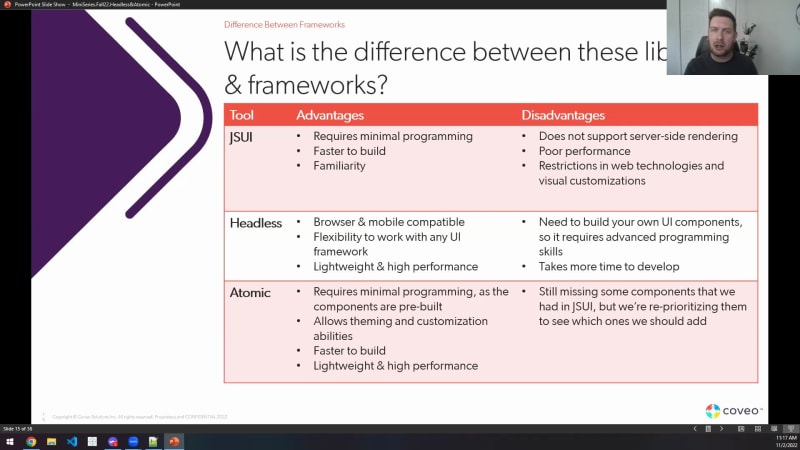
Hello, everyone, and welcome to our partner enablement fall miniseries. Today, we'll be going over a subject here that's dear at heart. We will be starting off the miniseries with changes to building the search UI on Coveo. So this should span the, estimates that we have in your meeting calendar. We'll be going over the content here, in the next few minutes. But I wanted to talk about a few things, for this subject. First off, we'll be going over a lot of content coming up. What I wanted to present here is a small disclaimer, of course, to be sure that, you know, you are privy to a lot of information here through these slides and our discussion. Some of it might be subject to change, so keep it at your discretion. Keep it for yourselves. We're never sure as to how this will unfold in the future for our plans, so, keep that in mind. As for the agenda today, we'll be going over a few things. One of those here is what are headless and atomic? We already have the JavaScript UI framework. So what's happening with that? We'll talk about differences between our, various frameworks and libraries, what's missing from Headless and Atomic right now, some additional resources that might be interesting for you, as well as a q and a session. I'm very grateful. Today in the audience and in the panel with me are, some of our our product managers as well as developers that have been working hard on Headless for quite a while now, ready to answer any of your questions. So if you have any questions throughout the presentation, make sure to send them over in the q and a panel. They will be answering live. If any of those are unresolved or they're flagged as if they're important, we'll definitely cover them in the q and a session at the end of this presentation. So going back here, my name is Michael. I am a partner solution architect. Been at Coveo for a few years now. I've helped steer, the partner community on the technical side of things, and this is the reason why I wanted to address you, the changes here going on with the search UI. So first things first here, what are headless and atomic? I wanna bring it back one step backwards and talk about what our current offering is. We've got the JavaScript UI framework, our trusty tool that we've used since two thousand fourteen. That's eight years ago. It's it's been very solid, and it brought us all here together. So definitely a great tool here. Framework in general is based on a set of components that are already prebuilt that can be assembled to create, some search UI in integrations and interfaces to leverage our APIs in our Camino cloud platform. Over the years, while it has been a trusty tool, we've come to certain challenges. Challenges such as the technology still some of it predates, you know, and still is dated here, in terms of two thousand fourteen. Some of it might need to change. Some major improvements have been made in the field when we talk about composable. We'll talk more about this later. It had to run-in a full fledged browser environment, which means it was very limited when it came to apps. You basically had to load the whole GS UI framework in order for it to work. It was difficult to move away from these building blocks as it wasn't necessarily easy to interact with the API level and the platform itself. It was the building blocks, and that's what it was limited to. You could go underneath it with a lot of work. Limited customizations were possible as well. So, again, same principle here. It wasn't as flexible as we would have liked it to be, and be future proof. And then another last challenge here was that it is a complete preparatory framework that every developer had to learn in order to work with us. The JavaScript UI was proper to us. While, you know, you could go a long way with knowing TypeScript and JavaScript, you still had to learn how Coveo functions as a whole. So that was the current sit the situation we've had for years. Right? And over the course of the pandemic, we began approaching this differently with a headless composable approach. So headless, has been worked on since twenty twenty. We did start with a smaller crew that were focused on developing headless, as well as Atomic and a few other things, but we'll concentrate on headless for now. And the focus shifted, you know, and putting more and more efforts and more focus and emphasis on making sure that we are approaching things headless from now on. It is based on a composable approach, as mentioned here, the library is Redux based, and it is a toolbox to help you develop, you know, your own search UI component libraries, whatever language you prefer, whatever language your developers know and are proficient with. So, that was one of the biggest approach of headless, and then having access to underlying functionalities that are independent of a specific UI was the key. So not tied into JavaScript per se. This was one of our goals for Headless. In general, Headless acts as a middleman layer for applications, which lets your development team work on the UI, interact with Headless, and leave Headless to interact with our server, with the Coveo platform and our APIs. It is a series of different engines and controllers prebuilt to interact with our stack so that you have minimal connections to do on your end. It brought us certain advantages such as mobile and browser compatibility, which was very difficult to implement with our GS UI solution. Developers can develop with any UI frameworks of their choice. Some of here, to name a few, Angular, React, Vue. Js, all three of those are mentioned and are documented in our documentation. More on that later, but still providing various tools to be able to make the job when it comes to the UI and the storefront. Support for analytics included via the search engine. We know, it is, it can be quite a complex piece to deal with usage analytics. So it was a goal to keep in mind that our headless would handle the analytics, at least the bare bone version of it, so that you did not have to go through this. We've stumbled upon, many complex situations with implementations going straight to API level where malleability was not necessarily the our strongest suit when it came to the UI API UA API. Sorry. And then higher performances. We'll talk about the performance comparison later on. But, definitely, we wanted faster, more lightweight, more composable, more approachable, and that's how Headless was born. What does this actually mean for us? And the reason for this actual presentation here for for the file mini series is our GSUI, our framework, has been used for more than eight years. We've developed tools in the headless to help us in the long run. Headless has been in development for, close to two years now. It started during the pandemic, where more, effort has been put in that direction. And as of right now, we feel as if this is sturdy enough that we've been used to implement dozens of customer implementations by now. Our professional services use Edless and Atomic on the daily, and we also have some of our partners using those new tools and their assets to build new implementations. So it's been used, little bit of both, little bit of an overlap. What we're looking at also here is there's not any net new features that were added to the GSUI since June twenty twenty, which means that development for the last year and a half, two years now, has not touched a GSUI necessarily. So all hands on deck for net new features to go with headless and atomic. It does create some sort of a discrepancy in features and being future proof. All hands are on deck with Headless and Atomic, and so we're encouraging you to move forward with us in twenty twenty three to use Headless and Atomic starting next year. Make them your go to. We have our full teams working on the headless and atomic. We have plenty of resources that we'll be going through, over in a bit. They're essential tools that we're really putting the focus on, to be able to deliver the next gen COVID-nineteen implementations. And so what we wanted to build here, and and I'd say the biggest messaging here and out of slides, the messaging here is we're building net new things. They're brand new. They're super strong, and they're covering a lot of flaws that our old JavaScript framework had. It would be very nice, and I'm encouraging you to start using more and more Atomic and Headless in your new implementations. Starting next year, it would be a go to or a default to go into adopt Atomic and Headless considering a hundred percent of our efforts are steered towards those libraries. It does come up to a good question here, a salute, you know, that I did bring up here in the, at the bottom of the slide. Do we have an actually easily approachable framework to help us out? Headless is good. It's composable. You can build your own UIs on top of it, but it does come at the cost of being maybe a bit more complex, less plug and play, less easily approachable. For this one, we've got Atomic. Atomic is a collection of different components similar to the JavaScript framework, that is built on top of headless. With Atomic, the user has the full flexibility, to power their own component UI library. Some of those are prebuilt components. You don't necessarily need full control, for your implementation. You want a quick search, you wanna integrate quickly, you want an accelerator. Atomic is there for this. You want a fast and approachable framework, that still leaves you open to all the customization needs you might have. Atomic's the key, and that's why we've built it. Atomic is a consumer of headless. Like the GS UI, it sits on top of Headless here to leave, the hard work to Headless to interact with our platform and our APIs and contain all of the different components that the GS UI had. So it makes sense that if you want to build something fully customizable, very complex, headless might be the go to. Atomic, on the other hand, will let you create projects quickly, will let you implement faster, and create stronger solutions with a subset of different components that we've made for this. One good question here would be what integrations can Atomic actually be used in? To be honest, little bit of a snip sneak peek here on the left about how it actually looks. Standalone search pages for websites could definitely do it amongst other use cases. Really, Atomic can be used pretty much everywhere. The list of where it cannot be used is actually a lot shorter than the list of actual places where we can implement Atomic. We've got the search interface builder that leverages Atomic as well. So we do have a simple interface builder that you can quickly iterate on for your books of concepts or your first iterations. That definitely help when it comes to quick accelerator implementations. For Salesforce, we've developed alongside Atomic, Quantic, which is a library, focusing on a a slew of different lightning web components built on top of headless. Same principle, different architecture, different language in a certain way, but everything applies. So very, very strong tool there as well. We're covering Salesforce, the vast majority of our different websites, and different use cases that you might have, apps, etcetera. Lots of use cases. Small disclaimer here at the bottom. Currently, there is no atomic package available for AM, ServiceNow, Sitecore, and Zendesk. So for those, I would stream strongly encourage that you go with a a headless approach instead. Now a few differences between our various frameworks. Quick slide here. One that can be shared. You can take a screenshot if you want or we can share the slides after the presentation. But quick differences between libraries and frameworks, we've listed a few here. As you can see here in the GSUI, we had very good strengths in that it required minimal programming. It was faster to build, and it was very familiar. We've used it for a long time. So it makes sense that your developer teams already were aware of this. Considering the partner ecosystem where it's repeated implementations, it's not a one off like a client or a customer. On your team, it would mean to reuse the same components that you've used in the past, which means it's pretty familiar. It came with a few disadvantages as listed earlier on in the challenges, reiterated here in that it does not support server side rendering. It didn't have the best performance in terms of speed, more on that in the resources, and then it had restrictions in web technologies and visual customizations. The headless approach here, very different. Browser and mobile compatible. We're fixing that problem. Very flexible to work in any UI and framework. It's lightweight, high performance, composable. Very important. That was the goal. It does come with a couple of disadvantages, and I wanna go through them before addressing the strengths of Atomic. But you need to build your own UI components while it is very nice for your developer your deliver developer, sorry, to work on React, Vue. Js, Angular, UI frameworks. It definitely it definitely requires more advanced programming skills. It takes more time to develop as well. You build it for very complex implementations, very specific needs. So some of the disadvantages that you might have when it comes to headless. I wanted to touch on Atomic here. As you'll see, it's the best of both worlds in a certain way. It requires minimal programming like the GS UI as the components are already prebuilt. It allows theming and customization abilities, something that GSUI was maybe a bit more restricted in. It's faster to build, kinda like the GSUI and one of the problems of headless. And it's like wait and hate high performance, so very similar to headless in that aspect and less so about the GS UI. Lots of strengths here combining the best of both worlds. It's still missing some components that we had in the GS UI. We'll talk a bit more about this in a bit, but that's definitely one of the disadvantages. There's a caveat, which we'll talk about in a bit as well. But we're reprioritizing them to see which ones we should add if there's a key missing feature, that you used to have in all of your implementations, something you couldn't live without in your implementations. Make sure to bring us a feedback. I'll show you a few ways as to how you can reach out to us. But we're able to listen. This is our net new product and project when it comes to UI, so we're really putting the time and effort into this. There's some documentation available if you're still curious about what's the best approach for your project. We do have a page here in the choose the right approach in our documentation, which is really, really strong. Took a quick screenshot here to display that. It has a couple graphs. It has a couple of of, snippets as well as tables that can help you understand a bit more about where each strength lies, what are the weaknesses into some of those languages. So really a strong document to take a look into, especially if you're new to Coveil. I think this one will be very enlightening. Okay. I'll take a sip of water, and then we can start on the what's missing? Good. Alright. So what what's the current state? What are we currently missing? There's a few missing components. There's no innate, and that's for atomic. There's no innate quick view. The tabs also is something that we do not have yet. Field suggestions may be might be another one of those, that are in the list. But I wanted to bring that small note here underneath it that it means, you know, even if the component is not available in Atomic, you can access the headless engine and do your customizations from there. The controllers are all available in headless, and some of them, like the tabs mentioned here in the missing components, is small enough and quick to implement enough that there is a complete level of course on how to build it within an hour. So small caveat that maybe the component, while it's still not there, can still be implemented by accessing headless underneath atomic when building. The relevance inspector tool is also something that's missing, and we know and we've heard from implementers, such as your crowd, the partner ecosystem, that this was extremely important. We're looking into things. We're in design. We're looking at how we could best leverage a, a an alternative to the relevance inspector, maybe the alt double click alternative, maybe some other shortcut or a better way to approach things, how to intuitively call the tool, as well as how to create a enhanced version for troubleshooting and debugging purposes. So team is hard at work on this one. We should have something to show, further down the line, probably next year, but really interested into having a similar function back to help the implementers. Few additional resources I wanted to cover here. Interesting ones of that. So, performance comparison here. Alright. Sorry. I was looking at a message. Just, taking a small break. So we ran a performance comparison. We ran multiple tests using both Lighthouse and PageSpeed as sources. We've created standard, implementations with the both the GS UI and Atomic. They had similar number of components. They were using the same Coveo cloud org, so the back end doesn't change. And it was made to get the same query results. So nothing changes in there. Same results, same query, same pipelines. We wanted to see, what was the actual performance comparison between both. I think that this is one piece of information you might find very, very helpful. So I've left both versions here to show you what we've used to do the testings. So first here, I wanna talk about the desktop version of our GS UI framework, what we've been used using in the past. So on the left here, Lighthouse, On the right, Page Speed. As you can see, pretty good. A couple of, you know, one second, one second, one point four, one point four, blocking time here and the layout shift being alright. Same thing here for page speed, maybe a bit slower there and blocking time being a bit higher. We've run multiple tests. This is not a one off. This is an average, and this is what we've found here for the GSUI desktop version. I wanna compare it with what we have in Atomic for desktop. So when we were talking about lightweight, composable, faster, higher performances, this is what we came up with. So we ran the same tests here for Atomic, again, using a same similar page, and you can definitely see some net improvements in the vast majority of those categories. From the index speed, the time to be interactive is a lot better. Blocking time is a lot better as well when it comes to page speed. So definitely a net improvement when it comes to speed on your navigator. And that's just from changing our perspective from going from our heavy JavaScript UI and going into headless and atomic instead. Pretty big change, and yet we're still seeing the same results. We're still seeing the same components. So that's a pretty nifty slide, I think, and it shows a lot. We've done the same thing for mobile. And, not gonna lie, we did talk about this earlier on. GS UI was not necessarily meant for a mobile approach. It was very heavy, and, it kinda shows with these, these results. Right? So in terms of performance, way higher here. Four seconds here on left, six seconds, six seconds, bit higher here on page speed. So pretty heavy here in the GSUI front. Performances of thirty five and seventeen. Keep it in mind. When it comes to Atomic, it's actually a lot better. So it did bring quite a big improvement here, when it comes to the performances and the tests that we've ran. So the performances have been pretty good here on Lighthouse as well as page speed. Not the same thing as the desktop environment, but definitely a net new improvement here when it comes to mobile environments. So a lot of good stuff came from doing that switch. We encourage whenever you have situations where you have a customer, a need, an opportunity where, mobile becomes more important, atomic and headless is probably what you wanna do. It's a lot better as you can see from the slides. So keep that in mind. Good languages. We're not you know, we're we're we're promoting very good products here in in Atomic and Headless. In terms of resources that are available to you is our documentation. There's plenty of documentation as you can see here, more than six hundred results for headless alone. So lots of pages, lots of content that could be leveraged. One small tidbit of of information that could be very helpful is take a look at our docs here. This is all running with Headless and Atomic. We are customer zero. Our own Kavio dot com search is also leveraging the new libraries. Same thing as the documentation, same thing as a lot of our other customers, already are using these new, languages. So lots of very good stuff there library. Sorry. So, it's always a good idea to take a look into it, your pariplex about what it actually looks like in the fields. Look at your documentation. I think it's gonna make a it might open your eyes as to how it actually looks and feels. Another part of the documentation I wanted to showcase here is for headless, for atomic. We do have interactive examples embedded within the pages, which is really interesting. You're able to search. You're able to take a look at how it's built. You have a slider here, that can be seen in the middle of the screenshot here. So we do have a slider in that. You can take a look at what the code actually looks like behind the scenes for these interactive examples. It's very helpful to see what you're interacting with and seeing how changing a few things could really change drastically the environment. So really one good thing to keep in mind. In terms of documentation again, third slide, then I'm moving on from our docs, but I really wanted to cover this one. We have been hard at work on working on the Coveo CLI, our command line interface to integrate headless and atomic, within it, it is a very, very powerful tool if you are to iterate very quickly on your projects. You can do use this to automate and manage organizations and how you build the platform, interact with it, as well as build templates and things like that. So the Coveo CLI is extremely, powerful and can help you deliver very quick projects. At least, you know, the basics of it, the template, and then you work on it, but definitely very good first iteration here. I know that the team internally in the professional services uses this tool a lot. So, really handy tool if you are to implement. There's various trainings available on LevelUp as well. So when it comes to headless, when it comes to Atomic, plenty of training here that will leave you with some very good templates as well. Again, with Atomic, with Headless, you're building a UI, you're building a, an implementation. You'll be able to not only understand how these different components work and how the calls are made between the different engines and controllers, but it will help it will help you as well in the atomic side with the various components and how to configure them. It leaves behind a copy that's a very good template to begin and and base your implementations on. So very, very handy tools here to get a quick grasp on these new languages and actually have a leave behind somewhere in your computer where you can always refer to if you're missing out on certain components in your implementation or you wanna use as a framework to iterate more quickly. There's also here a third level of course that I've added, create a custom Caveo atomic component. Pretty interesting. I did hint at this one earlier on, which is the tabs component that we were talking about. So if you're working on having multiple tabs to your search interface, this is the course. It will show you how, in Atomic, you can call upon headless to build tabs. And, I haven't lied. It's still under an hour. So, pretty interesting thing to have here in your, toolbox. If you company, you know, you have any technical questions, you have hurdles, you're using Atomic Headless, you have questions over the course of the implementation, or it's just you haven't found the information, there's multiple ways we can connect. One of them here is the partner community. It's where you're not only able to log in new opportunities, which is good, but, also, you can ask questions related to your implementations. Some of our Barca and d developers are actively looking at the community for questions to be able to answer them. So definitely a good way to leverage our expertise internally to answer some of your questions. You'll be able to log support tickets if we think we've stumbled upon a bug or you're you you have a very specific use case that might be a bit more of a tricky situation, and we're not sure if the out of the box solution in headless and atomic can do it. So another very interesting venue there. For, as for, maybe more quick touch ups, with the rest of our team, there's the Twilio community Slack, which I hopefully, you're all invited, where there's a slew of different channels and technical questions. There's Headless, Atomic, and Quantic. If you want to interact with our team, some of our professional services, teammates are in those channels answering some questions. We do have a variety of different subject matter experts also monitoring. We have our research and development devs that are interested into getting more feedback. This is one way to get your answers, answered quickly, and, it's also a good way to collaborate. If you are implementing something in a topic or in headless, you found a very nice and nifty feature or something you've developed that you wanna share, these are great channels to do so. We can only go so far if we're all working individually. So working as a team, collaborating in our community, that's what it was meant for. Take a little minute here. Hopefully, I've answered some of your questions. GSUI, we've talked about this, moving away from it. It's not seen development in a year and a half. It's mainly been in maintenance mode. So Atomic and the Headless is definitely where we're going. We're looking at having some changes. There's a lot of releases going on with Atomic and Headless over the course of the year. So starting next year, I think it would be a very good idea for your next project to start leveraging Atomic and Headless. Our development teams, all ears as to what your feedback is, and, again, want to talk about the fact that as the partner ecosystem, you're not only it's not a one off project where you're the customer self implementing and where once your implementation is done, it's done. No. You will work on, with this framework multiple times. It might be three projects, five, ten, fifteen, doesn't matter. If there's one thing in there that irritates you during the development the development, if there's a missing feature or something like that, it's not just a one off. Now it's gonna be repeatable. You know? It's gonna be five times. It's gonna be ten times. So your feedback is extremely important. We wanna hear you in the Slack community channels. We wanna, understand more about your questions in the partner community, so be sure to post your questions. Let's take a look at any questions here in the chat. Is there anything that maybe I can help out with? Okay. So one of the questions was, with the work we're investigating in headless and atomic, is the GS UI still going to be maintained? So maintenance has been done for a year and a half now, and there's no plans to necessarily stop and deprecate it. So no worries on that aspect if you are using the GS UI in your, implementation or you have a setup that's using the GS UI, maintenance is still there. It just means that over time, some of the net new features will most likely only be available in Endless and Atomic, hence the switch to it starting next year. Sounds good. Anything else? Okay. Sounds about good. Great. So alright. We'll close this off here. Thanks a lot for listening in. Hopefully, it made a bit more sense as to why we're putting the efforts into Headless and Atomic. It really is our new libraries and frameworks that we're putting a lot of focus on. Thank you for attending the partner mini series. It's been, it's been a pleasure here, announcing this and showing you what we have available in store in terms of UI. So really, really great session here. Thanks a lot. One thing to, maybe, mention here is, stay tuned for next week's session number two. We'll be going over it's a deep dive. We'll be going over the latest in terms of product development for both commerce and service. It will be a presentation led by Barca accompanied by, Simon Langevin as well as, Neil Costecki, both, working on their products, commerce, and service. So we'll see you in a week. Thanks a lot.
Changes to Building Search UI on Coveo
Make every experience relevant with Coveo
