
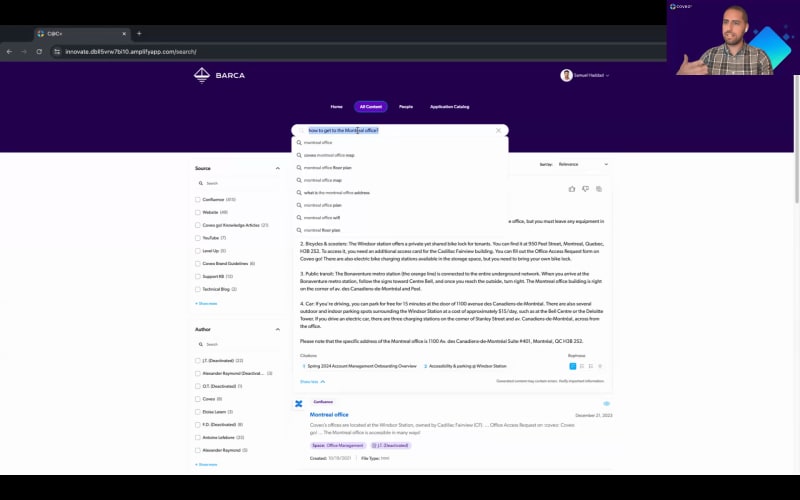
Alright. It's time to start our webinar. Hi, everyone. Thank you so much for joining us for today's webinar, five ways to build an intelligent digital workplace with GenAI. My name is Patricia Patsy Liang, and I'm the product marketing manager for Workplace here at Coveo. And I have the honor today of being joined by an incredible workplace expert, Simon Hassoun, who's the senior manager of employee systems here at Coveo. Today, we're going to explore five unique ways to keep your employees connected and up to date on the latest in enterprise knowledge, while also enhancing their productivity and proficiency using AI powered search and generative answering. Simon is also going to present an exclusive demo of Coveo at Coveo, which is our company's very own digital workplace solution that's part unified Internet, ITSM solution, part sales enablement hub, and so much more. And, of course, before we start the webinar, we'll just cut a little bit of ground rules. So first off, remember that everyone is in listen only mode, but we do want to hear from you. So please feel free to ask questions using the q and a portion of your screen, and we'll answer them at the end of today's presentation. And, of course, today's webinar is also being recorded. So please look out for a recording of this presentation in your inbox in the next twenty four hours. With that out of the way, I'm so excited to start this webinar, five ways to build an intelligent digital workplace with GenAI. So to start off, what I would like to share with you is that we recently received a new certification at Coveo. We're now certified in ISO twenty seven thousand eighteen. And this is all part of our ongoing commitment to really delivering the best in enterprise security by ensuring the confidentiality, integrity, and availability of our customers' data in the cloud while also staying compliant with applicable laws and regulations on a global scale. On top of this, Coveo is ISO twenty seven thousand and one certified, a GDPR, CCPA, and HIPAA compliant. And we also use early binding access controls, and we conduct regular audits and vulnerability assessments. Coveo offers even more than this in terms of security, but covering this all would take an entire webinar on its own. So let's dive into the main event. Now the digital workplace is in the middle of a knowledge crisis. And what we mean by this is that with the advent of new technologies and innovations like generative AI, many of us are now observing that knowledge and data are are in a bit of a crisis across countless industries because this technology is revealing both the potential and shortcomings of how organizations manage and use content and data both internally and externally. And the alarming rate of this enterprise data growth is impacting employee productivity and proficiency, which really demonstrates the need for better knowledge management and knowledge discovery solutions. And we can really see these impacts being felt as Forrester predicts that the employee engagement levels for twenty twenty four will hit about a low of thirty four percent this year, which is indicating a continued decline in both workplace engagement and practices. We're also seeing as well that within the latest Coveo employee experience report, basically, that employees, about fifty six percent of them are struggling to find the information they need to do to do their work on their own, and this is really affecting their performance. And we see this especially as well as about thirty four percent of employees report feeling burnt out due to having inadequate tools. On top of this, IDC projects that about ninety percent of enterprise data by two thousand and twenty six is projected to be unstructured. And it's growing at about a twenty one point two percent compound annual growth rate, which translates to about two hundred and twenty one trillion terabytes of data, across the enterprise by twenty twenty six. And so we can see that enterprises can achieve about a thirty to fifty percent growth and efficiency gains, when employers adopt new innovations like generative AI. But there is a new need for data cleanliness practices and knowledge management practices for these initiatives to succeed. And there's so many different things that can be impacting a company's knowledge management and discovery practices that can be causing a bit of a data and knowledge crisis. And this can be siloed systems, limited visibility into different applications and search interfaces. Of course, employee productivity can be impacted as well as self-service capabilities can be limited, slowing down the decision making process as well and making it harder for employees as well to have their cases handled. We can also see this as well through a lack of individualization, content and system overloads, as well as, of course, companies having to navigate mergers and acquisitions and all of the data nightmares that are related to those, new mergings. And this, of course, results in reduced employee productivity, increased internal support costs, reduced employee engagement, increased time to proficiency, and, of course, decreased customer satisfaction as employee experience has a large influence and impact on customer experience as well. And so what we see is that enterprises are really in the need for a connected and intelligent digital workplace that addresses these knowledge urgencies. And so with Coveo, we really hope to be your partner in digital transformation because the digital workplace of tomorrow is already here. Here. It's straightforward, attainable, and cost efficient, and it doesn't have to burden IT. With the right technology partner, you can focus on driving your business forward while we handle the AI powered search and generative answering. And, of course, we would also like to help you extend the value of your systems by amplifying knowledge from anywhere effortlessly within one unified interface to help you equip your teams with the knowledge they need to succeed to benefit both your customers and bottom line. Finally, we'd like to help employ, nurture both employee engagement and proficiency to help you attract the best talent while helping your employees be the best with engaging technology, that helps to lower these effort scores, reduce friction, throughout the employee search experience and, of course, improve cost savings. And so at Coveo, we're really reimagining, new ways to help unify this end to end digital employee experience. And this translates through the front office to the middle office to the back office across various department portals, intranets, in application search collaboration tools, HR and IT, and help desk enablement. And I'll go into a little bit more detail by exploring some examples later on in this presentation. And, of course, this is not possible without Coveo's thirty native and universal connectors that can connect to to hundreds of different systems, including Salesforce, SharePoint, ServiceNow, Confluence, and so much more. You can really connect to anything with Coveo. And so here's five really exciting use cases to build an intelligent digital workplace using generative AI and AI powered search amongst many other solutions like recommendations as well, and personalization. The first one that we'll explore, and Simon will go more in-depth during his demo later on in this presentation, will be Internet and employee portals. And so this is really meant to help enhance knowledge discovery by helping to upscale, and really enhance the flow of internal communication through a centralized self-service portal. And so this is going to help reduce ticket volume by enabling employees to self-service, and also speed on the onboarding process with technologies like generative AI to offer quick and easy answers to employee questions and queries. Of course, having content recommendations on your home page as well are very helpful, and Simon will show that to you later today. And, of course, if you're able to streamline and access to different platforms like ServiceNow, Confluence, Office three sixty five, and SharePoint online into one unified interface, that helps a lot too. We also have department portals as well, because employee experience extends so much further than your regular Intranet. It's also your sales, your legal, your manufacturing, and your engineering portals on top of so many others. And you can really empower various teams to interact and also discover knowledge more effortlessly with AI powered search and generative answer, to help basically enhance the decision making process with personalized results and knowledge recommendations right on their front page. And this will help to also improve employee and customer satisfaction by making workers by allowing workers to serve stakeholders more efficiently and confidently. We also have the expertise locator, which is a great way to help to connect your teams with the right subject matter experts using AI powered people search. And at Coveo, this is possible by helping to customize your search results with machine learning, card sorting, and custom filtering. And you can also enhance search specificity with tags like location or department, and even help to service employees within your generated answers, like in this example on screen here. And then we also have agent console or internal help desk, and this is really meant to help elevate the agent experience with AI powered knowledge and generative answering within your hosted agent panel. And this will help to provide not only your agents, but your ITSM workers as well, recommendations based on incident keywords and insights into your employees' digital journeys as well as your customers as well. It's always important to have insights on your customers. And this will help to also generate answers and numbered lists to help them resolve their cases faster as well. So having an action plan will always help them work more confidently and also using data from Salesforce, ServiceNow, and Confluence to solve these cases faster and increase satisfaction across your organization. Finally, we have collaboration tools. And so, at Coveo, we're really proud of being able to make company wide knowledge accessible via Slack and other communication interfaces for your teams. And this will help to encourage collaboration among your workers by allowing them to share documents directly within your company's chats and channels. And, of course, it'll help to enhance productivity as well by integrating this AI search directly through these tools and making everything serviceable. So as we can see, integrating AI search and generative answering across these use cases is a huge step forward towards creating a more efficient, user friendly, and intelligent digital workplace that'll benefit both employees, customers, and partners alike. Now let's see these examples in action, throughout the Coveo platform, across our very own end to end digital workplace journey. Simon, take it away. Awesome. Thank you, Patricia. Hello, everyone. So as Patricia mentioned, I am, Simon. I'm the manager of information systems at Coveo, and I'm super excited to talk to you about the workplace that we've built for our employees. Now a little bit of a backstory, of how this all started. So just like most other organizations, we are a company that is rich in information. We have decades of projects, successes, learnings that we've documented pretty much everywhere. So we use Confluence, ServiceNow, Jira, Google Drive, SharePoint, I mean, you name it. So you can imagine trying to find relevant information when you need it fast could be a challenge. And, of course, Cobayo's decades of experience in semantic search, machine learning, AI was the clear solution. But but this wasn't the only problem that we're trying to fix. As Patricia mentioned, and we're gonna look at, you know, what Patricia spoke about was really, really cool. We're gonna see it all in action. It's here. So first of all, we have different department needs. We know that, you know, someone in sales wants to see some information that's relevant to them, but that might be different from someone in security, someone in legal. So every department has its own needs, and we need to customize the way we show their information to that department. Also, we're a company that has offices pretty much around the world, and you're usually collaborating with someone who's in a different country, different time zone. So breaking that barrier and having an icebreaker with people across, you know, different countries could be a challenge as well. And that's not all. I mean, as always, we wanna make sure that our employees have the best tools to get their jobs done efficiently and quickly. But having so many software, having a rich portfolio of applications could be also hard to keep up with at times. So that's where Coveo at Coveo came to be. Coveo at Coveo is our internal digital workplace. It is powered by our Coveo platform, and we've customized it to give our employees access to pretty much everything they need in their day to day work conveniently located at one place. So we really want had a vision where employees can start their day on our workplace, and they can have everything they need at their fingertips, their pending tasks, their tickets, their information, all in one place. And as an added value, we also act as customer zero, so we get to test Coveo features before they're released to, to the public, made available to our customers. If you're interested in learning more, I have given a webinar in the past on the full history of Coveo at Coveo, where we were and how we got to where we are today, what were you gonna see in the demo. So, of course, if you're interested, you can check it out. But I think for now, enough with the slides. Let's jump right into a demo. So welcome to Courvayat Coveo, almost. So this is our demo environment. Is it it is an exact replica of our workplace. But, of course, for legal and personal information purposes, we've changed some information. So employee names and pictures have been changed, and we've hidden a few pages that have personal information as well. So we'll start here from the home page. And I would say this was the most difficult portion of the workplace to kind of architect and plan, and that is because our employees' journey starts here. So we really wanted to make sure that everything they needed is available here. As much information as we can show them on the home page, we can, but keeping it clean and keeping in mind the user experience, of course. So we'll start here with our featured content. This is where employees can get their views and relevant events, and this is personalized to the employee themselves. So this could be based on location, job profile, department. You know, you can imagine if you're in London, you don't wanna know about a barbecue happening in Montreal, but you do wanna know about a happy hour taking place in your office. So the news and events that you're seeing day there is personalized to the user that is looking at it. Then we have the, people worth celebrating section here, and this is a great way to bring employees closer together. So you're gonna see anniversaries, new hires that joined Coveo, birthdays if employees opted for it, and these will be boost boosted right on your home page. So this is a great excuse to reach out to fellow coworkers. Again, breaking those walls when you're working remotely or abroad or in offices across different countries. I mentioned also before we have a rich portfolio of applications. And, again, it could be hard to keep up with it. So we've done a few things within the, workplace to address that. First, we have your pending tasks. So this is where you'll see if you have tasks that are in outside applications. So whether in Workday, let's say you have things in Jira, you have an expense report in Conker, it could be hard to keep up with that. So you can you can see it all on your home page in the workplace. The other really cool feature that we've done that we we got great praise for is having this footer right here. So you can see you have bookmark we have bookmarked, applications that we know employees use generally on a daily basis. And just keep in mind when you when we talk about digital workplace, we're not trying to replace any application that already exists in the company. So we're not trying to create the new HR system. What we're trying to do is really centralize all of this information, all of these apps into one convenient location. And the nice thing with the footer that we've created is that you can personalize it. So as an employee, you can go in your preferences, and we've chosen some applications that we know that employees use regularly. So if you wanna see GitHub, for example, I get to save it here, and now I have GitHub added to my footer. And this will be available in every page of the workplace. So, again, very convenient to find things. The other thing you'll find on your home page is some job listings. So, of course, for internal mobility or if you wanna refer people to Coveo, it's a great place to work. Well, then you can find all the new, job listings that are being created right here from the home page. So that's a little overview here. But the most important thing when we talk about digital workplace, and Patricia touched on this, is information, is search, is finding the relevant information quickly. So, of course, we have our search page here our our search bar here powered by Coveo search. So let's take a look at a few examples to see how this could make your life employees' lives easier. So we're gonna take a look from the point of view of Samuel, who's gonna be a new manager who joins Coveo. And he he's been there for a few weeks. He's planning to visit the office for a first time. And as you can imagine, visiting an office could be overwhelming. So he's not exactly sure how to get there. He doesn't know who to ask. I mean, these are some questions sometimes that you're like, who do I ask how to get to the office? So you can simply say how to get to the Montreal office, and he's hoping to find some relevant information there. So you can see you have a generated answer that will pop up there. It will give him all the different ways to get to our Montreal office, whether it's by walking, by public transportation, by car. It will give him the address. And you can see this is curated from different sources. So instead of him having to go look and figure out I mean, do I look for this in Conker, in SharePoint? Where do I find this information? It's gonna curate it for him in one place. So he doesn't have to worry about where this information is coming from. And, of course, it's not just Gen AI. This is a search page at the end of the day, so you have all your relevant information. It is boosted based on our machine learning models. So the more employees do their queries and they choose results, it's gonna start boosting them. And then you have, you know, all the other features of a good search page. You have your facets. You can filter from here. You have your quick view. So in case you don't know if this is the right article for you or not, you can just click on the quick view. It will pop up, a portion of the article so you'll know if this is the right one for you or not, and then you can choose it. And it's not just office stuff. So let's say in this case, you know, when when Samuel joined, he was trying to connect to VPN, and it just wasn't working for him. So, normally, you would create an IT ticket. You would wait a few days until IT has time to look at it depending on the priority. So instead of doing all of this, you can simply say how to connect the VPN. And you'll notice I put a typo there on purpose just to showcase that, of course, you know, typos are are welcome. They're okay, and they will fix it for him. But here you can see he already has, you know, a few steps that he can check out before he can talk to IT. So I'm not saying that, you know, this might still not work and he might still need to go to IT, but we're really trying to encourage self-service first. So if you can find the answer, let's say this works for him. He just saved days or or hours of waiting for IT to answer, and then he saved someone, an agent from our IT team looking at this ticket, trying to answer him. So self-service is a really, really big portion here. And this applies to everything. So it it's all about what you index here. For us, we've tried to index kind of all the information that we know could be relevant for someone. So let's say Samuel, as I mentioned, is a new manager. He wants to know a little bit how job grades work at Coveo. And you can see he doesn't have to he doesn't have to type a question necessarily. So this is kind of our HR policies, how exactly do job grades work. You'll see it generates an answer for him. It says it's a short answer. If he wants a bit more detail, well, can ask Gen AI to rephrase it. It will kind of give him a lot more details, more step by step. There's there's different ways to put it in bullet points and step formats, and you can see, of course, the citations here. So it's kind of curating an answer. There's a few other things that we we can look at, which is here you see their smart snippets. So smart snippets is another Coveo feature that is pretty cool. It is also using AI, but instead of GenAI so GenAI will kind of curate an answer for you. It will generate a new answer for you. Smart snippets will actually look at relevant documentation in our portfolio of documents, and it will take snippets of documents that are relevant to your question. So it will show you kind of other questions that are related to your query and some snippets from our documents of, you know, of how to address those queries, and you can press here to learn more. You can open those documents. So that's all really cool. The The other important thing of a digital workplace, don't think of it as an HR portal. So it's not just about policies. It's not just about IT or or how to, you know, get to an office. We really try to put all the technical information, our product information, everything is in there. So Samuel sees here smart snippets. He's been hearing about smart snippets in a few meetings, and he's like, I don't really know what that is. Can you give me more information? So, again, you can ask Gen AI what is smart snippets. As long as we have that information created, our content managers have created that information, and it's indexed in our Gen AI model, you will be able to find his answer. So right here, you'll see he found a a nice description of what smart smart snippets is. He has all the, relevant information. So so all the search results, basically, that could be useful for him. And then, you know, I spoke about filtering and and these facets over here. So you can filter by where this information is coming from, who's the author, what kind of file type. So there's really almost unlimited kind of ways of finding your information. So let's say in this case, Samuel wants to find information here based on external documents. So documents that are available for our customers, he doesn't wanna see any internal documentation. Well, he can filter based on product documentation. So he can filter based on a specific source, and you'll notice that all of our search results are now based on product documentation. And notice that GenAI regenerated an answer for him. The reason for this is GenAI respects the sources that you've choose chosen or the filters that you put. So if you only wanna see external documentation, then Gen AI is gonna generate an answer based on our external documentation only. The really cool feature also that we were able to add is in instead of choosing, facets or filters to include, you can choose facets to exclude. So let's say here, Samuel does wants everything internal. He wants everything except for external documentation. We can simply exclude this facet. Again, Gen AI is gonna regenerate the answer, and you'll see that all the information is now from Confluence, from LevelUp, our internal, training model, and etcetera. The other really important thing when we talk about a workplace is security. Security is at the heart of Workplace. Right? So you wanna make sure that everything that the employee is seeing here, they have access to see. So that's exactly what we've done with our index. So if Samuel is seeing articles right here, it's because he has the of authorization in those systems to see. So if there's a knowledge article in Confluence that he does not have access to see, it's been hidden because it's only for an IT department and only IT can see it, then we're sure that it will not show up in the search results here. So security is is a very important thing, and it's kind of at the heart of this digital workplace. So this is a little overview of our search. Now we can move on to some other specialized pages. So we started with our all, like, all content search. Right now, we're looking at the people. So let's say you you wanna know more about people, you you're, I mean, you're new to the company. You don't know many people yet. Of course, you can, you know, personalize this based on do you wanna see it in list view, in grid view? You can sort by relevant, oldest, etcetera. So let's say, Samuel wants to know a bit more information about his manager. So you can search his manager, Sofia. You'll find the information here on her her title, department, how long she's been there at Coveo. And this is information curated from Workday, active directory, and Slack, but you don't see that. Right? So it's all in one convenient place. If he wants to learn more, well, he can open her card here. We have the full org chart that he can see, so all of his coworkers and kind of his management all up all up to the CEO. He can again see information, and the beauty of this is he can contact her directly from here. So if he wants to send her a message on Slack, he wants to send her an email, he can do this from here. He wants to check out her Workday profile to find out more about her. He can do this from here as well. You'll see there's some other tabs that we're playing around with. We test things. As I said, we're customer zero. So we're looking at, you know, my activity. So seeing what Sofia has been working on, how many projects she's on, how many Salesforce tickets she's commented on. Again, as long as you have, as long as Samuel has authorization or security to view these. So if there's a Salesforce ticket that he cannot see, or let's say he doesn't have access to Salesforce at all, then he won't be able to see them there. Now, of course, for demo purposes, we've left these blank, again, because we wanna hide some project information. But you don't have to search for people directly. So Patricia touched a little bit on expertise finder. So let's say Samuel, as a new manager, is tasked to hire a new business analyst on his team, but he's not exactly sure what a business analyst entails at Coveo. So you can simply search for business analyst. You will find all the people who have business analysis in their portfolio. And then from there, you can see, okay, who are they? Who do they report to? Who can I contact? They can and he can contact them directly from here to ask his questions. Quickly, I'll touch up upon application catalog as well. I mentioned we have a rich portfolio. In in this case, we have about two hundred applications that we support. So in case you wanna have, you know, a general a general rule, like a view of the applications that we have, you can see them from here. There's facets, etcetera. So let's say Samuel has a very, very technical question about ServiceNow that he wants to ask. We can simply search for ServiceNow, find out kind of what category it falls under, what is the main use, the description of it. And he knows that for technical, issues, Stefan is the right person to talk to, So you can contact Stefan. Go back on people search, search for Stefan, and he can contact him with this question. So as you can see, it is really about having convenience in one place. It's really about putting everything together in one place. So this is an overview of our workplace. There's quite a few things still, like features and pages that we were we had to hide for for for, legal purposes, but I still wanted to show them to you. So I've had it I've added a few slides here that I still wanna showcase. So you'll notice now we're in CoveoArt Coveo plus. Like, our our logo has changed. This is our real workplace, and these are screenshots taken from it. So first, I wanna show you here what we've curated in the personal person's profile. We've listened to our employees. We know. We've heard from them what they would like to see in kind of a convenient way, and we've put this in the profile. So you can see from here, I can see my requests. So all the tickets that I've created in the past, whether they're closed or still open. I can see my assets, so what software licenses I own, what hardware has been assigned to me by Coveo, all from one place. Another request that we got from our IT and security is to have an easy way for people to report vulnerabilities and incidents. So let's say you were, you're a victim of a phishing attempt and you wanna report this to our security team fast, you can simply go from here. This is available on every page in the workplace, and you can report your vulnerabilities and issues, easily and conveniently. So this is for urgent matters. For nonurgent matters where you wanna find the right form to to get to the right agent, well, we have our create ticket over here where you can press on it. It opens our another search page, which has all of the, portfolio of tickets that we have available to you. Again, you can filter by some facets that we have predefined before, or you can, of course, search for the right one. So let's say I wanna learn about paternity leave at Coveo, and I wanna ask some questions to HR. I simply write paternity leave. It gives me the right forms that I can, use. So leave management or contact HR because they're both relevant in this case. But, of course, leave management seems to be the right form for me to use, so I press on it. Now I do wanna show you a little bit inside our forms, and I'm wary of the time, so we'll go a bit faster. Inside the forms, we we use ServiceNow. But as you can see, we've kind of integrated it with our within our workplace, so it has the same kind of seamless experience for the user. And you'll see on the left hand side, we have all the, fields that I need to fill out. They're still blank. On the right hand side, we have some helpful articles, what we call case deflection. So while you're creating your form, we're suggesting some recommended articles for you that could help you avoid opening this ticket, maybe getting your answer faster. And you'll see they're all, related to leave since you're in a leave management form. And right here, you see as I start typing what this ticket is about, paternity leave, on the left hand on the right hand side, my, articles are being loading are reloading, and it's giving me now paternity leave specific articles. So it will kind of take the context of what you're filling in the form and suggest some articles that are related to your query. Very fast, the last thing I wanna show is content portals. Again, for legal reasons, I can't show the actual content portals. So for the legal team, if you're watching this, I'm I'm respecting your wishes, but I will show you the mock ups. So this is a mock up of the security portal that we've built. And so far, we've built one for sales, for security, and for legal. And, basically, you'll notice that this is curated kind of an a mini portal within our digital workplace, where you can find information related to the portal itself. So you'll see, of course, we're a search company, and search is at the heart of everything we do. You You have a search page a search bar. The difference between this and our all content search is that in the back end, we have pre filtered data working with the security team. So everything that you'll see in your results is specific to security here. You have, again, boosted information based on what the security team wants to put, and then you can categorize information in all sorts of ways. So you can choose kind of predefined categories. You can choose by audience. So you can categorize by audience, and then when you press on it I'm a system admin. Let's say I press on this. I'll see information related to me. By content type, you can show trainings over here. So, basically, it's kind of, as I said, a mini portal within our digital workplace. And with that, just to respect a bit of time, we can go into q and a. Thank you so much for this, Simon. And this is such an impressive undertaking. A lot of this is a custom Coveo implementation as well. So it's it's so exciting to see everything that you and your team are building for our company as well. And, really, not only if you're customer zero, you're a power user. Yep. But that that's what we aim to be. Right? Let me take a quick look at the questions. Alright. We have about three questions. We'll try to go through them quickly. We have about five more minutes. Simon, how do you start a project like this, and what are some of the best practices? That's a great question. So I would say one of the most important things, and you touched on this a little bit before, is cleaning up your content. For any of this to make sense, you need to make sure that what you're feeding into your search, into your Gen AI is relevant, is up to date, is being maintained. So definitely the most crucial part is cleaning up your content. Then you have to choose kind of where you wanna host this. Right? So if you are a ServiceNow user, Salesforce users, you can host your workplace within those systems. On our side, we chose for it to be a stand alone just it makes sense for customer zero to collaborate. But, again, you can choose, whichever works best for you. And then choose what you wanna customize in it. So what are your employees' needs? We did surveys, kind of, focus groups. You know, we listened to our employees, and that's how we built that home page and all these things. So that's what I would say, and then keep improving. Look at your metrics and keep improving. That continuous feedback loop with the employees is so important. So really happy to hear. And, of course, generative AI is still a very early and new kind of innovation and tool. What are some of the benefits and challenges that you and your team have encountered while trying to integrate GenAI into your systems? Yeah. Absolutely. I mean, integrating GenAI was, I mean, fairly simple for us. Of course, thanks to the great product team that helped us with it. And there's really good documentation on our website on on how to implement RGA. So, of course, if anyone's interested to learn more about that, they can. But I would say, you know, again, I'll go back to the content cleanliness. I would say that was our biggest challenge. I can tell you when we were testing, we were tested with a lot of our content owners, our IT teams, our HR teams, and we found a lot of, you know, outdated information or content gaps. So that's what took the longest time. But I would say that's, again, the biggest benefit of Gen AI. It kind of helped us define define those gaps so that we can give better and more relevant information to our employees. Oh, that's really cool. And then thinking about relevant information and, I guess, the flow and control of information. This this is a question I'm selfishly asking myself now. But how how are you tracking Coveo Coveo's success, and how do you measure the success of something like GenAI? That's a great question. So in terms of, metrics, there's there's quite a few metrics that we look at. First, for the workplace in general, I mean, we look at the traffic. Right? Number of unique visits, how many people are accessing per week, per month, how many people are coming back, so recurring visits. Right? So are we giving people good enough experience that they wanna come back to us? We also do some advanced analysis where we kind of track the employee or we map the employee journeys. So this gives us insight on what features, what pages are being the most used or the least used so we can now prioritize our next steps. In terms of GenAI, I mean, there's there's I showed a little bit. There's a thumbs up, thumbs down feature within the generated answer. So that helps gives us give us an insight of our employees happy with their answers. Are they not? So, again, helps us with this. We also see which queries are generating answers and which ones are not. So, again, helps us with defining content gaps. On the self-service side of things, I would say we've seen a huge decrease in the amount of tickets created. So the self-service portion of it is working very well, and that helps employees. They're getting their answers within seconds instead of hours and days, and it's helping our agents focus on the more serious, more crucial tickets. So I would think these are some of the metrics that we're currently using. Yeah. That's fantastic. And, oh, I see we have actually another from, someone in the audience. So bringing everything into one place is very exciting. What advantages or edge would we say we have over Office three sixty five? I think for us, it's probably the connectivity and being able to index content from so many different sources. Right, Simon? Absolutely. That's it. So so, you know, I mentioned we have so we have such a big portfolio. So be having that, you know, you showed we have, like, so many connectors that are out of the box. So being able to leverage this to index information from pretty much everywhere, that's one of the biggest advantages. Fantastic. Well, thank you so much for all of this. I mean, this has been so informative. I'm so excited. I'm gonna end off our presentation for today. But this has really been such a dream. So let me just quickly share my screen. Simon, thank you so much for everything you're doing. My pleasure. It's so inspiring, and I hope that this has helped to also inspire, within the audience some of your own digital workplace initiatives. As you can see at Coveo, we've really plotted out a really unified end to end employee experience journey that really meets employees where they're at, reducing friction at every single point of their their experience. And, of course, a huge thanks to Simon Hassoun and the incredible employee systems team at Coveo and the r and d and product team as well for for really solidifying Coveo's place, not only as a great workplace solution, but as a leading employer as well. Can't wait to use all of this. And as you can see as well, an AI search and generative experience platform really helps customers like these, like Dell, Comcast, Cisco, Adobe, and Salesforce. Our customer base really excel at delivering some of the most, leading global employee experiences to really help unify the entire end to end journey with intranets, department portals, sales portals, ITSM, agent consoles, and so much more. So please stay tuned for some more great digital workplace content. We just released today, actually, our twenty twenty four employee experience industry report. So please feel free to, check it out on the Coveo dot com website. We have some really great stats about how the end to end digital employee experience journey is is really changing with the advent of GenAI. And, also, please feel free to book a one on one discovery call with us if you'd like to get a demo of Coveo yourself. Thank you all so much for joining us today. It's been such a pleasure, and thanks again, Simon. Really great work. Thank you.

5 Ways to Build an Intelligent Digital Workplace With GenAI
AI has proven its ability to elevate employee engagement and proficiency. According to BCG, employers adopting innovations like GenAI have already achieved +30 - 50% in efficiency gains.
Coveo is revolutionizing the employee experience within our own digital workplace: Coveo@Coveo. This unified intranet and ITSM solution is the central hub for internal case handling, sales enablement and continuous upskilling.
In this demo webinar, learn how Coveo’s workplace architects designed a comprehensive portal for all employee needs, using AI search and generative answering. With seamless integrations into key systems like SharePoint, Google Drive and ServiceNow, Coveo@Coveo connects the enterprise, enhancing productivity and decision-making.
Digital Workplace Takeaways:
- Best Practices: Learn the process and best practices for creating a one-stop, multi-use intranet (directly from our Employee Systems team!)
- Employee Engagement: Discover how the design of Coveo@Coveo promotes employee engagement and adoption.
- Coveo as Customer 0: See how Coveo uses its own solution internally to enhance employee experience and productivity.


Make every experience relevant with Coveo
