
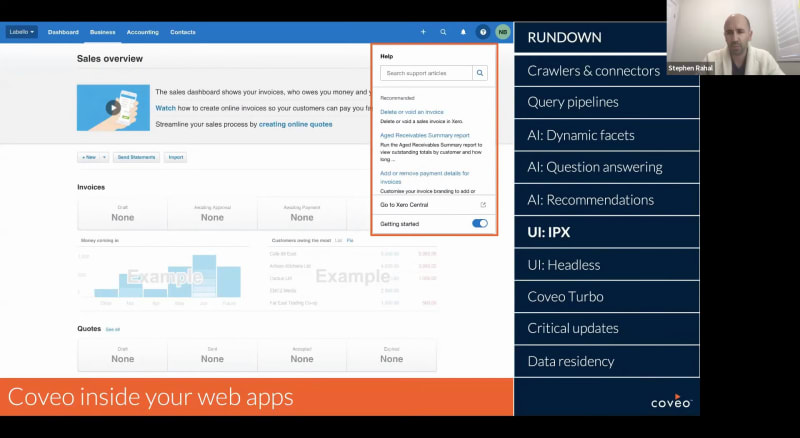
Okay. Hello, everyone. Thank you for joining us as the at for this month's Nuance Coveo. This monthly webinar series is where we share the latest capabilities that can help your business create more relevant service, workplace, and commerce experiences. My name is Claudine Ting, and I work on the global marketing team here at Coveo. For final new and Coveo webinar of the year, we'll take a look back at the most impactful product innovations that we developed in twenty twenty. From optimizing customer service journeys, creating intelligent and digital workplaces, and personalizing on-site experiences that convert to revenue, we'll talk about how these features can propel your business forward in twenty twenty one. Our presenters for today are Steven Rayhall, director of product marketing, and Nick Bordalo, price vice president for products. Before we get started, I have a few housekeeping items to cover quickly. For this webinar, we'll entertain your questions at the end of the presentation. However, we encourage you to type your questions on the q and a box in the chat box as we go along. During the q and a portion, you're also welcome to raise your virtual hand if you'd like to speak live to ask your question. Lastly, today's session is being recorded, and you'll receive the presentation within twenty four hours in your inbox and also in Coveo Connect, our online community. Now let's get started. Steven, please take it away. Awesome. Thank you, Claudine. Hello, everyone. Welcome. Welcome to new and Coveo platform edition. It is the season for top ten lists and checklists, and so we are inspired by that today and carrying on with that kind of end of year tradition recapping what was. So I have the pleasure to be joined by Nick to look back at product innovation in twenty twenty. And, hopefully, for you, it can serve as as a prompt, a reminder of some of the capabilities that exist within Coveo, maybe capabilities that you aren't leveraging today or maybe even sparking an idea around how you can reap more value from Coveo. So I'm excited. Nick, we have the chance to talk about new machine learning models, talk about the cloud infrastructure and how it's expanded, and even the toolset that we're providing to to better manage search and relevance. But, Nick, maybe let's start with the challenges of crawling on premises content and Yep. Tell us a little bit about what's happening there. Yeah. So, so sorry first for the diagram that's in there. It's it's never easy to to to showcase connectivity with, with nice images. So this year, we, we invested a lot into our on premise connectivity module. It it was available last year, but this year, we invested based on your feedback to to remove Docker to make it much easier to, to deploy it, and and don't have to to to mess with Dockers and stuff like that, but it's easier to deploy and to maintain as well. It's also now, incorporating incorporating the, the concept of source security. I can manage the security from the cloud platform versus having to deploy some some crazy files, on premises. Now everything is managed also from the connector side. So if you wanna connect to your on premise connectivity on prem on premise content, it's it's much more easier with, with the stack. On the on the crawling topic, a few other things we did this year, we we also released our first SDK for to talk with the push API. So if you wanna if you wanna connect to other sources, we have multiple generic ways to connect. The push API is one of those, and now there's an s there's an SDK for you. It's within c sharp. So if you wanna connect with the platform in c sharp, it's much easier, and we're working to create some, some other SDK for other languages. If you have some languages that you'd like to see in SDK for, let us know. We'll consider your your your vote in the list of, how we prioritize other languages. Another thing we did short and briefly, we we released a connector library on on GitHub, basically. If you want to talk this time with our with our rest rest API, there's now a connector recipe there for, for GitHub, Slack. There's one for, LinkedIn learnings as well, and there's multiple, basically, recipe to get you started to just connect API to API versus building a full connector. So that that's one more time much easier to to connect content with Clovio. So, Nick, between native and and generic connectors, the recipes that exist, over fifty different connectors that customers can leverage. Yep. Very cool. So moving from crawling and indexing content to being able to manage rules, ranking rules. And and so I think what's the investments that are being made around query pipelines are really interesting. As the platform adds greater capabilities, and greater sophistication around how you manage both rules and machine learning, it really opens up opportunities to, I think, relook at how that information is organized. And so, one great thing that came out of the the platform team, this year was just around the idea of ranking rules and combining featured results and ranking expressions together in one panel so you add it in one place and just really rethinking, query pipelines and the organization of those functions. And so within ranking rules, you've got the simple expression editor. So it's making it easier to do things like content bearing and and boosting without a real deep knowledge of the Cobayo syntax. One piece that I like too is the that ability to view the implications of the rules that you're creating and having that preview panel, as you're creating them. And just being able to avoid flipping between tabs but having that all centralized in in one area. What you're looking at here is is exciting. It's around managing ranking rules initially, but this concept of groups and campaigns. And so groups are a permanent set of rules. Campaigns are time bound, so they have a start date and an end date. And so when you think about organizing some of your your ranking rules, particularly around the campaign scenarios, Nick, I started to think about, use cases. And one use case is on the workplace side. So if you're using Coveo integrated into your Internet, you're thinking about maybe HR communications, and maybe your HR team is rolling out, a new benefits program. And there's a time frame and when you watch all when you, wish to have all employees enrolling in that new benefits program. So being able to build a campaign, and a set of rules associated with that is powerful. And then, obviously, being in in North America and in Canada, US, just coming off of Thanksgiving with Black Friday and Cyber Monday, you're thinking from a commerce standpoint as well. That ability to think about the ranking rules that you're implementing and being able to organize them, by campaigns, I think, is a pretty powerful tool. Agreed. Another thing so so this is an example of of another initiative we have, we have in in the product team is to is to streamline or simplify, complex test. The query pipelines, there's many, many, many options in there. And if you wanna control, like, their promotion or stuff like that, you had to you had to fiddle, create, connect, create, create, conditions and stuff like that all around to come to the end result, which is basically you wanna control a a set of rules together and have them timed or something like that. We're doing the same in other panels. Thinking about AB test. Today, if you wanna do AB test, you have to go and you have to control, pipelines. You have to control, the the the the the the reports. You have to also understand how to apply a pipeline to a search interface, streamlining that into a single flow, making it much easier for the admins on the other side to to to play with with Coveo. And the this screenshot is kinda giving you a preview of what's, how this interface is evolving, correct, Nick, in terms of bringing AB testing, bringing, ranking rules, groups, and campaigns altogether at once. And coaching campaigns, something that, is in beta today, can request early access, but will be rolled out to all customers here in the beginning of q one. Nick, talk about and maybe transitioning into AI into machine learning models, with dynamic filtering and navigation. Yep. This one, if you look into the documentation, is called dynamic navigation experience. But in the end is that we we we realize that facets are extremely powerful, but they're also complex. And the larger amount of data you have in the platform, the the the larger amount of of of meta information you have on your on your documents, on your on your products, whatever you have in the index. It's getting messier and messier to to manage this information for you, but also for the end user on the other side. So what what facet should I show to my users? What value what's the order I should show those values on? Where should I where should I, pre filter? Where should I let the user go? All of those questions are actually pretty good question for AI. If you give data usage data to a to a machine learning algorithms, they're gonna be able to find out what's the most used facet for that query or for that group of query, what are the most relevant values for that same facet. So, basically, that that algorithm is is a mix of four, four feature. You can go as as just as simple as asking Coveo to reorder the facet value in in in a facet if you want to, to to show the the the most, the most, possible click in there. You could also ask the algorithm to render the most relevant facet at the top so that if you're going into an ecommerce shop in here, if I'm searching for barbecues, probably the the voltage is not relevant, but the BDUs are still stuff like that. You can also go and ask the algorithm to boost some some facet value. Automatically select those values for you, but now just boost on those value. And then the last thing we added a couple of months ago is basically to automatically select value. If the level of confidence from the algorithm is strong enough, in this case, I'm looking for barbecues, and the category barbecue is selected automatically by by the platform. Nothing was configured aside from creating a model, basically saying, look at that data and then optimize, the the the facets and value selection based on that data. And based on how user interact with your content, the facets are are ordered dynamically, and and when the algorithm is is confident enough, he's also able to select the right values for you. Powerful. And continuing on the the same lines in terms of ML models and and some of the capabilities that you have at your disposal, question answering is is an interesting one and, really driven from just changes in in our behavior and consumer behavior. I think voice platforms are are in many cases, they're changing how we interact with search. And, in many cases, it's not just keywords, but where our search queries are formed, in the form of questions. And what's interesting about question answering and the the first feature behind this is the idea of smart snippets. So giving you the ability to extract, and return a relevant answer from a list of content returned from the index. So in this example, again, you can see, kind of a self-service support oriented use case, looking for particular information about, a product or capability. And that typical search results page that you see where it's the pages of blue links, that ability to bring an answer the what looks like the the most ideal answer right to the forefront. So, the goal here is really to to give the customer, give the user, an answer to their questions right away without them needing to dig through, the content, without needing to predefine, question answer, combinations, within within your search engine and within your back end. And it serves as a as a nice time saver, right, in terms of enabling people to engage with content, to get insights without touching the the source of content themselves. Nick, do you see the applicability here, obviously, is on the customer self-service side, but but potentially even on the employee side as well. Yep. Yep. So far, they where we need to have some some structured content, but we're working to improve the algorithms to be able to find answers. And and and just like you said, this this typically structured content is in service. So user guide, step by step procedures, but the same kind of content, but a bit less structure exists in in the workplace, in the one workplace environment. So that that's probably gonna be the next place where you could apply those, those algorithms. What's nice about the the structured content element too is if you're if you're doing any web optimization, search engine optimization for for your, content. But if it's support content, the structure that you're applying, to optimize for search is also optimizing for question answering as well at the same time. Yep. The building again on machine learning, models and and what's at your disposal. Again, you're many of you are familiar with, events, recommenders, and and that ability to do content recommendations. So you have this ability to drive deeper engagements, being able to surface, recommended learning, popular answers, being able to surface content. And what's interesting here is we've broadened the recommendation engine and and recommenders, to cross not just content, but to also cross product recommendations. And it's interesting because it's it's kinda like this ability to have a a personal shopping assistant as integrated into your commerce experience. Right? So as you're navigating a site, whether you are a repeat customer, and, you as a business have an insight into that repeat customer and what they purchased in the past, or in many cases, you have either anonymous visitors coming to your sites, or, first time visitors coming to your sites. And so this ability to understand product attributes and being able to, predict and recommend content accordingly. And so in terms of the specific models behind it, the idea and the the concept being able to recommend items that are frequently viewed together or frequently bought together. Here you have the the use case where, I'm looking at, a sport cleats, and you're seeing similar products that you might be interested in. So helping to to drive towards greater conversion to help, when you think about being able to recommend, you may also like this product. It's that ability to, improve average order values, on top of what a what a buyer's experience through that site. So, again, continuing to expand what you have in terms of machine learning models and, I think three great examples of of things that you can leverage, and capitalize on today or in the coming weeks. Yep. Kinda switching gears a little bit, moving from the idea of relevance and managing relevance, whether it's through rules or or whether it's, through machine learning to how do you surface, how do you integrate, a search UI into different applications. And so in product experience is something that was introduced here, towards the beginning of the year, back in February, March. And in product experiences, again, it's interesting because it gives us the ability to embed, a full Coveo in experience inside a web application. So, the example that you see is actually a customer example. It's one of the leading software accounting software applications. And what they've done is they've integrated or embedded Covea right inside the web application. And you can see here as I'm navigating, interacting with the user bar here, you've got, the question mark icon. When I click on it, I'm accessing in product help. And and oftentimes inside your products, there is in product help or in product documentation, but it's static content. And so what we're able to do here is, embed Coveo, with simply one line of code and give you the ability to surface help and documentation inside the product in the context of, of how your users are are using that product. And so when you look at something like recommendations that appear right even before I start to search for support articles, the recommendations are contextually aware. So you've got this, based on the the area in the application that I'm currently within, it takes that page context and is able to influence recommendations to help to guide the user. And, if you're thinking at all inside your organizations about more of a product led approach, user centric approach where you're trying to bring, more of the engagement and communication inside your products, or even if you're thinking about service and supports and how you can improve on the level of customer effort, how you can extend some of your support documentation and make it easier for your users to access this. IPX can be powerful in doing so. One one thing you mentioned is is one line of code. That single line of code is obviously rendering what you have here. You figure a lot on the platform side, but it's it's the single line of code is able to render what you have here. But that single line of code is also able to gather the context of where you are, and it's also what is gonna be tracking all what people are doing in your application. If you if you did the the path of a, b, c and then you you you you look for help, then typically, we know that people who have had this path typically looking for data just like we do on website. But now instead of having to deploy tracking, deploy integration for just that single line of code in your application and you control everything from the COVID side, you get the behaviors, you get the you get the the UI to render value. So that that's something we're trying to do, yes, in IPX, but across all of our, I would say, all across all of our library to make it easier to people to integrate and not have to understand how the APIs, but just deploy simple things to do complex things. The the nice thing too is just how you interact with your engineering teams and Yep. And get buy in for the integration of Coveo inside your products. Just the fact, Nick, that it's, controls decoupled from your application. Right? So you're actually controlling IPX from the Coveo admin console, in terms of not only just the relevance of what you see and what appears, but even from a from a UI standpoint, which can be, super powerful. And as a customer too, if you if you log in to the Coveo admin console and you click on the, question mark in your top right hand corner too and access help, you'll see you'll see IPX, even within Coveo itself. Next one is, his headless. So, if you're a customer or if you're looking at we probably know that we have that JS UI framework, which is, the the big framework to build all those search interfaces. A lot of the feedback that we had over the year with that framework is that it's extremely powerful, but it's also a bit, a big model. It it's it's large to download. It's it's slow downs a bit the pages, and in some precise case, it's it's just too big, and you wanna have more fine control over either the UI or or the behaviors. So the team decided to invest and to split that big UI framework into multiple components. The first one who's available is, is the Adlast library. This is basically what's managing your state, managing the performance, managing everything, and calling multiple APIs from Coveo. So the core API, the the the the UI API, user analytics API, sorry, The the the the the AI API. So all of those are controlled together in within one library. And if you want to integrate that with React, with Angular, with basically any any UI framework that you like to have fine control over the the final rendering. So you can count on Coveo to provide you the the basics about how to do a query, how to report statistics, how to integrate AI coming from different so just to simplify, simplify that part, you don't need to care about that. You just need to care about how you want to the the UI to look to look like. And the next iteration in there is to is to release Atomic. Atomic is basically the set of UI component that are built to work directly with, with the headless, with the headless library. Once you have all those two component, it's basically the equivalent of our current JS UI library, but now it's put in two parts, and there's gonna be more parts in in the future. But, yeah, I cannot find control which one do I wanna use. Do I wanna replace that one by mine, or do I wanna keep keep everything? Yep. That's it. Next one You're on mute you're on mute, Steven. Steven? Yeah. Sorry. I was on mute there. Go ahead. The one thing that I was gonna say around headless, which is interesting is organizations that have strong UX teams and you're thinking about, just the design system that's in place. You have specific guidelines for how a search box should look and feel. That that control that you get with headless is is super powerful. Yep. The next one is. So we released this one probably a few only a few months ago. It was in in development for a while by our professional services team. This is basically a client line, client line extension for for, I would say, advanced developer, but it's also a pretty powerful tool to help you, start developing custom components or do complex task with Coveo. It's it's just a modern way to develop. You go, you open your command line, you get some library to download, and then you have actions. So in there, you can easily scaffold a a control. So how do you how can I do a custom control with Coveo? Today, it's it's documentation. But with Turbo, it's basically just create a custom control. You get all the scaffolding done for you. And then from there, you can just build the you can just build the the the the main, the main behavior and the look and feel of that that component. You can publish that component to your current website or current search interface. You can also publish that component to the library. So which will cover also a library of of custom component, JSUI custom component, that have been built over a year by the social architect team, by professional services, by also some of our customers and and partners who are starting to contribute in there. So you get the you get the the the the tools to build those recipe and make it easier for you to do custom development with, with Coveo. And a few examples we have is, yes, creating custom component. But if you want to deploy, let's say, an example we often see is I wanna do case deflection. So today, doing case deflection, you have to create that that component. You have to integrate that into a page. You have to build a query pipeline. You have to hook the two together. And once that all that that poutine is done, then you have to go then configure. With with Tableau, you just type a a code to get everything is set up for you. You can just configure it, and then you can publish it as well. Another integration that we're working on is to integrate that with the, with the, configuration snapshot, a feature from the admin, or you can take a a snapshot of your organization. And if, typically, people want to move that from dev to QA to production, so which will go, you'll be able to say, take that take that snapshot, move it to move it to the to QA, move it to prod. You can also do the opposite. Take my prod configuration, bring that to bring that to QA. I wanna do some modification and do some tests there. I wanna make sure I'm starting from the right configuration. So that's another use case for. And there it's it's actually heavily developed. It's open source as well. So if you wanna look at it or if you wanna contribute, just go to our developer portal, and you're gonna be able to, to find it and and, and get your hands on it. Awesome. Kinda staying on that theme of, this overall developer control. And so one of the advantages, obviously, we trumpet with the SaaS product with Coveo is is that you're always on the latest version. Right? It's there's there's constant improvement. There's constant, optimization happening, across the platform. And Coveo periodically, we release updates that improve performance, improve logic, underlying the platform, and and some of those changes may impact, existing customizations. And so critical updates is a is an interesting feature from an admin standpoint, because it it gives you, advanced notice of changes that are going to happen within the platform and gives you the ability to, test drive those before they're applied within your production environment. So, with critical updates, giving you a summary of some of the changes that are happening, giving you the time to jump into a sandbox environment, to apply those changes to kinda test drive what the impacts would be so that you're in control of of when they're activated or or you have, a testing timeline to be able to to have control over that. And, Nick, I think it this is kind of inspired in part by by other SaaS products. Obviously, Salesforce is, a big integration for us and, Salesforce. If if people on the on the line here listening or, investing in Salesforce, you might be familiar with something similar they have around critical updates. That's, it's part of their tech stack if you're administrator. That ability to be able to manage updates and manage when when they're applied. And, again, giving you more control over, the experiences that you're creating for your end users. Yep. Last one is is data residency. If we would have had the same snapshot a year ago, there would be basically only three dots and one of those would be much smaller. So, basically, there is two thing you can do with Coveo. You can do, data replication and you can also do, data residency. So at the beginning of the year, we had, we added a replication between US est, which is our main region, and US west, and we also did the replication in Europe. This year, we added the concept of of, what we we call a main region, but basically data data residency in other in other region. So if you wanna have your data to to be outside of, of the US, it's a requirement for many of our customer who are not in the US. You have the option now to get this data to be indexed, and in transit only in those region for for Europe and Dublin and and, Asia Pacific and and Sydney. And, obviously, that's that's powerful to have this data to be hosted in in those region for a legal reason and compliance reason, but also for, faster query time. So if you're a global, if you have customer all across the globe, if if response time for query is important for you, you can decide to have Coveo up and and replicate the information your your index basically in all those region, and every query is gonna be routed to the right to the right node to be, to be much faster for for global customer. Relevance matters, but speed does too. So pretty powerful to be able to, to be able to have that capability depending on where your users are are located. Yep. That's our top ten. That's kind of a a wrap of the the summary of, you know, the the year end relevance, from a platform perspective and providing ten of the the big highlights. Again, hopefully, that, for some capabilities, maybe that is an introduction. For others, maybe it's it's a reminder. It's inspiration for thinking about how you're using Coveo today, and how you can be using it as you look forward to twenty twenty one. If there are capabilities that that you are thinking of leveraging, you're intrigued about, Customer success is is here for you, to help guide you, to help you better understand how to get the most, reap the most value, from Coveo. So encouraging you to to reach out, to your customer success managers, your customer success teams to to help provide that guidance and, to connect with our communities as well. Nicky mentioned, a lot of the investments that are happening to support, the development community, what we're doing in terms of SDKs, what we're doing in terms of open source. So being able to to be aware of what what's happening there and and the tool sets that you can that you can leverage. Make everything from what you talked about with some of the recipes on the connector sides, to capabilities around building your own custom connector to, what you're doing with Coveo turbo and what that can enable, as well, is powerful. So encourage everyone to to take a look at some of these resources. And and with that, Claudina, checking with you to see if there's any any questions that have come through. Okay. Thank you so much for that wonderful rundown, Nick and Steven. We did have some questions that came through earlier. Just wanted to, repeat this for everyone who didn't see for those who didn't see it. Someone was asking if these are applicable to Coveo for Sitecore. And Nick responded, yes. Turbo is a bit harder for now, but the team is working on it. Something in the chat came through. Recording, about the recording, yes, it will be available tomorrow. There is, there are some that came through as well. Can we expect to see Headless to be compatible with turbo soon? So that'll be that'll be early next year, but, but, yes yes, it can be expected. Yeah. Awesome. Okay. Also, are API updates released through the new critical updates feature? So, typically, API updates all of our all of our API are always backward compatible. If there's major changes, if there's breaking changes that we need to introduce, which arrive once and once upon a while once, looking for the word in English, can happen, might happen. Sorry. Yes. Yes. They would be released through the critical updates. Okay. Here's another one. I'd like to know more about the dynamic facets. Where can I learn more? So on the developer documentation, there's information there about it. I'm pretty sure there's some learning about about it also in in COVID Academy or COVID one zero one. And and the follow-up email, I'm sure we're gonna have links in the documentation and everything to, so you can learn more there. Okay. Thank you for that, Nick. And this is a great question. Nick and Steven, how are you investing in Coveo as a platform in twenty twenty one? Oh, that's a that's a that's a great but vague wide open question. The the main area we're investing today is, developer experience. We're investing a lot to make our developer experience much much smoother, much easier. We're investing a lot, obviously, in AI and data and data platform, to support all of those models that we currently have, but to support more complex processing for for all of data we're collecting and collecting more data. That's another pretty, area where we invest heavily. Commerce and service are also big area where we invest a lot. We are we're investing to support more more WCM, more, more website. I would say that's the that's the high level. Okay. Awesome. Another one here as well. Do we have any updates on accessibility? That's a good one. I don't know the answer to this one. I know the team had had looked at it this year. I know the the official answer. We we're not fully we we don't follow all the all the official standards. But typically, when we have discussion with developers who are looking to follow accessibility standard, we're we're close enough to to the standard that it's it's never really an issue. But officially, we're not stamped to support all the accessibility standard, but it's never really an issue because pretty much nobody is. Okay. We're a bit over time. We can take one last question before we end the webinar. I think that's it. Thank you so much, everyone, for joining us, for the final new and Coveo webinar of the year. We hope you found the list of features helpful in your in your journey to planning for twenty twenty one. Again, the recording will be available, and the slides will be available as well by tomorrow. Thank you so much for joining us today. We hope we you have a great rest of your day. Bye for now. Thanks, everyone. Thank you. Bye.

In this special edition of our monthly webinar series, New in Coveo, we will take a look at the most impactful innovations and enhancements that we developed in 2020.
In this special edition of our monthly webinar series, New in Coveo, we will take a look back at the most impactful platform innovations and enhancements that we developed in 2020.
Being less digital isn’t an option. That’s why you need to create relevant experiences across your ecommerce enterprise.
From optimizing customer service journeys, creating intelligent, digital workplaces, and personalizing onsite experiences that convert to revenue, we’ll talk about how these features can propel your business forward in 2021.
Can you imagine a new way to build your information from the ground up?
- Expanded connectivity through native, generic, and custom-built connectors.
- New machine learning models and an enhanced UX for managing query pipelines.
- Enhanced global cloud infrastructure to improve the speed of search and the security of your data.
Learn why Query Pipelines will be one of the most powerful tools in your toolbox.
Find out which features and capabilities made it to this year’s list! 2020 was a challenging year, but this is one year-end webinar you don’t want to miss!
Our team with Coveo will educate you on how you can simultaneously scale, maintain your data better, and implement more systems to meet the expectations your audience demands.
Make every experience relevant with Coveo
