
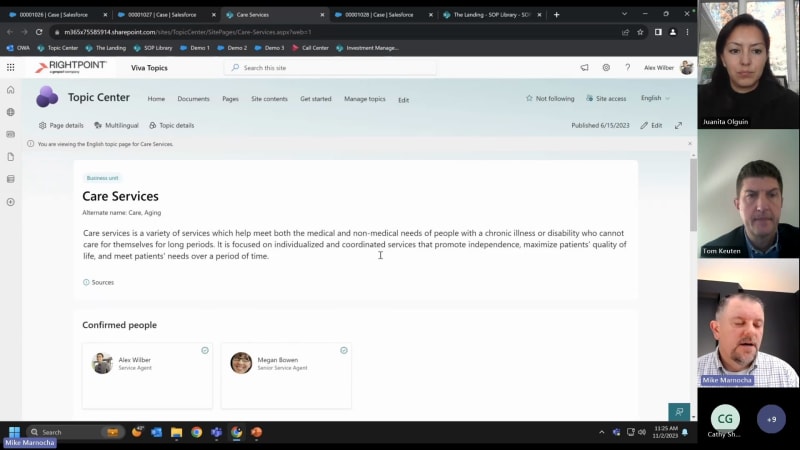
And good morning, everybody. It's my pleasure to welcome everybody to this joint webinar that's presented by Rightpoint and Coveo. We're all here to really learn about increasing productivity and efficiency with enterprise search and knowledge AI. My name is Tom Keuten. I'm a Senior Vice President. In our employee experience group here at Rightpoint, and I'll be the moderator for today's webinar. In just a few minutes, I'm going to hand it over to our speakers but before we get started, we are gonna have a a few housekeeping notes. First and foremost, thank you for attending today's webinar. We know your time is valuable. And, we think that's over to provide some valuable content today. In order to make sure that it's a really good experience for everybody, not only presenters, but also your fellow attendees. Please stay on mute while our presenters are presenting. And, if you'd like to be on camera, you're more than welcome. If you stay off camera, that's also fine too. We are gonna be recording. So just please be aware of that today. As you get into the session and you have questions, please feel free to drop them into the chat. I'll be watching for them. And if I've got the opportunity to pause our speakers and address the context, or address the question in context than I will. Otherwise, we'll make sure that we cover them at the end. If you'd like to, use the react button to do a thumbs up or add comments, as you see some of the interesting demos that you're about to see, then feel free to, to use those tools as well. Now let's go ahead and introduce our speakers. I'm excited to introduce Mike Marnocha, Mike's a long time colleague of mine here at White Point, and he currently serving as our senior director of enterprise search, knowledge management, and AI solutions. I'm also really excited to have Juanita Olguin from Coveo today. She is the senior director of product marketing and has a really unique perspective on some of the challenges Coveo solves and, some of the the, the customers that they work with as well. And so I'm excited and delighted to have them both with us. And with that, I will hand it off to Juanita. Thanks, Tom. Good morning and good afternoon to those of you joining us. For those of you not familiar with Coveo, I just wanted to share a quick high level. We've been around since 2005 solving for some of the toughest knowledge and information management challenges at some of the biggest enterprises, you would know. We've actually gone public a couple of years ago and, really are focused on helping companies take that next step in their innovation journeys. And so what I actually like to always get started with, especially because this is a knowledge management and a little bit of a workplace session today is really our view on the workplace and what we set out to do. As you can see here, hopefully, this looks a little familiar to you because what this effectively represents is, enterprises today. Right? Enterprises are a collection of departments. You have your front office, sales and marketing, brand teams, middle office, everything from, your, your, your research and development, legal work digital workplace HR and ITs, And then you have the back office, right, your your service management and support organization. And the fact of the matter is I think we all know today These are not as connected or collaborating, as flawlessly as they could be. And so where Coveo does come in. You see a lot of logos on here of the systems and applications that are actually quite specific to these departmental teams. And so we recognize that an enterprise is essentially a collection of departments, and there's an increasing need for these apartments to be able to share information, with one another, and also for employees to be able to find it along their, digital workplace or just onboarding journeys. And so Coveo really is trying to provide that one connected, intelligent digital workplace solution. I should say we are a technology company, so we really do, enjoy our partnership with Rightpoint who does a lot more of the consult consultancy. And we also recognize that every enterprise is very different. Every organization has a different tech stack, different systems that you're working with and op and operating on a daily basis. And so we're not trying to be another system to add rather we're trying to connect all of your systems and amplify them with our technology, and we try to provide, UI because we know that employees work in different places. Maybe they work on your intranet. Maybe they work in service management applications. There are various locations where people work and so We try to bring the the bring a level of flexibility to to bring power our feature packed capabilities that can work in any of your interfaces. So I'll talk a little bit more, quickly about the ways that we do that but really it's with our, Coveo platform. We provide a composable AI search and generative experience capability. And I know we're talking about workplace today, but we, you know, we're an enterprise wide solution that helps many different departments offer their different needs. If we were to take a step a step deeper or step down into the Coveo platform overall, it's a it's a little bit of a busy slide, but what I could tell you here is, you know, we're really aiming to be that intelligence layer, as I mentioned, connecting that enterprise and amplifying it with our AI So what you see at the bottom is all of the connectors and connectivity, to unify our systems. In the middle here, you see a few things, including a suite of AI models, which Mike will cover various ones of those today. You'll see our, UI and API frameworks as well as native integrations we work with, and of course, we provide reporting and analytics on the back end side. So we really try to be a a full stack, platform again, trying to amplify your various digital experiences. Happy to, you know, answer any questions along the way, but for now, I'm gonna pass it to Mike so we can dive into some real use cases scenarios. Yeah. Thanks, Juanita. So skip the slide here. At Rightpoint, we are a global experience company, and we drive growth for our clients by delivering experiences that transform how people, technology, and businesses interact. And we call this total experience. For today's session, we'll be focused on, employee experience. Specifically using enterprise search and knowledge AI so that your employees can find the information they need when they need it. So that they can be more productive and efficient in their roles. Our knowledge and AI solution is a perfect blend of enterprise search AI and knowledge management to help unlock answers and connect people with the right information. A recent Microsoft survey that you can see on this slide, confirms sixty two percent are struggling with spending too much time on search. And eighty six percent are looking for AI to help solve that. So RayPoint's knowledge AI is built on many knowledge intelligence technologies or or AI's. Document processing and classification to extract metadata out of documents, users don't have to tag everything. And we can minimize mistakes and tagging, semantic AI, extracting answers or meaning out of what the user asked for or is looking for. And, you know, that so that goes beyond just keyword matching. Enterprise search, leveraging a product like Coveo to help with finding the right information at the right time and presenting it to, the user and search results and also to, the AI to generate answers. Conversational and generative AI. So that's leveraging models like open AI from Azure to generate answers in context. Intelligent chatbots, leveraging the ability to respond to questions and teams, or other applications with intelligent information and answers. And finally, topic discovery and relationship AI, leveraging products like Microsoft DivA, topics to build a corporate Wikipedia of pages so users can explore, and discover knowledge and people related to a topic. And I'm gonna get into these in the demo, but just wanted to provide a little bit of, primer of of some of the AIs that we're going to see today. So let's take a look at the solution in action. I'm gonna walk us through four demos today, showcasing our knowledge AI solution. Demo one is generative AI answers in context. I'll switch over to the demo. Okay. So for me, the demos today, I'm gonna act as a call center agent, for, you know, like a long term care or retirement planning services company is kind of the fictitional model we have built to today. But you can take the examples and apply them to your company as anyone who's seeking information. Right? You could be as we need to mention the front office, sales rep looking for materials. Maybe it's a new employee, looking for benefit information, or a marketer trying to understand, a new service offering. Right? The takeaway is the ability to quickly get answers in context in where you work today. So in this, first demo, I'm an agent, you know, let's say I'm on the phone with a customer who has a question. Right? AI. So the question that they have is what is the next step after securing loan services for retirement planning. So I'm in Salesforce. I've created a case, for this. This is, you know, kind of the standard Salesforce case page. I've, you know, validated, you know, all the things you have to go through as an agent, their their name and phone number and address and and all those things And so I'm on the call, with with a customer. Your traditional, you know, solution knowledge base doesn't have an answer to a question. But what we have here on the right hand side is, what's called the Coveo insights panel. This insight panel provides details based, or relevant information based on the context of the case. So there's some really good information here. It's pulling information from teams, chats and conversations. It's pulling information from SharePoint. I could you know, take a quick view at the document and, you know, look at the standard operating procedure that might be relevant. But we've gone one step further and develop this enterprise search tab. The inter price search tab takes the case and the context again and runs a query against enterprise search, and it's able to generate an answer for me. Right? So instead of having to look through that eighty page, you know, standard operating procedure document, and find the answer on page, you know, fifty five Right? With the power of search and generative AI, I can get to an answer. So if you're curious, you know, what the next step is, it's, the initiation of, the customer approval form. Right? And assuming that would be relevant to the, the agent on the phone, and can, you know, coordinate that back to the the user who's called in and, you know, ultimately save time, right, instead of putting that person on hold or, you know, searching through, you know, multiple documents, you you now get the answer in in context. So really great to see that coming through. I still have search results, right, so I can dig into other documents if if that isn't quite the answer. But the the goal here is, you know, I'm working in Salesforce as an agent, and the information is coming to me, right, in the case. Right? So this is the you know, perfect example and everything, works out. We also can surface this in other app locations. Right? So kinda same use case. I'm gonna switch over to Microsoft Teams. You know, this could be your your whatever your chat technology is. If it's Slack, you know, we're we're big fans of Microsoft at right point as a enterprise partner of the year, but you know, so I so I'm in teams. Right? And in teams, I have a special app, here called Rightpoint search, developed for this demo. And again, I have the, enterprise search, tab. And if I were to put that query in, you know, the next step after securing loan services, I can also get the answer in context, here in teams. Then I still have the ability to, you know, filter this down, and do standard search query based based things, but just showing another example of the same interface, brought to where the users work. So, you know, correlating that back to, you know, your solution wherever you work, we can bring this, solution to you. So just to kind of summarize this, you know, what's happening in this demo, the agent receives the call. You know, they work in context of either teams or Salesforce, smart search, and Coveo looks for the answer to the claim question. The standard operating procedure has, the answer in it And because generative AI is able to reason over that and find the right information, we can present that answer to the agent and then ultimately to to the the customer. So that's a quick recap of demo one. And the so the feature that we, call this, right, within our knowledge AI is in app search. Right? So this is integrating knowledge AI into existing systems of engagement. So that's Microsoft Salesforce ServiceNow you know, whatever your CRM, system, Pega is is another one, for example. So so that's in app search. Demo two. We're gonna go in into finding answers in chat a little bit in GPT and show topics. So I'll switch back over to the demo. So my next demo, I'm gonna start in the same place. Right? I receive a call from a customer. They're asking about contract length. You know, what's our default contract length? You can see the insight panel doesn't have any, information on contract length, and even enterprise search isn't finding anything. Right? So this is, more real world. Right? You're not always gonna get the answers. You know, sometimes the information isn't there, and it needs to be created or you need to, collaborate with with someone. So I'm gonna go over into teams. And this time, I'm gonna switch into a teams channel. I have a knowledge AI channel here for this this demo. And, you can see some, you know, Halloween posts and, you know, there's free candy in the lunchroom, you know, back when everybody went in the office. Type of post, but, so I'm gonna look for my, an answer to this, this question, in, in in chat here. So I'm gonna as an agent, I'm gonna type in, does anybody know what the contract length is? Right? And you know, I'm I'm relying on my colleagues here in this in this situation. Maybe I'm a junior agent and there's senior agent out there who knows the answer to, to this or or where to find it. And they're gonna come in here and reply to this question. Another feature or tool that we've built in here is searching within, chat a chat extension. So we have this right point search app again here that I'm going to bring up to initiate a search And the secret sauce here is that the senior agent knows that, you know, kind of the technical jargon for the contract length is the default term. Right? And so because the the query didn't match that, it didn't it didn't pull up an answer, but I know as a senior agent that there's an FAQ page, I can find that using the right point, search app that could be integrated with, Coveo or or other systems. And I'm able to send this to, the junior agent and provide them an answer. So now that I have this answer, we are indexing this, and so this can be brought into our knowledge base as a future answer. And what we've done, in addition to this is, you know, there there could be good answers. There could be bad answers. Right? You know, so how do you trust this or how does the AI trust it? How do you, you know, as a user learn to trust that it's providing the right answers? So a concept that we have here is the ability to send it to the knowledge hub. Right? So, you know, maybe this is only available to certain users, or it has to go through a form, you know, for user, someone, to validate that this is a a known answer. So if I click send a knowledge hub, this is gonna give me a form to fill out, right, about, okay, what department are you in? I'm in the call center. This was on, a claim, and, you know, this is about contract. Length. So with this information, I can go ahead and submit this and that's going to be then reviewed for, you know, making it a formal piece of knowledge, right, and whatever that means you know, to your company in your system, we can figure that out. But now this could be used, in future answers, and the AI could could just give the the next user the answer. So we're kind of building on, you know, the cycle of interacting with people and pulling out the knowledge. Right? So that the next time, you know, someone doesn't have to put the user on hold while they go research, the answer. And so you you build up your knowledge, through this information. Another example, you know, let's say I was able to answer that question in, for the user. And they had another follow-up question about, you know, what's, you know, changing their password. Right? So I'm gonna put in a question here. What's the new application we're using when the customer password isn't working? And AI is gonna answer that for us. Right? So what we have here is what we are calling a passive chatbot. Right? You know, normal chat bots, you type in the box and it's always gonna answer you. It's gonna try to answer you. It's gonna force you into a path. We have more of a passive model here, and, you know, obviously, this could be customized to your situation. But the passive bot is essentially looking at the question and doing a search, and and maybe trying to generate an answer and figure out, is that a high enough relevancy score to provide value to the user. If it isn't, it's going to, you know, not respond. But if it does have an answer and it's a above a certain threshold, that it thinks it's gonna provide value, then it can respond to the answer. Right? So, another piece of the technology that we have here is this is using enterprise search on the back end and generative AI to, find information and generate answers. So again, this doesn't have to be through a interface. It can be through a chat. It can be, through through different applications. So one more, last scenario in here, you know, I mentioned it could be through a, a chat application. We have a GPT, you know, instance here within teams, again, within our right point search tab, we have the search app that I showed previously, and now I have AI chat. And so I can ask it, you know, standard questions, like, what is SAR? You know, apologize if if you're not, in in the industry here, but CFR apart, you know, ten twenty five is a is a knowledge piece of knowledge that we provided to it. So, it can, you know, generate an answer based off that as well. Right? And with the power of this chat GPT type interface, you can ask follow-up questions like how long do I have the file one? You see it has citations here. Right? So I can open up the document, and it can provide answers in in context. Another scenario in, in the knowledge base is, you know, maybe as an employee, I wanna know, about my health health care provider, you know, the plan benefits, and I'm choosing between maybe a standard plan and a plus plan, you know, what's included, and those types of things. So, again, chat, GPT, and the the Azure OpenAI large language model is going to, examine the policy information and determine that the plus offer offer coverage, has additional coverages, you know, and and a wider range of prescription drug coverage. For example. Right? So again, you know, there's many different use cases that could apply, here, but you, you get the exam example, and and maybe you've seen these these before, but again, we're trying to bring these tools to to the user. Continuing on this demo one more time, you know, it doesn't have to be this enterprise search doesn't have to be specific to the case. Right? Again, the user could use this for other, information. Maybe they ask about care services and wanna find information about that, you know, they can switch the context and ask a new query and see the information. In this case, it's found a SharePoint topic page on care services. So this is one, another AI that I mentioned, at the beginning. Viva topics is a is a Microsoft product. It's integrated into, SharePoint three sixty five online. And essentially what it does is you kinda let it let it go and scan all of the information in your you know, SharePoint ecosystem, and it comes up with topics. Right? It sees repeatedly that there's a number of documents about care services. There's a number of documents about aging, and it creates topic pages, essentially like a Wikipedia page. For that, automatically generated from AI. And it can, determine who are the most relevant people in your organization based on that information, you know, who who's been creating those documents about it, and who might have the knowledge, or information about it, it can track, you know, what files are most relevant to this topic. It can track, what, what, websites internally are relevant to this. So you can go find information, and then it can create a topic map of related topics that might be relevant so that you can, drill into aging or other, other topics. Right? So something like this reduces the bird burden on your your corporate, you know, IT or HR or, information services teams to create all of these pages, right, in the goal or the end result is you're able to connect people to information, more quickly. Right? So I could do a whole another demo on this, but just skimming the surface right now. This is Viva topics. And we've integrated it into our search so that, users can find and get answers about, contacts, you know, maybe in this to close out the demo. I'm still on the phone with this customer and they have, information. I may, you know, start a a private chat with a user. Or bring up one of the information, packets and send it to them, via email so that they can, get more information. So That was a long one. I'm gonna recap it, and then I'll pause for questions too. So what's happening in this one? There was a number of use cases, but the main use case was an agent receives a call. They work again in context of teams, in Salesforce. We have intelligent search looking for answers to the question. We couldn't find anything. So we escalated it to a senior agent to help us. The senior agent uses search to find the answer, provides it to the junior agent and ultimately to the customer. And then we have the ability to harvest that knowledge into the knowledge hub for future, queries. And the features here, we have intelligent chat, is a is a part of our knowledge AI and search. And we've we've shown that, you know, through the the chat interface and the GPT, as well as a knowledge feedback loop. So this is the ability to take that knowledge that was shared, and provide that back as well as integrating into topics pages. So I've been talking for a while. Tom, I haven't been monitoring the chatter. Are there any questions that I can answer, or anyone have a question for me so far? We did have a question in the chat that, Juanita was able to address about the different types of connections that Coveo has to other systems. One thing that I was thinking about was, as much as I'd love to see, white point branded throughout all of our clients, ecosystems. You showed white point search and you showed the white point knowledge hub. Those have to be branded right point or would they be branded as, the company's, individual brands? Yeah. Great question, Tom. So that's totally customizable. Right? For this demo, we we put the right point brand on it. Many many customers have a personality for their intranet, and, you know, could follow suit with that, to, you know, an intelligent chatbot So sometimes it's named after a founder or, you know, a catch phrase within the company. We've seen a number of different, creative ideas there. But giving it, you know, some sort of meaning, and easy to understand that, hey, this is where I go for knowledge. And and, you know, can ask questions. So that that can be customized for sure. If I could make a comment to Mike, I just wanna say, like, you're you have, like, a holistic view of people process and technology here all within these demo scenarios, which I think is pretty cool. I'm curious if those on the on the call wanna answer, and maybe your perspective too, Mike. Is there any sort of knowledge management do you all follow or promote like KCS or others? Yeah. That's a good question. At Rightpoint, with our total experience approach, we do have, a number of different practitioners in in many areas from, user experience design, visual design, content, knowledge management and strategy. Right? So within those practices, they they can help on that. Right? And and that's very important as a building block for, you know, a knowledge based solution. Right? The old phrase is garbage in garbage out. Right? So it's very important to have a good foundation of knowledge management and organization search can, you know, be the starting point to, see how close you can get, and then refine those things on the back end. But to answer your question, we don't necessarily have a preferred methodology, but, you know, can can work within, different different models or recommend a model, if you're looking wrong. Alright. We're, We have about fifteen minutes left. So I'm gonna suggest that we move to the next demo and, everybody, please feel free to continue to use the chat. Sounds good. Next demo is pretty quick, but it's, answers and calls, and I'll explain that what what that means on the demo. So I'm gonna pop back over into the next one. So again, you know, same setup. Right? I'm on on the call with a customer, and they're asking about a a monthly bill increase on their long term care agreements. Insights has identified that there's maybe a call, a previous call, you know, this is kinda goes into the, what can you record and use in future conversations, that whole topic. But, we've recorded a call transcript and, index that in the system. And because of that, the question when I feed it to enterprise search is able to read that transcript and come with an answer. Right? So in this case, a customer bill can be impacted by a luxury tax and that luxury tax increase can increase the monthly bill for long term long term care agreement. There is a note that it's a one time increase and, you know, more details you can see the customer agreement. So Again, just another way to think about how you can, use knowledge AI and search across different types of, different media. Right? It doesn't have to be documents, and chat. It could be calls. And I can, deep link into this and see the, the recording of the call and, you know, playback, the full conversation if I wanted to get more context So that is answers and calls, kind of a quick one. Next up is content extraction. Right? So one of the AIs that I mentioned was, document intelligence and content extraction. So for that, and and this also ties into kind of the knowledge management side of things, we have enabled here on a, Microsoft SharePoint site, a product called Microsoft syntax, and that is a document intelligence AI built into SharePoint to help extract information. What it's doing here is I have a number of standard operating procedures. You know, again, these are those eighty page documents that have lots of information. And we wanna track or pull out information, you know, that of them has a tracking ID, a process area, a start date, revision date, retention date, classification date, like all this metadata. That is stuck in the document. And, you know, down the road, we wanna use that for search. Right? What if I wanted to search? And, you know, only filter down to a specific process area and show me everything after vision date. If we didn't have this metadata, it wouldn't be possible. Right? And, you know, traditionally, what you would do is, okay, well, the users have to tag the content. So, you know, and that becomes error prone to mistakes. Users don't like to do it. So what this technology is doing is essentially auto classifying and extracting that metadata and applying the tags so that in turn makes search more powerful. I'm gonna click on the classify and extract here and look at the model that we've trained on this. Each each, you know, type of document can have a model to, classify it, and you essentially train the model on example files, you know, in in the, you know, just a couple years ago, this may have taken hundreds of documents to train. But in this case, it only, it can train on a handful of documents. So I've, you know, five or ten different documents here. You can see when I click on, a piece of metadata, it finds it in the document, and you can, kinda scan through the different documents and see, okay, it's picking up, the information, and this document doesn't match. So this is like a negative case, right, where it doesn't match the metadata. But as you continue down, it it does. Right? So you essentially train it with these extractors to extract this information, and it can pull that information back into your library. So the next file that I upload, with this information in it, it'll pull that up. So kind of a neat technology. There's there's more to it than that, and it can do contracts and invoices and, all kinds, all kinds of documents, or you can train it. So That's another, use of A hat. So to wrap it up, we demonstrated six different AI knowledge, technologies in our solution and and we call this knowledge AI, right, including our great relevancy partner, Coveo today. The goal is to provide answers, not just search links and to optimize the experience for users to make it easy to access and discover your knowledge. I challenge everyone on the call to to think about where your users spend most of the time. You know, is it in teams? Is is it in a CRM? Is it in SharePoint ServiceNow, our solution is designed to plug into different systems where you work, and with the power of Kaveo can index content in different platforms and bring that knowledge to you. And generative AI is icing on the cake or whipped cream on that pumpkin spice latte if you wanna go with the Halloween fall theme analogy. But so thank you for joining us today, and and we'll open it for any, other Q and A. Awesome. Thanks, Juanita. Thanks, Mike. That that was fantastic. Everybody that is on, you know, feel free to drop additional questions in the chat. We have one to start with, and, I I think I'll open it up to either one of you And question is around the various deployment models for your search engine. Can you talk a little bit about, how we think about deployments and, can keep if we don't need to your question, please feel free to clarify. Yeah. I could take that one. So, the one thing that I love about Coveo is it is a fully, you know, SaaS based solution. Right? So, when we look at deployment, it makes it very easy. The deployment the search engine itself is already in the cloud. Right? And, you know, you swipe the credit card and can get it going, is is one of the models, that you can you can set it up. But it does have, you know, obviously there's on prem applications and and different, you know, hurdles with that. But they have a number of strategies, for that. They have an on premise crawler that can be installed. That connects to the cloud and, you know, do they do a great job with handling security, to keep that you know, easy to deploy as well as, you, you know, you don't have to worry about the maintenance of, you know, servers and things like that. You know, if there's a specific, use case where, you know, that may work or not work, you know, we can certainly talk talk about alternatives, but that's where I would start is, you know, setting up for a headless, you know, type of, interface where you can, you know, build the UI and consume that search interface, anywhere, you need to. Sorry. I think I dropped for a little bit. Nothing to add there. I think you covered that well, Mike. So thank you. But yeah, I agree. A lot of a lot of the customers we're speaking with as well are are considering more of that headless approach as well. That's just a lot more, you know, modern and flexible. Yeah. Alright. If you'd like to hear more about deployment, feel free to drop an additional question in the chat Sunday. There was Oh, yeah. So with this, multi tenant, SaaS based model, how do ensure that our data is safe unsecure. Yeah. That's a good question. So from a, instant standpoint, alright, you have an isolated, dedicated instance, or do you get a, production and non production and can date get multiple, you know, non production instances if you if you need have the need for that. But your data is, you know, secured in the cloud, and I know Coveo has several, certifications and, you know, can provide more detail on that. Happy to dive dive deeper, but yep. Yeah. I could add we we were at the twenty seven and one GDPR, HIPAA compliant, all of those. So, and I know for some industries, There's more caution with cloud, than others. And so, what I would say is we have pharma customers that are, you know, on our cloud, and I think one of the key benefits is that we're rolling up rolling out updates in real time, you're getting access to the latest innovation. So you don't have to worry about version updates or any of that. Right? You're getting you know, eleven different AI models, including generative answering out of the box available for your, private enterprise. Directly. So, yeah, I'm happy to talk more about that, but, I think we we see a change in in landscape and customers that maybe weren't you know, cloud forward before being a little bit more open to it because it brings a lot of benefits as well. I saw another question from, Jodi about, in terms of GenAI service, do we need to use Coveo provided Genai, or do we have the ability to use other providers? So I brought back to this, Coveo platform slide. Let's see if I can zoom in here a little bit. Yeah, there we go. So Coveo's model is a plug and play, with large language models. I think the first adoption is, Azure Open AI as as the model, but there is plans to support others in addition in the right point solution, we have, different ways of plugging in other Gen AI models, depending on the use case. So there's there's flexibility there for sure. Oh, do you have any fintech customers right now? And you had a question for Rightpoint or Coveo? Oh, yes. That's for both of us. From both of us. You know? Are we saying yes to that? Yes. Yes. And maybe if I could add, they levered us in all manner of use cases, some more on the agent or port site, some more on, like, the website, you know, dot com area, some, and as part of the, like, middle layer with brokers and such. So interfaces where they're communicating with between brokers. So all all manner of different types of use cases. And you are search engines, PC compliant? That I might need to come I might need to come back to you on. I'll take an action there. That we follow. In terms of your various use cases, is there I I know you guys, spoke about a few Microsoft's, applications. Anything around that worked on within supply chain and customer service modules or PSA. Which is their implementation, project operations as it was called previously. Just curious if you had any Nothing that comes to mind. I could do a little more research, within the Rightpoint organization. We are also owned by a parent company called Genpact, which has, larger supply chain and outsourcing kind of technologies. So we can we can dive into that deeper to, see if there's a a match there. Yeah. It would be good to hear more of what you're thinking, Chelsea, because we're also hearing supply chain come up a lot more, which is an interesting area. I don't know that Coveo, has covered that extensively yet. We do have logistics customers that I can look into to see how they use us if that's helpful. But it'd be it'd be interesting to hear, like, what sort of, like, you know, use cases or needs you're you're seeing there. Yeah. No. I I think I'll I'll schedule a follow-up with you guys, and then we can just, touch on some of this. I think there was another spot that I wanted to just run by, hopefully, outcome. No worries. No problem. Nobody else have a final question with, just a little over a minute left. Juanita, you talked a little bit about, the front office, the middle office and the back office. Most of the what we described today is really kind of through the back office for employees that are trying to find answers, what about, technologies for customers with similar similar sub supply? Yeah. Are you asking more on the the front end side, sorry, instead of the buckle? I am. Yeah. Yeah. Yeah. Yeah. Okay. Yeah. I would say, we have a number of customers that use us on their dot com sites or as part of, like, a commerce capabilities. So if you think of, visitors coming to your your dot com sites, you wanna make sure they can find what they need. Especially if you have a commerce or transactional component and you want to offer product discovery as an example. That becomes really important. And I think those are popular use cases because they there's more of a direct impact or influence on revenues, I think. Than other areas. So, yeah, I think I covered, like, we we have a lot of workplace service or agent experience, but we we have growing number of and a large, actually, customer base that uses us on their, you know, dot com and commerce side. And so lots of customers using us to amplify site core, to amplify Adobe and other CMS systems. If anyone here, you know, is familiar with those systems, which I'm sure you are. What kind of use cases with Adobe at a high level? Yeah. So I would say on the Adobe side, I think a very big and I was gonna ask you this Joti. A big keyword there is content supply chain, right? So focusing on helping creators, you know, build and publish content But what about the search and discovery? And I think oftentimes, teams end up having to curate a bunch of pages, and so this is power of search and AI is, you know, you you can publish once and surface anywhere. And so on the Adobe side, it's, again, mostly used to amplify or use AI to surface content on your websites. Some people use Adobe as an Internet as an example, so would be, again, using surgeon AI and discovery and recommendations models internally. But really I think main ones are around content findability or product findability on your sites and trying to get people down that, you know, buyer journey in a more scalable manner than having to, like, touring a bunch of sites. Oh, okay. Interesting. And that's actually I mean, we're in the b to b and also getting into b to c, gift card. Areas. And so the content part with some of the partners that we work with a big aspect of it. So, okay. Good. So that's that's good too. That's interesting. And and sorry, guys. I I just remembered. So my other just a thought, like, what's your point of view on this with Microsoft co pilot coming up? And how they're trying to also mobilize a lot of AI related capabilities embedded within each one of the applications, you know, be it sort of like the office apps or any other. How do you see this all of this competing stuff that, you know, everyone's got some aspect of AI, built getting built into the system, which is great. Right? That's what we wanna see. But I'm just trying to kind of put my head around. How do I think of that in the future? Like how where to invest? Is it like an overkill when you go with multiple, kind of, like, I'm gonna call it pantries within a house, or or is it be separated? Yeah. I I think there's a great value in Copilot, and and we're very excited about it and have been in, some private previews, with customers And, I I would say the top level viewpoint on it is co pilot is, you know, very good at specific things, but it's it's not very customizable. Right? It's, you know, because designed to kinda just meet everybody's needs, like, Here's word. Here's PowerPoint. You get it. If you like it, that's great. Right? There is some extensibility, and it obviously uses your corporate data, and it's it's evolving over time. But, it it may not be specifically suited best for, you know, certain, you know, scenarios, right, where you need very specific, prompt guidance and, customization to make it relevant to the your exact use cases. And, you know, certainly it's it's, very Microsoft friendly, but if you wanted to try and put it in, you know, ServiceNow and Salesforce and other applications, right, that's that's gonna be a little bit more difficult. So, I think it comes down to your use cases and you know, pricing model is is big too. Right? Whether you want to, you know, pay per user per month, honestly, and like that versus build something and, you know, get value out of it over time. So there's a lot of things to consider. But, you know, I I think it definitely has some overlap and you know, with the the way things are moving so rapidly, you have to, you know, take it all into consideration and see what's best for you and continue to use the best, you know, that's out there. Yeah. No. Great. Thank you for that. Yeah. That's helpful. Yeah. There's there's just the questions. Is obviously a very rich topic. It's a hot topic. It's a lot of, it's something that a lot of people are talking about and serious about and we covered this, technology is just in this session alone. And, there's a lot to think about coming out of this. If you'd like to continue the discussion, like, then why need to have left their contact in information up here. So please feel free to reach out. We'd love to continue the discussion kind of understanding more deeply some of the rescases that you have in your trunk to tackle. And, we'd love to help out however we can. Thank you, everybody, for, attending today. For taking the to be with us. Thanks again. I need to invite for the valuable perspective. And, have a wonderful rest of your day. Thanks, everyone. Thank

Increase Productivity & Efficiency With Enterprise Search & Knowledge AI
How often have you tried to find critical information to answer questions from a client or customer? Then, after searching for minutes (or even hours,) inevitability you give up?
The ability to find the right information at the right time, while in the flow of work, is more critical than ever before.
During this on-demand webinar, Rightpoint and Coveo provide a live demo and show how using AI can help you deliver a connected experience to:
- Drive productivity
- Increase customer satisfaction
- Reduce handle time
- Provide faster onboarding
- Harvest Microsoft Teams conversations
- Leverage Chatbots
- Generate answers from various sources
- Integrate Microsoft Syntex and Viva Topics
- Increase document and content intelligence


Make every experience relevant with Coveo
