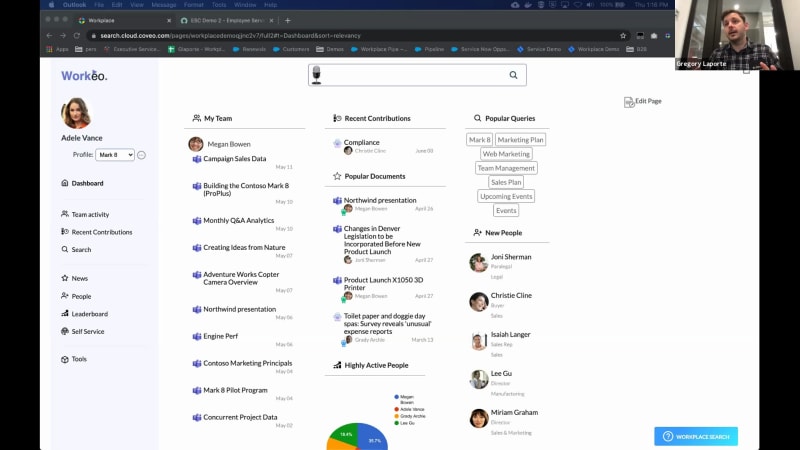
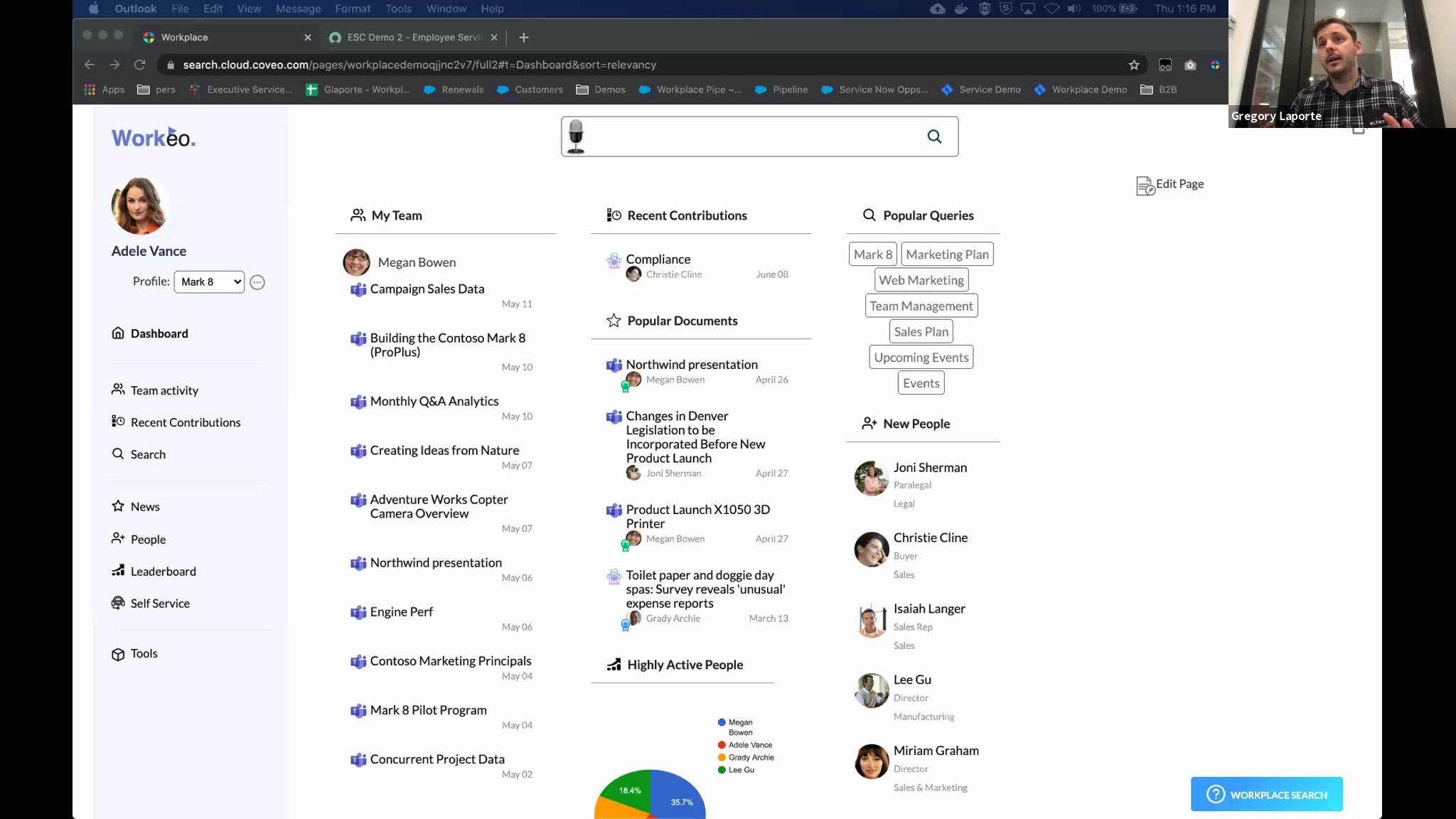
Alright. Hi, everyone. We'll just start in a few seconds. I'll just give, everyone some time to join and we'll be ready to start, very shortly. Alright, I see a few have joined. So I'll just start slowly with our housekeeping, while we have some more people joining. So hi again, everyone. Thank you for joining our demo webinar, Coveo Search and AI for Employee Experiences. My name is Clara Blanger and I work on the marketing team here at Coveo, and I'm really excited to be a part of today's session. I'm also thrilled to introduce our speakers for today. We have Sami Helen and Craig Laporte. Sami is global account director here at Coveo, and Craig is director of product, management at Coveo as well. I have a couple of housekeeping items to cover quickly before we get started. First, everyone is in listen only mode, but we really do want to hear from you during today's presentation, and we'll be answering questions as we go during the presentation. So please remember to ask your questions in the q and a panel, and, we'll be able to get to it to to them during this session, today. The webinar is also being recorded, and we'll make sure to send you the recording within twenty four hours after the conclusion of the event. And, I see more of you joined, so, if you just joined, welcome to our webinar, Coveo Search and AI for Employee Experiences. And now we'll get started. First, we wanted to start with a a very small poll to see, actually, two things we want to ask you. The first one is we we'd like to know what your current Internet platform is. This will really help us make sure that the content that we presented here today will be relevant to you. And then we wanted to know what your, what are your priorities for workplace development. So you have multiple choices here, so please take some time to answer the questions. And as I said, we'll, we'll try to make sure that the content is relevant to your answers, today. So, for the current insurance platform, we put some choices. You have Microsoft SharePoint, Salesforce community, experience cloud, ServiceNow, or other. Feel free to, comment if you answered other what you're using. And then second, what are your priorities for workplace development? You can choose multiple. Currently, I see that, findability of information across multiple systems is pretty popular. So I'll just give a few seconds, and then I'll be able to show the results. Alright. Ending the polls. I can share the results. There you go. So we can see, some Microsoft SharePoint users, some others, and then find the findability of information is definitely, something that is a priority for you. So I'll stop sharing, and then I'll hand it over to Sami for, his portion of the webinar. Great. Thank you very much, Clara. So, with regards from, from, Sunny or a little bit cloudy England, We have a straightforward agenda. We have a quick look at employee challenges in today's workplace. Then, we'll go through the basics of Covia Relevance platform for workplace, and then we'll move to demonstrations. So as Clara said, if you have any questions, please drop those to the chat and we'll try to to cover them as quickly as possible because if you are thinking about a question, there's a high chance another attendee is also thinking about the same thing. So so first of all, what's happening in the, modern workplace? Technology is, of course, a friend. It's a good thing. It helps us to be more productive, get more done, etcetera etcetera. The challenge is, though, that when there's too many point solutions, it becomes, you know, a burden as well, and it gets more difficult to to do your jobs. And particularly, it gets much more difficult to find information. And there's been a couple of recent studies that that summarize that twenty five percent of average office workers' time is spent on finding information, searching information. So so that's quite significant, loss of productivity, which obviously is is not great for employee engagement and, satisfaction. So the more, larger the organization, the more systems you're likely to have, more departments, more silos, and also the data quality in different systems is is not the same. So it's real challenge to find information if you the the relevant information happens to be actually multiple systems and multiple locations. So there's lots and lots of problems there. So that's where we come in as Kobiros. So Kobi mission is to drive relevant digital experiences that drive employee and customer satisfaction and productivity while reducing costs. So we're leveraging artificial intelligence and machine learning heavily there, as many other digital leaders. And the core capabilities we provide are search, recommendation, and personalization. And and these are the leaders like Amazon, Uber, and Netflix have really pioneered using, lots and lots of data scientists and AI to to provide transforming experiences, which is why they have been successful. And our mission is to help you, get those capabilities as well. And the four key use cases where we drive value are websites, ecommerce service, and workplace. Today, we are, of course, focused on workplace and employee productivity. So what does this mean in kind of plain English at the workplace? It's really, let's enable the employee find the right information when they need it. So irrespective in which systems they are, whether they know where the information resides or whether the information happens to be in multiple places that that needs to be collated in into into this user to to satisfy the information need and requirement. So let's make it real easy. Let's look at it from a user perspective. So here are some of the core things that we have learned throughout hundreds of projects, what are kind of the best practices. So number one is, it's very important to be able to provide one search experience for all employees irrespective of the systems we are. Second thing, over time, your information will change, your users will change, which means that it's very important to have a good analytics so that track the behavior so that you can learn continuously and drive continuous improvement. AI will also then learn from user behavior and start providing predictive recommendations, which is really helpful, because, again, the the the wisdom of the masses will be learned by machine learning and the AI again start being proactive and provide the relevant information, just before people need it. And so these these are some of the core principles. So when we start working with a with a, new new company, we try to figure out where they are in in the relevance journey. And for the discussion, we have built this relevance maturity matrix. And, typically, companies start from the bottom left hand corner about being reactive. If your employee goes to the right place, ask the right question, they find information. Next level of maturity is to be responsive, provide rich answers. One after that, to be proactive, provide suggestions. One after that is to be predictive. So here, a little pause here. I'd like to ask each one, of you, are you a Netflix customer? You don't have to answer on chat, but just have a think about it. No. I have to say I am. And the interesting thing is that seventy percent of the content consumption of Netflix is driven by the AI predicted content rather than people going to search things. Now apply that to your workplace. Wouldn't it be nice to provide relevant information to your individual users before they need it? That That would be good. So in plain English, what we help companies do is move from providing answers to suggestions to recommendations. So in practice, how do we achieve that? Step one, in a COVID implementation, we index all of the information in all of the key systems. We have native connectors to most popular enterprise applications like Salesforce, ServiceNow, SharePoint, even external systems like YouTube. We build single index of metadata, which enables us to provide single search across all of the information. Secondly, we look at the user. What have they done in the past? But more importantly, what are they doing right now? So which pages are they viewing? What searches are they executing? Which PDFs are they downloading? And then we can really figure out what they need now and a can can predict what they're likely to do next. Then we can combine that with your business logic. So let's say that you want to promote your newest innovations or announcements or high margin products, on top of the the, portals or search results. And then finally, we push everything to the right hand side to machine learning, which then will provide more personalized relevant experiences and information to find things, to learn things, to to fix things. Here are some of the examples of some other world class companies, what they have achieved with with our capabilities. So Honeywell, for example, improved sixty seven percent their internal case deflection, so massive saving for for their support desk at the same time providing users answers much quicker twenty four seven. UW Health reduced their content gap. So searches that were done that resulted into no no, no information being returned. So they had a content gap which we helped uncover. If we drill further into the into the Dell example, again, Dell, big complex global company, they had a low employee satisfaction, twenty three percent for for their intranet because they had fifty systems, and it was difficult to find information. They overlaid Kovea on top of that, enabled single search experience across everything, and the employee satisfaction went up from twenty three percent to sixty percent in twelve months. So huge boost to productivity, employee satisfaction, engagement, innovation, etcetera. Lastly, if you haven't heard about Covio before, here are some hard facts and, what industry analysts are saying about Covio. So we have done over fifteen hundred custom deployments. Gartner has ranked us as a leader in the Magic Quadrant for Insight engines, and Forrester ranked us as a leader in the cognitive search wave report and strong perform in journey of a stress wave. And we're the only company in the world that's ranked in all of these three reports because we really look at end to end digital journeys from a user perspective. We have lots of global customers like Dell, Pfizer, Salesforce, Dow, and DuPont, etcetera. And on the right hand side, we we can say that we are really humbled that over the past three years, we have received over three hundred million dollars of investment, which is fueling our r and d. So what does that mean in practice again? Last year twenty twenty, we added over one thousand six hundred improvements onto our, multitenant SaaS platform. So and because all of our customers are on the latest version all the time, we can really drive innovations very quickly to our customers. And lastly, we have a good ecosystem of, Scorpio certified partners starting from the big ones like Accenture, Deloitte Wipro, to then more regional, boutique partners as well. So I'm gonna pause here. Before we move to the demonstration, are there any questions? If not, I'll hand over to Greg, for the demonstration. Over to you, Greg. Thanks, Sammy. And thanks for answering the poll. Because of that, I wanna start by showing you, the breadth of connectivity. So let me just share my screen here. So, Sami, can you, can you see my screen? Yeah. We're good. So, the first thing I wanted to to talk about because it's seemed to be such an important, aspect in the poll is how Coveo connects to all of your content source. And this is where everything starts. You need to create your Covid-nineteen index of all the relevant content your employee might be looking for. And, our experience shows that this content don't sit all in one place. It doesn't sit all in SharePoint. Yes. There's a big bulk of content in SharePoint, but there's content in Confluence. There's content in some file shares. There's content, in Google Drive. We're seeing this, across the board. And as you can see, we have, native connectors to most of those systems. And for those, for which we don't have a native connector, we have a Jiraq REST API. We have site map connectors. So, typically, we are able to connect to any system, you would like. If you wanna learn more about this, you can look at our documentation. There's a lot of systems and all the recipe on how to connect to it. So, so yeah. So the first step is building your index, indexing all of this content, making sure that everything is available from one place. And once you do that, you can build your, own user interface. So I'll give you an example here. This is a a totally homegrown, custom built, intranet with Kaveo. You can obviously integrate this into SharePoint if you want. You can integrate this into ServiceNow, salesforce work dot com. Any system that you're using to power your employee experience, you can integrate, Kaleo pretty easily. So as you can see here Can I interrupt you? We have a question. Oh. How does your product handle tables within documents? Can it recognize key value pairs? As you probably can tell. So there's a way to do that with, with, web scraping. So if you're indexing, if if you're indexing content like, like a website, you would be able to map, key value pairs to metadata in Coveo. There's there's multiple ways to do that. We also have indexing pipeline extensions. Those are our Python script that you can run on the content before it gets into the index. But there's a lot of flexibility on that front, to be able to extract, the metadata that you would like. So, hopefully, that answers. If not, feel free to to ask a follow-up question. And thanks for thanks for asking. Thanks for having them, come up. We have a follow-up. Was this, interface interface automatically generated by Coveo? So, this one, yes. So that that's the so let me just talk a bit about about this interface. I think this is gonna this is gonna help understand. So this is, this is a a a could be a search page that we tweaked using our machine learning. So in this case, we're recommending content, using different type of attributes. So so here, you can see content from your team. You can see, popular document based on the number of clicks, etcetera. You can see the new people coming from, your company. So all of these are small search widgets, if you will. Some of them can be powered by pure, queries, and and configuration, and others can be powered by machine learning and personalization. As you can see, like, things like your team, things like the popular documents, etcetera. You can also see here the the popular queries. So these are also based on, on the the data that we're capturing, what people are searching for, and what are they successful with. So so I hope this answers your question. If not, feel free to ask a follow-up. But, yes, what you're seeing here is an example of what can be done. And in this example where it it's hosted directly on Caveo, so that's a possibility. We call it, our own search page service system. But you can, again, use any of those components and integrate them wherever you want. So here, Adele Vance is is working, in in marketing, and she's working on this Barca project. So if I go ahead and I search for Margate, then I can actually have a rich search experience. As you can see, it's very quick. The result got back in in less than ten milliseconds. And the reason why things are so fast is because we're indexing this content ahead of time. So what I showed you earlier, all these connectors are fetching all of this content, fetching the permissions as well, so who has access to what. And then all of this content, becomes searchable and available for, all of our search and recommendation widgets. So as you can see here, I have facets on the left. So these facets are powered by all the metadata that we're indexing. So we're not only indexing title and and and, description. We're we're indexing all the metadata. We're indexing all the body of the documents, and we can use that, to generate those facets on the left hand side. So if I wanna see, for instance, only content from Google Drive, I can do that without a problem. Again, similarly, you can use, tabs to filter certain type of content. And all of this experience, can be, can be tailored. So it can be personalized based on, based on my department, based on, what I who I interact with the most, etcetera. So all of those things, can be done, with with Kubero AI. So, again, all of all of this interface can be, can be configured, the way the way you'd like. Another, interesting aspect is, as I said, this can be integrated, in this example, within ServiceNow. We also one use case we're seeing a lot is chatbots. It's getting increasingly popular. So for instance here, we're integrated in, the ServiceNow chatbot, but it could be any type. It could be a Google chatbot. It could be a Salesforce Einstein bot, any type of bot because all of this is API driven, and it can can be used and leveraged by, by any chatbot. So here, one thing that we're hearing a lot, is, customers asking us well, we have this chatbot. We started working on this, but it's a lot of work. We have to, think about all utterances of of sentences, and we have to understand what are the top drivers, what is leading people to create tickets, etcetera. So, where Coveo comes into play is for everything else, because the reality is maintaining a tree of different options and in a chatbot is usually not reasonable or not possible, based on the resource that that you have. So what we do is we say, well, for every other questions, think of, Adele is wanting to, get a tuition reimbursement. So she wants to know if there's a policy for that in the company, etcetera. So she wants to ask the chatbot. But, obviously, if you go here, there's nothing that talks about, tuition reimbursement. So she's gonna go ahead and click on something else. And, basically, that's where Coveo kicks in. You can ask Coveo any question, and, Coveo will will do its best to find, the the best document to answer your questions. So here, she typed, I would like to do an MBA. Can I get my tuition reimbursed? So she's talking a sentence in natural language. And, basically, what Coveo does is, using machine learning, AI, etcetera, we're extracting the most important keywords to recommend the best results. And they'll those can be rich, rich results like YouTube videos, or they can be Confluence document. It could be knowledge articles. All of this content, can be pulled and the most relevant will always be, on top of the result list. And something that's coming, also, in q three is being able to extract answers. So not only recommend content, but also find, the snippet in the document that really answers the question so that it's even more conversational. Another point of, interest that we're noticing is, as as Sammy said earlier, there's a lot of different systems that employees spend time on today. So as we thought that everything would converge to one, it's quite the opposite. So people work in Confluence. They will work in Google Drive. They will work in SharePoint. So there's all these different places, and, we thought of a way of, finding, employees where they are. And for that, we built a Chrome extension, that can be deployed to all of your employee and that will display Coveo on different system of your liking. So if you're saying, well, I wanna display it on Confluence, I wanna display it on SharePoint. So that you respect your employees' privacy. When they're not on your properties, they don't see it. But on on your own company's property, they will see a widget here, like this one that's workplace search. So as I'm managing tasks in Jira, I can quickly click on on this widget. And the first thing you're seeing is recommended content. So based on the fact that, I'm on Jira, we know that you're on on Jira and people, and Jira usually click on those those results. We can, automatically recommend content. And if I go ahead and I search again for Barca eight, I can do a quick search here and and be, and find the information. So this is very handy, and this really helps you, meet your employees where they are and where they work. So really helping productivity instead of context switching, trying to find, okay, which system is this document that I'm looking for. They can stay right where they are and really find this document to open it. Taking a pause here. I don't see oh, I'm seeing just another question just popped up. Yeah. Can you search across multiple indexes? So, so you mean having multiple really multiple indexes versus multiple sources? And, I guess, I don't know. Clark, can you unmute maybe the the person so that we can ask follow-up? Okay. So multiple indexes. Usually, we, usually, we don't do that. We prefer to build one big index. If, if I would like to understand the use case a bit better. This is, this is something we used to do in the past, but we've, we've prefer to have one big index. And, basically, we we scale. Since we're in the cloud, it scales to, millions of documents. So, but I'm happy to take this one as a follow-up. Can I just make a comment? So, typically, we end up doing a single index for everything, but then we have capability to to apply different sets of rules for different regions, divisions, products, whatever, so that you can you can you have the editorial control to customize the experience to different audiences or regions if if necessary. If you do nothing because you don't have to do anything, then AI and machine learning will always find the most relevant, content for each individual, considering who they are, what they're doing right now. However, you know, you may say that, look, for Barca and d team, we want to to boost this type of information, for example. So, you know, it's it's it's a most common approach right now. Single index, but then different rule sets. We call them query pipelines, which are then you can have as many as you want. So I think it will probably achieve the same same objective as having multiple indexes without the problems of having multiple index indexes. Absolutely. So I'm seeing the next question. This this one is quite long, so I don't I I think I'm I'd rather read it myself, Clara. I I guess this is gonna be simpler. So what about text techniques do you use under the hood to make search smarter in terms of producing relevant ranked results? For example, I currently have several tens of thousands of document in a container on Azure. I have modified what Microsoft calls skill set and cognitive search and introduced over ML techniques into the workflow. This process works quite well and is very fast. It can be scaled to a little more documents. I've done a similar or since with Amazon with Comprehend, but one thing I don't care for with both of these processes is result output as part of a bloated JSON file. Does your product point to a location in the original text? They're obviously much easier to read. So, so there's a let's start with the first question. So how do, what are ML techniques we're using to make search, more relevant? So one of them is what we call advanced, relevance tuning Barca, automated relevance tuning. And what this does is it looks at, all your profile as a user. So all the information we have on you, what you're searching for and what you're clicking on, and what other users have been clicking on searching for a same term. So even if you search for something that, for a term that doesn't match the document, if we're if if you refine your search, end up clicking on a document, and we see this pattern over and over, we'll learn from that. Another approach, we're doing is is, as I said, the the personalization aspect. So looking at your department, looking at, all all of your context so that not only you search for this and you clicked on that, but you search for this in this certain context and you click on this document instead of this one. So this is an other type of refinement, that we're doing. When it comes to, comprehend and and and adding, embeddings to the content, this is, something you can do with our, IPE. So, it's, it's it's a process. It's a a Python script that you can run-in your content. So if you wanna enrich, the content with any type of metadata, that can be done. And, to talk about, extracting, I'm not sure I understood, the last part perfectly, but my understanding is, you would like to be able to pinpoint the location in the original text that really answers the question. This is what our smart snippets feature is is aimed at. So if the content is, is structured, it doesn't have to be, structured in a specific way, but it has to have a certain level of structure with titles and and bullets and things like that. Kaviyo can actually extract the answer that matches, the question right within the the document using both, the index and seven ML capabilities, built together. So, So, hopefully, that that helps. If you have a follow-up, feel free to ask. So I'm seeing, is Kaveo a pass only offering? Can this be deployed on prem? If so, what kind of GPU requirements needed? Unfortunately, Kaveo is cloud only, so we cannot, deploy, Koveo on premise. Having said that, there is a way to, to push content in the cloud using our, on premise crawling modules, which means that, if you don't want to if you don't want us to access content that is or access your firewall, etcetera, there's a way to select the content you want indexed and push it, to the Coveo cloud. We also have high level of certification for our cloud platform, SOC two type two, HIPAA compliance, obviously, GDPR. So, so we have a very secure cloud. And, and as Sami said, with sixteen hundred, improvements to the product every year and and growing, this number is is growing every month, we, we really think cloud is cloud is is the best way to offer our platform. Good. Back to, back to the demo here, and let me just be cognizant of time. So so, really, I I showed you, around how Kibbeo can be deployed in, in in as a user interface. So this is really the end user experience. But there's a wealth of things that you can do on the back end. So as we said, this is where you configure your sources. There are tons of advanced features. Like I I said earlier, the Python script for intelligence pipeline extension. We have query pipelines. Sami briefly touched on that. Being able to, to segment your different audiences and saying, well, depending on the departments, etcetera, I wanna I wanna select the the documents I wanna show, etcetera. I wanna have full control on the synonyms, etcetera, that, that they're using, acronyms, all of those things. This can be managed right from, our query pipelines. And one very important aspect, obviously, is, our analytics. So being able to understand really well what people are searching for, what projects are they interacting with, etcetera. This is, this is this is also a a gold mine for you to understand. Okay. Those are actually what people are searching for. I didn't know that. And I can create better documentation. I can really help people, find what they're looking for. So I'm seeing that we're at the top of the hour. Do we have other questions here? I don't see any. And as we're at the top of the hour, we're we're kinda, this was pretty much the time that we had for today. But we'll make sure if you have any questions, feel free to, write to us and we'll make sure to follow-up with you if you had more complex questions as well. I see one that's coming in. We'll make sure to, follow-up with you, very quickly. And I just want to remind everyone that we recorded this session and we'll be sending it via email within twenty four hours, so you'll be able to rewatch as well as share with, your colleagues if, you need to. So I'll make note of all the questions that are coming in and, as I said, both follow-up. On behalf of Sami, Greg, and the Collio team, I want to thank you for spending some time with us today, and we hope to see you again soon. Thank you very much. Thank you. Yeah. Bye bye.
How to Do Search & AI for Employee Experiences the Right Way
Finding knowledge can be difficult, especially when you’re buried in work.
Turns out that the knowledge is all around you… but it’s often hiding in your systems.
It’s easy to lose hours just trying to find the information you need. This can be time-consuming, inefficient, and error-prone.
Coveo makes your information easy to access by delivering relevant knowledge in real-time. Recommendations are automated so that employees are guided to the information they need when they need it.
Not only will they spend less time searching, but they’ll get the actionable insights they need to make quick, smart decisions without extra help.
Being able to work efficiently causes an exponential acceleration in workability allowing your audience and customers to have a better chance at a transaction that will have them returning.
Employees and customers have bad experiences due to irrelevant experiences.
But with Coveo, there are no guessing games, no playing “hide-and-seek”, and it’s streamlined with AI learning.
Watch this product demo to learn how Coveo AI-Powered Search & Recommendations makes information easy to find across your enterprise applications to help employees be effective, productive, and empowered in their work.
You’ll learn how Coveo can help you build:
- A personalized intranet portal that’s the go-to place for employees to find unified, relevant, and personalized answers
- Employee support experiences that drive self-service success with intelligent and proactive answers from HR and IT articles
- Empowering experiences for help desk agents, with knowledge recommendations and line of sight into employees’ support actions
- An informed understanding, through search analytics, of content gaps and emerging issues.
Find knowledge without the guesswork.


Make every experience relevant with Coveo