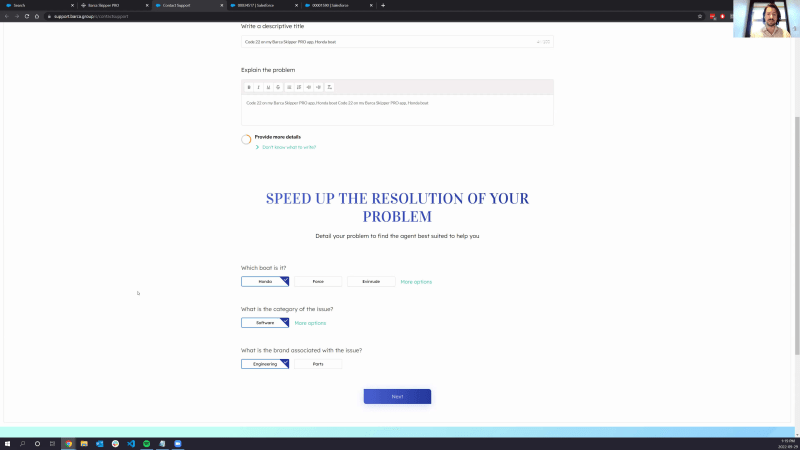
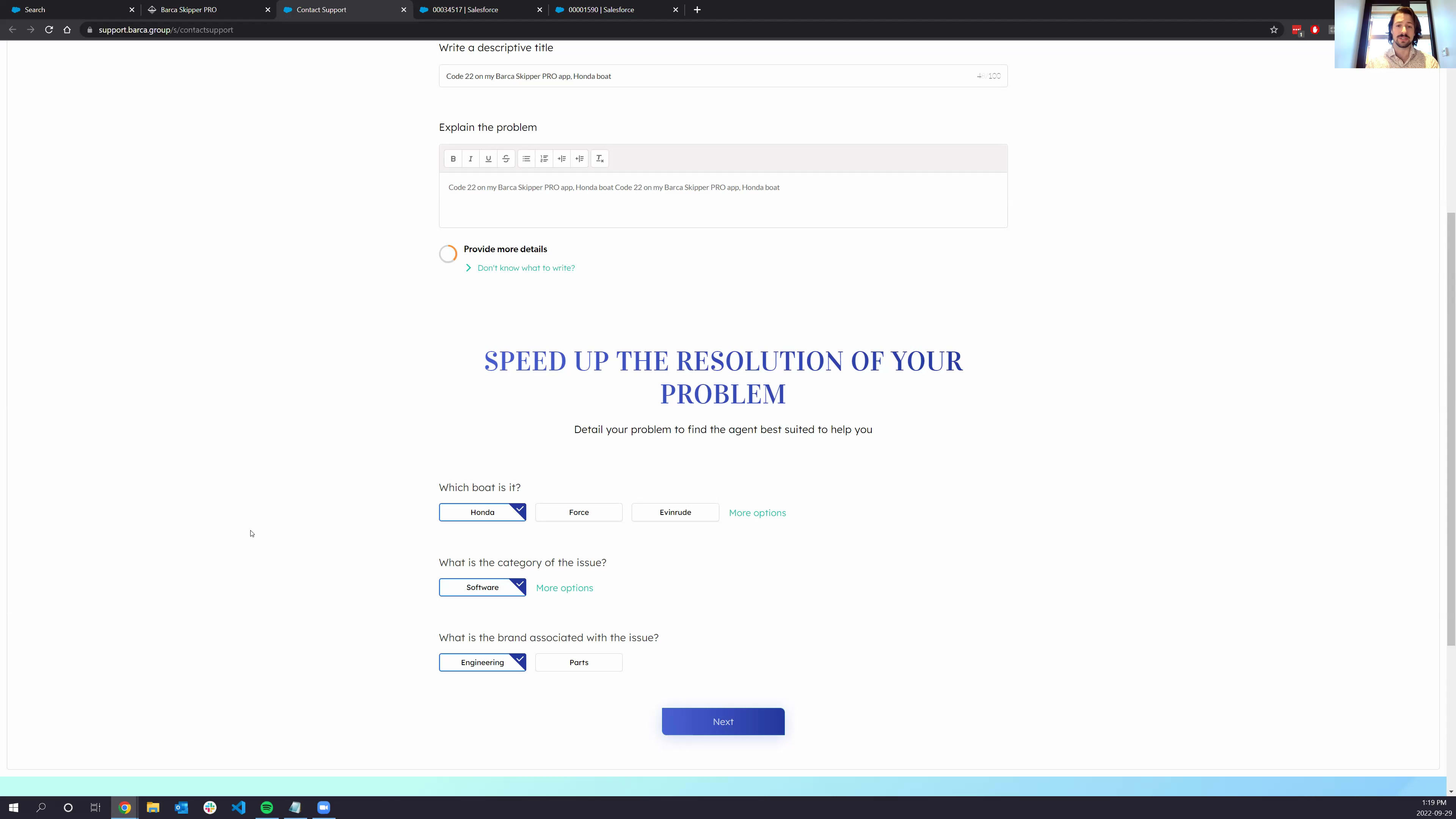
Hi, everyone. Thanks for joining our Coveo AI powered search for customer support in Salesforce webinar. My name is Phil. I will be your host and demo today. I think we should wait for another maybe minutes until more people join, and then it will be, good to start the webinar. So as soon as it turns one zero two, I shall start. Maybe I can bridge the minutes with, fun facts about me. I've been I'm a solution engineer at Coveo. I've been in the company for five years. I'm based out of very sunny Montreal today. We we can see in the background from our offices. So Coveo has offices in Montreal, Quebec City, and Canada. But we also have offices in London in the UK. So we're spread out spread pretty much around the world, so don't hesitate to if you're not specifically in Montreal, don't hesitate to to reach out to us. We'll be there to to support you. Alright. Alright. I think that's good. I'll start. So the demo portion should take around forty minutes, and then I'll leave a quick kind of five minutes for any q and a if there are any. So let me start and share the screen directly. Today, we're going to go over John's use case. John is an is experiencing some issues with his newly acquired Barca Skipper app. Barca is a fictional company we've created. It's all around boats, software for boats, parts for boats. So this is a company, which John bought a a product in the past, and now he's experienced some issues. So we'll see how Coveo is able with John's visit, Coveo is able to unify and rank the most relevant content from siloed repositories within Salesforce, how to detect customer intent and use previous interaction data to predict what they'll need next, empower agents with insights on the full customer support journey across Salesforce clouds, and then measure case deflection, identify content gaps, and tracks tracks track cost savings with, our analytics engine. Alright. So let me jump right in into John's use John's visit. We understand that most users, their first touch point is Google. Right? They're gonna perform that Google search and get to our community. So that's exactly what we're gonna do. John's having an issue with his Barca Skipper app, and the first result is our Barca support community. So John clicks on that result, and we get to the self service community that Barca has to offer. What we're going to see right here is a just a traditional Salesforce knowledge article on the left. And then on the right, we have the Coveo recommendations. Now the difference with these recommendations is that it's not only surfacing Salesforce content, right? Coveo is a unified platform, a unified relevance platform. Meaning, you can bring in external content from outside of Salesforce directly into your Salesforce, experience. And so here, the first two results are actually Salesforce knowledge article, but then the second two are Confluence articles or documentation on an external website or even files, file system documents that Coveo has been able to index. And so John's gonna read through this article. It is not exactly what he's looking for, but using the context of that article right here and using the recommendations that are based on kind of the article we're currently looking at, John's gonna be able to continue his visit and start gathering more knowledge on his issue. So he's getting back on, once again, on a new knowledge article page. He reads through it, and we see here that he needs especially for the Great Lakes, he needs to update, his Barca Skipper app with a higher resolution package. And so we're gonna start John's gonna go here and use the the global search box that Coveo has to offer right here, And we're gonna see the first Coveo machine learning model in place. So right now, I'm typing even though my hands are here, and we're gonna see the query suggestions from Coveo. So once as I stated, this is all, dynamic lead coming from one of our machine learning model, which is called the query suggestion model. So it's the type ahead feature, the the auto correction tool. And all of the the queries that are gonna be recommended are queries that are relevant to your business. So it's gonna learn on what your users are searching for. And so if you have specific product names or even skews if you're on more of the commerce side or part numbers, very complicated content, Covet's gonna be able to pick up on these suggestions too and not just on kind of some traditional English or or language, language words. So John's gonna go over here and launch his query. We're getting to the search results page. So this is what Coveo does best on experience cloud. This is a LWC component, but we do have purely lightning components or our components that are drag and dragable drag and dropable directly in a Salesforce community. So very easy to configure. Time to deployment is very fast with Kaveo. But to come back on John's use case, we're getting to the search page, and this is really where it gets interesting. So first thing we notice is here the green recommended tags. Right? Why are they why is this coming up? This is because people like John, people that have the Barca that are searching for the Barca Skipper clicked on these results, and they've been promoted to the top of the list automatically by our AI model, which is called the automatic relevance tuning. So based on user clicks, user behavior, what people found, interesting or relevant for this specific query, Coveo is gonna automatically rerank the results to always show the most relevant content in the maybe one or or first or second results or maybe maybe four here that we can see. Because the goal is to get our users not to focus on twenty different documents. Right? It's to get them to focus and find their information in the top two. We've we've implemented that, component here, the page at the bottom. Let's be honest, it's the least useful feature in the world. Nobody uses a pager anymore. People expect the results to be on the the first kind of the first results, their their content to be on the first result. And the keyword here is expect because people now are expecting everything to be easy to get their information in one query, maybe two at most. And if they don't get it, they associate a bad experience with your brands, and that drives down customer satisfaction. And this is app something we absolutely cannot, afford in our economic context right now. Another, I mean, extremely useful feature or value that Covey has to offer is the unification of content that I was talking previously. So here, we do have a Salesforce knowledge article, but the second result is an actual YouTube video, and it's been promoted as a second result because people like to see YouTube videos. So you see kind of that reranking of the results based on what people engage with and what they find kind of interesting. We also have a downloads package from Amazon s three. So this is a hosted directly on Amazon s three. The Coveo crawler is gonna be able to go and index that information. Kind of as a side note, Coveo has fifty four different productized connectors that are purely out of the box. You only need to configure them. So connect them to your SharePoint, tenants, your confluence pages, web articles, site maps, generate rest API. So if your system is homegrown and you've developed a an API layer, Kuvinta is gonna be able to go and index all of the content behind that API. We even have a push source meaning if you do have a homegrown system, but it's not API reachable, Coveo can push, expose any URL, and you can push content directly to the Coveo cloud. And so the the fact that we're building this kind of unified index and and putting all of the content inside a a one single place, one single source of truth, that's where you can actually start applying kind of the AI behind all of this because it's impossible to rank SharePoint results against Confluence results if you have a federated engine, meaning you actually are fetching the results on query time. It's very difficult to rank results against each other when you have a system like that. Covell is not a federated engine. It's a unified search platform. So we're gonna preindex the content before the actual search, and then your users are gonna get basically search against, the Covell platform rather than the system. And that's how we can apply our AI and machine learning in the back to always promote relevant content. Now the AI doesn't stop here just with the re ranking of the results. It's powering the full experience. So we've seen the query suggestions. We've seen the automatic relevance tuning from the results. But even here on the filtering options on the left, we even have AI and ML in place. So let's say we have a fifty different, facets. Right? Filtering options that we want our users to be able to kind of filter the content with. Fifty is a lot. If that's our business use case, though, we do need these fifty facets. Nobody's gonna go and go on the fiftieth facet to to rank their results. What Covell does here is using against, again, the what people search for, what people clicked on, it's gonna rerank the facets based on their relevancy to the current query. So right here, we see that, I'm searching how to download map updates for Skipper. So that's why kind of the brand is important, the type of content is important, but especially the topic. And that's why we're seeing Barca Skipper as the first, facet value here because it's relevant to our current context. We can see here this facet is not ranked based on occurrences. It is not ranked based on alphabetical, order. It's purely based on relevance. And that's what Coveo is striving to achieve for customers is really to get them the answer as fast as possible and as effortlessly, as possible. Talking about effortlessly, if you go on Google for instance and you search for the weather, is it gonna give you the link to the weather channel? No. It's simply gonna give you the answer. That's what one of our again, our other ML model is gonna do with the smart snippet that we call it. It's gonna extract the relevant content out of your documents to present it in a more digestible manner. So here, John sees this page. He doesn't need to go and click on this knowledge article. He reads here directly and sees that the first thing he needs to do is log in with his credential. So Kahoot offers kind of an alternative way to end to to consume knowledge, for again once again, to get our users to find content faster and more effortlessly. So I'm gonna log in. And while I log in, I do see a question. So I'm gonna check this. Are the category icons, so the videos of knowledge customizable? Yes. So everything on the search result page is fully customizable. What we've seen it probably go Barca quickly. So what we've seen here in that search results list, it's just traditional layered results list with icons here and recommended text. This is purely customizable. Right? Because it was API first, meaning all of the data is in, is in our head kinda we have a headless engine too. So everything is the the UI is decoupled from the intelligence layer, the the where the data is coming from. And so you can choose to display the information in the manner you want. On a commerce standpoint, for instance, we usually have kind of tiles instead of a list. We have customers that have a extensive AI powered search, but in a table. So they have they can display two thousand result in a single page because it's super streamlined. You can have kind of you honestly, sky is the limit when it comes to personalizing the actual look and feel of the results. This is just a standard kind of or out of the box components. So if this is a UI that suits you and you just wanna rebrand it, take kind of the out of the box component. And if you wanna customize everything, go ahead, have some fun, and start, personalizing your UI. So I was talking about let's let's log in because that's what the knowledge article tells us to do. So John is going to go here and log in to the search results to the to the community. Now I've talked about relevancy of the search results, but why not push this further and go on a full relevancy of the the complete experience and the personalization that Coveo has to offer? So now that John's logged in, we have access to everything in the Salesforce. So his profile, the account the account he's related from, in, maybe the products he purchased in the past. And so we can bring all of this information on query time and send that to Coveo to get personalized recommendations. So here we have, what John, recently clicked on. These are actually the two knowledge articles that I clicked on, previously. But because we know what which product John, owns, we can promote some some documentation on these specific products or even marketing content like like videos on how to use their their content or how to better use their products or even, interest. So we know that John likes sailing, so we can promote some some articles right here. And the difference with kind of the out of the box recommendations from Salesforce Einstein is that we can bring external content here. Right? So if everything lives into Salesforce, Einstein's great. If some of the content lives outside of Salesforce, we need you need Coveo to bring in that content and to get that personalized experience for everything, every system that you have in your organization. So I'm gonna go back on the top of the page and here we were looking at map download. So the first thing is I, I logged in and then I'm gonna use here the correct suggestions to click on map download. Now we talked about personalization. Right? Well, this not doesn't just go apply for, recommendations. It can apply for search results. So here, because we know in the recent queries that I'm looking for the the download for the Great Lakes, that's why the first result is actually the download for the Great Lakes. So we're also doing in session personalization. Once again, for your users for it to be easier for your users, right, they don't need to once again search for the Great Lakes query. We're gonna infer that that's what they're looking for and that the Coveo AI is gonna infer. John's looking for download package for Great Lakes, and that is exactly why this this document or this download package is the first one on the top, and it's even tagged as recommended for, John. So bit of a skip in the in the flow. John's gonna click on the downloads package, install everything on his Skipper app, and I'm actually gonna go and log in directly in the Skipper app. So I'm gonna go over here, and John knows that by typing skipper login, he actually gets redirected to the product. So just as a side note, Kavail can feature, redirects based on some queries, even messages based on some queries. So we can really kind of come in here and and suit your business needs if that's what you wish for. So John's gonna sign in and we get to, the actual Barca Skipper Pro app. Why am I showing this? This is an application. It's not living on Salesforce, but I wanted to cover it today because it is tied to the service use case. It's tied to getting your users the content they're looking for in the f in most effort effortless way possible and in every single one of their touch point with your, online touch, your online kind of experiences. So this could be a standalone website. This could be a mobile application. And why I'm showing this is because here, the little help button, this is powered by Coveo. This is called the in product app, IPX. So in product in product experience, where we're going to get the same Coveo result, but now once again personalized based on the context. So now I'm on the dashboards page, and that's why I'm recommending content to help the users interact with this specific dashboards dashboards page. And they don't even need to go on your self help community to to get that content. They have it directly here in kind of their day to day experience with you. On a side note, more on the workplace and internal side, we can do we we can have this widget directly, let's say, in Google Chrome. Not Google Chrome, Google Doc where we're gonna use the content of the Google Doc to go and personalize that panel to give you recommendations based on the actual content of what you're currently typing in in Google Docs. That's pretty pretty interesting. So John wants to add a trip at a new travel location on the Barca Skipper app. We click on this, and, unfortunately, he encounters an error. And the reason why I wanted to show this is if I go back again and I click on the help button, now it's fully, once again, personalized on exactly the problem I'm currently facing facing. So really bringing kind of the full context of what we're doing, understanding what our users are looking for, and boom, gets you the actual content to resolve these issue. So our goal here is kind of to deflect the user to a self-service use case, but we understand that sometimes they actually need to contact the support. The problem might be not, not solvable by just kind of their own means. They need actual help from our teams. And so here, if we look at the code twenty two problem, it says the code twenty two error requires to open a support case. So that's exactly what John's gonna do. He clicks on contact support, and now we get to a case deflection or, well, case submission form. But we at Coveo, we call it a case deflection form because as I stated, our goal is to deflect the case. Right? Because cases are costly, but here we have the case creation form. So what can Coveo offer here? Let me start by typing a title and for time's sake, I'm just gonna put in twice the the title here in the description. So Coveo is gonna use this information. So the subject, the description, you can have any other forms directly in that case creation, panel that can help Coveo really understand what the the the user what the problem of the user is. So the first thing we're gonna do here is at the bottom, this is fully AI driven and Coveo driven. We're gonna recommend some tags for that case. So these tags are based on the current existing cases inside of your Salesforce organization. Coveo is only gonna recommend the tags, so your users are fit are are free to change which boat it is or change a category if, the tags recommended were not exactly their issue. But the reason why Covey was doing this and the reason why we've invested in in creating that case classification is for the cases to be routed to the right support agents. I'm an engineer. If I get a case that is for marketing, it's gonna take more time because I need to reroute it to my my colleagues. So Camille is gonna help a bit here and solve this issue directly in the case creation form. Now once again, if we click on next and we get to the actual, case kind of the second panel, we are presenting once again some small, knowledge here based on the subject and description to deflect that case and for to get users to click on these and, in terms not log the case because they found their knowledge. So it's kind of our our last little hope of getting that user to self serve and to drive our our service cost down. But, let's say John really needs to to to log that case. We don't really have information on code twenty two, and so we're gonna click on send request. Now I'm not gonna do this not to pollute my Salesforce organization, but what we should see here is, the actual case inside of Salesforce. So I've talked about how we can help really John self serve his for for his problem from the experience cloud, from a a stand alone application with the in app experience, even deflect his case, try to deflect his case one last time using the case creation panel. Now the case is being logged. Doesn't matter. We're there to help our customers satisfaction. Customer satisfaction is our number one kind of metric that we're trying to to promote here. So we get this case logged into Salesforce service console. If you notice here, this might be something different from your traditional case, case, case form or case in service console because this is Kovac property. We're gonna use once again the subject, the description, any custom fields that you can have on your case, even related accounts. We can really bring in basically any information that is tied to that case or the the case owner and everything, feed that to the Kaleo, inside panel. So we call this the Kaleo inside panel to get recommendations for or search results for that specific case. Now once again, we can bring external content here. And so let's say our our our support agent that is trying to solve this case has access to a document that maybe external users don't have in SharePoint. We can now surface this document directly in the insight panel. Also, what's great is that our support agent doesn't even have to kinda start typing for for and to find that document because we're using the context here to get the most relevant results. We can even attach content to the case, attach any type of content, the case of whether that be a YouTube video, for instance. Let's say a YouTube video helped us solve this case case. We can attach that, YouTube video directly to the case. We can attach, of course, Salesforce knowledge. We can attach a a confluence page for instance. And then we can even surface the this this specific case on the inside panel of another case when the case is similar. So we can recommend that content saying, hey. This case is very similar to the one you previously created or someone pre previously created. The other support agent managed to solve that case using this knowledge article that they attached to the other case, and then Covell can recommend that knowledge article once again to really drive down the time to resolution for your cases. So that's definitely one of our big value prop, right, is is solving the issues way faster because you've had access to now way more content than a traditional kind of case interface. But the other thing is that we can have kind of very g the junior support agent be as proficient as a senior user because they have access to the to to that information. So they don't need to go and start looking in in every system. They have all of the content there they need directly in that panel. So we've really seen a lot of organization use this inside panel for agent proficiency, but also agent onboarding because now junior people can be as proficient as senior people. And with our current kind of economic context and also demographic context, and people a lot with people shifting from companies to companies, onboarding is critical, and you wanna make that process as smooth as possible. I'm just gonna go and switch here to a different Salesforce organization where the inside panel is kinda more robust because we have more traffic on that specific website. So I'm gonna I mean, I'm gonna be able to show features like view it by customer and even the, full, agent history. So because all of the visits are done from, Salesforce experience cloud and then the case is being resolved in Salesforce service console or service cloud, we can do the customer three sixty kind of alignment with Salesforce and present information and insights for that customer or that case that can be very valuable for your support agent. So view by customer is something that I I personally really like as a feature because when I log a case and the agent sends me the documentation that I've previously seen, it's just it infuriates me. It's it's really annoying. But here we we can have well, that's not what I wanted to do. We can have much more information than just kind of viewed by customer. We can see our full customer journey on the community, and we can have that directly on the the case, the case, panel right here. And so we can know exactly which which content our our user clicked on, what what type of queries they did, so how to pair with an iPhone eleven, which yeah. So which document they actually open and read through and then the, the event where the ticket was created. So we can track all of this information. It's a great tool for the support agent to really understand more of why the user logged that case and what they they previously looked at, and it just overall gives a way better, customer experience for our customers and even, makes the job easier for our agents. Now the last thing I wanted to show is kind of the under the covers of let's say log in. The under the covers of Coveo. So this is the Coveo Relevance Cloud. This is where you're going to go and configure all of your different data source connectivities. You remember the fifty four sources I was talking about? This is here. So if I click on add source for instance, I can see kind of a list of these. These are probably some logos that everybody's familiar with, but we can index AEM, Confluence, Dropbox, generic rest API, which I talked about, Jira. So Jira is very useful for internal use cases, especially for the inside panel. Imagine getting your Jira tickets directly in the inside panel can drive a lot of case resolution. Of course, we have our beloved Salesforce. I can actually go here on a Salesforce source, my support source, and click on it, and we'll see what it looks like to configure Coveo. It doesn't take a a developer to configure it. So if I go here on knowledge, first of all, this list here gives me all of my, existing self force object in my org. And then when I click on knowledge, for instance, I get all of the fields that exist on that object and not only the field, but also the parent and child relationship. So I can go and on it augments my knowledge articles with the account owner for not the account owner, but the the owner or the creator, the author of that knowledge article, or which case has been have been, solved by this knowledge article. So there's a lot of different relationships, interesting relations that I can create and go fetch with the Coveo Salesforce connector. But if I go back here on the, source quickly, right, I was talking about Salesforce. We have SharePoint, even Slack now. So Coveo is able to index Slack. Very useful for case swarming. So let's say you have a swarm on a case, and then you have another case being logged in that can be solved with that swarm. Coveo is gonna be able to go and surface that Slack channel and all of the the discussion threaded under the channel for your agents to be able to access. So it gets them kind of that that new piece of information that traditionally they would not have access to or even think about, about kind of go and look for directly in the inside panel. So Slack's a very useful source, and YouTube's always nice to have, because people love watching videos. It is way easier than reading through a, fifty or sixty page long PDF. Talking about PDF, just as a quick side note, could be able to index PDF and also the content within the PDFs. So let's say my user has a problem with the Barca, Skipper app on Bluetooth connection. I I'm just I'm going on a side, sidetrack here. But let's say there's a specific mention of Bluetooth in the document, but not in the metadata, not in the title. Covello can still surface that, result to the top of the list because we've we found that match. We are able to, find this the information directly inside of the PDF. But what's great about, one of our UI feature too is you're able to navigate directly in the PDF where that mention is. So really, once again, different way of, ingesting knowledge and in a effortlessly effortless, manner. The last thing I want to go over is the reports. So, yes, we're talking a great deal about we're doing everything about AI and ML. What do we knew what do we need for AI and ML? We need data. We need interactions. We need behaviors. We need to understand the behavior of yours from our users. So we have this to train the AI models and the ML models. Well, why not use that to build reports to to let you understand what your users are searching for? So here, we have a full kind of activity over time, report where we can see the the amount of traffic being done on my website. We can split that per, use case. So let's say I wanna see what my keys deflection users are doing, what my, global search users are doing, but also what my insights, my agents are are searching for. So you can track all of this information. You can see where the the visits are coming from, the device the visits per device. So if you have a lot of smartphone versus personal computer, maybe that indicates that you should, create content targeted for for, mobile users. We can have insights like what peep what is the most top well, the top click documents here by my users. So I know that people really like that map loading issue with Barca Skipper, knowledge article. So it indicates for me as a support organization, maybe I should create more content similar to this document. Top keyword search was kinda giving a, kind of the feel of what people are currently, searching for in my in my, support on my on my websites, the top queries. But I can have things like content gaps, which I I I personally think this this report is amazing. You can see all of the queries that led to no results. And this is critical because you understand where the problems are. People are searching for something. They're not finding it. So this their support is giving me everything that has either no results or really bad results. And and that allows me as a business user to say, hey. People can't find information for this specific query. Let me either create content to go and solve that gap or tweak search results to surface a knowledge article that already exists that people are not able to find using that specific query. So you can go and and come and and tune the relevancy of the, the Coveo engine because everything is configurable. If you want to promote knowledge article over anything, you can do that. If you wanna promote a specific article, for instance, when download is in the query, you can do that. So it's purely customizable because we understand that sometimes, well, you have some specific business needs and business rules that you need to implement. So Coveo, allows you to kinda do do that too in addition to the AI. Right? So you can have kind of you can say, I wanna let the AI do its job by boosting the results, reranking the results by itself, but I also want this feature to be applied, but also that the knowledge article should take more weight. So you can kind of play with both manual rules and, automatic or AI driven rules. It's not they're not conflicting. They're really playing well together. And and that's kind of one of our big differentiator with most of the competition is that usually it's on or off. It's either you have AI driven results or manual driven results. And sometimes there's a clash between kind of the both of the philosophies, but Caveo can allow you to do both at the same time. Also on a note, these reports are purely customizable. So if I click on edit, I could change literally everything in my report. I can change the tabs here. I have a tab specifically for my self-service users. So here, I have content like percentage of users with a search. Oh, fifty eight percent Total c I there's a lot of information that you can extract from these reports. So you can change kind of everything in here, from from the reports. Also, these this is your content. This is your analytics. It's your users searching for from, it's your users' the well, analytics. So you can even stream this content out of the Coveo platform. So we have Snowflake every all of our AI or usage analytics is in Snowflake, and you can create kind of reader accounts and stream that data out of Coveo into your own system, like maybe Tableau or Google Analytics. If these are systems that you're using, we're not gonna keep all of our content in the Coveo cloud. You can use that content as you that information, that data as you wish because it's yours. So I I think that's all I wanted to cover today. There's plenty of other features that we can we can go over. But in the sake of time, I'm going to stop here and open it up for questions. So I see there's, like, one notification in the q and a. Okay. So I have one. So can Covell index content sitting on a server not accessible through the cloud? Yes. The answer is yes. I can even show you guys right here. So if I go on to my sources, I have plenty of sources that are available via crawling modules or even on premise directly installing kind of this directly on the server, but I I prefer crawling modules. So we're gonna install kind of a service on your your local network, and it's going to go and crawl your either SharePoint content, even a file system, for instance, a database, Jira. So we can it's gonna go and and crawl this information, and then you can expose or open up a port out of your net network, and the crawling module is going going to send the information to the Coveo cloud. Now what's great about the crawling module is when you deploy it, all of the configuration is gonna be done here on the Coveo relevance cloud. So you don't need to kind of maintain two systems, maintain the service, have the configuration in the service. You can configure the, the that source directly here on the relevance cloud and yet have it in, kinda crawl on premise data on our data on your local network. Okay. Then okay. Another question. Is there a limit of the amount of data that can be indexed and surfaced in the results? So the quick answer is no. If I need to do my due diligence, Cavayo is extremely fast. We have an internal tool at Cavayo that crawls around six million data six million items, and we get the search results within milliseconds. Right? So it's extremely performance. That being said, when you have sources of maybe ten million documents, the indexing process is going to be kinda slower based on the the the the size of what of the information we need to crawl. So all these systems, right, we usually set schedules to kind of always keep the data fresh into Coveo. So you can set res refreshes and rescans. So we set these these these schedules. When the sources maybe have twenty million documents and we wanna refresh it every fifteen minutes, it just doesn't make sense. So you just need to be careful about these kind of technical issues. But because Coveo kind of the Coveo index lives and sits on Amazon AWS, we can scale it as much as we want. So if you have twenty million documents, Coveo can go and index all of your twenty million documents. So I hope that answers, the question. And I don't see any more questions. So, that's gonna be a wrap for the the Coveo Salesforce service webinar. Hopefully, we're gonna hear back from all of you guys because you're super interested in what Coveo has to offer. We are using Coveo internally at Coveo to index all of our different systems. I never have to go on two different systems to perform searches because I don't remember where I put my information. I just go on a unified search results list, type my query, and always gets my get my answers in maybe the first or second, results. So do check it out and give us, give us a phone call. So on this, I will wish you everybody a great, afternoon or maybe evening or maybe morning depending on where you're in the world. And, hope to see hope to hear from you soon. Alright, everybody. Take care.
Coveo AI-Powered Search for Customer Support in Salesforce
You’ll get a walkthrough of some of our customers' support sites such as those of Salesforce, Tableau and Xero, and see how they are going beyond search to deliver personalized content experiences using Coveo.
Watch and you’ll learn:
- Unify and rank the most relevant content from siloed repositories, within Salesforce
- Detect customer intent and use previous interaction data to predict what they’ll need next
- Measure case deflection, identify content gaps, and track cost savings
- Empower agents with insights on the full customer support journey across Salesforce Clouds
Make every experience relevant with Coveo