
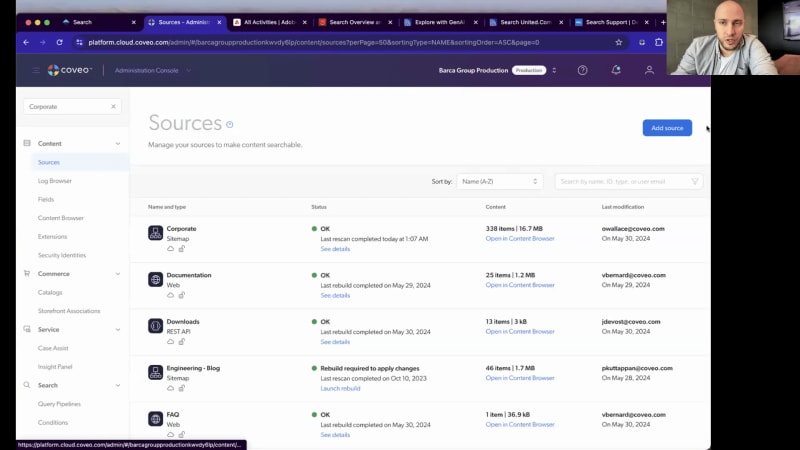
Welcome to today's webinar on Coveo for Adobe. So my name is Carrie Anne Beach. I'm a product marketing manager here at Coveo. Very excited to be joined today by my colleague, Vincent Bernard. Do you want me to introduce yourself? Yeah. Of course. I'm Vincent, director r and d for Covey Labs, so the demo and experimental part of r and d, based in Quebec City. So back to you, Carrie. Awesome. So, yes, we have a great webinar for you today. We're gonna be showcasing how Coveo amplifies Adobe eco the entire Adobe ecosystem with AI search generative answering across your site. So we're gonna be diving into experience manager, target, and analytics. Vince is gonna have a demo for us where we're gonna dive into all of that, and we're also gonna see real customer examples that are deploying generative answering. So, of course, please feel free to add any questions that you have in the chat as we're going along, and we will get to them at the end of the session. So let's jump in. So it's no secret that the demand for content is absolutely exploding recently, and this is in pursuit of personalized experiences that customers have come to expect. In fact, we've seen that enterprise organizations can actually spend between forty to sixty thousand dollars per month on content marketing alone. So to meet this need, you're likely creating and housing more and more of your content in Adobe Experience Manager. Maybe you also, have content that's living in other CMS platforms. But the marketing team is not the only ones that are creating content. So maybe the support team is creating knowledge articles, FAQs, documentation. You have commerce teams that are publishing product information. You have videos, PDFs, blogs. All of this content can be useful to users somewhat throughout their journey, of course, if they can find it. And the tricky part is that you don't just need to create all of this content. You need to then turn it into engaging experiences that is going to drive ROI for your organization. Now what's hard is the more content that you have, the harder it becomes to distribute, especially if it's stuck in all these silos across the organization like in that image you just saw. And the truth is if users can't find your content, it can't generate returns for you. Or a really dramatic way of saying that is if they can't find it, does it really exist? So findability is one part, but it's really only a a section of the problem. Right? Of course, when a user's gonna come to your site, they're going to expect to find what they need. That's kind of the first thing that you need to be able to give to them. And if they can't find it, they're going to leave. But beyond that, it's actually not just about being able to find the information. It's being able to surface the right content to the right person at the right time and being able to do this at scale across countless user journeys, across countless profiles. It's also about understanding their intent, right, based on who they are, where they've been, what they've clicked on, and then surfacing the most relevant and accurate information that's personalized to them no matter where it's stored in your organization and also no matter where they might be on your site, which site they're interacting with you, at a certain point. Then you also wanna help them discover content that they didn't know that they needed, but you understand their intent and you know that, you know what, this could be helpful to them because you understand them. And then, of course, you need visibility into all of these different user journeys to understand what's working, what's not working, maybe identify some new terms that are being searched that you don't yet have content for. But if that all wasn't enough, you also need to continuously be innovating and keeping up with customers that are growing more towards not just wanting results, but wanting answers. They want conversations because they've seen what Chachi p p can do, and this is what they're coming to expect from all interactions with their sites. So you might be thinking to yourself, this is getting overwhelming. Well, not to worry because that's where Coveo comes in. We're here to manage all of this complexity for you so that you can really focus on creating those exceptional digital experiences. So for those of you, who don't know us, the reason we're able to do this is because we are an AI search platform that seamlessly connects to your existing tech stack to make sure that all of this art and content that you're creating is easy to find, highly relevant, secure, and also accurate. So once you've indexed all of your content, you can choose from a suite of out of the box machine learning models that Vince is gonna talk to you about a little bit later. And you can apply AI search recommendations, generative answering across all of this content to create those really exciting experiences. You can also use generative answering to even summarize the most relevant parts across different sources to create something new and truly make a very personalized experience. So maybe you're thinking that's all really cool, but how do you work with Adobe? And that is where I'm going to turn to, Vince to talk through how we help find information that's in a AEM, personalize it via Barca, and then understand it with analytics, and, of course, get into some GenAI, use case examples. Thanks, Gary. So let's get started with, the demo. Today, I will introduce all these concepts through this property here called Barco corporate. Barco is a fictional brand. This is something we use here internally, at Coveo. And then, Barco corporate is the, main website, I'd say, of the company, the corporate website running on, AEM. So if you're not familiar with Coveo or if you are an existing client but in a a previous build or if you're just not up to date, I'll do a little refresh here. And the first thing we want to highlight, with our technology is the search box, obviously. This is the introduction for search. Search box at Coveo is a little bit different from what you'll find, from other providers being that it's suggesting some, interesting and some relevant search requests. These have been performed by previous users, so they are already, I'd say, voucher relevant. They they they led to good outcome from other people, and, I'd say even more other people like you. This is not content based. It's query based, so success based. So if you start typing for something what is, Barca environmental policy, for instance, You can see your history. You can also see all the different suggestions. And like Carrie Anne said, the more we have the better the experience is becoming, the better the customers are engaging with the content. So, with Gen AI, and you'll see a little bit later when I I proceed, but we are giving now very natural responses to long queries, and the users did react to that. So the more that we are getting a good experience, the more generous people are with their language and their queries. So this is why you're you're you're starting to see these long tail queries that are very interesting. So this is also bipolar, obviously. So if you are on your mobile or if you're, if you have your hands full of Toms, this is really gonna help you actually perform well on your website and and tolerate these different things. So let's proceed here to what is the Barca, environmental policies. So the first thing you'll notice when you reach the search page here is that it's a fully, featured full web, web page search page. This is all powered by Coveo. This is using more specifically Atomic, which is our JavaScript framework, TypeScript based, for building the experiences out there. The first component we're putting on the top is the generational, aspect of the ORGA as we call it. So this guy here will gather the best chunks or the best passages from a variety of documents and will craft a response to, be personalized to the user, question here. So you can see in the citations that I got two different, YouTube videos. It could be coming from, your blog, from your documentation, from your FAQ. No matter what's the source, of the content you're putting there, we're able to grab it and combine it to build RGU. Behind, but just below, we also have what we call smart snippets. So smart snippets, super interesting component as well. It is, a a component that we built before generation, but it uses similar concepts. And the main concept it uses is semantic search. So you see my question is what are Barca environmental policies? And here, the, the component is what is Barco commitment regarding the environment. So there is a mismatch between my user input and this document, but then the semantic search, which is a fuzzy, a fuzzy search looking for, semantic meaning, of these words is still able to recall that content. This is very useful for highly regulated industries, hospital or or, financial or insurance where you're gonna need, like, a precise answer to a question. So this is called smart snippet. We also have, like, suggested questions here. And at the bottom, you're gonna find rich templates such as, videos, content article, blogs. All those are, exposing the type of content you have here and mixing it together. So that's the kind of experience we have in a nutshell. This one has all the pieces together. I will show you how it works behind the scene as well so you can understand a little bit more how these are deployed, and I will also show you how it's tied up in AEM. The first part that I wanna touch upon is the reporting capabilities. So in Coveo, we have these reports. So here you can see my corporate report. I'll just zoom out a little bit. And Coveo is specialized in search analytics. So you're gonna find here documents, top documents, top queries. You're gonna find content gaps for instance, which can be very useful, but, it's usually not enough. And what I mean is that if you have an entire department or a whole company running on AEM and on Adobe, you are working in Adobe Analytics, and that's that's fair. That's fine. This is where you you go to get all your data. So having two tools is not necessarily the good way to go. So what we have, built here on this specific UI is we use the tag, Adobe tags to deploy some, some captors. And every time there is an event that is sent to Coveo Analytics, we're also sending it to the Adobe Analytics platform. We're using Adobe visitor ID to make sure that these events are tied in the full visits that are logged in Adobe. So the outcome of that is actually a very full, Adobe Analytics dashboard that I have here. And all the different information you find, like who clicked on what, what's the content gaps, the queries, clicks, click through, content gaps. They're all there actually directly embedded in your Adobe, dashboard. So, I mean, having this information and that and that granular information directly embedded to your reports will give you a very good visibility overall of what's happening, but, also, you can do, deep dives into some segments or some advanced, analytic reporting. Carrie Anne, you work in marketing. What's what do you need from a marketing, standpoint regarding analytics like this? Well, this is awesome. Honestly, the one that always kind of stands out to me is the content gap. So what that is is when someone's going to be searching for something and they're not getting any results because you don't have content that's gonna match that specific search. So it's a really great listening tool, right, to kinda to stay on top of new trends that are coming up, new things that people are starting to search that kind of signals to you that, hey. You should probably be creating some new content around this. Or maybe there's just kind of a little bit of a mismatch in the way that they're searching for it and the way that you're labeling it, which is something that you can actually kind of fix on the back end as well. But I think content gaps are really, really great to just kind of see how everything is performing and what might be missing as well as kinda your classic just top searches, what is most top of mind to people, what are they clicking on most. So I think there's a lot of really great kind of contextual type of content or data that we're able to see that just adds more to the the stats that you're looking at at Adobe. And it's great that you can do it all in one place, and you don't have to be kinda going back and forth. I agree. And then the experience as well of, like, you you learn that that that specific suites, specific suite of tool, Adobe Analytics, and you're you're good at it. So having to learn another platform and log it two different places is not optimal. We still are sending data to Coveo because we need that data for for machine learning, behavioral, and and our legacy models, but it's still, yep. So that's the kind of the approach we have right now, forking the traffic into two solutions. So you're gonna have the best of both worlds. If we continue here, there is something that we set up on this, on this environment, which is using Adobe Barca. So here, let's go and click on, one of the, events. So I will look at here the events. So let's go in a marine insurance seminar. Very interesting topic. So if you click on this guy, at this point, my Adobe Barca rule is extremely, not sophisticated. So, basically, what we do is if you're interested into events, we log you or we we we put you in that profile of being a a a segment of user that is, more interested toward attending events or registering events. You are an in person, type of, type of folks, so you want to see people. You wanna go there. That's the type of rule we put. Obviously, yours can be more sophisticated. This one is really just an example, but that's how we're, doing it. So this one is in Chicago. Cool. Coming next month. So I'm interested, I think. And then I leave this, I go do something else. When I come back to this website, the rule we put in is very basic, but you see that the home page is now personalized. So ready for events, go register now, and we change the banner. If you remember the the the previous state, so this is an anonymous window. This is the standard state of the page. So if I toggle back, this is my new personalized person. So if you look at something at this point generic like swimming, you'll see that now we are machine learning will give you a little bit of a boost here, and and the first thing that you'll find is an event, for swimming, and then after, you're gonna find articles, etcetera. This will be a little bit different. If you're not personalized, with machine learning or with Barca, then you're gonna find, like, the blog post first. And you see that the even the, RG, so the generative answer is a little bit different. So you'll find, like I said, a personalized experience for the people who are using Barca. So the way we're doing it is basically by taking that target segment and passing it to Coveo so Coveo can learn from it, report from it, and you can also add manual rules based on that segment. I now wanna touch upon, we'll go in real life examples after, but lastly, I wanna go in and show you few different things. To build the kind of experience we have with corporate, the first thing we've done is creating some content sources. So here, if you go into cloud, you're gonna find and you're gonna have access to a ton of connectors. And these connectors are basically preconfigured, very easy to use. Usually, one clicks does it. And then you can also have on premises connector if you have databases. We have crawling modules. So those are are little server we put in your environment that can host some crawlers inside your firewall to push it to Coveo. And then the cloud connectivity is the largest one where you can just, have these connectors preconfigured to get your content. We have for this specific example some site map setup. The site map source, the interesting part is you can have a very aggressive refresh schedule of, like, up to five minutes. So it's almost instant in term of indexing for no matter how large your website is. You can use, web scraping. All these different things are are pretty common for for for a site map connector, but ours is very, very scalable. We're also here using some rest APIs, some web connector and the YouTube connector to do this experience. So once you have all the content in Coveo, you can start building your search experience. People will start finding documents. That's great. But let's say you're, are an existing Coveo customer, and you have questions regarding how to do Gen AI on top of that. I'll show you quickly how it works. So the machine learning model you need to do GenAI, we need two of them. The first one is the generative, answering module. This is the one that will call an LLM and generate based on the chunks, a response. The second one you need is the semantic encoder, which is actually using some vectors, a vectorization of your content just to make sure we can find your content using semantic search. Just to show you how easy it is to configure, if you click on one of them, you're gonna have a little guide that will tell you, fine. We can build a relevance generative model. What content do you need? So at this point, you're gonna go here, start selecting across your whole organization, which content do you need. So for instance, we'll use in this in this example, we'll use, the blog here. We'll use an FAQ. We'll use, the skipper app. We'll use support documents. I'm starting to get more, articles, etcetera. So as you are selecting your source, you're gonna have live feedback regarding those are good candidates or not. And then you can apply some filters on top of it. So let's say you wanna have everything only in language is equal to English. And then this is gonna be applied, and you're gonna see live information. And that's it. Once you got your content ready, you build your model and you assign it to an experience, and there you go. I won't build it for now. But that's the gist of it. Actually, Vince, what's really interesting there too is being able to ground GenAI on not only your data, but the specific data that you want. Because, obviously, there's gonna have certain ones, like, certain pieces of content that you don't really want to be available for generative answering. So there's really a high level of control over that. Of course. And and, yeah, you make me think about the fact that it's also based on the content you're entitled to see. So here, this is a portal where I I'm not logged in, and and, everybody has it's a public website. But then if you're doing it in an intranet or an extranet and each user has specific roles or permissions to see content, let's say you're indexing SharePoint or or even Adobe, and and you have content that is locked in, or you need to subscribe to see. This will be impacting your Gen AI experience, meaning that if I will only serve the content I'm entitled to see, and you as a marketer decided to share as well. Yeah. Permissions are definitely very important here. Let's go and have a look with, some live examples here. The first one I wanna share is this one from United Airline. Very large brand using Coveo on multiple deployments, intranet, websites, and here is support. Interestingly here, this is one new experience that they've done using JDI, and it's actually looking at, travel information and travel suggestions. So let's try it. Let's give it a try. Authentic food to eat in Singapore, and then you'll see that it's using the content generated by blogs and and such, and we'll start giving you some very interesting thing. You like Asian food, don't you, Carrie Anne? Anything you like about this experience or you wanna share? Of course. I love all food. I don't discriminate. But, so this is actually so exciting to me, I think, because for a long time, Gen AI, is often kinda talked about in the self-service type of or the, you know, support type of, experience, which is incredible, especially to be able to help people kind of solve their own problems and not have to escalate to an agent of that sort. But there's also so many applications you can have when you just have so much content that you want to be able to surface to people in different ways. And in this part, as you were saying, you can take the most relevant parts of different sources. So you didn't need to write this exact query. Like, you didn't need to write content that's specific to this exact query because, ultimately, you could never do that. You can't think of every single search and thing that someone's ever going to put in there. So this for me as a marketer, like, this is truly maximizing the value of the content that I'm writing and kind of putting it together in different ways to be very personalized to the person who's, searching. And this is a, I'd say a discovery interface, but United is also using it on their full support website or website search here. And like you like, same thing with Barco corporate, our fictional example. Here, you'll see that the the better you answer questions, the more generous the users are becoming. So you're gonna start having, like, these longer and longer queries here. And then if you ask how to get an upgrade list, for instance, you're gonna have answers. Fun thing here, United is in a very I'd say, there's a lot of legal implication between, behind these responses. You may have heard some nightmare stories with, with some other airline providers and GenAI. So this one here is grounded aggressively with a very low temperature, so there is no way for the model to say something. It doesn't have access to the information, so everything is backed up, right, with citation. This is really, really strict. And then, you see that the UI is also pretty, I'd say, standard. What I mean here is that the the main focus here is accessibility, making sure this is compliant, and also that that it it looks like Google, which is an interface everybody's used to. So the goal here is not to to to be extravagant, but to give the right answer. If you try to make it the rail, I can, put my kid in the overhead bin. You'll see that at this point, the model will just prefer to stay silent instead of trying to hallucinate or to give you a hard time for your question that doesn't make any sense. So last example before we jump to, five minute question mark here. This one is one of my favorite. Dell Dell has been running with Coveo for years, on the commerce side, but also here on the support side. And then you can ask some all sorts of questions. So, my Inspirer is getting hot and smoking, and you see I even added typo in there. It's it's it goes through. So Dell has millions of different forum posts, PDF, technical documentation. So this is a very strong content based, demo here. Not a demo, but an example of a website. You see, like, it says that you should first off, turn it off, and unplug it, which which is appreciated. You have these little icons here showing you have fan issues. You see that below. Very interesting results set. So go try it. If you have a Dell computer, very resourceful example. And, and, yeah, that's it for the the quick demo. So, Carrie Anne, back to you, and then we'll take some questions, I think. Awesome. Okay. I see that we do have this slide here actually. Before I take it away, do you wanna maybe set a high level summarize kind of what you just showed in in how we're interacting with, these three different components? Yeah. Of course. But, like, you saw in the demo, we went through Adobe AEM, which is the host of my search page, but also where most of my content is. We're using site map to index it. But then there's also all these different other sources, Salesforce, SAP, YouTube, SharePoint, etcetera, that you may have or not in your business that you want to index. We're gonna unify all that content and these permissions as well, which is the most, important fact here. On the, lower left side, you'll find Adobe Analytics, which is our right system to make sure that you have access to all the deep search information in your, reporting suite. And then, the, Adobe target part where we're getting the profile segment, and IDs, and we can use it for machine learning, for reporting, but also for, manual rules if ever. And then once you have all that good information in Coveo, this is where you're gonna find on the right side all the features we have to provide personalized experiences such as semantic search, REX, Gen AI, and personalization at scale. Awesome. Thanks. And what you're really doing here is kind of just in enhance exchanging signals. Right? Most ones that we're capturing, ones that you have stored in Adobe and Target just to enhance that personalization as well. So, very cool stuff. I do see some questions in the chat. We'll definitely try to get into those. I'm gonna share one last slide, then, Vince, maybe we can, start to answer some other questions here. If we don't get to your question, we will absolutely follow-up with you after this, so don't worry, about that. I just kinda wanted to share before, we jump into questions that Adobe is actually also, a Coveo customer. So they are using Coveo across multiple different use cases throughout the organization. What you see here is actually, for their internal workplace, use case. So that's unifying all of their knowledge across the enterprise so that their employees, are more easily able to self serve and find information that they need. Because we know that employees are, our customers too, and we power all the different use cases that you have in your organization from website, support, commerce, and, workplace. So with that, how about we get into some questions? Of course. I did answer to a few of them directly, but then I'll take one live. So Gwen Elin Elder asked, do the analytics shown here allows you to see the funnel? So the answer is yes. Basically, you can see everything. The report I was sharing was just kind of a splash showcase of all the data points we collected. But then these data are points Barca attached to your visits and to your journey. So you could start your, Adobe funnel by saying if someone searched for something, and then you can drill down until a conversion event happened, for instance. In my example, my conversion is someone registered to a webinar or to an event, and then I could list all the queries that led to this just to fine tune them or craft them specifically. Basically, the Caveo events are getting a part of, are are getting full native in your Adobe, events. So you can you can do funnels on them. It's totally support. Another question here is the Adobe analytics data pulled in by Canada reports via API. So the way it works is we have on our front end some tags that will send events to Adobe like the rest of your website. So it's basically just that all the components and behavioral attached to search is now captured in Adobe as well. Coveo has a very reactive front end with a lot of different hooks, So you can really listen to precise events, and then at this point, send it back to, to Adobe. So that's it for this one. Is that done by a connector? So no way it's done by tags. So JavaScript on the front end that will, that will pull the analytics in. It's not a batch process or something behind the scene. There's also Oh, go ahead. Oh, sorry. I was just gonna say there's a question here about, our only previously searched for terms recommended. So kind of a little bit of how we get, those query suggestions, how we end up with the the the queries that are being suggested to you. Yeah. Okay. For query suggestions, it's actually using successful visits. So you need to have enough search and enough clicks on documents that are relevant. And if there's enough of that, at one point, we will include these in what we call query suggestions. So the way and that's the experience you have on Google, actually. If you go on Google and start typing p for pizza, you wanna get, like, the name of the web pages out there. You're gonna get, like, really queries that people have done before you. And the reason why we're doing it that way is that we can get millions of query suggestion candidates and then fine tune them based on your interests. So it's really create it creates a, I'd say, a very personal personalized experience. Another one here by anonymous. How does content in Adobe need to be authored, in order to use Gen AI? So that's very interesting. Yes. We are tolerating PDF, even very large PDF. So there are guidelines or learning authoring for, optimizing your authoring for for Gen AI. For instance, having tables is usually not super efficient because you're gonna get, like, Jenny I, the LLM will have a hard time figuring out which values goes with each label. But then, we've done a lot of technical search using very large PDFs. And this is one of our strength, actually. Our connector can pull in, like, very, very large content pieces. We'll still chunk them in pieces and feed it to Gen AI without any problem, which I think is a very strong differentiator for Coveo. I think we're on time, Carrie Anne. So, any final words? Well, I will put this slide up here just kind of to take us home, and summarize. Thank you so much for that awesome demo. Thank you for all of the questions that you put into the chat. Again, if we weren't able to get, to any of them, we'll follow-up. We're happy to deep dive with this, deep dive into this with you a little bit more. Essentially, coming on Adobe is really here to help turn your content no matter where it's stored into these exceptional digital experiences by applying our AI search recommendations, generative answering across all of your sites. We do have machine learning models, as Vince mentioned, personalization and rich search UI that's baked into the platform so you can really start to get results from day one. So, really, you can give your content the search that it deserves. Make sure that the content you have is not getting lost in the noise. So, again, thank you so much. We hope that you enjoy this program. We will be sending out the recording as well, and some helpful asset.

Turn Content into Answers with GenAI for AEM Sites
Product showcase: Coveo for Adobe Experience Manager
As Adobe customers, partners and prospects, you understand the importance of continuous innovation. You’ve invested in digital transformation and created countless pieces of content to drive personalized experiences. But as content grows, it becomes harder to find—especially if it's stuck in siloed systems. If it’s not relevant and easy to find, it won’t deliver the returns you need.
That’s where Coveo for Adobe Experience Manager comes in! Join our demo webinar to see how AI Search and Generative Answering turns your content into answers, increasing discoverability, relevance, and impact—across and beyond AEM!
Insights you won't want to miss:
- Gain the AI Advantage: Learn how to personalize experiences at scale with intent-based AI Search & Generative Experiences across sites.
- Achieve Real GenAI Results: Help users self-service with trusted and secure generative answering across the enterprise
- See a Live Demo: Learn how Coveo complements your Adobe ecosystem, including AEM, Adobe analytics and Adobe target!


Make every experience relevant with Coveo
