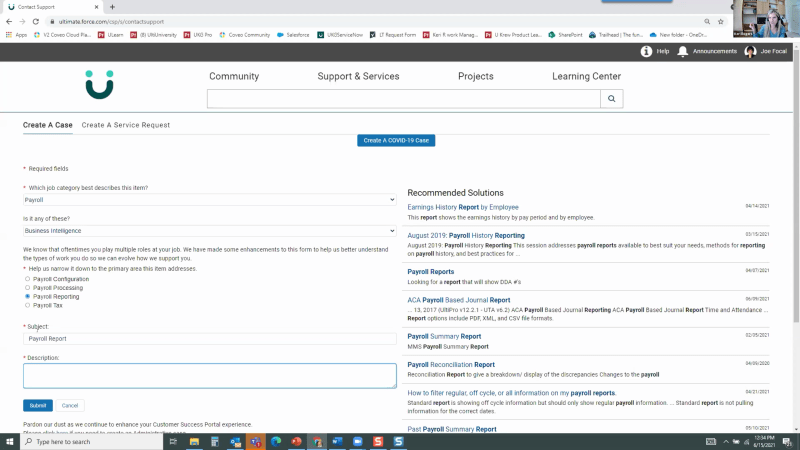
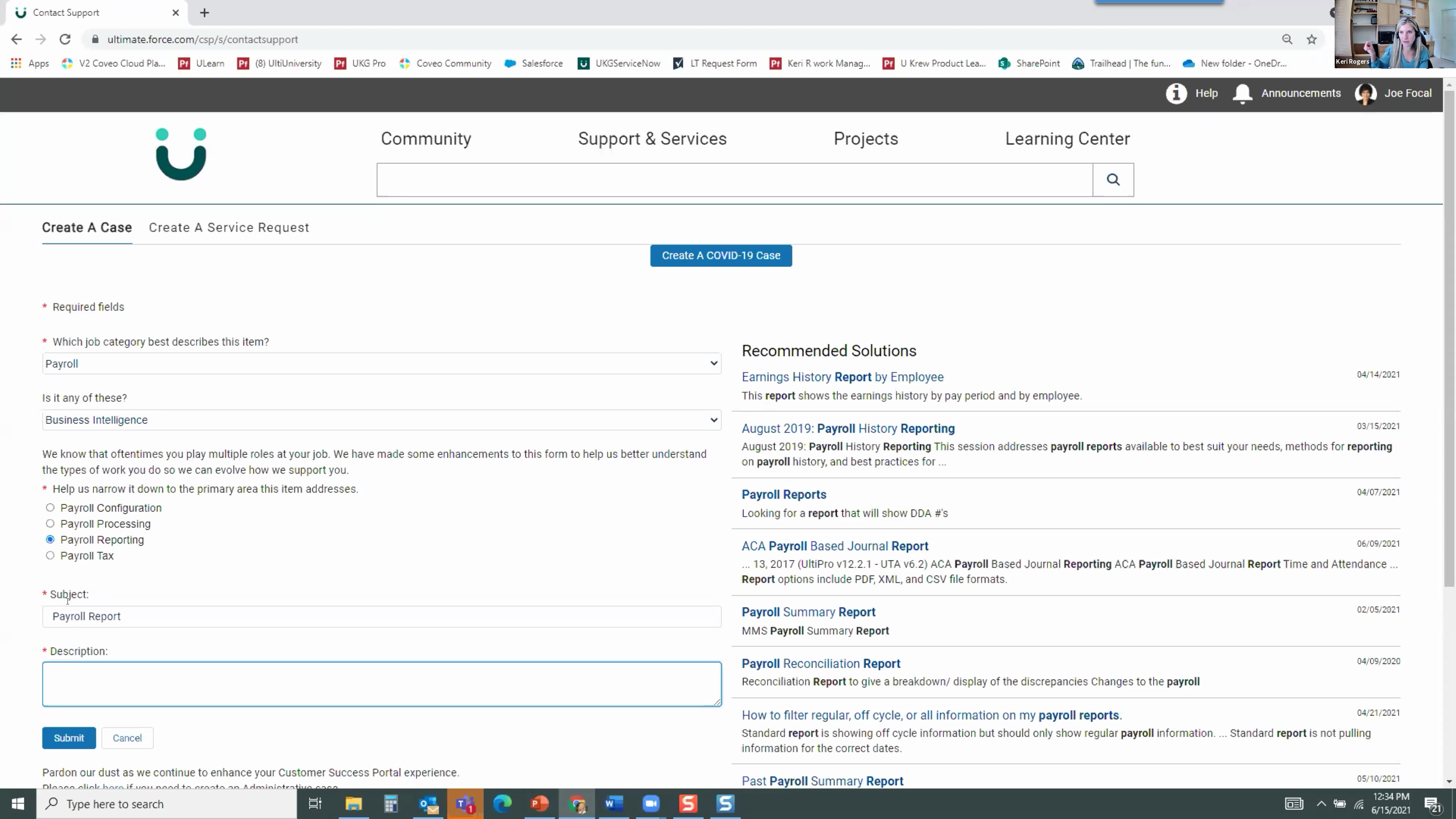
Hello, everyone. Thank you so much for joining us at our first user group meeting for service experts. My name is Claudine, and I work on the global marketing team here at Coveo. I'm really excited to be kicking off this event today. I know we're a few months from being able to have coffee together at maybe TSW, a consortium event, or, you know, make connections at our own in person event, Coveo impact. But in the meantime, we know we miss these types of conversations, safe spaces with our peers who are who are ready to share their knowledge and experiences. It could be good. It could be bad. And this is why we chose to launch our user group program. I'm joined today by Carrie Rogers, program manager for learning technologies from the Ultimate Kronos Group, otherwise known as UKG. And from our team here at Coveo, we have Thomas Kerolak from the customer success team, and we have Carmen Young and Neil Kostecki from our product team. So just, to kick off this meeting, there's two parts. I wanted to keep the agenda as simple as possible. First, we'll start with the customer presentation from Carrie and Thomas. They've prepared a really great presentation on how UKG boosted their search performance and improved their case deflection numbers through the ultimate community. For the second part, we have Carmen Young who will be sharing a roadmap presentation on Coveo for service. She'll show you the newest features that we think you should know about and give you a sneak peek into what's being released into the next few months. We also have Neil Kostecki to help with any of any questions you may have and also to hear feedback. We're really looking forward to that. Again, this is called a user group meeting because we truly want everyone here today to participate. We want you to ask your questions and share your opinions. Challenge our experts. Get ready, Carrie and Thomas, and share your feedback on your user experience. Carmen and Neil, I hope you're all ears for this. At the end of the day, we'd like everyone to walk away with ideas. You, our customers, with key takeaways on enhancing your solutions, and us in Coveo taking into account your opinions and advice on how we can improve our products and services for you. So raise your hand. Use the chat. Let me know if you want to join us with your camera on or just use the mic. That would be great. We'd like to make this as conversational or maybe as close to an in person user group meeting as possible. Lastly, today's session is being recorded, and you'll receive the presentation in your inbox in the next few days. With all that said, I'd like to do a quick intro to, a a quick background on on Carrie and how she got looped into this, user group meeting. Back in February, we ran a customer engagement survey to just to get a full check on how you, our customer user community, would like to learn more about Coveo. And Carrie was just so kind to take a call from me to follow-up on her service survey responses. Thank you so much, Carrie, for doing that. And she shared some good insights as to how we can get a user group program going. So a few minutes after, I reached out again and asked, hey. Would you like to lead the first meeting? And we're just very fortunate that she said yes. Again, thank you, Carrie. Quick background on Carrie. Carrie is the program manager of learning technologies at UKG. We also had the Kupeo relevance awards last year where she won the industry leader award. She lives in Sunnysound, Florida with her husband and two very busy little boys. She's been with the UKG for six years, and she loves what she does. Her ultimate I see the pun here. Ultimate work goal is to save people time and energy by, helping them find what they need to get stuff done. Thomas Kerouac, their Coveo CSM, will be joining her in this presentation. And with that, I'm gonna pause. I know I've talked too much to kick this off, so I'm gonna get out of the way and have, Carrie and Thomas, kick start the conversation. Alright. Awesome. Thanks so much, Claudine. That was a great introduction. I appreciate it. You're very welcome. Let me get queued up here. See. So first and foremost, I I just have a couple slides here, and then I'm gonna walk, walk you all through our community. And, as Claudine mentioned when she approached with the well, first, the survey and then the conversation around user groups, I was thinking a lot about, what I would like to see from from other Coveo customers and, of course, was more than willing to share what, we're doing here at UKG because, I think it's it's super helpful. We get so much support, from the Coveo team, but it's super helpful to see, of course, a real implementation from from other customers. So, that being said, here I am, and I as, again, as Claudine mentioned, feel free to ask as many questions as you have, and I'll I'll answer what I can, and I'll defer what I can't answer. So, just starting off, we we feel pretty successful. We feel pretty happy about where our community is. Our service community is at, UKG today. So, as I go through the as I walk you all through the community, I wanna touch on a couple of things that I feel have, really got us to success. So that's focusing on the user experience, and starting starting focusing with the user experience, really leveraging the machine learning that we have available to us with Caveo, and, of course, not forgetting about the the content management piece, especially when it comes to search content management is key. So I'll walk you through some of these again as we go through our demo today. One thing I don't have on here is collaboration. And, again, trying to give back by, by being the guinea pig with this user group, but we spend so much time collaborating at UKG and also with the Caveo team. It's I I work so closely with our technology folks. I myself sit on the the learning and community team, but I work really closely with our technology folks who are responsible for for hands on, implementing some of the Coveo features. I work really closely with our KCS team. The technology folks and our KCS team, sit on a in a biweekly call with, with Thomas, our CSM, at Caveo. And no matter what, even if we don't have an agenda for that call or if we don't have any big items on the agenda, we always end up, really thinking creatively and coming up with solutions to things that we didn't didn't even know were problems to start with. So I I can't say enough about how important, collaboration is for us. Right. So, again, before we get to the demo, I wanted to start off with, some of our search performance metrics. So I hope these are, pretty familiar to most people on the call. I know we talk about them a lot here at UKG and and with our Caveo team, so, kind of assuming that they're familiar to you. But our this is just for our community search. We do have Caveo implemented in a couple different places. But in our community, we see a visit click through, of just over eighty percent, which is, pretty high above the benchmark, so we're happy with that. The query click through, so, of course, that's the, percentage of specific searches that are followed by a click. We see about fifty eight percent there. Our click rank is at, about four point five. We're not meeting the benchmark there, and and I can officially say that we've been working for years. It's been at least two years now that we've been working to bring that click rank down. We've made an impact, but it's still not to that number three. Thomas keeps assuring us that, four point five is is a okay and nothing to be concerned about. But, of course, we know the lower, the better when it comes to page rank. Mhmm. And our content gap is just under two percent. So we're happy with that as well. We Carrie, I'm a jump in here really quickly, and I brought this to your attention, and I celebrated this with the rest of the the UKG team a few times. Given the the the magnitude of the searches and the volume of searches on the community, having less than two percent of all these queries that have absolutely no content, no result, that's that's quite fantastic. That's quite, that's best in class I would consider. I think it'd be good for the group if you could talk to how you approach content management. And, again, you spoke, earlier that many hats are involved in our conversations, but I wanna see from a content management perspective, what does that look like? Yeah. For sure. Happy to, to show you a bit about that in the demo. So but in general content management for us, we, were very hands on with, the management of things and also really looking at that content gap. So if we, we really don't see a spike in our content gap when we look at our conveyor metrics. But if we do, we do regularly look at those, queries with no results, of course, in our admin portal, and we say, okay. This if we ever see an instance where we say this person searched for this thing and we know we have content on that, Why didn't they find it? We do some analysis. And that has really to to circle back, I'll talk about some of the changes we made in our community over the years and, like, specifically to search over the years. But it's really led to some of those changes. In general, around content management, we do have a lot of content, which is great. There's plenty of stuff for people to search. Of course, when you have plenty of stuff, you wanna make sure that they're getting, served up the relevant stuff. So, we we are regularly, auditing our content. When I say regular auditing, we're not looking at all, fifteen thousand items we have in our index, but we do a lot of reporting. So we will report monthly and quarterly to take a look at content that people haven't touched, whether it would be attached to a case, or to or click or modify in it's not just having modified monthly, but it might be, say, in two years or something like that. And the timeline varies, but, essentially, we're regularly archiving content, and sometimes we do a bulk archive. And, honestly speaking, anytime we've done a bulk archive, we see a direct reflection in our search metrics. So we just recently, archived, I think, around four thousand, knowledge articles, and we saw an immediate improvement in our in our click rank. So I can't say there's a specific correlation there, but, I can say that it definitely definitely helps clearing out some of these things from our index. Alright. So I'm gonna jump over to our community and, again, just give you guys a little walk through. And, again, feel free, anyone on the line, feel free to speak up, if you have questions. So this is the UKG Ultimate Community. It's built on Salesforce. And, we're fortunate. We've went through a recent rebranding, so we have some really awesome colors and some pretty modern, logos here. So I myself think it's pretty nice to look at, which doesn't hurt for the the user experience. I should mention that, UKG, so Ultimate Kronos Group, is a HCM software provider. So we really provide everything, employee management for companies. So everything HCM, so every the full life cycle of the employees. So we have, recruiting, onboarding, learning, payroll benefits, like, anything to manage, the employee life cycle. So we sell one product. Well, I'm sorry. The the UKG ultimate community focuses on one product, which is pro, and there are many features to that product. So a user who's coming here is looking for, essentially, software support. So maybe it's how to do something. Maybe there's a question that they have, just general functionality question, or, maybe they're running into an issue. They're receiving an error. Something isn't working. They expect it the way they expect it to be. So, they land on our community home here. And, of course, right front and center, we have, featured topic discussions. So this is where they can go and view the the peer to peer conversations in the community. We have, of course, our global search that's powered by Caveo. In global search, we have our knowledge articles. We have all of our our learning content that is actually lives in our learning center, and we also have a custom Salesforce app that we have indexed. It's a it's a Salesforce app that allows our users to, build custom reports and share them with one another. So those are also indexed for our users to search. Let's just scroll down and give you guys a little more of a preview. So we we do have, of course, the groups that users can join. So if they join a group, say I'm a benefits administrator and I want to join the benefits group, I'll, you know, then get notifications on the conversations that are happening in that group, and I can follow along and, be an active participant with with other, people like me also using our software. We feature top contributors. So this is, of of course, to drive engagement in our community. So we want, we want our customers to come in here and engage with their peers and help answer questions, solve it, or share best practices. So we feature our top contributors. If you click on any of their profiles, you'll see, like, the scoring as far as, how many, questions they've answered, how many comments they provided, how many likes they've got. It's a very, social social learning community friendly platform platform. And, of course, at the bottom, we have more, news focused stuff. Any questions about the overview of our community before I just speed right through? Alright. So oh, somebody on mute? Said I just said I don't think, I don't think there are any, so we can just, we can go along. Alright. So, I wanted to kind of take you all through a little bit of the journey of how we got to where we are today. So, again, we're we're at a really great place with our community. We're constantly improving, but it has been a journey to get here. So, I've been personally involved in search and hands on community for about two years, so I can speak to, really well to what we've done. So about two years ago, we did a a full revamp of our community. Prior to that, we, the the customer service experience was essentially landing in what, at the time, was called our customer success portal, and they actually landed, on our support and services page. So this is and I'm logged in as a a test user right now, but this is our support and services page. So when our customers would, again, go and need needed some support, whether it was a how to question or, an issue they're running into or they just wanted to learn about the product, they would, land on our support and services page, which is where all of their open cases are featured and also, front and center of the button to create a case. So, this isn't necessarily a bad experience, but it's not it's not an extremely positive experience. Again, they're as soon as they log in here, they're faced with, their previous problems. Even if they've been resolved, they still have record of them here. So with, doing a lot of just user surveys, user experience research, and having conversations with our customers. We wanted to make it a more positive experience, and that's when we decided to move the landing page over, to our community home. So, again, this is where our users land today. And with that simple change, we saw a huge increase in the number of self-service searches and also clicks. There was about a forty percent increase year over year, for users doing that self-service search. And you'll notice even when I was on the support and services page, that global search is still there. It's just not as prominent as it is here on the home page. So, again, like, the the success measures for that product project were not case deflection. It wasn't to drive people away from the case creation page, but that was a a nice result. We saw we saw about a two percent decrease, again, year over year with our customers' customer base growing, of visits to that crease creation page. Also, for the user experience, again, we did a full refresh of our community. We wanted to make sure that if we were putting search in self-service front and center, really highlighting those for our customers, we wanted to make sure we were building confidence in search for them. So say we had customers who were just used to coming to our service portal, and they only came here to create, create cases. They didn't really know all the resources we had at their fingertips. We wanna make sure if they went up here and they started using search that when they searched, they found results that helped them. And that's when we really started, diving into all the features of Caveo and, leaning a lot more on our CSM to help us out and make sure that the search experience was awesome. So over that two year period, we've definitely, made an impact, and we've just watched those, those relevance metrics just keep growing, which is really cool. So with that, I want to I'm I'm kinda pausing to see if there are any questions because I could talk all day about search and self-service. But any questions at the moment? Yeah. Carrie, we can maybe touch on some of the benefits you've seen from, the self-service and more precisely cases deflected. I just want the group to hear the the great approach and the great intent of, what self-service means to you. And I believe after that, we'll follow-up with Lucy's question. Yeah. So for to me, self-service means, giving people the tools that they need to, answer a question or resolve an issue on their own without having to, actually interact with someone from our support team. So we're, like I said, more than happy to help. We're happy to resolve cases, but, me as a millennial, I would much rather go and search and solve my own problem, not have to bother anyone, along the way. So, that's exactly it. We wanna just give them the tools. They can interact with peers. They can, you know, read through our discussions and see if someone else has experienced the problem or, again, share best practices. How did you do x y z? How did you accomplish, the same thing? So just really providing the tools to do that. Perfect. Thanks. And to Lucy's question, if, UKG uses any of the Coveo recommendations capabilities, if we're I'm gonna assume that you're talking about, Coveo's machine learning models. And at this time, UKG is leveraging, the automatic relevance tuning model, the query suggestions model, and we're testing out the dynamic navigation experience model. And we have yet to leverage, the recommendation machine learning model. We're we're figuring out what will be the best use case for that, and that's something that we can approach and visit in the future. Yep. Awesome, Thomas. Thanks for asking. So that's because that's actually one other thing I wanted to touch on. So the recommendations component, like Thomas mentioned, we, really, really have been eager to get it in our community. We haven't done that yet. We just wanna, like you said, find the right place and and use case for it. But as far as the other machine learning components go, we implemented the the query suggestions, January of last year. So that is, of course, the ability to suggest queries to users who are typing in the search box up here. So I type payroll, and I get these query suggestions. We saw huge success from, the implementation of query suggestions, and I actually have some metrics back on my slide I'll bounce back to. But, because I I was fascinated. It's I when we implemented it, I was more under the impression, oh, this is just convenient for the user. They don't have to think as much about asking their question or typing their query. It just gives them options to choose from. Like, when I go to Google and I click how do I, it gives me some options, and I always find it interesting to see what other people are have typed in there. But what's really cool is on on the back end, of course, in our in the analytics, in the admin console, we you can, of course, report on users who have used suggested queries versus users who are not using suggested queries. And, basically, I I pulled those same relevance metrics for the past three hundred sixty five days and compared them side by side. So for our users who are not using suggested queries up top, all of the relevance metrics are still very good. They're mostly all beating the benchmark. But when we look at those users who are using the suggested queries, they're really knocking it out of the park. So we see a huge jump, for the query click through. So for the specific search, about seventy three percent of users actually, follow their search up with a click, which, is a big difference from the fifty six percent for those users who are not using those suggested queries. And then, of course, the content gap, the content gap for users who are utilizing those suggested queries, so, again, just clicking what is suggested to them is almost, nonexistent. So it's Mhmm. About half a percent, which is really cool. Thank you for that answer, Carrie. Yeah. Colleen have another question over here and sorry, Thomas, but, I just wanted to check. Jeff Jeff Hamby has, has a great question. Would like to hear about self-service outside of deflection. Deflection suggests intent to create a case. How do you measure self-service success outside of avoidance of cases? Alright. So I might need that question reworded for me. So how do we measure self-service? Okay. So outside. So what do we consider self-service success? Mhmm. Really just, the the click through. For me, that's what it is. If we see, people looking at our content, we kinda assume that they got, you know, they got something out of it. We do have on our, in our knowledge articles, we have the was this helpful, thumbs up, thumbs down, feedback. Other than that, that's about it. Mhmm. You're right, Carrie. Ultimately, the the click through metrics are reflections of the content sound rate and ultimately reflections of the user engagement. So aside from a case deflection perspective, we can safely assume and safely infer intent of, self-service with the the clicks. Yeah. And we can also measure those users who don't ever go to the case creation page. Correct. You know, I I know that is along the lines of a case deflection, but we have, like, the, explicit case deflection, which is where they go to the case patient page, start typing a case, and then click, click a recommended item, but don't open a case as explicit case deflection. But then we have, of course, a whole group of users who never go to the case creation page. And I think that's a a measurement or talk speaks to, you know, what they were able to find without actually going to that case creation page. So while we're all kind of along the lines of the machine learning component, as far as suggested queries go, I think it's important to mention to to other users, maybe like us or or not like us. I'm not sure. But we had been encouraged by our CSM for months to essentially clean out our pipelines and and really just leverage the machine learning that Caveo has, and we were really hesitant to do so. So as I mentioned, we had, Caveo implemented for about two or three years before, we decided to to really focus heavily on making that, search experience awesome. And it was do and Cameo was doing great. Our search experience was good, but we just wanted to make it awesome. So the recommendation again from our CSM was, well, you have so many thesaurus rules. You have so many featured results. You have so many, ranking weights in your pipelines. Maybe we can clear some of those things out and let machine learning do its thing. So, again, we were hesitant too, but we we had the ability to do the AB testing, so we figured why not. So we, took our community pipeline, wiped out all of those thesaurus roles. I mean, we probably had forty thesaurus roles accumulated over the years. Again, featured results, a lot of them, we don't even didn't even know what we were featuring, but somebody at some time had asked us to put it there, so we did. We removed all of that and, ran the AB test side by side for several weeks. And, the pipelines without the all of the junk, essentially, that we manually build in there performed so much better. So in the long run, we we went through all of our different, implementation all the different pages we have where we have Caveo implemented and we wiped out all of our pipelines. And today, anytime people reach out and say, can you add a thesaurus rule or can you add a future We we really push back and say, well, let's wait and see, how machine learning does. And, generally, it it's I have to say it it's pretty good. Alexis has sent in a question. Sorry to jump in, Carrie. Discussing content gap. So I'll read out the question for the group. Carrie, I'll answer the first part, then I'll turn it to you for the second part of the answer. So once the content gap is identified, how does the team take action on the content gap deficiencies? Alex has noticed that some of the searches are not very actionable. How do you overcome that issue? Also, how do you enter a closed loop process on the ones that are actionable? First and foremost, Alex, when looking at content gap, you need always to evaluate the result of the table with some type of nuance. Yes. Content gap can be driven the content gaps queries can be driven by a a lack of content, first and foremost, but it can also be a result of users without the right permission trying to access that content. It could also be a as a result of folks having the improper filters or facets selected. And if they were to perform a query that doesn't have those facets or those filters, then it would show up as a, as a content gap. So, again, it's about understanding and filtering the report to make sure that you understand what is a true, from, true content management gap. So, Carrie, on your end, when we do identify those real gaps in content, how do you enter a closed loop process on the ones that are actually actionable? Yeah. So it is it's always really interesting, and sometimes it is a wild goose chase to figure out what is this person looking for, you know, like, not having much context as to why, like, why they're looking for again, our software is so vast, and sometimes there's things going on with, like, legislation that I'm just not familiar with that that our customers are searching for. So I would say, first and foremost, I when I look at the content gap, if I see that it's, one user who's searching for something and not finding content, I don't really pay too much attention to it. I assume it's a it's a one off thing where somebody maybe didn't understand where they were searching or what they were searching for. But if I see repeat visitors or not repeat visitors, but multiple visitors, multiple users searching for the same thing, that's when I generally take it back to, some of our community managers and I say, you know, do you know what this is? And or do you know why they might be searching for it? I go in myself and see if there's content that I can find. If I can find the content but the the user wasn't able to find the content, that's when I know there might be another issue that Thomas mentioned. Like, maybe they're selecting facets or something that's limiting what they can see. But, internally, if there if there is a true content gap, gap identified, the content just doesn't exist. It's not really anything that that with search that's limiting them. I have a a kind of a, a ladder of teams that I go through. I start with my community team internally. If if they have information, they'll set me up with the right SMEs internally to get the content written, and, generally, it's just in an article. If they're not familiar, I kinda go to my KCS team who can then go to the the SMEs, and we we just make sure that it gets in there. And, and then I monitor, of course, over time to make sure that that gap no longer exists. I had a a couple points I wanted to throw in there, and this is all really good. I actually, my previous life, before Coveo, I was doing knowledge management, at a customer of ours. And so this is near and dear to my heart, but, definitely a couple things that that I would add is also content gap is is, you know, the one metric around, like, no results at all. But there's also, you know, queries where there was no click at all. And that's that's another form of content gap where the user, you know, searched for something and didn't didn't find what they were looking for, an opportunity to improve. So that's another metric that I'm sure, you know, you've gotten your reports and that that other customers and users in the group here are probably tracking that good to to look at. The other part is, looking at the visit. So what did the person do after that, you know, that one search where there wasn't a result or there wasn't a click? You know, looking at the visit that that occurred in to see the path. Like, what did they do next? And that sometimes can give you the insight around what, you know, how they reformulated the query, what additional filtering they did or removed. So those you know, looking at the full session of of their visit can really help to to provide some, some insight. And around collaborating with teams, it's super important. You know, having sneeze and having different areas of company that are able to help you, you know, look for those key things like acronyms and error codes and things that are are maybe, you know, you know, specific to their department or or skill set. So just wanted to throw that in there. Yep. No. Absolutely. I appreciate it. And that's something that I didn't mention is we actually I think we focus more. I spend more time looking at the queries without clicks than I do the actual content gap just because I see more, generally, the the a lot of the content gap we see in that small percentage are are they're searching for, like, a course number, an article number that, they're just not gonna find. So but the the queries without clicks is really important, for us to focus on internally. Sure. Alright. Let's see. So we talked about our content gap. I I did wanna mention to you guys just looking at our search page in general or show you, maybe the facets that we have in place. Not sure if this is valuable or interesting for everyone to see, but I as I mentioned, there's one core product that we, focus on in this community, and that's, called UKG Pro. And but it has several, I should say, many features associated with it. So that's where, when a customer user comes in, they can filter down their search based on a specific feature that they're working with. There's broader functional areas that they can filter by. So if they're working in payroll or they're working more on tax stuff, they can filter by functional area and then, of course, the type of content that they're looking for. We do have a lot of, types of content listed in here. It is something that we're working on kinda dumbing down for the user. We're not sure users really know the difference between all of these, but, but it's an option for them today. Alright. I think maybe the last piece that I'll walk you through is our actual case creation page. And just fingers crossed that it's gonna work for me because I'm in here as a a test user. But if I go back here to support and services and take you to create a case, we do have, the Caveo case deflection component, implemented here, and we see we're we're fairly happy with how it's performing. We did, about a year ago, sit down with the solution architect at Caveo, and we really went through and fine tuned some of, what we have set up. But, we asked the customer a few questions before they actually get to start entering their case. So we asked them about, job category, and is it any of these? So there's extra context we can add to them creating their case. So while these these questions this context is, intended to help, of course, route the case internally to make sure the case gets to the right team, we use these questions as context in search. So we send this to Coveo as context saying, okay. This is about payroll, something about business intelligence. Prior to meeting with that solution architect at Coveo and revamping this, we were sending we were using these as filters for search. So we were filtering on payroll and then, in this example, business intelligence. But we have had much greater success with sending them as context. So it's just a little extra information, again, for machine learning to do its thing. So as I start typing here, we do have its, searches you type. So, the the subject of our cases gets sent to Caveo as what's called the basic query, and then the description gets sent over as the, the long query. And we have again, just giving you all the details because I think this is interesting, but, hopefully, it's interesting to you. But, we have the the searches you type functionality. It's, it sends another query after the user pauses typing for one point five seconds. That way, it's not constantly over there spinning, going through tons of queries. We just wait for, again, the user to pause. So if I say, how do I and then I pause, it should refresh over here and give me some recommended solutions. So we see anywhere. It varies, you know, through the time of year, but we see about, between two and three percent case deflection, from specific clicks on our recommended solutions on the case creation page. Any questions about this? Alright. Well think so. It's pretty it's pretty quiet. Carrie, thank you so much for this wonderful presentation and being such a great trooper for being the first one to present at our first user group meeting. Now I'm gonna transition to Carmen. She will be, sharing a the serve Coveo for service road map presentation. So I encourage everyone here to, ask your questions again and also share your feedback. We've prepared what we've prepared some features to show you and also a list of features of what's coming down, in the next few months. Members of our product, product team is here to, of course, hear your suggestions, grab your feedback, and answer any questions about the features that we have in store. So, Carmen, Neil, take it away. Alright. Thanks for the introduction, Claudine. So today, we're gonna walk you through the Coveo for service road map. And just another introduction of who I am is I joined the product team at Coveo about two months ago. So I'm the associate product manager under the service and workplace line of business, and I'll be going over the road map presentation today. And then I also have Neil, who's the director of product management for Coveo for service, and he'll be here to field any questions and then answer them accordingly. To go over the different agenda that we'll cover today and the different features and releases, I split this into four different sections, and we do have a mix of business and technical users today on the call. So I wanted to stick to a high level overview and accommodate to the business users. So I'll be walking you through the case assist, headless, and quantum components for the service and community experience, the agent experience, and also talk about smart snippets, which was previously called question and answering. Some more about case assist. I'm going to explain what case assist is, and the main premise of case assist is really to streamline that case creation experience and to help with a complete and accurate case creation experience. And then there's two features and two models that support these features under the case assist section. There's the case classification model, which is case classification as you see here, and then there's also the case resolution retrieval model, which is document suggest and it's essentially case deflection. So walking you through the first feature in the first model, which is case classification, as the customer goes on your community and they're creating a case, there are several case fields that they need to fill out. For example, the subject and the description of their issue along with other related categories to ensure that it's the case is rooting towards the right support team. And with case classification, we're able to use our machine learning and deep learning infrastructure to ingest all of that information that's outlined on the case value that the customer fills out while creating the case. And we can return values, metadata values, to ensure that the right categories are recommended, and they can click that. And then, this means that they don't have to go through the multiple values under the case fields, and they can get recommendations for the certain fields to fill in. And then as for the second model, which is document suggestions, what this means here is after the customer has finished filling out all the case values and they have accurately tagged the correct categories to the actual case, they could click on the next button and get document suggestions right before they submit that case to really encourage that self help and self-service success. And this is using our automatic relevance tuning and intelligent term detection to really make sure that the documents are are going up to the view and able to solve the customer issue so that it doesn't burden that support team and they can find the answers that they need right away. And then in terms of the road map itself, right now, the case classification model, which is supported with the deep learning infrastructure, this is available now. And for case assist quantic components, I have an entire section dedicated to this, so I'll go over that. But, essentially, it's a set of prebuilt technologies to, build those UI components and in improve that case assist experience. And then number three, support for entitlements on document suggestions. This just means that by quarter three of this year, we would like to support entitlements that customers have when they view certain documents. So those are those security permissions and access levels and ensuring that customers can view the documents that they're entitled to. And then number four, role based case creation, which is also called user prompting. This is really about creating that adaptive case creation experience where the user for example, if I'm a customer and I log in to the customer portal and I'm entitled to two out of ten products that the business owns, the business would adopt the case creation experience and limit the amount of questions asked to me. And then also the different fields for the case fields the different values for the case fields, they would limit that to ensure that it accommodates to my profile as I'm creating that case. And then the case resolution retrieval model, which is the same thing as document suggestions, we would like to eventually move away from intelligent term detection, which is ITD and that automatic relevance tuning and start using that natural language processing model, which is supported with the deep learning infrastructure. So we're using that right now for the case classification model, and we would also like to apply that for document suggestions by quarter four of this year. And before Carmen Yes. I just wanted to, jump in here with a few questions, while on we're while on while we're on the topic of case assist. So the first question that we have is, can the case assist technology be used if the customer has sent the case by email, or is it only on the portal? Thank you so much for this question, Lucy, by the way. Yeah. So I can take that one. So case assist is really an API first. It's an API first solution, which means you can leverage it inside of really any integration. You can pass that information to the API from any kind of experience. So what we've built and what, the screenshots that Carmen has shown are using those those components that you would use in a in a Salesforce flow, basically, is what what we've got there. But you can build this directly into any UI, and you'll see mentioned here around, Quantic components, and maybe that's worth hitting on as well as, Quantic is actually what we're calling kind of the front end of our, our headless. So if you've heard of Kaleo headless, which is kind of the back end logic to interact with our APIs to make it simpler to interact with the APIs, we're building Quantic, which is the front end that we work inside of Salesforce. So Salesforce Lightning Design System. If you're building a Lightning component natively on Salesforce, well, what we're essentially doing is building a native front end that is Lightning on top of our Kaveo headless. So that's what our these new Quantic components are. So that'll allow you to choose, you know, in q three here, implement a case assist UI in lightning that really feels native that's using Kavio headless. But, yeah, as far as, you know, what you can send the API, an email or any sort of input, you can set you can basically send it directly, or you can do it through the UI. It's totally doable. Thank you so much for that, Neil. So we have a couple questions from Alex here. For the case assist, is there a minimum character requirement before Coveo makes a recommendation? What value would be best practice recommended? So you wanna send, typically so the API is set up to receive subject and description. So those are the the two input values. Now that could be, you know, a single keyword. Obviously, you're not gonna get, a great relevance if it's very, very vague that in that sense. It's designed for more, you know, more detailed information. There's not really a specific character limit, but, it's designed for, you know, your typical subject and description type length. We're experimenting. I know our own support team is even experimenting. You'll see it on our case submission page. And they've actually created their own, description strength component, which encourages the user to add more content. So as far as exact numbers, you know, we don't have a a guideline just yet, but, something we're looking at. Thank you, Neil. And last one before I throw the mic back to Barca. For the documents suggest slide or screenshot, does the Coveo machine learning take into account the thumbs up, thumbs down to help rank documents for future recommendations? Not today, but, plan for future. So, yeah. And and, again, thumbs up thumbs up thumbs down in general. It's an additional piece of information that, you know, you need to ask from the user. It's another step. Carrie mentioned that they're using that on their site. We typically when we talk with customers, we don't see a lot of even our own site uses this, and we don't see a lot of interaction. So when we look at how our machine models, how our machine learning models learn, it's based off of click behavior because that's the action of actually consuming the content. And, of course, it's not one click, one user. It's across many different sessions. So, yes, we we can certainly collect that event so we can collect it and report on it. As for what kind of impact we'll, implement in the model, it's still to be determined. Alright. That sounds good. Thanks for answering those questions, Neil, and thanks for the questions from the audience too. So moving on to headless and quantum components for a community and service experience. I will talk about the, you how what what these terms actually mean because, I'll explain what QUANEC and headless and LWC is, and it's really about using the latest technology available. So what headless essentially is is it's a framework that can be used in any type of environment, including your service environment, your community environment, and also in Salesforce. And headless is that software that can work independently of or even without a UI, where Quantic is that UI that UI layer that works on top of the headless framework. And then in terms of LWC, this is Salesforce's technology for building those UIs. So our Quantic would work exactly like that. And why we wanted to start with headless and Quantic is really to ensure better performance and make it more developer friendly and have that flexibility for customers. And you could see in this screenshot right here, this is what the out of the box full search experience on Quantic looks like, and it's really native. It looks and feels native to Salesforce Lightning, and that's how we designed it. And just to let you know, headless and Quantic, it it can be used in both community and for agent experience. Within the road map itself, so what's available now is the library of LWC components that are built on headless. This is available on GitHub. And then we also have a sample prebuilt full search component that we would like to roll out in July. And more about the prebuilt full search component is this screenshot right here. And to explain what we mean by having that advanced full search component on Quantic, Right now, on your full search experience that you're using right now, there are a series of individual components like that facet on the left hand side, the result template, and also the standalone search box. So with the advanced full search component, we really wanna make sure that these are no longer standalone components, and it would be one single component that customers can drop in and create that full search experience. And then there would be additional widgets like the your recent searches, your recently opened documents, and also the ability to save on default filters so that you can perform the same searches on those filters that you use often. And then other sample prebuilt components that we plan to include by quarter three are the insight panel for the agent experience and then recommendations and case assist for that community experience. One thing I will add, just on, Quantic, components in general and just packaging LWC, in case there is, you know, anyone kind of curious about our our approach on this. Today, we're not packaging these components into our AppExchange package. So these are available on our our open source GitHub. They can be leveraged. They can be, you know, used, customized to your own needs, and that includes case assist and all the things we're doing for agent as well. There is a a limitation in Salesforce around, basically wrapping and including, managed LWC component in your own custom components. Because of a lot of a lot of our customers do that, to add context and to make changes, to leverage and, you know, build the component in the way they they need. We've taken this route of making them open source. Once that limitation is is removed it's basically with Lightning Locker, is the challenge. Once that's been removed, we'll be able to package these components directly into the AppExchange package. So it's really not a a very, you know, big lift for us. And the advantage is we can continue building them. These are the same components that will be packaged. So it just makes it so that we can continue innovating and bringing new components to market, and be ready to be able to package those once once cross namespace components is available in Lightning Locker. So I hope that makes sense for anyone that maybe is curious, you know, why we're going that route, and exactly what the strategy is for Quantic. If you have other questions, feel free to ask, or we can we can follow-up after as well. For sure. And speaking of feedback, because today, it's the first user group, and we really wanted to gather feedback for the product team. So we wanted to have your thoughts on the advanced full search on Quantic and what you think of the UI that you see right here. And you can unmute yourself. I think Claudia enabled that feature right now. And maybe a a little bit more additional context. You know, this is something that we've done some pilots with customers. We've we've collected feedback, and it's really you know, what we found with agents is they're not so much concerned about personalization from the point of I mean, obviously, personalization is nice from the point of context and, you know, relation to the the, you know, the case and and those sorts of things, but they also really wanna have some level of control over their experience. They wanna be able to see what they recently clicked, what they recently searched. They wanna save their filters. They they wanna be able to handle the display density and see more content or less content and more results on one page. So giving them those those levers to be able to customize the experience to their own needs, was really a a high level piece of feedback that we got. Alright. Sounds good. So thinking more to the agent experience road map that out of the box, IKB experience on on Quantic was that screenshot that I showed earlier. And then we're working on improvements to lightning user actions and also the next generation of new user action features where I'll show you that in these slides. So in terms of improvements to the lightning user actions, for those that are not familiar with what user actions are, this can be accessible for when an agent when they log in to service cloud and they open a customer support case, they will automatically see an insight panel on the right hand side. And within that insight panel, they could have that user actions button, which would show them this view right here. And what we wanted to improve is really we wanted to enable the ability to filter down to activity that's close to the case submission date and time, and we wanted to have improvements to the timeline. So with the user's recent activity, like what they clicked on, what they searched for, what they viewed, We wanted to make sure that there is a time frame associated to those activities so that the agent can really track in real time what the customer is doing. And then we're working on general UX improvements to really organize that user actions panel and make it easier for the agent to digest those data points and then suggest the right documents to close that customer case. And then this is what it would look like within the Salesforce environment from the agent's point of view. So this would be the insight panel. This is the open case at hand, and they can look at the user actions features here. And just to add, this this here is going a bit further into, you know, what we're planning for the insight panel, user actions. So user actions today is is really the journey, the the, you know, the the click path, and a summary of those clicks and queries. And if actually, if you go to the next slide, you know, to zoom in a little bit more, you know, this is the kind of stuff that we're looking to bring to that experience. We have a a new personalization API that's, a service that we'll be able to leverage in that experience. So being able to understand not just the the journey the user took, but understanding a bit more about how they engaged, where they spent their time, and, for example, at the top where you see affinity. So actually being able to determine from the content they clicked on, the queries they performed, what are the interests that this particular user has. And and all of this is in an effort to provide the agent with, you know, the ability to speak in a in a personal sense to the customer, provide, you know, support that is not just based on the information in the case, but actually based on understanding that that customer's journey because, you know, that's that's how you provide personalized support is understanding the experience your customer has gone through. I'm gonna pause here just for, a few questions. So, Jeff, thank you so much. Jeff says, it looks great. Is there a canned report to measure TTR? Sorry. TTR. Jeff, can you clarify what TTR is? Time to resolution? Time to resolution. Yes. So we don't actually we don't handle the the case resolution. So we're not tracking the status of a case from open to resolve. It's not within the the Caveo index necessarily. It is something that we're, you know, obviously impacting by providing content, you know, solving a case faster. It is possible for our customers to index cases, and, obviously, that's a dependency when you're using, as you mentioned before, with, case assist. If you wanna be able to do classification, you're indexing your cases to do so. But, really, we have a a real time, you know, index of those cases. You're you're indexing those cases, and we have the status as it currently are. It's not like the the, you know, the case status, is being tracked over time. So I would say we we don't have a canned report to track a time to resolution. It's something that you can do and is becoming more possible also with the way that our analytics are going. So we're moving, some of you might already be moved on to Snowflake as the the data ware warehousing solution and, the front end as far as the actual reporting, moving to Tableau front end. So we're, you know, we're in transition doing that, which means that you'll you can do more with your data. And our some of our customers are already taking that data and merging it into their own BI tool, and leveraging it with their case data so they can actually say, you know, here's my case data, the status of cases over time, and my search and and relevance data, and you can start to, you know, build your own reports, around those metrics. So, yeah, nothing can report out of the box from Kaveo, but you can certainly use, our our analytics to, to see the impact on that data. Thank you for that, Neil. And then I have another question here. How soon can we expect smart snippets for doc sites that are built in Salesforce? So smart snippets is not tied strictly to Salesforce. It really, the only only dependency is on, well structured knowledge and HTML content. So, unstructured unstructured content, but with headings and, sections. You know? So we wouldn't wanna, have a thirty page, book of information, with no headings or no way to break it up. But if you have HTML content across your website, a documentation site, you have knowledge articles, and those could be Salesforce knowledge articles or any other kind of knowledge platform. But if you have those headings to kind of break it up, you index that content. You can build a smart snippets model. And surfacing the actual smart snippets is as simple as adding a a JavaScript search framework. We have our own open source UI, so you can add a Coveo component, JavaScript JS UI component directly on the page. So that could be a search page. It could be a, you know, an agent insight panel. It could be any kind of experience where you already have the JS UI. It could also just be, you know, a hosted search page. You can leverage it even through the API, so you wanna build that into a chat experience. Really, as far as channels go and implementing smart snippets, it's it's pretty open game. Even IP, in product experience. So if anyone's leveraging IPX, you know, building a search and recommendations directly into their product, same idea. It's really just a matter of adding the the component to your search page. Tony is clapping his hands. Thank you so much for that feedback, Tony. Yeah. Thank you. And, I'll turn it back to the both of you again. It sounds good. So just to elaborate more on this slide and what it means and what the next generation of user action features is is that the agent would be able to see how the customer was interacting on different digital properties leading up to that case creation and submission experience. So they could track how long the customer spent looking at the chatbot, help center community, and then look at the different user actions to compute that engagement score. And then, Neil talked a lot about other features within this screenshot, so this would cover the user actions in the Salesforce environment. And then moving on to smart snippets where I know that there was an audience question here. So this was called question answering, and the reason why we changed the feature name to smart snippets is it's really a better reflection of what this feature is. So when a customer types a query on the community, they are expecting not a document or not a knowledge article that they have to sift through and find the answer that they need. They're really expecting that snippet and answer extraction from those structured structured content like the HTML document or knowledge articles similar to that Google search experience. And, the analogy is that when you're typing something into Google, you're not expecting a document returned. You're really expecting that excerpt of an answer so that you could carry on with your day or open the link so so that it links to the right document. And this leverages our deep learning infrastructure, and several different customers are piloting this right now. I'm not sure if any of those customers are on the call, but if you want to speak up about how you're using smart snippets, that would be great to share and have feedback for the other user group members. And then another interesting feature of smart snippets is it really learns and proposes questions and topics that the customer viewed earlier. So that that would be it for the smart snippets feature. If Oscar had anything to add, I'm he's the machine learning product manager in the service team. Alright. So one last slide on smart snippets and the road map itself. The what we need to create for the models to actually start deploying this model in the admin is to create that UI layer, and this should be available by July. So we're really hoping to roll that out soon. And, in terms of questions to, you, we wanted to know how you would start using smart snippets within your help and support channels and some feedback that you have on smart snippets. Oh, you want us to start talking now? Yes. Go for it. Alright. So the idea is that, we saw this in a in our, EBR a couple months ago, and we've been really looking forward to implementing this answers based, content in our search pages for, well, it looks like ever since we saw it advertised in, like, April. So we're just sort of like chomping at the bit to get started on putting some of these things into our test search pages internally. We're working with Matthew, our, CSM. But, if you guys can enable it quickly. Yeah. So, just to to be, you know, obviously, you know, all of this is a, you know, safe harbor as far as, you know, we're we're sharing a lot with with this group, and we really appreciate it. The the feature, the model itself is ready to go. The configuration service, which which is basically an API call to, be able to configure that type of model. It's a new type of model because we're actually doing it on index content, not just on analytic events. Right? So, typically, a lot of our models, will learn from just user behavior. Well, this is learning from user behavior, but also is learning about the content. So that and then the final piece that we're working on right now that that's just about ready is the is the admin UI. So it's really just the steps in the admin to click add model, take you through, you know, the three or four, screens to be able to create it. I mean, that's one of the great things about how we do machine learning is that, you know, it's clicks, not code. You you know, set it and forget it. Once you've created the model, you're you're ready to rock. You can drop that component I mentioned into your search page, and and you have answers. Right? If you want, I can actually even show I know we've got a screenshot here, but I can kind of show you. We've got a Kaveo page that I can show. I don't know if you had a lot more slides, Carmen. So I don't wanna jump the gun, but, okay. Cool. Let me pull this up here. So as far as, like, how how real is it and how ready is it, it's it's we're at the the finish line here, basically. Let Share my screen. So as far as using it for us, Neil, what we're looking at is we have a wide range of content that's all publicly available. Mhmm. We have a docs portal, knowledge portal. We have a Salesforce portal, and then we have an API docs portal. And the idea is that all of these things combine different types of information that could easily feed the smart snippets module. Mhmm. Right. Because a lot of our task based content would be in the step would appear as steps. A lot of our informational content would appear as information, you know, that kind of thing. Yep. And then we've also got the code the Salesforce answers and some other stuff that we're using. So this would this would really be nice to, to implement on our site because we've got a Yeah. It's a it's a enterprise level search as opposed to just a specific, platform search. For sure. K. Yeah. Exactly. And so, yeah, what you're seeing here is, you know, we have our our product documentation. So for as an example, one great use case is like FAQs where you have tons of answers in one document that you wanna centralize because you want people to be able to find them all in one place. But then once they find that in the results, it's kind of like, how do you let them know that the exact answer they're looking for is is in there? So, like, an example is, can I try pro, which is a specific sorry? Take the question over there. And, of course, live demos. Once we've indexed the content again. Okay. I'll try a new one here. Let's do query pipeline. So I can try and find the other example here, but you can see as an example, query pipeline, which is a common query for Kaveo, will give you these are different answers to different types of questions that you would ask around duplicating a pipeline inside of, you know, inside of your admin or deleting a query pipeline. So these are sections that you would need to navigate to, that you can basically extract out of that larger document, rather than just having, you know, the link that says, you know, manage query pipelines. You're able to actually extract out the specific thing that you're looking to do. So, yeah, dev environment, test environment, and as far as what's maybe been reindexed in the last twenty four hours. But, FAQs is a good example. I don't wanna go digging right now, but, you know, we have FAQs that have, like, thirty, forty questions. You need to scroll quite a ways down to get to an answer, and we can extract that that answer right out into the, the snippet. That's really good. K. So, we're just waiting on the admin UI. It's in the And if you do wanna get started, there is I know Oscar's on the line. Oscar can certainly connect with you. We we do have a few customers that are are, already live with models and and building out their their search experience. So even without the admin UI, there is a way that we can kind of get you, you know, get you started as an early adopter. But we're, again, we're very close to the finish line. The admin UI is it's, I think, we've we've said, July. So probably mid July, we should have that ready, if not sooner. But, that will just make it clicks, and then you'll be able to set up your model, do some testing, create new models at your own whim. Right now, we kind of have to help you with that process via the API. Well, we're running some other tests right now, so that we can probably wait till July for that. That's good to know, though. Awesome. Thanks. No problem. Alright. So in terms of the service road map, that's all I had to present. So we'd we'd like to open the floor up to other questions and answers and other feedback for the four different sections, which, are case assist, the Quantic and Headless, and smart snippets, and agent experience. Okay. If there are no further questions, Claudine Claudine, you're on mute. And we also don't see you. I think so. I'm here. I'm here. I am so sorry about that. Just to, wrap up again, I'd like to say, thank you to our presenters today. Carrie, Thomas, we really appreciate you for joining us. Carmen, Neil, sorry about that. Thank you so much for a wonderful presentation and to everyone who joined us for our first user group meeting. I know we went over time, but the questions and feedback that you've provided has been very helpful. I also promised you twenty five dollar Uber Eats gift cards for lunch, dinner, or breakfast, so that will be coming in your inbox as well. Again, thank you so much. I hope you join us at our upcoming events, which is in my screen, developer hour, our learning series, and our new and Coveo on June on June twenty ninth. You will be receiving links to register for these events as well. And with that, I would, end the meeting, shortly. Thank you so much, and bye for now. Thanks, everybody. Thank you. Thanks, everyone.