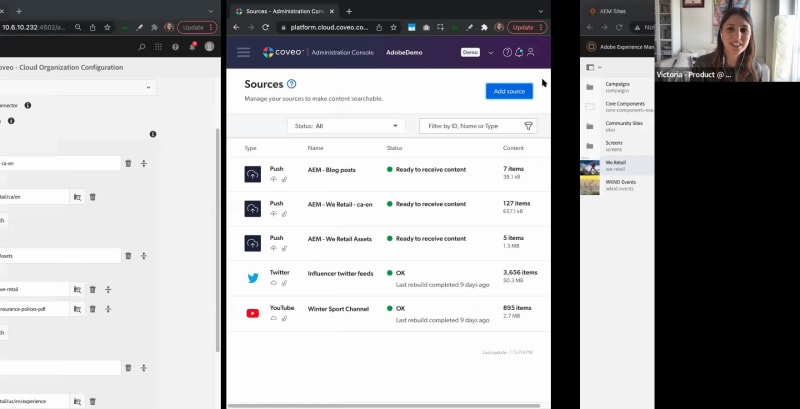
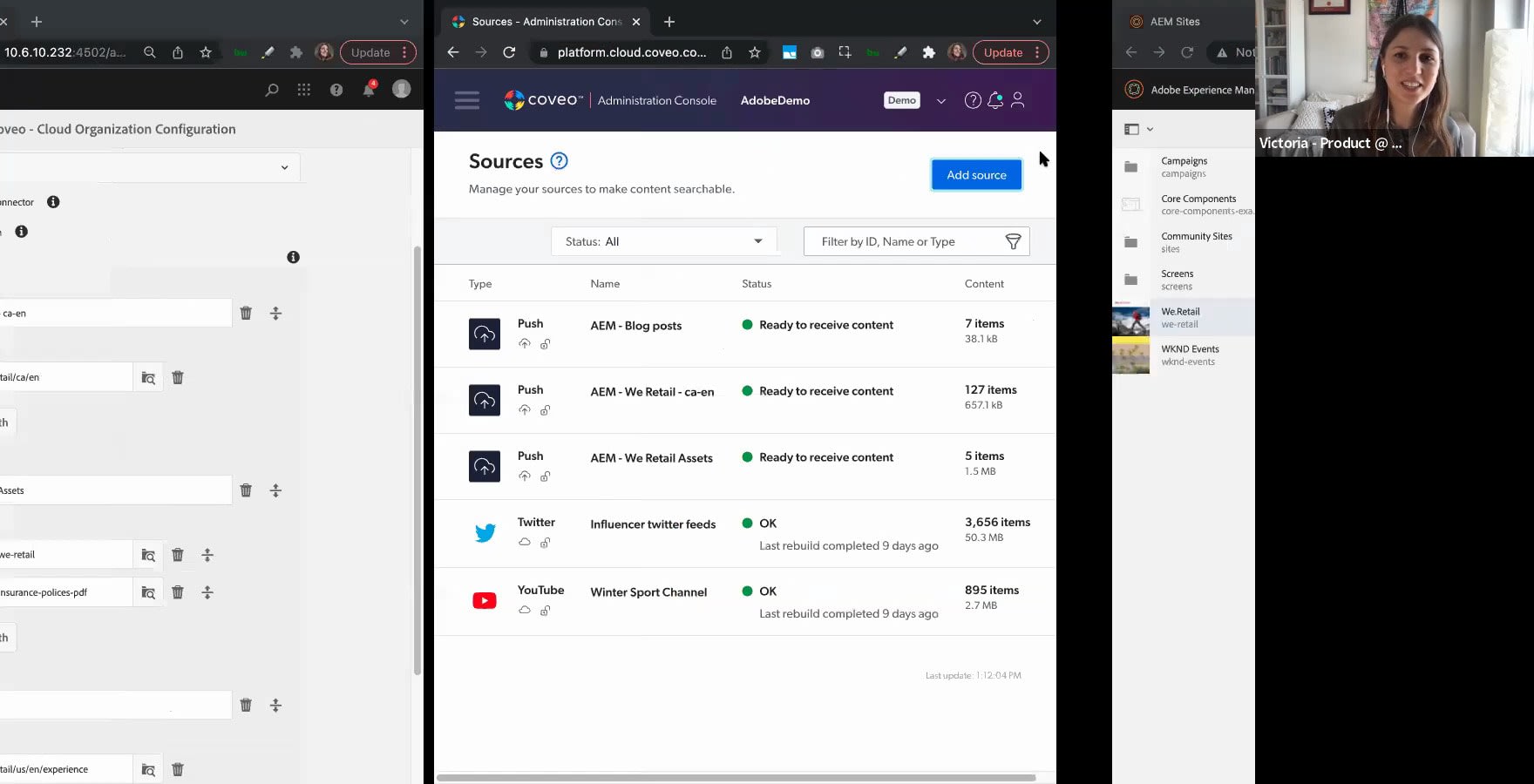
Hello, everyone. We'll just get started in a few minutes. Just giving everyone a chance to join in. Alright. Welcome, everyone. Good morning, good afternoon, good evening, whichever part of the world you are in. My name is Sarah Samnani, product marketing manager here at Coveo. I'm also joined by Victoria Pascanaia, sorry, Victoria, who's a product manager at Coveo, and we will be talking about Coveo for Adobe Experience Manager today. So let's just jump into the agenda. But before I talk about the agenda, just a couple of housekeeping items as well. Everyone's on mute right now. If you have any questions, please do put it on chat, and we will address it at the end of the call. So the agenda, we'll do a little bit of introduction about Coveo, what we do, why we do it. We'll go through some live customer examples and talk about the product of Adobe Experience Manager that Coveo supports and a live product demo with Victoria, and then jump into q and a for any additional questions that you might have. So let's get started. When we think about search and site search specifically, Forrester did this research a couple years ago, and they they found out that forty three percent of website visitors use site search first. So think about it. Whenever you go to a website, what's the first thing you do? Go to a search bar. What do you expect from a search bar? And what we expect from a search bar is that we expect personalized and relevant content, and we also demand that. And why do we do that? Because over the years, we have experienced really good search. Think about Google. Think about Amazon. Think about the amazing tech companies that are offering relevant and personalized results to the answers and the questions that you're looking for. So but whenever you go to a site, do you always have the great experience? No. Sometimes there's there's a expectation and then there's the reality, and they're not aligned all the time. A lot of sites still fail to give that results that the visitors could that come to their sites expect. But this is where Coveo comes in for you. Coveo's relevance cloud platform is that intelligence that powers your search no matter what journey your visitor is in. They can be on the website, coming on to their websites, trying to look for specific information to help them convert. They could be on your ecommerce store trying to look for a product. They could be your customer trying to look for questions or support results about some problems that they might be having, or they could be your employees trying to find knowledge within your corporation to really be able to find and do their job well. Coveo works in this three sixty circle. We we power every single interaction and make sure that it is holistic, personalized, and relevant to the person that's looking for it. But, honestly, don't take our word for it. When you look at our clients that are using us, we have a long list of clients that have been using Coveo, have seen amazing results like Adobe, Intel. You got Manulife. You got Best Buy. We have a range of verticals that we really support and have seen amazing results. Some of the results that we've seen over the years for website and search specifically is one of the results is fifty five percent increase in search and visit success rate. And that's what you want when when a visitor is coming to your site. You want them to succeed. You want them to engage with your site. We've also seen a twenty five percent increase on the average time spent on-site. For shopping experiences, we have seen an increase in order value because we give recommendations. We provide the the products that they're looking for and what they might be expecting to potentially buy as well. And for for self re for self-service, we've also seen that case deflection has decreased. Sorry. Case deflection has increased. That means your support teams actually have a lot more that they can have capacity to answer, and your customers are able to self serve a lot better. So overall, here you can see, like, we can really drive results for your site itself. So let's see how Coveo really works. And, Victoria, this is all you know. Yes. Those are pretty amazing and impressive, business value, metrics. It's quite an impressive product, that is able to deliver those types of results. I'm here to show you how to achieve the value path, how to reach, the engaging digital experiences. Right away, let's look at a few customer examples that we have. One of the first customers I love to show is Ansys. Ansys is an engineering company, and one of the interesting parts of, their search set up with Coveo is that they're also running on Adobe Experience Manager. They host all of the different pages and materials on Adobe Experience Manager, for example, assets. And let's say I'm starting to search for simulation. I'm already met with something that we call query suggest also known as search as you type. And you might think, well, Victoria, you're typing simulation so there is a keyword, word to word, letter by letter match. But in reality, every single suggestion that you see here, Coveo knows that there was a success result tied to each one, which means that every time somebody searches for simulation world or simulating a single battery cell using and it continues, there was a click after. And this is why these are the results that are surfacing. Now let's look at I'm actually seeing that there are a few people who are raising hands. I encourage you to use the q and a part or the chat as well to engage with the questions. We'll be happy to do a q and a at the end of the session, and we have plenty of time for it. Let's get back to Ansys and look at the search page powered by Coveo. One of the first things that catches my eye is that they have the free trial facet. What I know about Ansys is they're trying to make their engineering software available to students to try for free. So this is a very nice, eye catching free trial class. Another thing that I know is that Ansys is an engineering company, so they have a lot of content that is developed in English. So even though you have a lot of different locales and different languages where the site is available, you're able to boost the languages that you need, but you still have the original English language materials available. But that's not where Coveo limits its capabilities. In fact, if you just want the search results for your language, for your users like how we're also able to display the results based on that. Next client I wanted to show you is Motorola. It's another Adobe Experience Manager user and they have Coveo search installed on a few different places. So first thing I wanted to show you is the type of tolerance that Coveo does. Let's say I am rushing to to find information. I'm looking for cybersecurity, and I'm misspelling it. I actually kind of butchered the word. But you can see that Coveo already understands that I meant cybersecurity, cyber as well, and is able to suggest this for me. Now another thing I wanted to show you about Motorola is something we will call search hub. Search hub is a term that Coveo uses to signify the origin of the question, the origin of the query. For example, right now, when I'm on the main page let's have a look. And I'm looking for what am I thinking of? I want to buy headset. Let's look for headset. Yep. From the front page, I'm going to be met with product recommendations right away boosted at the top so I can buy them. But let's imagine that my initial query is coming from the support page. Am I going to receive the same results when I type in headset? Let's see. Since I'm starting my query and my intent is to come from the support page, I'm actually receiving a lot more user guides. This is where Coveo really truly understands the intent of the user and the query at query time whether it's search or recommendation. Now let's finally jump into how does the integration look within Adobe Experience Manager. If you have AEM already, this is a familiar site. You start with sites and assets. You can find Coveo when with just a couple of clicks in your settings where you have access to your cloud organization configuration. There you have all the crucial concepts to connect to your Coveo relevance cloud. And one of the things that I'm really proud of is that this product that was just released a couple of quarters ago and we are already just released just one week ago, last Monday, we released version number two. We Barca committed to improving this product, and we see amazing response from clients who were clients previously without us having a native connector, but also clients who are currently choosing Coveo thanks to the Coveo for Adobe integration. Another thing I wanted to point out is that we're able to index not only sites, not only the pages with content, but also digital asset manager. So if your company is using assets as part of your AEM package, we're able to index them as well and show them as search results. Now you see that I'm currently splitting different sources. How does it look like on Coveo's side? Right here. So this is pretty much a one by one side by side look. You see that I set up multiple sources for my Adobe Experience Manager, but I'm not limiting content to just Adobe experience manager. Maybe you're a multinational company or you have multiple teams on different locations or maybe historically you prefer different tools to create and author content. Well, the beauty of Covia is that we are able to unify content from different places. We have a wide range of sources that are available to you. And if you don't see the source in your list right now, we also have universal sources. For example, you have Adobe Experience Manager sites. Maybe you have a smaller blog hosted on WordPress or Squarespace or Webflow. Well, Coveo can index that using the universal connectors. So that's, one thing I wanted to mention in the initial setup stage. So once you have done the initial implementation and the setup, let's say you are changing some kind of content in your Adobe Experience Manager and you're thinking, well, how is Kovea going to pick up all of those different changes? I just changed my page. What's gonna happen? Well, one of the things you can do is that you can enable indexing on publish. So whenever there is any change, deletion, update, or creation of any new content or page, Covia will automatically pick up those changes, push them onto the Covia relevance cloud, and show them a search result immediately. But if you really want to make sure, you can always select Covia reindex button available at the top right so that you can always refresh the content as you want. Now how do you show the results and show the business value of what Coveo delivers for you? One of the beautiful features of Coveo is reports. We have both embedded reports, which I'm about to show you, and we also have data export, which you can put through Snowflake in and use with the data stack that your company prefers and do visualizations, do reports, and, work, the way that you want to work with it. The embedded reports, usually show you the classic KPIs like the type of events, that happened. Let's say you had this many click events, this many views of the different documents. You can also see the popular searches, but one of the things that I really really enjoy about reporting is the ability to report on content gaps. For example, imagine that a user lands on your page and they have a dead end. They either type a query that has zero results or they type a query that has results that none of them are yielding in a click. So what happens is Coveo shows you what kind of queries they are. You can take it back to your team, and you can strategize the content ahead. What kind of content do you want to create to drive traffic to the appropriate place so that you don't have any more of the dead ends? Another way, to really enhance the customer journey on your website is to use the visit browser. You are able to see all the different users and interactions that they had with your site because of the click events, search events, view events, and also custom events where you can declare your conversion events. And you can always see the journey of each client one by one, or you can group them and aggregate them to really improve the customer journey. Last but not least, one of the easiest way to introduce you to the concept of artificial intelligence and machine learning, the fun part of Coveo is to show you query pipelines. Query pipelines, imagine a big pipeline where the all of the questions are coming through, and they're joined together with the content. So, basically, here, what you will have available is you have over ten different rules for you to navigate your clients through. For example, you have recently gone through a rebranding, and you still have users who are coming onto your website and typing the old name or typing in the new name but with a typo. Here, I'm doing a replacement or I can do synonyms to reroute users to the new name to the new rebranded name. I can also boost different results based on the query specifically. For example, you want to surface more content because of the campaign you're having or maybe you want to, showcase the new material that was created recently to test something out. You can always do result ranking by boosting the result or by featuring it based on the query. So that's pretty much it for the, query pipelines. We also have, over five different machine learning models. Here is the searches you type that I mentioned with Ansys and that you have seen on Motorola site. You're able to use everything from search to recommendations powered by machine learning models. And the beauty of them is that you set them up, and they're able to learn and update themselves as you go. And they're really, really powerful and attuned to your business needs. That's pretty much it on the side of the demo. You're always open to book a free site search assessment, with your salesperson or through the link that you see on your, screen right now. This site search assessment will help to really optimize the areas of your site where you can improve it. And I know that it's really demanding to currently manage a web property where you have both new clients, existing clients, where you have multiple different tools available to every single member of your team. And it's really important for you to be that digital product for your company by managing that digital property and making sure that every single client is finding their destination and that every single voice of the content author is being heard. And, yeah, that's pretty much it. We're open to questions right now. What do we have in the q and a or chat? Or yeah. We have a raised hand. See. Amazing, Victoria. Thanks so much. This was very insightful. We really got to see the Coveo product and how it can fit into different pieces of a business perspective from analysis if you're trying to understand where your customers are getting stuck, how you can get more content to really how easy it is to use it from your Adobe integration. Mhmm. I see Maya, Woods is currently raising her hand. I'm gonna allow let me see. We have a webinar manager who's advising us to use the q and a for the chat. Wonder what would be the best way. Liv, would you be able to unmute, Maya? Okay. Maya, if you have a question, can you please just add it into the chat? Victoria, there's one question that I got. The question is, do you integrate with Adobe Target and other products in the Adobe Experience cloud umbrella? I get this question a lot. For Adobe Experience cloud umbrella, we have a lot of the different tools and integrations planned ahead. We have, I don't want to name the specific product, but we're currently exploring, export of data from Coveo into some kind of analytics platform. And we're also looking for ways to export data from Adobe, the type of tool that is going to be able to map the profile in real time and that feed that into Coveo and personalize the result based on the audience that Adobe is predicting that is currently browsing the website. Adobe Barca is a really interesting tool. And I and I also get a lot of questions, because oftentimes, Adobe Barca, injects personalization for experience fragments, which are part of Adobe experience manager. Adobe target is different from Coveo. Coveo is pulling information from all of the different sources and unifies it altogether to be displayed in your Adobe experience manager site. And Adobe Barca would be rather the opposite. You take it from one place, and then you try to distribute it and push it onto other channels, let's say Barca and so on. Then I think that also with Adobe Target, you can achieve personalization, but it's a lot of setup that you have to prepare. With Coveo, it's, much more of a setting up machine learning model and, maybe revisiting the results and optimizing for results maybe once a month, depends on your personal appetite. Maybe you're free like me and you like to go every single week to check how it's doing. But, really, there is not much maintenance that's required with, Cobeo. So I hope that, that answers the question. The other question we have is how easy is the AM connector configuration at Oveo admin console? Oh, good question. In fact, with the new release that just got out last Monday, you don't really have to configure a lot on the Coveo admin console. Once you download the package, the AEM connector package, you upload it onto your AEM instance on prem or managed services. Once you start configuring it within, and I'm gonna show you here, once you start doing this configuration and click save, it's going to be automatically created on the administration console. So that connection is already automated for you. In fact, you're also going to have a lot of the essential fields that are going to pull out of your site, and assets and put into Coveo. And this is the way you you you saw the facets being, created on the left side. So all of these facets are actually coming from the metadata from Adobe experience manager. So a lot of the basic, essential facets are already being automatically imported and, mapped into Coveo. And then you just need to to do a bit of customization for yourself, but that's about it. Amazing. And one last question that we have is, how do I display content once it's displayed on the site? Yes. Let's see. Would be this page could be a good example. So there are a few ways to deliver your content. Right? We index it, all of the different sources, Twitter, YouTube, maybe your scrape base, maybe Adobe experience manager. You put everything together. Now you apply all of the different artificial intelligence and machine learning models. And you're like, okay. Now I need to make it, like, available to my clients. There are a few ways. There are low code versions, which I'm going to show you right now, which is what we call Cobia hosted search page, which is going to be basically pulling a search page, built in JS UI, and put it right away on your screen right here. So you see it's already done for me. And you will also see the same view right here. Search pages. Here you go. So it's going to be one of these search pages that you can just configure in a couple of clicks and put it right here. Maybe you want more customization. Maybe you want to have more ownership of the UI. You can always replace the CSS import, or you can even just use the JavaScript frameworks. We have three different types. All of them have different abstraction. I know we have UI and UX, champions who are currently working on Coveo client side, and they absolutely love those frameworks because they're very developer friendly, pro code, and open source as well. So there is a lot of, innovation that is coming in, and they're also very easy to use. So those are the different ways on the spectrum on how you can display your content in your Adobe experience manager. Amazing. And for a marketer like myself, I mean, if I can get all of these things running quick and easy, changes come faster, I get to do a lot more content, focus on the things that are important to me Yeah. While these things keep rolling in in the back end. Yeah. The Coveo hosted search page is a great way. You just download a package. It's currently in beta. I have to warn you because we have a lot of really interesting improvements coming in. But we're really, really open to feedback. And if you're, giving any feedback, I'll be probably on the other end receiving it. So this is actually it. I literally downloaded a package, uploaded it onto my end of the experience manager, and I put in a few security API keys, and that's about it. And there I have it. It's already preconfigured for me thanks to Courvair. Amazing. Alright. I don't see any other questions. That's about it then, Victoria. Thank you everyone for joining us. If you have any questions, feel free to reach out to us. Victoria and I are also available on LinkedIn. You can email us as well, and we'll be happy to chat with you. Thank you so much. Thank you. Have a great one.
Recherche et recoupement optimisés par l'IA pour Adobe
Moins de règles, plus de personnalisation ?
Regardez cette courte session de démonstration pour voir comment vous pouvez tirer parti de l'IA de Coveo adaptée à la conversion pour offrir une personnalisation plus poussée dans votre site Web Adobe Experience Manager, de sorte que vous pouvez obtenir des résultats tout en remplaçant des milliers de règles et des heures d'administration.
Vous découvrirez comment Coveo for Adobe peut vous aider à
- Répondre aux attentes de vos visiteurs avec des réponses plus intelligentes et des résultats de recherche plus pertinents.
- Améliorer vos taux de conversion grâce à une expérience visiteur plus personnalisée et proactive
- Exploiter de puissantes analyses de recherche pour identifier les lacunes de votre stratégie de contenu
Rendez chaque expérience plus pertinente avec Coveo