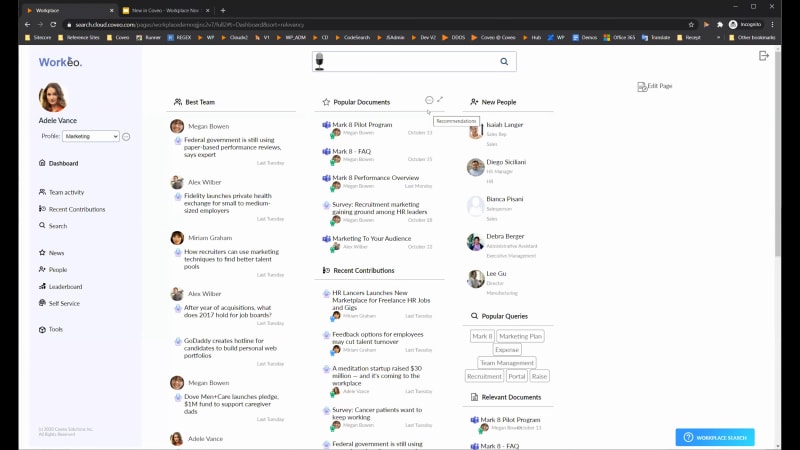
Like to say hello, everyone. Thank you for joining us at this month's new in Coveo. This monthly webinar series is where we share the latest capabilities that can help your business create more relevant workplace commerce and service experiences. My name is Claudine Ting, and I work on the global marketing team here at Coveo. This month at new and Coveo, we'll be focusing on the latest enhancements for search architects, knowledge, and workplace leaders. Our presenters for today are Juanita Ogin and Wim Nye Meyer. Wim is based in the Netherlands and is a solution architect specializing in the workplace, and he's been with Coveo for thirteen years now. On the other hand, Juanita is the product marketing lead for Workplace, and she considers herself a workplace activist. She believes in the blend of technology, culture, and leadership to create great experiences. Before we get started, I have a few housekeeping items to cover quickly. For this webinar, we'll entertain your questions towards the end of the presentation. However, we encourage you to type your questions in the q and a box and the chat box as we go along. During the q and a portion, you're also welcome to raise your virtual hand if you'd like to speak live to ask your question. Lastly, today's session is being recorded, and you'll receive the presentation within twenty four hours in your inbox and also in Coveo Connect, our online community. Now we're ready to get started. Juanita, take it away. Thanks, Claudine, and hello, everyone. Thank you for joining us today. Wim and I are excited, and we hope that you're staying safe, wherever you are. So our plan for today is that, I will start with a quick overview of workplace and how we think about it. Then Wim and I are gonna sort of tag team and talk about the new capabilities that we have. And then you're gonna be in for a treat because, Wim is going to demo what we consider our sort of next gen employee experience platform, and then we'll just share some upcoming events and resources for you to, leverage. So if we just go ahead and jump right in, you know, our goal, our mission is to help companies build a relevant workplace that delivers the right knowledge, the relevant knowledge to employees at the moment of need, no matter where they are. And the way that we do this is by using our technology platform, which uses AI, intelligent search, and analytics to deliver, that relevant and personalized experience, and we do that, for teams across the enterprise. So when we think about workplace, we break it down into sort of four different solution areas, and those solution areas, you can see here. So the first is intranet, the second is employee self-service, the third is departmental, and finally, internal help desk. And I think it's really important to call these out as separate solution areas because, one, they each have a different intent, but two, there's actually different departments that are involved in managing this experience. So just quickly, obviously, when we talk about the Internet, everyone knows what an Internet is, and that is still important as the place employees go to to start their to start their day. And the Internet is for all employees and common general company information. When we get into employee self-service, we really are talking about those HR and IT portals. Again, this is for all employees, but it's helping to solve for what we call that foundational knowledge, and that's, the information employee needs to get up and running. Right? They need to select their HR benefits, they need to have all of their IT and applications and the right access levels. And then we get into departmental solutions. So departmental solutions is really it's moving away from an all employee need and moving into department specific needs and use cases. So every company has multiple departments have specific systems, specific knowledge needs, and obviously a team that needs help working together. So we help solve for these, different use cases as well. And lastly is the internal help desk, which is all around making sure that we that the help desk is providing employees with that great kind of service experience. So we use our technologies to help kind of augment that capacity for these help desk agents. And the last thing I'll cover on this slide is how we deliver or the way that we deliver these solutions to our customers, and we do it in two ways. The first is that we embed our capabilities into your existing existing sites and applications. So if you use SharePoint, Jive, ServiceNow, Salesforce, Sitecore, and others, we have, we have, connectors to those and we can embed our capabilities into your existing sites. And what you'll see today is that we can off also offer our different capabilities and features as a standalone experience. So it's important to keep both of those in mind. So we move on for today's, agenda. We wanna talk about some of the new things that are coming out. And so there's sort of two major categories plus the Coveo and action that we'll cover. So we'll get into connectivity and security enhancements. We'll talk about some location, expansion and enhancements, and then we'll get to the demo. So on the connectivity slide, what I what I really wanted to cover is that, before we jump to the new, I did wanna remind everyone that we do have, existing, you know, sources and capability. And so when you think about building that unified workplace or that single sort of source of truth for employees, what I thought was important was to list the, sources and applications that we have experience with indexing and and unifying content, across. So, hopefully, these applications are familiar to you. Everything from Box to Jive, SharePoint Online, ServiceNow, you know, we have experience working with a lot of common workplace sources and applications, and I've included a link here so you can see the full list, to understand kinda, you know, what where we can work with. I'm gonna pass it over to you, Wim, to talk about, the new capabilities that we have to offer here. Yeah. So thanks, Juanita. So, essentially, we made a few enhancements. The first one is in our crawling module. I don't know if you know the crawling module, but it's essentially, our ways of indexing content behind the firewall, so inside your data center. And it used to be quite a non seamless process. So we made it much more seamless. So for example, you do not need any docker installations anymore. You just need a Maestro to make sure that all the communicate goes smoothly. And another thing we did is, we now offer out of the box indexing the security of those on prem applications. That was already the case, but you needed to configure that, and that was quite, not easy. So we made that available out of the box. So using that technique, you could simply quickly, support a migration, for example, from, SharePoint on premise to SharePoint online. We can both index the repositories now even easier because we also support the security. And based on that, you can slowly migrate to SharePoint online. So the end user doesn't know where the content is. They just need to find it. Another thing we did is, our generic REST API connector, now also supports security. So, before, you could index a generic REST API, but without security. Now you can use security settings within your REST API, and we can, for example, use properties retrieved when getting the content from the REST API as security ways of securing the content. For example, ServiceNow is now also supporting security, and it's using essentially the same mechanism. That's it. Thank you. So, essentially, we have more and safer ways, to connect to your content. And as Wim, mentioned, we also, we can also help with, your cloud migrations, which we know is, there's a lot of activity going on there. So we're gonna now move on to the, location, the location, capabilities. So as many of you might already know, we do support, geolocalization or the ability to use your latitude and longitude data from index content so that you're surfacing the most relevant content for employees based off of their location. And so what you're looking at here is just just one of many examples, as to how we leverage this capability. This is a little bit, you know, COVID specific or COVID relevant. But as you can see, we're using information about an employee, their location, and we can provide options, for visibility into where this employee is actually seated, at an office, for sort of tracing and tracking mechanisms. So just wanted to cover that. You know, we we do have some some rich capabilities here. But now we're moving into expanded coverage so that we can support a multinational companies in their goals of creating one brand and one place to work. So, Wim, do you wanna share just some updates there? Yeah. So, as you know, in the past, we had a very central, data center in the US, and now we also opened recently a data center in Europe, and in APAC so that multinational companies who need fast response times in indexing and also in data residency can now be served properly. And, the way that works is we have two options. One is, replication of the index. So, for example, if you are a large multinational, you want to have that people in Europe or in APAC have the same query performance as people in the US, so you can replicate your index. That's a process we can, perform for you. So that means we index the content in the US, and the replication happens automatically. So all the changes will be sent automatically to the index in, the EU or in, the APEC region. And end users who are doing searches will use the, most, the the the content which is closest to them, to get served properly and very fast. That's one way of looking at, multiple regions. Another way is is very specific for, customers who are living inside Australia or APAC or in Europe. They have a data residency problems normally, because they don't want to host the content in the US data center. Well, now we can index, and everything is happening inside the region you are connected to. So for people living in Europe, all the content is being indexed, converted all inside the data center in the EU or in APAC. That's how we can support, multiple, locations. Then I directly go to, the demo. So what I will show you today is, first of all, I will start with, what we call the hub. It's essentially your starting point of the day. So you start your day. You want to go to a central location to know everything around your team and around your teammates and what is happening within the company. Well, then the hub is the place to go. As you will see, we will show you personalized and contextual content based on your profile. We will also show you some more collaboration features like, People three sixty. So instead of just showing a people result list, we will show you much much richer user experience, and the same thing applies for, people and documents. I will also show you an in product experience. That means, we can deploy the workplace data anywhere in some other application who is supported by some some some web experience because we can use the in product experience to do that, and I will show you that during the demo. One thing to keep in mind, what I will not show is that we also can power chatbots. So we are not a chatbot vendor, but we can provide the results which the chatbot needs to answer questions. So that's one way of using a chatbot together with Coveo technology. So let's dive into the demo. What you see here is essentially our, what we call the hub. And what you see here is essentially a dashboard which contains a lot of widgets. All the widgets, show certain content related to this person, and this person is using different profiles. So for example, Adele here is part of the marketing team and is on a special project Barca eight. So the marketing team, has different team members. Right? She has different team members here, and she has different filters, different, requirements for the content to show, and probably a different UI to show here in this this setup. So the profile is essentially the starting point for her day. She can quickly catch up with what people are doing, and the profile is also driving the machine learning. So based on the machine learning, we can show popular documents, but also the popular queries are all powered by machine learning. And when her teammates is doing something that is influenced by the whole team. Team members can also change the way the the page look like to make sure that, everybody is nobody is the same. So everybody wants to have a different user experience while they can change the layout the page look like. And, all of this is stored inside the index so everybody can, can take advantage of that. When I change the profile to Barca eight, you will see that the content will change. Also, the layout is changing. The popular queries are being adjusted, and, Adele could also change the way the widget are presenting information. So, again, the widgets are responding to the current profile. And, for example, if Adele doesn't want to show content from her team or only show content from her team, she could just simply select this, and that is stored again inside the index so that everybody can leverage that. As you can see, we also have some more dedicated search interfaces here. One of them is, for example, the people search interface. The same mechanism applies here, and we also have a leaderboard. We found out that gamification is quite hot inside workplace, so you want to, leverage that, to people. And, so we created this leaderboard dashboard, to quickly show, what kind of contributors are there, what kind of new content, what kind of updates are going on everywhere. And, for example, we are using the top contributors also later on in the badges so that you quickly can see who has worked the most on this specific, topic. When I go back to my dashboard, well, some of the widgets explained. So for example, my team, I can quickly catch up what my team members did, and, of course, I can can preview, all of this content right in here so I do not have to navigate back from the page. I have access to new people. I have the popular queries. I can do everything within this interface. In this case, Adele needs to check one of her emails. Again, that's also supplied here. She needs to check if some customer focused approach is somewhere available. So she, simply goes to the search box, and she can start typing. Again, the typing is powered by machine learning based on the profile of Barca eight. Once I got the results, you see that, the the the machine learning kicks in again. So based on what her team members did, probably this content is very popular, so these are boosted automatically by Barca. Again, you see here the leader badges. So I can directly see that Megan here is one of my team members, who is very active in, updating the content. So she probably also knows a lot about the topic. Everything to bring the workplace together to the end user. So instead of just showing a plain and simple search interface, we try to enrich it as much as possible to, give the, employee, some more added value. When I go to my preview here, you see that, instead of just showing a preview, we also show related documents and related people. So the related documents are documents based on the same topics, which might be of interest. So, again, we try to be proactive here, but also related people. So for example, Lee has been working on this specific topic, so I could investigate what Lee is all about. So, again, this is the People three sixty. So instead of just showing some, some some people result, we are showing a more three sixty overview. So, like, what is he has been working on, what kind of content types, what kind of documents he has been authoring, where does he stand inside the the company structure, what kind of email correspondation did I have with him, but also what is his team working on. Everything to make sure that, we are very, close to what people will need. And finally, also, very often requested in workplace scenario is a self-service tool. Of course, we can support something like this. It is a bit of a different search interface because it automatically reacts on what people are entering in the search box without doing anything to make sure that they are getting their own answers. When I searched for this and I still could not find it, we could create a case, and this could be powered by, for example, Zapier, to quickly create a case very generic, inside Salesforce or in ServiceNow, for example, to quickly create a case if the content was not found. Hopefully, it is. The tools gives you a quick access to the tools being used within the company so that you are, all aware of how to quickly get access to those frequently used tools. As mentioned before, we have this IPX. This is what we call the IPX. And as you can see, it's almost the same interface, but it's completely powered again, by our, in product search experience. And, again, if I search for the Barca eight, I almost get the same results, but this little, plug in, can be created everywhere almost. So inside your confluence, you could create a a Coveo IPX. And within confluence, you would have direct access to your your content to, to do your work. I think that's it. So back to, the presentation. Thanks, Wim. I hope you all enjoyed that demo. We will, send out this recording and, a link to YouTube so you can see it again, on your own time. And since we're nearing time, I'm just gonna cover a few sort of resource slides here. But first, we know we have a variety of different people on the call today. So for our existing Cameo customers, if you are interested in this workplace hub, the UI that Wim just demoed, please do reach out to your customer manager and they'll bring us in, appropriate when it's appropriate to help you kind of brainstorm and plan for how you might be able to use this. If you're new to Coveo, if this is your first time engaging with us, we have a workplace assessment, offer for you. There's a link to a form here if you wanna get in touch again to learn a little bit more about where and how you might use, what we have to offer. And most importantly, we our goal is to help you with the sort of ROI and business justification, so you'll find more details on this, assessment form. And then we did wanna highlight for those of you that have ServiceNow, which we know many companies do have ServiceNow, we also, would love to hear from you specifically and connect you with our teams because, we we have a lot of, interest in, you know, trying to use ServiceNow and the kind of IT perspective to drive employee experience. So we'd love to hear from you on that and to brainstorm with you on on what you can do with, with ServiceNow. And then on our next slide, I believe we have just, some additional resources for you. So everything we covered today from connectivity and security, to the location and even again the the hub, demo that Wim just gave, her links for you to be able to reference. And I also just wanted to call out our Coveo Connect site, which you see here under recording. We'll obviously email you today's session, but you can always connect with us on our community site and this is the link that you would do that. So we'll also have this recording stored at that location. Moving to the next slide. Just wanted to highlight that we do have, an upcoming event at Service Management World. So we have a a sort of CX and EX customer experience and employee experience, presentation where we talk about the parallels between the two, and the fact that, you know, there are a few core things including knowledge, self-service, and a few other similarities. So as you think about your overall company strategies and the fact that employee experience has increased in importance, especially this year, this will be a good, presentation for you to join. And I think with that, Wim and Claudine, we pretty much covered the presentation, so happy to open it up to questions. Alright. Thank you so much, Juanita and Wim, for that wonderful presentation. So, yes, just to second Juanita, we are opening the floor for questions. K. We do have one here right now. Wim or Juanita, what if we want to use the workplace scenario that you just showed earlier using our data? Well, first of all, we we need to have the proper data. Right? So if if the data is not yet in your index, we need to look at, how to get that data in the index. So for example, user profiles, from SharePoint or something from active directory so that we know, who the people are because workplace is all about the people. Then probably the, the the repositories around the people to index them. And then then lastly, of course, the user interface, and that's something where you can engage with us to see how we can, start developing that. Okay. Thank you so much for that. Another question over here. How do you see the future of the workplace? I'll I'll take that one. So, I think what we're really seeing is, you know, every company wants this. We've been talking about the single source of truth, for a long time. And so in our opinion, the future of work or the future workplace is one that works for employees, one where employees don't have to search. They can just go to a site and know, meaning that they'll have these proactive and AI driven content and people recommendations for them that are very specific to who they are, their role, their team, their department. So we really think and and we're also seeing in the market, that there's a lot of, investment in trying to create that kind of unified and very dynamic user interface, but also obviously using smart technologies like AI, and analytics which we didn't show today. We didn't show our Barca end analytics, the fact that we can track pretty much everything that an employee is doing and searching and clicking on. That's the future of work. It's it's really using technology to work for employees and not the other way around. Alright. Thank you for that, Juanita. Another question that came here in the q and a box. Would you include, the OneDrive date in the search results? Wim, that's probably a better one for you. Would you include the OneDrive what? OneDrive date. Oh, sorry. Data. OneDrive data is Okay. Okay. Yeah. It it really depends, how OneDrive is being utilized in the company. Right? We see that a lot of people, instead of using file servers, they start using OneDrive, and they are just dumping everything on OneDrive. So it some areas, it might be useful to use the OneDrive data, but it needs to be examined if it really makes sense to, get the best end user experience. But in in a lot of scenarios, OneDrive could be beneficial. Yes. Okay. Thank you for that, Wim. Another question that we have here. Is there a specific type of data that we need to make, to make this work? I'm assuming this refers to the demo that you showed earlier. Yeah. As mentioned before, you need user profile data and and, yeah, data, where your employees get happy from, when they see that inside a workplace area like this. So you need to to know what people need, where is it stored, and how we can index it. I would just add, you know, I think it's important to know the applications your employees are using regularly because that's what we will tap into to pull, you know, the data and the insights from those again, that can be, general intranet, but it could be very departmental. So being able to map kinda needs by different employee groups or departments, in terms of the applications and knowledge they need will be important. K. Thank you so much for that, Wim and Juanita. So we're about to wrap up pretty soon. Any last minute questions before we before we end the webinar? No. Hope you enjoyed it, and please, register for the next event so you can hear a little bit more from us. Thank you, Claudine. Thank you so much. Again, women, Juanita, thank you everyone for being here. Again, as a reminder, we will be sending you the slides and the recording of the webinar. Thank you so much for your time today. We hope you have a great rest of your day. Bye for now. Goodbye. Bye.

New in Coveo - Workplace