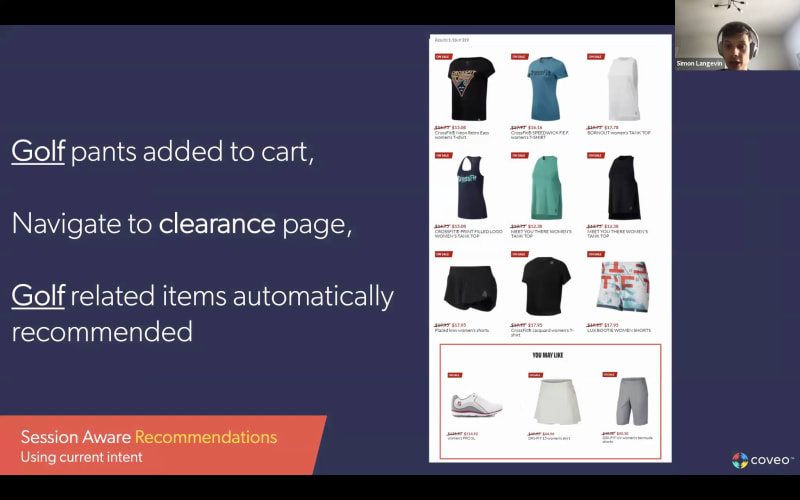
Hello, everyone, and thanks for joining our session today on what's new in Coveo for ecommerce. My name is Shareen Reed. I work on the product marketing team here at Coveo, and I'm joined by my colleague, Simon Langebaix, who is the director of product management. And he's going to be leading the session today, providing most of the content. So I have a couple of housekeeping items to cover quickly before we get started. First, everyone is in listen only mode. However, we do wanna hear from you today during the presentation. So feel free to send your questions along using the q and a section on your screen. And the most popular question that always comes up is, is the session being recorded? And, yes, it is. So, it will be recorded, and you'll receive the presentation recording within about twenty four hours of the conclusion of the event. Alright. So with that put aside, let's get started. So before I I hand over to Simone, he takes a a deeper dive into some of the new features for this quarter. I kind of wanted to give some perspective on where we've been investing and some of the major enhancements that have been released since the beginning of the year. So we class and you see on the slide, we classify them into three big buckets, shopper experience, merchandiser experience, and IT optimization. So the first bucket, which is shopper experience, is obviously exactly how it sounds. So any feature really that helps shoppers find products better, maybe explore product related content or influence add to cart purchases, anything around that. So here, we've introduced some really unique innovation under the umbrella term what we call personalization as you go. So what that is in a nutshell is it's creating a vector map of product catalog and then combining that with on-site behavior. And we use those two two pieces together. And then Coveo machine learning can deliver a more tailored experience for either unknown, visitors that come to your site or new visitors that come to your site. And what's unique about all this is that it's in real time. So it reacts to what a shopper might be clicking on, viewing, adding to cart. So there are many new features that we're coming out with now and in the future that can be tied to this capability. For example, the ability to provide better query suggestions that are more aligned with what the shopper's current intent is or even delivering, as you see here, more personalized recommendations within the session. So Simon's gonna spend some time on this with you, and we'll dive into some more detail. The second bucket, if you go to the to the middle one, which is merchandiser experience, that really covers any of the behind the scene tools that we provide to make life easier for the business user. So things like allowing a merchandiser to tune the experience with, boosting and burying by boosting and burying products or maybe setting up listing pages, reporting on performance, all those things will go into here. And we introduced some new features around campaign management, so enabling merchandisers to create and apply rules for time based campaigns. And we also simplify the a b testing process so that it's easier to configure and then just to view those results. The last item here is Simon's going to spend some time on it as well, which is our enriched attribution analytics dashboards. So I won't elaborate on that further right now. The third bucket, which is IT optimization, relates to any features, for easing deployment, maintenance, maybe improving scalability. We lump them into this bucket here. So we introduced, last quarter, smart catalog indexing, and that was designed to simplify the onboarding process, for product catalogs. But it also sets it up in a more standardized way, and that enables a lot of the the other features to work better and more seamlessly. We also made available a headless controller for product recommendations so that, front end developers can easily deploy product recommendations without really having to dive into, Coveo, under the hood. So they have less expertise per se. And Coveo, they can deploy them, a lot more easily. The last one here, which is the Snowflake reader account, we'll get into more detail and talk about that later as well. So finally, just before I hand it over to Simon, I wanted to let you know that, we have these CodeNew and Coveo sessions every quarter. And then the last one we did in March was under the the framework of the Relevance three sixty event. So if you missed it and you're interested in more detail on some of the features that we're not necessarily diving into today, I invite you to take a look at the recording that's available on our What's New page for more detail on those. Alright. Take it away, Simon. Thank you. Alright. Hi, everyone. So, as Sherry mentioned, there has been a lot of things that have been, developed since the start of the year. I will cover really just for the second quarter, so q q two calendar, of the of the calendar year. And I will do a special kind of focus this time on recommendations. So, obviously, Coveo is a search engine. We also drive product listings, but I will, well, we did actually spend a bit more time on our recommendation models, and I will cover, these these recommendation more in detail. Do not hesitate to ask questions about other offering of Kaveo at the end of the session, but be aware that this session will be, geared toward recommendation, quite heavily. So just a a bit of a reminder here of how Kaveo works. We are a unified platform, meaning that commerce is only, although for me, it is everything, it is only a part of the type of content and the type of experience that we can drive. So from website to workplace, going to commerce and service, Kadeo unifies all of the endpoints, ensure that there is intelligence at every single endpoint where, the the user requests or interact with content, including, obviously, commerce catalog products. And every single reaction from these users will be tracked, used as behavioral analytics to improve our machine learning models. Then I will dive a little bit further into vectorization. Content is not only for search to be able to return it, but it's also a way for us to learn. So now the secure unified content, actually, I should have an additional arrow that goes into the Coveo AI even from the content side, but I will explain a bit more how vectors work, later in this presentation. And, obviously, the outcome of this is under search results, recommendation, and product listings. So, obviously, we are we have a personalization core, but we we still have an index at our core, so you will use Coveo for things that are really content. So our recommendation model has been improving, quite or, actually, the offering has been improved improving quite heavily. The the reason is, that the requirement for recommendation has also been kind of increasing, especially with the pandemic. We got a lot more of these different recommendation use case that were requested. So I'm gonna go over a few of them, the one that are currently existing and the war and the ones that we are developing at the moment. So, obviously, what you would all expect from a recommendation engine is similar products. So this one leveraging, mostly the product details view, as simple as that. So a product is viewed. The other product is viewed, and we kinda combine them together. So it's mostly popularity of products in relation to other products that will drive these clustering to happen. Now the similar product itself is more of an outcome, than an output. So the output, obviously, is detailed view, but similar products can mean different things. So we do have a few strategies that we'll use, for example, a similar taxonomy, so such as, for example, similar categories, as well as similar vectors. So I will explain a little bit later, with vectorization how this, this basic model can be augmented with vectorization. So mostly the goal of this, simple model is to help you discover, browse, and simplify the, the journey. The complete your look or frequently bought together, as we call it, is a way for you to increase AOV. That is really the main goal, and that's what we will track, when we put this model in place. So it's mostly for, your your shopper to do a first purchase and make sure that they don't forget other related items. So, obviously, increasing AOV, but also reducing frustration. In this case, obviously, we're talking about gloves to cap. This is not necessarily a requirement, but let's say, for example, if you're into complex manufacturing or you're into, groceries or pet food, or anything that is a bit more specific, like, for example, a DIY a DIY hardware store, for example, and you buy a certain tool, you might not know that another tool is required with that tool or even, for example, that tool uses units, like, for example, recharge batteries or anything like that, that these different, that these kind of related, these related items are being recommended. So this is the other popular, recommendation model. Now the one also that we, that we developed last year and that we're starting to use more and more is the cart recommendation model. So kinda similar to the frequently bought. However, this one will do a bit of a mix between products that are similar to what you have in the cart and products that are, that are popular or that are frequently bought overall. So this is a little bit like, for example, when you go grocery shopping, you get to the end, or to the, to the cashier, and you usually have some products that are kind of independent of what you're currently purchasing, for example, candies, chocolate bars, magazines, and whatnot. So this this cart model is a little bit of a, takes takes a little bit more than just what is usually purchased together. We'll look at other taxonomy elements. For example, margin could be one that that is taken into account. And we have recommendations that are more contextual to the home page, for example, such as best seller. So this one is simply, when we don't know anything about the user, anonymous user first visit, being able to recommend what currently is the most popular. Again, here, there's always personalization take taken into account. So this model will take into account your location, your device, and if you pass any other custom context to Covell will be it will be taken into account as well. So for example, the referrer, where the user is coming from, or even if there's any way to identify this user, we'll use it. Obviously, if the user is completely authenticated, we'll have the user base recommender, again, here more on the home page, which is a kind of customized, kinda home page recommendation on things that you have purchased before that you might be that are kinda related to or mostly recommendations that are related to things that you have purchased before, I should say. So all of these recommendation, when put in place this is, one of our client Bunnings, Bunnings Warehouse in Australia. So they are using some of these recommendation model on their site today. So this is the home page. When you scroll down a bit, they have seasonal recommendation using our popular, our popular recommendation. So this is a kind of recommendation that you'll have when you're anonymous, but they take into account some of the kind of environment context such as, in this case, seasonality. Now, obviously, this is currently on the site. Might sound a bit weird, if you're in North America because it's in or actually anywhere in the North, hemisphere, because it's summertime right now. And if you're in the the south the the northwest, North American continent, it is more than summer right now. It's actually, the oven, cooking in the oven at the moment. But in Australia, it's wintertime starting. So this is the current recommendation that they get, based on popularity and based on also inventory levels. On the product detail page itself, some of the recommendations that are proposed are, for example, you might also like. So similar product combined with frequently bought together, as well as a recommendation model that I didn't think of didn't talk about so far, but that is extremely important is the content recommendation model. So this model is completely different and will take into account rich content, not product. Actually, will not recommend product at all. It will recommend rich content based on your current interest, based on what you have clicked, and will be feeding mostly page views and journeys. So it will look at the entire current journey and adapt the recommendation along the way. So DIY advice is here based on the product being viewed. And, obviously, this can be done both ways. So in this case here, where you have your, your current rich article, being able to propose, products that are related to that, that current article. A new model, that we are putting in place, actually, that we, developed, is the buy again recommendation. So this one is currently being deployed in some clients' environments. If you are interested, if you have a catalog today that could use of that model, please reach out to us, and we'll work together to put it in place. So what it does mostly is that it will, understand the, propensity to buy again on the products themselves as well as the time frame between purchases so that we can know when to recommend a product to buy again. So we will not recommend products that you just bought yesterday if we know that usually it takes about one month beef before these products are bought again. So, again, if you are interested into that new model, please let us know. And, we are currently beta testing in some client's environment. So if you, are wondering kind of what recommendations to use when, obviously, your CSM, or your solution architect, Ecovail, can help you. But we also have a blog, a recently released blog, by Alexandre Liu, part of the, solution architect team on product recommendation examples and commerce, how to set them up, how to use the different strategies, etcetera etcetera. Now on the the core kind of the core change is really the development of vectors. So if you have been at my presentation, last quarter, you probably heard about vectors and how we use it into different parts of the product, such as, for example, for query suggestion. Product vectors are mostly a an enrichment of your product catalog. So we will look at users' patterns and behavior, and we will define how products are actually interconnected to each other, without being just coked on categories or brands or any other taxonomy. We'll actually look at the movement of the user across the catalog and try to create a relationship in between these different products. So it creates clusters that goes beyond categories and allows us also to, do fast one to one personalization, based on the current user intent. So it's really, the the the main the the main clientele, I would say, is anonymous visitors or anonymous journeys, so users that have not yet logged in or that will never logged in and, that we don't know anything about them so far. So it means reacting fast. And it's also, quite interesting into complex catalog where you have a lot of different items that goes beyond just a few categories, and it will also take into account the product data. So, obviously, the richer your taxonomy, the better the vector will work. But still, without any taxonomy, we will use, the user behavior to kinda patch it. And the the end goal is really to have some kind of aisles, but aisles that are trans transformative. So in if I was to walk into a store and the aisle will kinda move around, based on what I need. Now, obviously, not become completely confusing, but when I walk into a aisle where all of the products that I care about are actually at my eye level, instead of being kind of spread out everywhere. So the example of usage is, for example, for query suggestion, where a, you know, a user that is completely anonymous versus a user that I've done, three or four actions, will see different query suggestion based on our understanding from the, from the products and the the next action that we believe is the most relevant one. So if the user, for example, was looking for anything related to runnings, we will understand where the cluster the user is and start, changing our, our machine learning model to reorder the the query suggestion properly. But, obviously, now since we have that vector technology developed and we also have a lot of recommendation models, we decided to put vectors into, into our our machine learning models to make them session aware. And, obviously, this can be used for the home page, product page, cart page, pretty much everything that I was showing before. So I'm gonna do a bit of a stop here, go into a, demo mode, and then go back to the slide afterward. So here I have, my, demo environment. I'll just search, for example, for golf pants here. Choose, for example, this pair here. Now similar product recommendation, being proposed. I'll just add here to my cart, search, let's say, for gloves. So you can already see the vector, starting to show, for example, gloves for men as well as the sporting category golf golfing category. And then I'll have here my different gloves. I'll look, for example, for this one here. Start adding to cart. And then if I go back to my home page, you can see that already the you may like is already kind of, showing, pants that are related to categories that I've looked at before. So if I look at this one, I'm into the golf apparel category. So that's a bit of the session aware recommendation, where, for example, this rec the these recommendation on the home page were not even, appearing at first. We used our our headless recommendation widget to make them appear and use the session aware to look at the current vector, what is the current intent and journey of the user to make them appear. Now there was one thing mentioned while I'm on this demo page. One thing mentioned by, Shareen, which was our headless controller for product recommendation. It was built about two quarters ago, but just a reminder that it exists and fits into, any framework, any JavaScript based framework. So in this case here, Windows Vue JS, store. And we have these recommendations that are powered server side using the Koveo headless controller, so no need for a JavaScript library. And when I click on any of these recommendations, you can see the update is extremely fast. We're talking here about about five to ten milliseconds for, not only the the page to load, but, obviously, the products to be, to be shown. So that is for the demo related to recommendations. Now, obviously, you know, the the the the big question about these recommendations, about the vectors, about the session aware, buy again recommendation, cart recommendation, all of these offers, is what kind of data do I need? And I can answer that. So the data required is obviously purchase data. So we use the Google Analytics and then ccommerce protocol. So if you are already using Google Analytics, if you're using even Google Tag Manager, it's even better because we have Google Tag Manager templates. And if you are not using Google Analytics, you're using Adobe or, Attilium tags, with another, custom data layer protocol, it doesn't matter. We'll just have to reformat it a bit before sending it. But the important thing is that we receive purchases, add to cart, checkout, refunds, detail view, anything that, kind of, that shows the, the the the shopper journey across the the commerce experience. On our side, we will build these, reports. So these are some of the newest reports that we are building for commerce. We are slowly rolling them out, for some of our clients. So if I look more into details, here I have, you know, a few kind of hover with the tooltips. We go quite, quite granular with, for example, what are the top selling products? What is the percentage of total revenue you can expect from this product? Or so far, the performance of this product? What is the total revenue over time? What is the most, what is the the the top trending keyword, but also the keyword that is the most valuable in terms of revenue and transaction, being able to to focus on this. What are the top selling categories? What is the the session? So the conversion funnel. How is search listings and recommendation affecting your conversion funnel as well as top rec selling recommended product. So that is the overview, and we have expanded. And, again, we'll be rolling this to some of our clients, into a more detailed revenue, kind of revenue explorer, where we can show, for example, again, what are the top training categories, the revenue per country, revenue per visitor type, new visitors versus returning visitors. We can look more in detail into sessions. So, you know, again, what are the the peak hours here? What are the sessions per visitor type? So the difference between, you know, revenue or session focus. And we can focus more onto search, so into each of the different categories that are offered by Kaveo. So whether your search performance, again, here always tied to revenue, your category listing performance if they are driven by Kaveo, as well as your recommendation performance. So these all of these recommendation model, how they perform over time. So these all of these visualization are available for our clients. And, again, if you are interested into any of those, the only thing that is required is the data underneath. And one last important thing about data is a snowflake reader account, that, Shareen was mentioning. So every single client, that is sending data to Coveo, that has a Coveo for commerce license will have access to a Snowflake reader account. This reader account will allow you to stream data out. So instead of having to do exports, of data, into, you know, CSV format or or anything similar, you can actually connect to our Snowflake, our Snowflake provider and and grab the content directly in a streaming fashion and bring it into your favorite BI environment. There are credits. Yes. So you do have a credit limit depending on your license type. So if you want more information on that, just reach out to your CSM. Or if you are in the process right now of, of, you know, purchasing Coveo or you're interested to Coveo, just reach out to your sales, your account executive. On this, so that was pretty much it for, what's here in Covell. So, again, a big focus on recommendation on dashboarding and data. And, again, as always, we do offer a free assessment of your ecommerce site search. And before we dive more into this, Shareen, if there's if there are any questions. Yeah. We had a few come through that I was able to answer, but this one I left for you. So, hopefully, you can answer this one. So, basically, on the last part that you're covering on using the Google, data information, it says, does the Google integration mean that the data captured in GA via data layer, the conversion tracking, events can be utilized to run, reports? Yes. Absolutely. So we use the same data layer for Google Analytics and for Kaveo. We tend to so so we don't connect to Google Analytics. We really use a shared data layer. And the reason for this is that we don't want to have any delay on the data coming in. So when you use a data layer, the data is sent to Coveo and usually processed in a matter of seconds, because we need to do real time personalization. So we cannot wait for Google, for example, to stream out the data to. So we use, the the same data layer that you use for your ecommerce, your Google Analytics reporting. We will use the same to do our own reports on our site. Alright. Okay. Perfect. I think you mentioned this, but what kind of data is needed for product recommendations to work? I mean, you you covered that. Right? Yeah. I I did cover a part of it. I think, you know, for for some recommendations. So so I kinda said, you know, send your purchase, your refund. Yeah. But, obviously, it's kind of a stage process, and some models will require less data than other. So as I mentioned, like, for example, if you only send us detailed view, so products are being seen, which is also, for example, if you're in a b to b scenario, only do catalog browsing, you don't necessarily do transaction on-site. Mhmm. It might be the only thing you can send. So in this case, you'll be able to have a frequently viewed product, frequently viewed recommendation. If you can send, for example, request quote for b two b or complete transaction for b two c, then you'll be able to have frequently bought together model. You'll be able to have popular bot model, cart recommendation, etcetera, etcetera. So it really kinda depend on the model you wanna build. And on each of these, strategies in our documentation, you'll have the required data. Yeah. So the more data gets sent, the better the more tailored the recommendation is to cut. That. Yeah. Never too much. You could do. Yeah. Yeah. Okay. A follow-up question on the last one. Would that require any customization, or is it out of the box? I guess that's on the the previous question being able to run reports. Yeah. Yeah. Exactly. So okay. So on on the reports, no. It does not require, customization. We use pretty much the, the, the data layer of Google Analytics as is. We do you can send additional data. So there are some actions that we accept that Google Analytics does not. So for example, especially for b two b, if you want to send a quote, the request quote is not a standard action of Google Analytics. So if you want to see a report on your quote, you will need to augment your data layer with a quote action. And, and the same for for a few others. We do have data, sorry, data that extend the the standard of Google. But as for the normal events, like purchases at the cart, product detail view, product impressions, we really use the the same the same format as Google Analytics, so it shouldn't require any customization. Okay. Maybe you can mention the fact that we also have a Coveo tracker, right, that is following whatever a person's doing on the site. In the data layer, but you might need to augment your data layer still. So, like, the Cruevo tracker will not build your data layer for you, however. So you still need to kind of build that data layer. And we're pretty good at this. So if you ask a solution architect at Cruevo, we can definitely help you build your day later, which will be used both for Coveo and for Google Analytics, Adobe, Omniture, or any, technology you use. Okay. Perfect. And there was a question around recommendation strategies or models. So you covered a few and you talked about them in different contexts. One was on the home page, one product detail page, etcetera. So the question is, can you simply use the same model or strategy on every page? No. It's really what we want, what we want to avoid at all cost. And and and what we see a lot, we see a lot of recommendation engines on the market that says you can use us everywhere and we only need page views. You put that tracker. It's super simple. But at the end of the day, you always only get, like, page view recommendation, which are extremely weak. They they will only show you, like, the the current journey. If you have anything specific to your catalog, it will not take it into account like variation, entitlements. So doing recommendation properly do take a bit of time and do take a bit of reflection. So, obviously, there is one type of model for each situation, and you have to learn how to use them properly. We are investing into, some recommendation that could be combined, and we will decide, which one, you know, is the best to be shown in some situation. But since they require different data, we will not be able to do that for all recommendation and have just the one size fits all one. And we don't want to. We want people to kind of think when they put recommendation on what they want to achieve. Yep. And a good starting point, you mentioned it before, and I actually posted it in the chat because somebody was asking for the blog, URL directly. So I did post that, and and she goes over at least, you know, four main strategies and what you would use on on different pages. And think really about, the the outcome. That's that's one of the main error that people do with recommendation is they put recommendation, and it looks good. So, yes, we have recommendation, and we'll track the click rate. But all of these recommendation really have different outcomes that we expect out of them. So whether, you know, it's to increase your card size, to increase, the or to reduce the PAP conversion, you know, these are different outcomes. And I I would say it's more important to think about those outcomes than to think about the actual recommendation model itself. Yeah. And what's what's funny is that it seems like recommendations are ubiquitous, but when you dig a little bit deeper, you realize that there's a lot of manual stuff going on behind the scenes and people not even using machine learning in order to serve these up. Yeah. Indeed. Still. Alright. One more is, are product vectors just using catalog data? No. They use both. So catalog data, the more you have, the better they will be called, but they will always be augmented with users' behavioral data. So mostly, as users confirm our previous assumption, it will allow us to have a vector that is kind of more, in which we have more confidence. And, obviously, vectors will change. As your content change, as your visitors change, as season progress, you our vectors will change. They will react, quickly. And, usually, we rebuild these vectors about every day, so they they never stay static. And and, again, even if your catalog data is static, your users will confirm and change these vectors over time. Yeah. It's it's like the the chocolate bars being at as you exit at the grocery store, if people are constantly buying chocolate bars with their cereal, then we'll end up putting the chocolate bars and the cereal together, which we wouldn't normally put. Think about it. Yep. Yeah. Exactly. Alright. So how much data does the machine learning need to be effective? Oh, we get this all the time. So how much data do you need for it to actually kick in? It's not that that, it's not much about the data or the amount of data. It's more about, the quality of the data and the repetition of it. So so if we get a lot of repetition, we get behaviors that kinda look similar, that's where we will kick in. But, usually, you know, the time that it takes so let's say you have about a million visits on your site. And, and on these visits, you have, you know, about one percent or even maybe not, like, zero point five percent of the of those visits end up, purchasing something. It will take about two days, three days before you start having recommendation based on purchases. So if you have more visits, then, obviously, it will take a bit less time. If you have less or a smaller purchase frequency, then obviously would take a bit more time. But it it's usually done within a few days. And for some simple model, like here, we're talking about recommendations, which are a bit more complex, but let's take query suggestion. For query suggestion, if user starts using search, it takes about a day, and you'll start having query being suggested. So recommendations, it would take a little bit longer, but something simpler as query suggestions, it kicks in fairly quickly because there's more data to run on. Exactly. And and maybe for the the b to b, a b to b seller here on on the on this call, you might have some products that are, you know, not frequently bought, that are not frequently visited. That's where vector will really help, because the vector will, use also catalog data and will look at relationship between products. And, when there is a, a user behavior or a user that is interacting with a product, that is related to other products, all of these products will be boosted in a way, maybe not as much as the product that was selected, but they will be kind of boosted accordingly, which mean that a product that is not necessarily as popular, but that belongs into a category that has a lot of movement might be, might use kind of the the the boost of the crowd to be able to be boosted higher. So that's that's where vectorization can help as opposed to a simple, popularity based on clickstream. Okay. So it'll improve the visibility for products that aren't necessarily frequently purchased. Yep. Yep. Okay. Perfect. Alright. So I think we've covered everything. This is great, Simone. Thank you for the overview. Remind everyone, if you are not currently a Coveo customer, if you're a Coveo customer, we're not using it for commerce and you want a site assessment, that's available to you. If you are a customer and you wanna enable some of these, features in your, commerce instance, then please reach out to your customer success manager and work with them to get that going. And with that, thank you for joining us, and have a good rest of your day, everybody. Thank you. Bye.
New in Coveo - Ecommerce