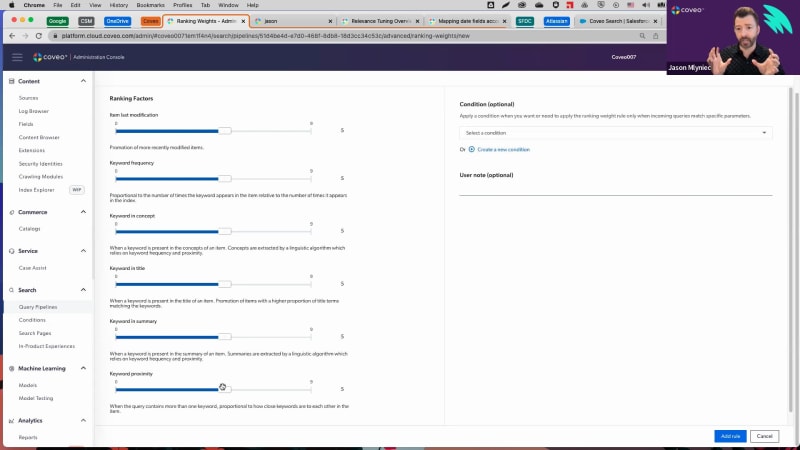
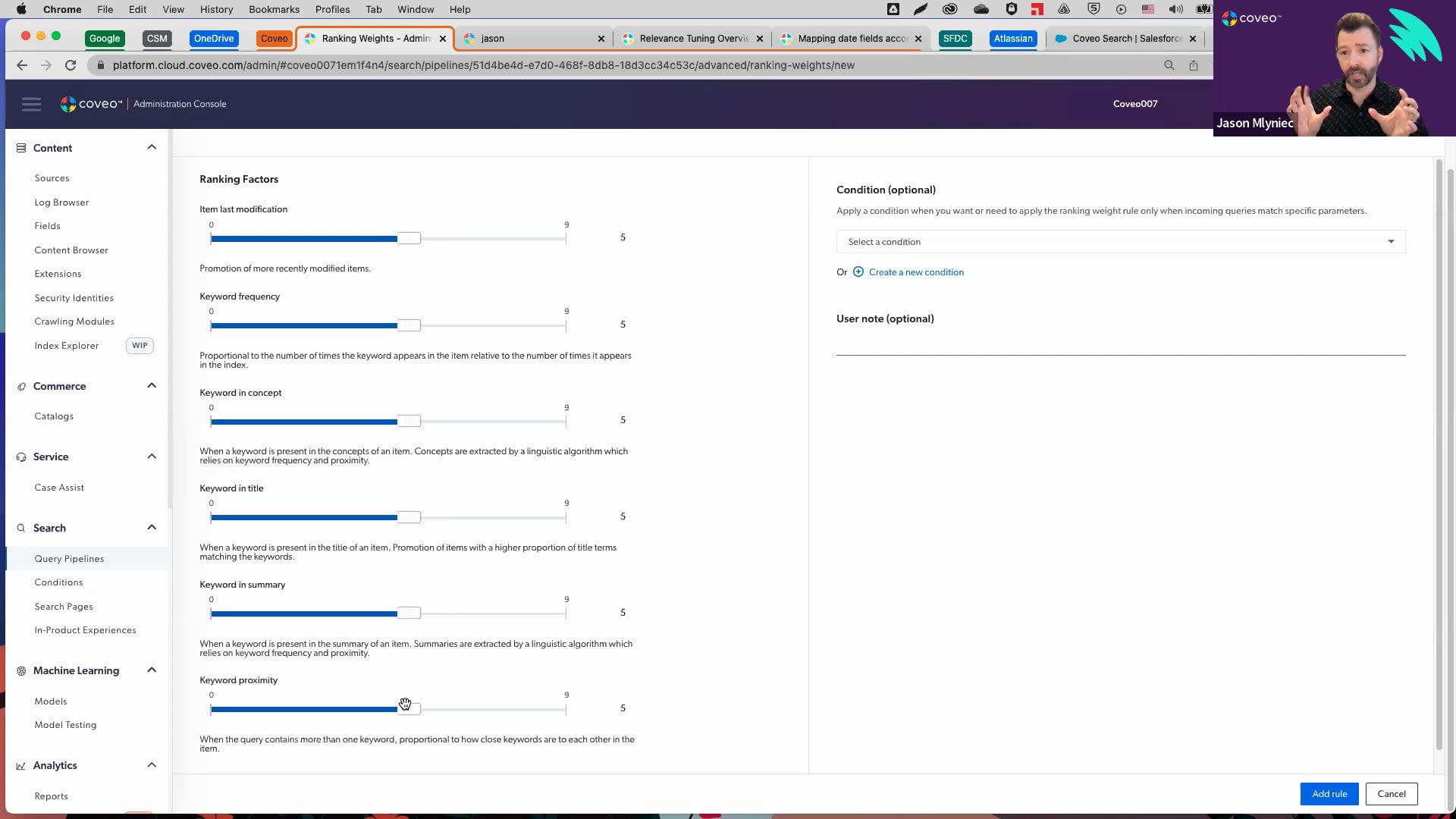
Alright. So we'll get started. So hello, everyone, and welcome to this month's learning series webinar. My name is Jasmine Oraz, and I work on the marketing team here at Coveo. For those of you who are attending a learning series webinar for the first time, this monthly webinar program is where we get more hands on with how to enable Coveo's features that can help you to create more relevant experiences. This is actually the second part second and final session in our two part series on Coveo platform primers. So if you missed the first one, it was about two weeks ago. So you can watch the recording on our website if you missed that. And we're here for the final session of that. So today we'll be focusing on on Coveo's most useful Barca end features to help you optimize your solution on day one and you'll walk away from the webinar. Being able to confidently manage Coveo on an ongoing basis. So before we do get started I have a couple of housekeeping items to cover. So first and foremost, we always encourage you to ask any questions, throughout the webinar using either the Q and A panel or the chat box, on your screen as we go along. And our experts will answer them throughout and at the end of the session as well. And as usual, today's session is also being recorded, so you can expect to receive the presentation within the next, probably forty eight hours, into your inbox. So look out for that. And like I said, if you miss part one, you can always catch the recording on our website as well. And today, I'm super excited to welcome back our speakers. So we have Jesse, our customer, onboarding specialist, and Jason Milnek, our director of cost customer onboarding. So without further ado, I will pass it off to Jesse to get started. Hello. And welcome to part two of the series. If you've been to our previous session, then welcome back. So we've got a pretty packed agenda today. So let's get right into it. Gonna go ahead and start with just a high level overview of some of what we've covered, in the last session as well as about relevance tuning in general. From there, we'll go over some of the main tools that you can use to be able to tune the relevance of your search experience. And then finally, Jason's going to give us a little bit of a look behind the curtains. And we can actually see the impact that we're making on relevance through the debug panel. Just like last session, we're going to go ahead and wrap up with a q and a. Like Jasmine mentioned, don't be shy to send any questions. We'll be able to answer them even as I'm presenting. And if there's anything left over, then we'll make sure that we can cover that before the end of today's session. Finally, the last thing that I want to go ahead and preface is just a couple of additional resources, which I can actually just quickly go over now. We're going to go ahead and send the slide deck, so don't be shy, to get into it after the fact. We've left this as well as a couple of other slides that explain in further detail what we're going to be covering today. So starting with a quick recap, in our last session, we looked at being able to identify gaps in search performance through our usage analytics, through our reporting dashboards. Once we've identified the issues and maybe some of the queries that cause the issues, we could look at what we could do to essentially improve the experience and improve on relevance, say, by adding a query pipeline rule or through our machine learning models. So when we get the question of, well, what exactly is relevance tuning anyways? We've actually just answered that because simply put it very much is just the process of identifying gaps in your search performance, and then taking whatever measures that are necessary to go ahead and improve them. There's a couple of different steps to this that I'll cover really quickly. Starting with so very much diagnosing the issue. So this is very much by looking at the queries that aren't getting results, using our reports to be able to spot issues and what searches and what queries are behind them. Troubleshooting. And then the last thing that I'll really press on is the emphasis of evaluation and revision. So relevance tuning isn't just set it and forget it. It's a living and breathing process. It's ongoing. And we want to revise, see if what we've done actually worked. And as we get more data, and as we move further, we can look at what else we can do strategically to improve on our relevance. Really common question is when should I tune relevance? And it's a great question. Really, in this case, I've said this before, I said that I was going to be a broken record player about this. And I don't mind doing that again. Definitely, the takeaway is to be able to tune relevance when we very much spotted a problem. So once we've spotted a problem, and we're certain to then go ahead and enact something. While we can have a lot of optimistic, hunches about what might improve relevancy, We do wanna do as little as possible and only when absolutely necessary so that we don't get in the way of our machine learning models and so that we can let machine learning models become deadly effective at understanding how to deliver relevant experiences. So looking at a couple of different tools for relevance tuning. So a lot of these tools we're actually gonna cover and I'm gonna show you practical examples of what you can do with an actual scenario. We'll do that in the platform in just a moment. But before we do that, there's a couple of other items that I do want to touch on and make sure that you have kind of in your back pocket. First one is starting with query correction features. So so there's three primary ones. Now auto correction and did enable did you mean, I'm not gonna touch on because as long as you're technically implemented properly, these should already be running underneath the hood, without any further kind of action needed on that or revision. That being said, the query correction feature that I do wanna talk about is our query suggest machine learning model. So a query correction feature, as the name implies, is very much just making these slight guidances or adjustments to your end users' queries. So a support agent, somebody within the company, maybe somebody on an ecommerce page, it's gonna be helping them by guiding them along a little bit. The machine learning model query suggest is when you go ahead and start typing. And as you type, it'll start to suggest responses for you in real time. This really helps with not misspelling something properly. Or if you're not certain of the terminology that's used, it might point it out for you before you potentially search for something different. You can think of Google in this example. It's a famous example of when you start typing and it'll start to populate suggestions as you type. What I will touch on quickly is, for example, auto correction will essentially change the actual nature of the query if there are no items that match the terminology. So it was misspelled and it would automatically be corrected to the new spelling, which has results. Next up, enable did you mean. Again, we can just think of this as if there might have been if it might have been misspelled. But you can see that there actually are results here that match the spelling even though it was misspelled, but we likely mean to say pipeline in this case. So it will suggest that you can click on that and in turn, it won't impact the click through rate, because something may have been misspelled. The last thing that I wanna touch on here just before we jump into a demo is looking at AB testing. So once we've enacted a rule, there's no need to proverbially jump off of the deep end and just hope that the rule worked. We have an actual mechanism. We have this feature that will let you add the rule into a test scenario and be able to see over time if it's actually working or not. So I'll show you this in a little bit more detail, but great feature in terms of actually making sure that this is working without having to commit to the rule entirely. With that out of the way, let's go ahead and jump right on to a demo. Okay. So you'll see that I'm here within the query pipelines. Now this is a test organization, so, of course, take these numbers with a grain of salt. But before we get going, we're actually gonna do a little bit of improvisation. We're gonna put ourselves in a scenario. While Coveo is everything machine learning and relevancy, let's pretend, so hypothetically, that Coveo has a travel division. And in fact, we've gotten pretty good at it. We spent a lot of time doing this. Now we're about to go live with our use case in the travel department, and we wanna look at the top queries and see exactly what we could potentially do to tune our relevance to put some best practices into place and make our search performance better. So I'm going to guide you through this scenario, and we'll show some actual examples of what you can do. But the first question is, where do we start? Let's go back to that process of diagnosing, troubleshooting, and then evaluating and revising. So we'll start with diagnosing. Let's jump right into the reporting tab. And I'm going to go ahead and move into the search details report. We had gone over this report in pretty great detail during the last session. It's a really powerful tool gives you a great high level of a lot of functionality, I would definitely recommend that you check this out, in the last session if you want a little bit more detail on the report. But let's jump right into the content gap tab. Now this is not only gonna show you, the breakdown of your content gap, so essentially how large the content gap is, but it will show you what queries are actually responsible here. So what queries led to not having any results for your end users? The first thing that I wanna touch on here is let's just take the example of Greater China. So this is a query, and we might wanna jump to okay, well, what kind of rule can we put into place? Is there a machine learning model that can help with this? Before we get into that, there's also the perspective of relevance tuning outside of the platform, by realizing what content we might potentially need to build. Now this is test data, but let's just say that we were getting this query, say, hundreds of times to no avail with no results at all. That would be a great indication that we need to build some content around this topic to essentially be able to mitigate a content gap associated with that. Another valuable example is, let's just say, a support team or a community. By seeing what your clients are searching for and not getting results for, we might actually have a voice directly into our clients and what they are asking to which they're not receiving answers for. So really powerful and great to know that sometimes it might actually be the content that's missing rather than a rule that we could be adding to in turn tune our relevance. Now we'll take the example that you know, within the travel industry, you've noticed that one of our top queries is n y. Of course, you know, being this industry and why is very obviously from New York, so we have a lot of people visiting there. Now let's go check it out. When somebody searches for NY, we'll just give this a moment here. Right. So we can see that there's no results for n y. But that actually doesn't make sense because we know that we actually do have content for New York. So what could be going on here? Being the fact that n y isn't a keyword that we have in our documentation, it's not registering. This, in turn, would be a great example of when we could use a thesaurus rule. A thesaurus rule, very quickly put, is if we search for one thing, let's go ahead and throw in a second keyword. So we're expanding our results, and in turn, we're trying to avoid content gap, and we're giving your end users more things to choose from. Now, what we want to do here is we'd actually want to go for a one way synonym, a one way thesaurus rule. This one here would be bi directional. But let me explain my thinking. When I search for n y, I also want to perform a second query within that same query for New York. But we don't have any documentation that matches n y, So we only want this to go one way. When you search for n y, it searches through New York. But when you search for New York, it's not gonna search for n y. By getting rid of as many potential keywords that aren't relevant, we're essentially mitigating the amount of potential negative impact that we can have on the search experience. So let's go ahead and add the rule. And with that out of the way, let's refresh this. Okay. Okay. And now let's give this a try. And there we have it. Where we didn't have any results before, it's now queuing what we can't see, a secondary query which matches our results. So the end user has something to click on, and they're able they don't fall into a content gap. Let's look at a couple of other rules here. Let's go ahead and jump into result ranking. So what this would be is we can think of this as a rule that integrates a point system. Now I've gone over this briefly in our last session, but let me show you some actual practical examples of how we could use this. When it comes to a featured result, so talking about points, this would essentially give one item a million points. So we can forget about machine learning. We can forget about other, query pipeline rules. This whatever we add as an item as a featured result is always gonna triumph as long as these criterias are met. So an example of this, when would we use this? Every year we have, you know, Coveo's yearly travel summit. And it's becoming a very popular event. This is, of course, again, hypothetical. And we had a great attendance last year and we want to make sure that we keep that attendance up. In fact, we've gotten a bit of a name for this and people are starting to look for this. We know that people want to see this and it's coming very soon. So in this case, if I go ahead and I type in events, you can see that we have a whole plethora of results and it might not be likely that somebody finds what they're looking for. So what we'll go ahead and do is we'll say that if the query contains events, then let's go ahead and add an item. In fact, we'll go ahead and add that travel summit that we were talking about. Here we go, travel summit twenty twenty two. And you'll now notice that when I refresh the query right off of the bat, there's no way that this can be triumphed. It has all of the points in the world. This will always be the most relevant and pop up on top as long as we're meeting these criterias. We can even go ahead and type in travel events because the query only needs to contain the word event. Another quick practical example of this is let's just say we know that, you know, we've been doing a lot of recruiting And a really popular web page is our open positions web page. In fact, we have a really good assumption that if somebody is going to search for something related to job career recruitment, there's a really high likelihood that they're gonna want to go onto that page. We've also noticed that job and careers are some of the top queries. So because they're so popular, let's go ahead and address that. If the search contains job, if the search contains career and let's just go ahead and throw in recruitment, then the item that we're gonna wanna feature is that open positions career page. Here we go. We'll add the item. Now what you'll notice here is I've spelled this as singular, but as long as it contains the word job, then even if it's spelled as jobs with plural, then right off the bat, here it is, that careers open position page, Same thing with careers, singular or plural, and we can make sure that anybody that's looking for that page based on their need is gonna be able to get it on the top. Alright. Let's go over one, last rule that I wanna walk you through. I'll just need a different pipeline here. So finally, let's use a ranking expression. Now, instead of a million points or instead of an unlimited amount of points for one item, we can add a boost or de boost of our choosing based on again, the criteria right here. So what we'll try and do is let's just say, you know, if we're using this internally and we have all of our travel agents are searching for important information, important documents, we tend to notice that people really want to use PDFs and really wanna use documents. Now at the same time, we don't want, for example, less popular documents or document types, just say Excel sheets, other kinds of document types that are maybe less popular. We don't want those to get in the way of our relevancy. We don't want them to crowd the results. So say no more. Let's go ahead and add some criteria here. We're gonna use the filter expression editor. So we'll click right here where the pencil is. And based on the criteria, we can choose that the file type is equal to PDF and a document. Let's go ahead and add a boost of, say, a hundred and fifty points. How many points you ask? Let's try not to add too many points. This follows again the principle that we don't wanna impact the search experience too greatly because it might sway machine learning in a way that's not favorable. In fact, if we really go off the deep end with our points, it'll actually tell you, be careful. This is a really high score. You're, you know, proverbially playing god, and you don't wanna potentially get in the way of the machine learning models in this case. So let's keep this at a cool one hundred and fifty points. We'll add the rule. Here we go. We can see it's ready to go. Now let's jump right into the search page. Now you can see right off the bat, we have what was recommended by our machine learning models. But aside from that, already you can see a pretty overwhelming amount of documents being PDFs and being documents. Problem solved. We don't have these other kinds of files that might be crowding in the way of relevance. And the last thing that I'll mention here is, again, this is very much a push and pull kind of methodology. It's always great to just go ahead and test things out. Put yourself in the mind of the end user and see what's valuable for them. What are they searching for? What could they expect to find them. I'll just give this a minute. And from there, actually, go ahead and test it out and see if it's lining up and see if it's adding up. So, finally, the last thing that I'll just cover on is, again, just a really quick kind of overview. So now we've added a couple of rules. Let's go ahead and see if these actually work. So we can go configure AB test. Here's that thesaurus rule that we were talking about. So one way, if we search for NY, let's search for New York. We'll add the rule. That's perfect. Now let's head back to the AB test. We'll choose the traffic here. So let's just say we don't want to take too much of a chance. Maybe we're getting thousands of queries a day. You know, we don't want to potentially compromise our current traffic. So let's give the original pipeline eighty percent. So only twenty percent of the people that are engaging with the Coveo powered search page are going to get that thesaurus rule or are going to get that, for example, that ranking expression, maybe that featured results. From there, once we confirm this, it's gonna go ahead and give us the metrics. It'll take us a little bit more time because it will have to consume the data to see which one's performing better. But you'll notice that over time, it's gonna tell you based on some of our biggest, most performant metrics, which one is actually working. Did the test scenario with the new rule actually make a positive difference? If so, let's use the test scenario. If not, let's use the original configuration. So there we have it in a nutshell, a couple of tools, a couple of fairly common tools that you can use to diagnose what kind of relevancy issues that you have and a couple of examples as to how you can actually go about troubleshooting these. From here, I'll go ahead and pass this over to Jason who can take us a little bit behind the curtains using the debug panel, go a step further in relevance tuning. Alright. Thanks a lot, Jesse. Great job. Let's, move on, as you said, into the Coveo cloud platform and take a deeper look into ranking. So before we get into all this stuff, I wanna kinda, like, set the level with a couple of key concepts with regards to Coveo relevance. And I would advise every customer, of this same kind of approach. So I think of Coveo relevance as, like, three layers. And, really, the first layer is what I would refer to as sort of, like, out of the box relevance, what you get with Coveo's search algorithm without the need to boost content and to use machine learning and all of this. And it really is the first place to start. And sometimes there is really no shortcut around having good content and good metadata, and I would argue good relevance with your search right out of the gates. Because if you have pretty solid relevance out of the gates, which Coveo's algorithm will provide, then you've got a good platform to build on with your other strategies. So the next strategy above this is gonna be, like, using manual boosting, rules like Jesse had just gone through, such as, like, a featured result or, result ranking. This could help you in a couple of ways. So if you know that there are certain things that you wanted to carry forward from your previous implementation or some ideas that you know are gonna have a big impact, you might as well layer those on there and get things started off out of the gates. And it also helps to pretrain the machine learning models because the way especially our automatic relevance tuning model works is it correlates searches with clicks. And people are gonna be more prone to click content that is presented first. And so by kind of, you know, adding some boosting rules into your implementation, you are gonna bring certain results up to the up up to the top, and it's human nature that those results are going to get more clicks and will ultimately help you train your machine learning models. And if you do it this way, you can actually get to the point where you start to reduce your manual rules over time to the point where now you're really relying on machine learning to do the fine tuning of your relevance dynamically as your solution, matures. So let's get into the next concept. We're gonna go into a query pipeline, and we're gonna talk about ranking weights. Because ranking weights is really that initial out of the box search algorithm that that Coveo dishes out. When you're in a query pipeline, you can get a good visual of this if you go into the advanced section, and then you'll see ranking weights as an option in here. And by default, there are no specific rules because there is essentially a a default algorithm that's put in place. You have the ability to tweak and tune this algorithm, though. And to do that, you're gonna you're gonna hit add rule. When you hit add rule, now you're gonna be presented with the out of the box ranking factors. And so whenever you search for a keyword in a Coveo implementation, a Coveo search page, these are the ranking factors that are determining, like, what order, your results are gonna come back at. So we can we include last item modification or or otherwise known as date in here. By default, it's right in the middle. Now I saw that earlier Brian had a question around dates. So if date is really important to you and you feel like you wanna always put your latest and greatest content forward, you can influence this algorithm. You can actually slide this slider up, which will, you know, have an impact of bringing newer items to the top. This is based on the index date, by the way. You can also do some field mapping to change that, but that's a bit more of a custom thing. We can talk to you about this. If, on the other hand, date is not important to you, you have some static content, maybe you have, like, like, a commerce use case where you you just have content that's always there and you don't really wanna muddy up the waters with this. You can turn that all the way off. Next one is keyword frequency. So this is how many times the certain keyword that you search for appears within the body of the result. If you feel like that's gonna have an impact, you want you know, maybe there's some results that just have, like, a lot of repetitive words in there. You can turn that down. You can turn it up if you want it to have more impact. This one, there's not a lot of reason to change it too much, but you have that option. There is a factor called keyword and concept. Now a concept field is actually a field that Coveo generates at indexing time. So when we are indexing content, scanning the body of each item, there are certain keywords that are pulled out of this. Think of it as, like, automatic tagging that is done at indexing time by Coveo. And if the keyword that was searched for happened to be in the concept field of one of your items, then it might get a little bit more of a boost, and you can actually influence the boost with this. Keyword and title. This one is relatively self explanatory. But, yes, certainly, if the keyword that was searched for is in the title of the document, there should be a higher weight to it. The keyword and the summary. So if your documents items have a summary field in there, which is a generated summary, then if the keyword appears in that summary, it'll get more of a boost. And then keyword proximity, also known as adjacency as you'll see in the UI. This refers to the if you have multiple keywords in one query, like machine learning is a good example of this. So machine learning, those are two separate keywords. But in Coveo world, you see those two words together all the time everywhere. And so results that have machine learning together back to back, that's gonna have the maximum proximity that we're gonna boost it higher than results that have the word machine in one sentence. And then, you know, maybe a few paragraphs down the page, the word learning comes up in a different context. Still a keyword match in both keywords, but because the proximity is so far away, it's not gonna get as much boosting as those keywords or those results that have exact proximity of keywords. So those are the what we call ranking factors. And each of these factors has, an impact on the results that you see on your search page when you send a query. Alright. Next thing we want to go through is scoring and and how scoring works. I will also send this message to you right away. Everything you do in the Cobio cloud platform so, like, when Jesse was showing you earlier, the ranking boost that he put on on PDFs, He did a boost of a hundred and fifty. What does that mean? Well, this is the score, the points that are attributed to your relevant score. And so, really, it's as simple as this. The higher the score that each item gets individually, the higher it's gonna be up on the results page. That determines the the ranking of of each result. Another important factor is everything you do here in the Coveo cloud platform, when you look at this in the front end in the UI, you're gonna have to multiply it by ten. So this says a hundred and fifty right here. In the search UI, it's gonna be fifteen hundred. So pay so that's why we say when he mentioned use small increments, definitely, we wanna double down on that. Smaller increments for boosting and deboosting is better. Do just enough that it's gonna achieve the results that you're looking for. And then we he mentioned as well featured results. Well, featured results adds a million points to your results. And, basically, what that does, it just makes sure that it's always a top result because nothing will will supersede this. So he showed you the ways you can do this. I also really want quickly want to, talk about, the machine learning model itself. So when you have the automatic relevance tuning model in your in your query pipeline, which you all should, you can configure how much boosting you want the model to give. As Jesse mentioned, you don't wanna boost your result rankings too much because it could supersede machine learning. Well, what do we mean by that is this. By default, your your your your results that are boosted by ML are gonna get boosted by two hundred and fifty points. So if I went into my ranking result ranking rules and I created a rule and I boosted something greater than two hundred and fifty points, then even the most, the highest achieved machine learned result would not be able to dethrone the artificial result that you put in there using a, a boosting rule. So that's why we wanna be careful, but you can change this. So if you want your machine learning model to have a higher impact, you can really crank that baby up, and that's gonna make sure that those machine learning results are always always at the top. But also note that you're gonna be working in larger intervals, and you'll even see a notification here that kinda says as such, this is gonna have a it's gonna make any manual rules you put have a lower impact. So that's why the default recommended setting of two hundred and fifty is there. And some clients do rec like, even try to decrease that a little bit if they don't wanna have their machine learning results that have too much prevalence. Alright. So now let's do one more thing. I'm gonna go back into, this pipeline, and we added a rule. So I'll just take a look at what rule that was. Remember, he added file type of PDF or doc. We wanna boost it by a hundred and fifty. So let's see what this looks like in the real world. So if I go into my search interface here, as I scroll down, I will see that there are a couple of recommended results here. You can tell again by the recommended flag, but look. Here's all my PDFs. So those PDFs are getting the benefit of, that boost. You can check on this using our debug panel. The debug panel is a feature that's available with Coveo JavaScript UI out of the box. It won't work if you have a headless framework, implementation, but I'm gonna show you another strategy in a minute that you can use, that'll work around this as well. This is a what I'll show you now is a as a JS UI function. You can hold on the, the option if you're using a Mac like me or if you have a PC, it's the alt key. Hold it down, and then double click in the white space of any result. And then you wanna click on this enable query debug option up here. And then as you're gonna scroll down, now you will see the your QREs. So what I'm seeing right here is this expression at file type PDF doc, and it gave me a score of fifteen hundred. Remember, it's gonna multiply it by by by ten. So if I I can look back in here, that is the result of this expression that Jesse added in there. You can see it playing out in real time, and that's why when I look at all my results, they're really colored by these PDFs. If I were to go in here and say, you know, I don't like that. Actually, I want them to be lower. You could scroll that back the opposite way and save it. And now if I just refresh my page, I I shouldn't see any PDFs, in the in the top part of my results page here. That's running slowly. Something did go wrong. Something always goes wrong when we're working in a demo. Right? Alright. So there we go. My results look a lot different right now. You can see the file types are different. Those PDFs are still there. In fact, I think if I were able to, you know, you know, add that as a facet, I should be able to find them, and then I might find something different here. So if I if I filter now by my PDF, file type And then I do the same debug. Now you can see I have a score of negative a thousand. I compare that to what I just did. I put a modifier of negative one hundred on here. It shows up as negative a thousand here, but that's how you know that it's working. You can run a debug this way. So let's clear out these facets. Alright. And let's let's show a a featured result so you can get an idea how that works. So if I were gonna go featured result in my result ranking rule, and then let's call this one, ML, And I'm just gonna choose a result here. Find one that's a little bit further down. Not not one of the top results, but let's see if I can find one that is, pretty deep down in the result list here. Like, that might be good. Test machine learning. I'll select this. Add it. And I'll say when the query is unicorn. And the cool thing about using featured results is it's one way you can put any query you want. It actually uses what we call the disjunctive expression, which means that the featured result doesn't have to match the keywords that the end user typed. You can just set a condition in here and say that if it's on a certain interface or if there's a certain keyword that you want to use to break that up, it's kinda independent. Whereas with the ranking expression, only the results that match the query that was sent are gonna get boosted. So with the feature result, you do have the option why which is why it's really good for using, if you have content gaps. So if you have a query that you know has no results, you can use a feature result to make a result appear where there otherwise wouldn't be one. So we're gonna go ahead and add this result rule. And remember, it's when I search for unicorn. So let's hope that this, works a little bit faster than it's been. Unicorn. There is my featured result, test machine learning, and you can see that it even has a featured flag on here. This is something you can control within the user interface using JavaScript UI. You could add a featured badge just like that. Now when I debug it, I'll double click. When I take a look at the scoring, you can see this QRE score here has a million points. Boom. There it is. That's because it's a featured result. So let's talk about some of those other, ranking weights in here really quick before we get too deep. So I'll I'll I'll I'll use the smart snippets example. I'll just do a quick search for this. We'll look at the debug panel again. Enable period debug here. Not sure why that didn't give me that debug. Alright. I took the back end here. But, that's okay because we can move on right to the to the next, thing I wanted to demonstrate with you anyway, which is okay. So maybe you don't want to use the debug panel itself to, pull up all of those results, and to and to actually look at the the different results this way. There's another way to do it. If you are on a HTML based search interface that is built using Coveo JavaScript UI, You can go into your URL string just like this and then type in add debug equals, true, and then re execute your query. What you're gonna do with this is unlock a feature that we call the relevance inspector, and you can see that it shows up up here at the top of my UI. My page is just getting all kinds of, jacked up today. Good times. Let's try this again. Alright. So with the relevance inspector turned on, you can see down below, you have on your results some of these that say toggle QRE breakdown. And you can see right in here, you have got a few things. You've got title, date, adjacency, a few other items like source and so forth as well. These are some of those ranking weights. So keywords and titles and and so forth are gonna be showed up in here. Date is gonna be getting a certain ranking as well, and that's why you'll see this total show up here as well. This total has been influenced by machine learning. You can open up your QRE breakdown and see it. And this is a little bit harder to to, to comprehend, but I know this was boosted by machine learning well for one because I have the flag on here. But if you didn't have this recommended flag turned on, you can still look at the breakdown of your QRE to figure it out. And in this case, you see the expression permanent ID equals, yeah, a bunch of garbledygook, and then the score is twenty five hundred. So if you recall, when I we were talking about the ART model, we said the max, limit there was two fifty. That's the recommended boosting for it. So that's twenty five hundred here in the UI world. So that's how I know this result specifically was boosted by machine learning, if I didn't have that flag. I can look at this one as well, and I think, again, I can see that they have, some some boosting being done on here. Now if I go ahead and execute a query I know I'm really asking a lot of this, this poor UI right now. Maybe it's my Internet connection because something keeps going on. K. Got my relevance inspector turned on, and now I'm gonna have some more detailed breakdown. So because I have some query terms that were sent in addition to just the QRE breakdown, I also can see terms relevancy breakdown. So you can see a little bit of it right here. So title, remember, I'm looking for the keywords in the title, the the date, the keyword adjacency. So that's the proximity of keywords, how close they are to each other. So I searched for machine learning, my favorite query. So there's strong adjacency right there. If I open this up, you can see the full breakdown of each keyword. So you have the keyword. Was it in the title? Was it in the concept? The remember that field we talked about that's auto generated by Coveo? If it's in the concept, it will show up here. Is that keyword in the summary? Even like the formatting and the casing. So if it's lowercase or uppercase, it's gonna have an impact on the overall algorithm here. The frequency, how many times does it show up in a result in that relation to the other keywords that are in there, another way of saying adjacency. Yeah. The the the words are the the terminology is a little bit, under standardized here, but they're all still here as long as you know what you're looking for. And we have some documentation that'll help, become the decoder ring for this. But by looking at this, you can actually see exactly how the score was attributed of the total of, nine nine thousand seven hundred and twenty five. So this is, like, the standard algorithm stuff. And then if I open up the toggle QRE breakdown, the QRE added another twenty five hundred points to that because of machine learning, which when you add up all these points, this is how you end up at your top score over here. So you can look at each result one at a time and look at the quality, the title, all of these different keyword terms. You can look at the keyword breakdowns in there and see how that all works. Or if you go up to the top of your page where it says relevance inspector, you can open this up. And this is gonna show you all of the results that were generated where you in a in a in a manner of which you can look at them kinda side by side and and do a comparison to see how they are. Because one question that customers have a lot is, like, how do I know why a particular result was placed where it is, and how do I get this result that's showing up, like, fifth down on the list or whatever to be the first list. And the answer to that question is you just have to have enough points attributed to that result given your scenario for it to move its way up in the ranking. And with the relevance inspector or the debug panel, you can actually see exactly how many points that particular result has. So you'll know how many points you need to attribute to it, divided by ten. So if you see like, let's let's take a look at this example. This these couple of top results have been boosted by machine learning, which is why we're seeing them so high up. You see a QRE associated to each of these that's giving you a total score, and then you can see the kinda, like, the breakdown of the different ranking factors in here as well. If I scroll down to say, like, alright. What about this mastering machine learning part one? That was a great webinar. What if I want that to be my number one result? Well, that result has seven thousand nine hundred and thirty five points associated to it Barca, and the top result has nine thousand seven hundred and twenty five points. So I'm gonna have to boost this thing by, over two thousand points. Let's give it a good twenty five hundred points. That ought to be enough to I think yeah. That twenty five hundred points ought to be enough to move this one up to the top. Back in the organization, we would have to boost it by two hundred and fifty points, for this particular query. So I could write a rule for that. So machine learning, mastering machine learning part one. Now at first, you could also create this as a featured result. So if you wanted this to be the top result all the time, make it a featured result, you're gonna add a million points to that, and Bob's your uncle. It's always gonna be number one result. Nothing's gonna be through on that. But if you wanted to be more subtle, again, if you're looking at the point total attribution here and your relevant score, you'll know exactly how many points you need to add or subtract to a particular result to make it move its position respectively in the result list compared to the other results that are there. So this is really fun. The relevance inspector, definitely a a good way to do it. Some some key takeaways again is make sure that when you are in the org, you don't go crazy with your boosting rules. Try to keep them. I would recommend, like, increments of twenty five or fifty, especially if you want to, you know, boost a, like, a whole group of items at once. Like, like, in this case, it's an entire file type. I see a lot of customers use source. So there's a particular source of content that you want, like, documents or, like, you know, KB articles, and you want the articles to be showing up higher on the list, I would definitely recommend using small increments and maybe twenty five or fifty, just so that your top results are getting colored with them, but it's not overpowering some results that may not be within, you know, that particular resource, but also still valid. And, also, be careful if you have something that you really wanna boost that you don't push it up above, you know, two fifty. Because if you do, yeah, you it'll still train machine learning, and eventually, you're gonna add your machine learning points along to this point. But at some point in time, this thing might it's gonna always be on top even if, machine learning is there. And then as it learns, the machine learning points are just gonna add to it. So it'll never really lose its top status position unless you have a featured result in there that over that over over, achieves that. And then when it comes to featured results, again, that's when you're adding a million points of things. Be very careful about these. I've seen customers use a lot of different featured results. And in some cases, you got to be really careful with your conditions. There should be a very specific use case for this, a very specific condition that is applied. And if your conditions aren't specific enough, you might actually have two featured results for the same query if there's a little bit of overlap there. Or you might have one result that's getting, like, two or three million points attributed to it. So, they definitely serve a purpose but shouldn't be overused. So with that, I think, we've got about ten minutes left. That's pretty much what I wanted to cover, but I wanted to see if there were any specific questions from the team, from the audience here. Alright. I take that as no questions. I can, perfect. Now it looks like we've got some questions. I'll just jump in quickly. I can see. Are there relevance tuning best practices to better specific metrics, for example, average click rank? Okay. So great question. And the simple answer in and of itself would be, it would really depend on the rule. There's so many rules and so many different use cases that, and it might even be a combination of rules that might be able to improve a specific metric. But looking really quickly at some of the rules that we've looked at today. So for example, thesaurus rule, let's take the example of NY and not having content for that with New York. If somebody were to search NY, they would have a content gap if there's no, answers, there's no results that they can click on. Soon as we add that thesaurus rule, they now have something to click on. They go ahead and click on it. We've just addressed the content gap. One more example could be, for example, looking at ranking expressions. So if we want to give a boost specifically to PDF and documents, at that point, people that are searching through documents might have less cluttered in the way. And as a result, what they're looking for if they're prioritizing those types of documents are gonna pop up higher at the top. So that would help with your average click rank because it might be the the second thing that they find instead of being buried under a bunch of different types of documents. So so it really depend in this case. Awesome. I I see Brian asked a question in the chat as well that I I could demo really quick, which his question was, how do you exclude entirely a document type from your results versus deboosting it? And so for this, within the query pipeline, there is a different feature that you can use, and it's called the filter expression. This is gonna be underneath your advanced section. And then the first thing you'll see in advanced is filters. So what filters do is exactly what you've asked. They they let they let you use any metadata associated with any of your items, and you can filter them out completely. So what you'll do here is in advanced under filters, hit add a rule. It's gonna ask you to choose a parameter here. What you're basically, you're doing is you're gonna send another query parameter alongside the query that's being sent. So just a quick breakdown of what these are. The queue or query parameter is basically, like, the same as if you were to type a query into the search box and hit submit. So that's sort of like the user query. The advanced expression or advanced query is usually associated with the facet that you click on. So if you were to click on, like, a particular filter on the results, that's how you will achieve this. The constant query is basically what it sounds like. It's a constant query that is always being sent, and it's most commonly used for filters. So when you see a filter expression in here, it'll most likely be, and I would recommend it should be, a constant query. That'll make sure that it's filtered out all the time. The disjunctive query, I mentioned that very briefly when talking about the featured result. That's how the featured result works. It's also how machine learning results with ART work. It's basically, it uses a or statement. So it's, like, looking for whatever you search for, all those results, or this featured result or these machine learning boosted results. So you can add that DQ in there, and it basically would amend or append your query with anything you want, whether it's related to the initial query or not. And then there's your large query. This is gonna be associated with, when you're using, like, a case deflection or a, a case, you know, form use case of an insight panel. Anytime when you've got a large block of text like a paragraph, the LQ will, like, kind of comb through that large expression and pull from it, some specific keywords. So to get to your answer, we're gonna go c q, and then you can just put the operator in here. And maybe we'll just say at file type. That's gonna be the field name is double equal to PDF. If you do that and execute it, you will not have any PDFs in your query or in your results at any point in time. You can also condition this. So maybe you you want to apply that to a particular filter. And incidentally, actually, I should say I would do this not at file type is equal to PDF. That's how you did it out. So you might see if you're looking for your query pipelines, if you have multiple tabs on your interface, kinda like we have a tab for all content, Salesforce, YouTube, and Google Drive. And in this example, you might see that you have filters for each of your tabs where the condition says, if the tab is equal to Salesforce, you might have a filter expression that says at source is equal to Salesforce. That means that when you're on the Salesforce tab, you're only seeing content where at source is equal to Salesforce and and so on. But the filter is the way that you would approach this. Probably a long answer to a short question. That's how I roll it up. Alright. And then lastly, I can see one other one that just rolled in. What's a good first place to start with assessing the relevance tuning that needs to be done? So the first thing that I would prescribe here and, Jason, right after, I'm done, feel free to go ahead and add any, wizardry that you might want to. But the first thing I would definitely start with is just looking at your top fifty queries. That'll definitely vary based on your industry, based on your use case. If you have access to that data, it's gonna prove to be very valuable because the most pressing things to address are the ones that are being queried for the most. And that would be a great premise in terms of looking, at what you would wanna start to do in terms of relevance tuning. In fact, if you're nearing your go live and still on the onboarding phase, then an onboarding manager would even be able to help you by offering some best practices. And then finally, the part b of that, I would just suggest our reports. They're the eyes and ears of everything that's happening in terms of the events taking place. A great place to start is either the content gap report or that content gap tab of the search details report. Yeah. That's a great answer, Jesse. That's exactly where I was gonna head as well. If you have been onboarded by one of us, you'll definitely have the search details report in your org. If you don't have one of these, you can add the, detailed summary report. It's one of the templates, and it has all these same tabs. The content gap report, this is the first place we'd wanna look. Queries without results. If you see a query that doesn't have results here, you could amend this with a thesaurus rule to put it someplace else. You could actually use a disjunctive query expression. You could use a featured result to bring those there. There's also a really good, tab in here called search event performance. And what this does is it looks at every query that was sent across many different metrics. And so I usually would like to sort this by the most common queries. So you have the count of the queries as your primary sort and then look through them. Now this is a demo org. Obviously, it didn't do such a great job of demoing today because I had some issues there. But in your org, you'll see things like this. We'll be able to look at you what your click through is, how many results you see, and so forth. And look for some that are not performing very well, and then you can dig into them a little bit deeper by looking through the visit browser and kind of investigating what people are clicking on for this. For example, if I see that there maybe there were some clicks for this platform result, but not a ton, I can click on this. I can add it as a filter to the top of my dashboard, and then I can slide over to the document performance tab. And now I'm gonna get a visualization of exactly what documents were being clicked on when people searched for the word platform. And if this result is lower down in the list, then maybe but it's also very valuable, then maybe you wanna put a little bit of an artificial boost on that to move it up towards the top so that it's, front and center for your customers. Alright. So it looks like we're about to the end of our time. Great questions, everybody. I did see one more question just come in now, but, maybe for the sake of time, one of you could just, follow-up with them following the session. Perfect. Yeah. Okay. So I just like to thank, Jesse, Jason, and the team at Coveo for, being here today. I just have one or two quick reminders before we sign off. So like I said at the beginning, you will be receiving the recording of the presentation following today's session within the next couple of days. And like we said, you can always catch part one on demand. It's already on our website. And we also do have another session coming up, for, Coveo year in review. So we'll look back at some of the most exciting updates to the Coveo platform of the past year, and we'll also share a bit of a sneak peek for the road map for twenty twenty two. So that will be on December fourteenth, and we'll make sure to send you all an invite for that as well. Thanks, everyone. Thank you for your time. Thanks.
Learning Series Part 2: Machine Models Working For You