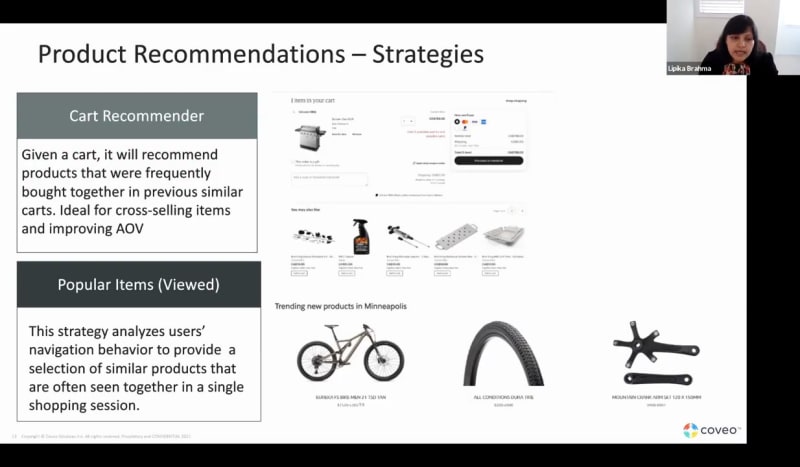
Okay. Hello, everyone. Welcome to another learning series webinar. My name is Claudine Ting, and I work on the global marketing team here at Coveo. For those who are attending a learning series webinar for the first time, this monthly webinar program is where we get more hands on with how to enable Coveo's features that can help you create more relevant experiences. Today, for the final session of our three part webinar series, we'll focus on optimizing your machine learning models using DNE and recommendations. So our presenters for today are Lipika Brahma, customer success architect, and Ludmila Mitarova, customer success manager. So before we get started, I just have a few housekeeping items to cover quickly. For this webinar, we'll entertain your questions at the halfway mark and at the end of the presentation. However, we encourage you to type your questions in the q and a box and the chat box as we go along. Lastly, today's session is being recorded, and you'll receive the presentation within twenty four hours in your inbox. So now we're ready to get started. Ludmila, take it away. Yeah. Thank you so much, Claudine. So hi, everyone. As Claudine introduced, today we're talking about machine learning, and it's the third and last part of our machine learning webinar series. So the focus of today is going to be on creating recommendations and dynamic navigation experience or DNE machine learning models. So in terms of what our objectives for today are, first of all, we're actually going to do a little recap of our last webinar. So the first and second webinars that we did in this series, that's going to include the ARRT or automatic relevance tuning model and the query suggestions model and how to analyze their performance. Then we'll move on to the recommendation models. What are the different recommendation models? And, a little spoiler, there's actually more than one. And what are their prerequisites and how do we set them up? And then lastly, we'll look into the dynamic navigation experience model, do a deep dive into what it is, its prerequisites, and as well how to set it up. So if we go ahead and start with that recap. So in the first webinar of the series, we looked at what the different machine learning models that Coveo offers are, just a general introduction. And so to recap for everybody, we have our automatic relevance tuning or ARIT model. This is the machine learning model that helps boost the most relevant results to the top of the search page. Then we have our query suggestions or QS machine learning model, and this is the model that, provides recommendations or suggestions in the drop down, of the search bar when you're typing something. Then we have our recommendations models, the event and product models, which are the ones we're covering today, as well as the dynamic navigation experience or DME model, which works with facets and to create dynamic facet experience. And, again, we'll be covering this one later today. We also looked at how to create an automatic relevance tuning and query suggestions models. So for this, we really went through the Coveo admin console, and we were able to follow the steps as to how to set them up directly in the Coveo console. And you can do this yourselves. And if you're interested in going through this and if you missed the first webinar, you know, go ahead and you can watch the recording on the Coveo website. And so it's quite simple to set up these models, and all it requires is really just for you to go in and to configure them and to associate them to a, query pipeline. Then we looked for custom context, what it is and how to use it to personalize your search. So just as a little recap, custom context is, a way to really bucket out your experiences into different buckets depending on what kind of information you're actually gathering from your users to create personalized and different experiences for different user groups. So it's really great to use either with machine learning and or without machine learning actually as well. And then lastly, how do we create reports and reporting templates for these models, and how do we actually look to see whether the models are working and whether they're doing a good job? And And so if you're interested in these last two points, again, we encourage you to go on the website and watch, webinar number two that we did. And so now that we did that recap, let's actually move on to today's topic, The first one being the recommendation models. So, again, we have two different models, our events and product recommendations, and we'll start off with the event recommendations model. So first things first, what does this model actually do? So first, I just wanna highlight, that we have this little screenshot here. It shows us people like you watch these videos, and that pretty much gives you the gist of the recommendations model because this model is going to provide you with content that is recommended for your users. And this can be different types of content, and we'll get into that. But what this model does is it actually learns from user page and search navigation history, and it's going to return the most relevant content for users, in their session. And so this kind of, of model and this kind of, you know, window and tile here that we see with the recommendations, it can be included on your home page and could be included in a content page for on something like a side window or really on any other page or place on your website where you wanna add it. So, you know, the possibilities are really endless here. You don't only have to include it on a content page, but you can do that and or you can also include it on any of the other pages of your website. And, again, as we'll see on the next slide, you can really, use different types of data for this these models in order to provide different types of recommendations. So in terms of when to use this, pretty much we can use this on most use cases, almost all. You can use on your website case, on your community search, Internet, or other. So the caveat here being is that the only use case you would not use this model, for is your ecommerce use case. And the reason for that is because for the ecommerce use case, we have a specific, model, which is the product recommendations model, which Lipica will cover later on in the presentation. So now that we know a little bit more about the model, how do we actually set it up? So the first step is to configure our content types. And so this is where I when I mentioned you can actually use different types of content for your models, and you can create different recommendation models. This is what I meant. So if we look at the examples here, you can see you can include, for example, videos inspired by your searches, or you can have, a tile that shows you popular articles that, you know, are like yours. Or maybe people like you're asking. So for your FAQ section, you could have, a model running. And so this step, in order to configure your content types, you are going to need a developer to help you out, with the steps. So it's not done in the Coveo, setup itself. But pretty much what you're going to do is that you're going to configure, the types of content, like I mentioned, that you're going to be using, and it can pertain to either one or several types of content. So for example, you could be looking at your products, your downloads, your articles, courses, things like that, and you can be tracking either one or all of these depending on what kind of, what kind of model you'd like to create. Once you have this content configured, you're going to go on to step two. And this is really to configure your actual recommendations panel and your UI. And this is where you're actually going to be adding in into your code, your actual recommendations, child onto your web page. So depending again on whether you have it on your home page, on your content page, on another different page, this is where your developer is going to help you actually add in that panel. And so with Kameo the Kameo JavaScript search framework, it actually offers a component that you can use, and you can add it to either one or multiple interfaces depending on where you're using this model. And so once you're done this, we'll move on to step three. And this is tracking and sending, events back to Covell. And so this is really important because this up to now, we've really just set up, our model and where it's gonna live, what it's going to be tracking. But but here, we're really going to actually be sending back data into Caveo, which is what the model is going to use to actually learn. So the first thing we're going to send back is their view events. So every single page on your website that you would like to, be a potential recommendation will need to have, will need to be sending view events. So, you know, for example, if you guys, would like recommendations for all of your knowledge articles, well, then every single knowledge article page is going to have to be sending back few events, etcetera. And then as well, you're going to be sending back searches and click events to Coveo. So not only your views, but also every time there's a search and a click associated, you're gonna be sending back this data. So every time your recommendation panel or or any other UI sends back, searches and clicks, so and this is going to help reporting, and it's actually going to feed the model, in order for the model to be able to learn. And the cool thing here as well is that, by sending all this data back into Coveo, you'll actually be able to then track this data in your Coveo Analytics. And then lastly, you can also send back custom context. So I know we touched on context a little bit a couple slides ago in our recap. And so you can actually utilize context for your recommendations model as well. So you can send custom context with each event and with each query and allow your model to really further personalize the results it's providing. So, you know, again, depending on maybe the type of user you're presenting this model to, you can use context to really personalize it further, which is really cool. And then once you've gone ahead and done that, we're getting back into our administration console. So this is where we, in our first couple webinars, we looked a lot at the ART, the query suggestions models. And so now we're back here to go ahead and create our event recommendations model. So go ahead and create your model, in the administration console very similar to how the ART or query suggestions models are created. You'll add your model. You configure, the data frequent and frequency. And then what you're going to do is you're going to come back into your query pipeline, again, same as we did for the other models, and you're going to associate your recommendations model here. However, there is a slight caveat. And we ask you, and I know that we put this in capitals, but do not put your recommendations model in the same pipeline as your other models, so any of your other models. And, also, do not put your recommendations model in the default pipeline. Our recommendation is anytime you have a recommendations model or you're setting one up, create a new unique pipeline for it. Just call it, you know, let's say recommendations, whatever you'd like to call it, and include your recommendations model in there. This this is just a little caveat in order to ensure that it'll be working properly. And once you're done all of these steps, you'll have your model working. But, again, just to kind of highlight that this step is the only step, in the admin console, but you do need to make sure you complete steps one to three in order for the model to actually fully work before you go ahead and create the model. Or you can create the model, earlier as well, but it just won't be working until you've completed steps one to three. And so this is the BBM recommendation model. This is showing you, again, for pretty much any use case where you wanna add recommendations, you'll be using this model. But now we're going to look at our product recommendations model, and Lipika is going to take it over from here, and actually show us what the ecommerce model looks like. Awesome. Thank you so much, Lyudmila. So now that Lyudmila has covered, you know, what we call as the event recommendation model, which is basically when you want to recommend, you know, different types of content like articles or, you know, training material, PDFs, training videos. Let's talk about product recommendation model. So when we talk about product recommendation models, it is very, very specific to, you know, an ecommerce experience or a shopping experience where you're either showing, and you might not be having customers who actually buy the product. But you might have a product catalog where you display all of your products and you still want to show product recommendations based on what customers are actually looking at, based on the products that they are looking at. So this model, the product recommendation model is slightly different from the event recommendation model. So when you looked at, what Ludmila was saying was that, you know, it looks at searches clicks. It also looks at, you know, page views, which means that it looks at all the different pages that, you know, any customer looked at. So say, for example, they did a query and they looked at a couple different pages, it is gonna take that into account. In case of the product recommendation model, it not only takes into account the different products you have viewed, but it can take into account it does take into account the purchase information. We all know when it comes to, you know, a a shopping experience, every shopper is different. And what really happens is sometimes customers will will go on a site not necessarily sure about what they want to buy, so they just wanna browse around the site. So which I do very often. So you go, you browse on the site, and you add a couple of things to your cart, but you won't necessarily buy them. So machine learning model takes into the takes into account the clicks, but the product recommendation model takes into account the commerce aspect of it, which is the actual purchase, happening. Next slide, please, Ludmila. So, now we talk about product recommendation strategies. I spoke a little bit about, you know, how product recommendation model is different from an event recommendation model. In case of the product recommendation model, not only do we look at clicks and searches and queries, we also look at, you know, add to cart and purchase events. So there are different strategies that you can apply with these product recommendation models, and they can be used in different areas of your experience. So the first two strategies, you know, there there are total of six strategies that you can use, and they all are different from each other. And they all have different purposes, and they all can be put in different places on your website to to increase your, you know, conversion rate or to increase the average order value of your of your products. The first two strategies are frequently bought together and frequently viewed together. So when we look at frequently bought together so right right now, say, for example, I am, I'm in market to buy a bicycle, And I would go online. I would look at the bicycle. Typically, when, you know, you're buying a bike, you will also buy different kinds of accessories. So you will want to show your customers that customers like you who bought a bike also bought, you know, a saddle or also bought, you know, a crank arm or whatever is needed as an accessory for their bike. So this particular model can be put on a product detail page, where they are already looking at the product, and they can also look at, you know, what other people want along with this product. The frequently viewed together is a little bit different from the frequently bought together. So the frequently bought together takes into account the purchase aspect of it. The frequently viewed together takes into account the clicks, and and looks at, you know, people who were, you know, buying bicycle. And if we're looking at the same model that you're looking at, they also looked at these three models. And, you know, it might interest you. So, also, this would this is something that you would put in the product detail page where the customer is already viewing a product. Next strategies. The next slide. Thank you. So the next row strategies, are slightly different. Cart recommender, it kind of gives it away, about what it is. So, basically, a cart recommender is something that you would use on your cart page. And what it does is it looks at similar carts. So, say, for example, like, in this cart, I'm just buying a Barca station. And, along with my barbecue station, I buy, you know, different kinds of accessories to go along with it. So when I reach the cart page and I've I've already decided to buy a product, and I've I've, you know, I'm in the last portion of it where I just have to pay, I can add recommendations on that page to make sure that, you know, customers, if they need accessories, they can buy it right over there, and they can add it to the cart right away, hence increasing your average order value. The next one is the most popular items. So this is a good candidate to have on your home page on your website. A lot of times when I'm looking at different products or if I'm visiting, you know, if I'm buying shoes, I will go on the brand website and I will look at, you know, the top trending shoes, or the top trending sandals for summer, and I would want to buy some of those. So the popular items is definitely something that's a candidate for your home page because it overall looks at, you know, which are the items that are viewed the most. So it doesn't necessarily relate to another product or another purchase, but it'll look at what was viewed the most. Next slide, please. Thank you. The last two models, one is the for the first one here is the interest based model. So this one works, in a way that it recognizes similar browsing patterns of users. So it looks at, you know, this user looked at these four products and this other user also looked at these four products. And I'm completely simplifying this, but it is much more complicated than that. But it definitely looks at patterns and tries to suggest, you know, items that, you know, someone else bought this and this user also might like it and buy it. So that's what is interest based. And I would typically put that, you know, on the product page. Or if you have, you know, logged in users, you can put put something like this on their profile page so they can look at, you know, people who are like me, who have similar interests like me. What what else are they buying? And then comes popular items that are bought. So we looked at popular items that were viewed. Now we look at popular items that are bought, which means we are taking into acts, you know, consideration the purchase aspect of it. Next slide, please. So the recommendation model setup is very similar to the setup of an event recommendation model. The prerequisite are you have to track the events. You have to track the commerce events because, we spoke about how it's different from event recommendations wherein it takes into account the purchase, the add to cart, which are typical commerce events. So you have to be tracking them. And you have to be tracking them in a particular format where Coveo product recommendations will work with it. So there's a little bit of prework that is required, for you to have these product recommendation model. But the rest of it is, you know, you create a model, you select the model type. Next slide, please, Mudmela. And the last step is actually the most important one where you associate the model with the pipeline. It is when you're associating the model with the pipeline, that's when you select your strategy. That's when you say that, you know, this is the pipeline for my frequently bought together, you know, panel that I will put on my, I know, product detail page. And this is the pipeline it'll use, and this is the model it'll use. So this is where you make the, like, the final selection. So a little bit of setup definitely required, but the actual building of the model is very, very simple. So I kind of take a pause there and see if Claudine has any questions for us. We do have a question here, Latika. So to be GDPR and other relay other regulations compliant, can we customize what can be captured with this framework based on user acceptance? I I will say yes, but we can definitely take this one offline to give you more information on what we do with regards to GDPR. Okay. Thank you for that, Levica. Another question we have here. Can you only pick one strategy and or how many can you pick? So it really depends. You can pick many strategies. Basically, what you will need to do is when you're associating your model, you create just one model, then you associate that model to your pipeline, you select the strategy. Then you associate the same model, select a different strategy. So in that same pipeline, you can have multiple strategies. So you don't have to recreate the model. You're just changing the strategy where you want to. Okay. Next question we have here. What's the relation between, the model and the search hub? The model and the search so the relationship, I would say, is the search hub is your UI, and your model is basically your machine learning model. So the relationship is typically, each search hub is associated with a query pipeline. And the the model that you create will be put into that pipeline. So that's one line of thinking the association between model and search hub. I hope that answered the question. Okay. I guess it's also good to check. Can I set recommendations up on my own, or will I need extra help? Ludmila, do you wanna take that one? Yeah. For sure. So for recommendations, you will need some help from a developer. So I guess this depends on what role in the company is and how, you know, tech savvy you are. But you will need a little bit of development work, so kind of like we showed with, with implementing the actual panel and the UI and setting up those, those events and those clicks that are being sent back into Coveo. Okay. And is this free to use, or does it require, extra payment? Yeah. It's a great question. So the recommendation models are free for the majority of clients. This does depend a little bit on your licensing. So if you're not sure and you'd like to use the model, just reach out to your customer success manager, and they'll be able to help you out. Okay. Thank you so much for that, Ludmila. I guess we can, proceed to the second half of the presentation. Mhmm. If you click next. Okay. So we spoke about both the event recommendation models. Now we're gonna talk about, our dynamic navigation experience. So if you click next slide, Mila. So dynamic navigation experience, the use cases that are, you know, the most popular for dynamic navigation experience are websites and ecommerce. That doesn't mean we cannot use it in a community search or an Internet environment, but really think of using the dynamic navigation experience where you have, you know, lots of different facets, lots of different categories, and you really want to simplify your user's experience and you really want to make sure that, you know, you're auto selecting facets for them maybe or you're rearranging facets for them. So you're kind of reducing the amount of effort they would typically have to take if they are, you know, buying something from your site or if they are selecting from something from your site. So to back the bus up a little bit, so VNE, again, it looks at queries and different actions that are performed by users. And and I'll give you an example of three different ways it it it it can apply to your, to your environment. So DNE has three different kinds of, models or some models, I would say. So one is or three different kinds you can implement it. So the first one is, you know, rearranging of facets. So say, for example, you you go on a site and you buy a laptop. And when you're buying a laptop, you the first category that you select is the monitor size. And the monitor size is, say, for example, a category on the website. And the monitor size size is typically somewhere in the low lower, you know, lower half of the page. So your customer has to scroll down and then select and then go back up to see their see their results. With DNE, what what DNE can do is based on the pattern, based on the user behavior, if this happens enough number of times, DNE will automatically rearrange that facet and will bring that entire facet category to the top. What it can also do is within the facet so say, for example, you know, you're always selecting, the monitor size, but say, for example, you always want a fifteen inch monitor, it'll rearrange the size within the category. So it'll put the fifteen inch on the top and the thirteen inch, and then later on, the non popular categories. And last but not the late least. So, we'll go by the same example. You're you're selecting you're buying a laptop, and you always want, a monitor of size that's fifteen inch. And DNE learns from this behavior that, you know, every time customers or most customers that come on your site, they always always look at fifteen inch monitors. So what DNE does is it provides a slight boost to all the monitor to all the laptops that that are that have the fifteen inch monitor. So which means that these laptops will get a slight boost. It doesn't mean that it'll push them right to the top. It doesn't mean that it'll act like a featured result, but it'll give them a slight boost, a little bit more than the rest of the, you know, products on your page. So that's the three different kinds of behavior for DNE. So now let's look at how we set it up. So just like any other recommend, you know, any other machine learning model, it needs to learn from searches and clicks. So the prerequisite is make sure it's learning from make sure it's sending that information back to Coveo, you know, Coveo cloud analytics environment. So the first, thing that we'll talk about is the DNE ranking boosting. Remember when I said that it'll give a slight boost to all the laptops with the fifteen inch monitor? So this is what it does. How do you set that up? So the setup again is very, very similar to what you do with any of the other machine learning models. You create a model. You select the type of the model. You associate the, you know, the time period and the frequency, and then you associate the model with your pipeline. Unlike recommendation models, DNA models can stay in the same pipeline as your other models. So in the same pipeline as your ART model, same pipeline as your query suggestions model, they do not need a separate pipeline on their own. They can stay in the same pipeline, which means you don't have to the extra effort or creating a pipeline doesn't exist anymore. So this is how you create the DNE ranking boosting. The next one that we have is the facet reordering or the auto selection. So the best way to get this done is if you have Coveo's you know, you're using the Coveo GSUI framework, a lot of this is available for you to manage very, very easily. So, you know, the prerequisites Barca little bit of work, again, has to be done before you have the DNA model working for you. So you have to be using something called a dynamic facets and dynamic facet manager, which means your facets are able to, you know, show that they have a hierarchy. Your facets are able to, you know, move up and down based on user behavior. All of that can only happen if you're using dynamic facets. So a little bit of structural change has to happen on the back end side of the site for you to be able to use the DNA models. So the auto select features, basically will let you you know, if there is something, if if there is a particular category that always gets selected, what DNE can do is not only push that category to the top, but it will also automatically select it for you. And, again, all of these are options. It doesn't mean that, they all work together. You can you can, you know, pick and choose which one, you select. But make sure that you create a model. You can put them in the same pipeline. You select the learning, time period and frequency. And just like any other machine learning model, the time period and frequency is very, very relative to how users in your environment or how how much traffic you get in your environment. If you get a ton of traffic, then I would say, like, choose a lesser time period and frequency. If you don't, choose a wider range so you can learn very quickly. So that is how you, create a dynamic navigation experience. I will hand it over to Ludmila to kind of round up our, webinar for today. Okay. Thank you so much, Luca, and thank you for that great description of DNE. So let's go through some key takeaways. What did we discuss today? So we started off with our recommendation models. The recommendation models, what they do is they suggest recommendations without needing to select that content manually. That that's really what they do. And so the benefit of having them and of using them is that you don't have to go ahead and kind of manually pick what tiles or what content you wanna be recommended for every single one of your pages or every single one of your articles. The model learns and dynamically is able to suggest that content, and you can use custom context to personalize that even further. And then we looked at the fact that there's two of these models. Right? So the product recommendations that Flipbook has covered is really used for the ecommerce, recommendations, and there's a couple of different types, of models you can use with the product recommendations depending on where and how you'd like to use them. And then for all of other other use cases, we're using those event recommendations that, again, can be placed, you know, in any part of your website and can really learn from different types of, of information depending on what you're interested presenting. And then, secondly, we had our DNE or dynamic navigation experience model. And so as Lapitha explained, this really creates a dynamic facet experience for your search page. And there's also a couple of different ways that you can use this model a couple of different options that you can select, in order to make it work, you know, as efficient as possible for you in your use case. And so with that being said, we really wanna thank you for joining us in this webinar and for our learning series for for the past three webinars. It's really been a pleasure, and I hope you guys have learned a lot. And so now, I just wanna open up the floor to any other questions that people might have. Okay. So, Lipica, I think you answered the question earlier, but I think it's good to share to everyone what the question was and what the answer is. So are all of the features for regular facets available for dynamic facets, sort order, multi select, or the number of items per facet? Mhmm. And that's actually a great question because, there are some limitations to dynamic facets, but all of the ones that you listed here are not limitations of the dynamic facets. They're more like, you know, you cannot have a computed field as a facet, so things like those. And I, we will also send this link along to everybody else. So I sent a link in the answer, but we have a we have documented all the limitations that dynamic facets have, and we'll send it along with the with the deck so everyone is aware. Okay. Thank you so much for that, Lavika. Another question that we have is for, for DNE, can I have just one of the features and not all of them applied? Like, for example, can I just have ranking boosting but no facet ordering? I'm sorry. Go ahead. Go ahead, Linda. Take it. Sorry. I got a little eager there. So you can have more than one of the features. So pretty much what you do is when you actually create your DNA model and then you associate it to your query pipeline, At that stage, you're going to be able to select which features you you'll be using. Okay. Thank you so much for that. Let's go back to recommendations. Does recommendations count again count against, QPMs? So not they do not. So they do not count against your regular QPM count. But for your recommendations, you do actually have in your licensing from a recommendation, query limit as well. So this is probably different, than your QPM limits. Again, you can check on this if you're interested, in implementing recommendations with your CSM, and they can confer for you what that is. But, no, it does not count for your actual QPM limit. So that's a great question. Okay. Thank you so much for that, Ludmila. Do we have any other questions? Okay. I think we've answered all the questions for today. So just as a reminder, we're going to be sending the recording of this webinar within twenty four hours in your inbox, and we're also gonna be sending a list of documentation articles that will help you when it comes to putting together your DNN recommendations, machine learning models. So on behalf of our team at Coveo, thank you so much for joining us at the final, final session of the three part series on machine learning. We hope that you join us again for next month. And okay. I think we have another someone wants to add another question. Hold on. Before we okay. Can we access videos from prior prior sessions in the series? Yes. They are all available on our website, and maybe we can also add links to the recordings in our follow-up email for this one. Thank you so much for bringing that up. Okay? Again, we're about to wrap up. Thank you again, everyone. We hope to see you next month. Bye for now. Thank you, everyone. Bye. Bye.