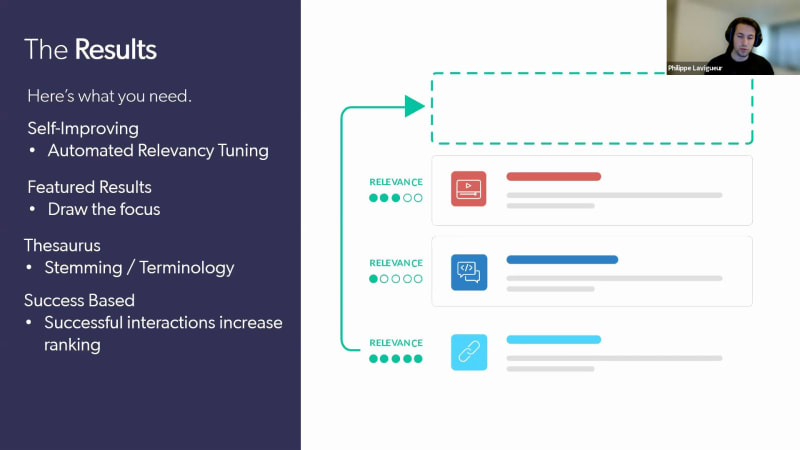
Hi, everyone. Thanks for joining. We'll just wait a few seconds before we get started just to give people some time to join. Alright. So we'll get started. So hi, everyone. Thanks for joining us today for our webinar called, AI powered search for your website. My name is Clara Boulanger, and I work on the marketing team here at Coveo. And I'm really thrilled to be, a part of today's session. I'll be taking you, I will be taking you to the demo portion, but, actually, Philip here who's joining me will be taking you to the demo portion of, our webinar. So Philip is a sales engineer here at Coveo, and he will, like I said, be giving you a a demo of what Coveo does and, explain how important it is to deliver relevant website experiences. Before we get started, I have a couple of housekeeping items to, cover quickly. So, you, are able to ask any questions that you might have through the Q and A on your screen. So feel free, when you have a question to write it there, and we'll try to get to it before the end of the session. If we don't have time, we'll make sure to follow-up with you right after. This session will also be recorded, so we'll send a recording, within twenty four hours of the conclusion of the event. Finally, I want to welcome you again, and thanks for joining us. And, Philippe, you can, take it away. Alright. Thank you, Clara. So hi, everyone. My name is Philip. I am a sales engineer at Coveo. I've been working here for more than four years now, and I will, be your presenter today for Coveo for websites. So this is our agenda today. We're going to go with a bit of an introduction, then go on the actual product features and integrations, and then go directly in a in a sort short short demo that we have at the end. And then hopefully, we have time for a bit of a q and a session towards the end. Alright. So let's get into it. So we know that there's forty three percent of website visitor visitors that use site search as their first touch point on any website. Right? Whether it is to find content, product, a video, a, a TV series, whatever you name it, people are using search. And search has really become something important in the website experience. And that's great, but we've really been spoiled by these tech giants that are delivering personalized, effortless, and relevant, web search experiences. Right? Sometime most of the time when you go on these platforms, you're able to find your information as fast as possible without too much effort. And if your content is just not there, just doesn't exist, well, these platforms are great at, recommending content that might, be what you're looking for, that might be tied to what you're looking for or great alternatives to what you are looking for. However, these companies, they spend millions of dollars every year on developing their search platforms. So this poses the questions of how can we deliver personalized, effortless, and relevant experiences without investing as much as they are in their search platforms. And, well, that is where Coveo comes in. Coveo will help you deliver unified, relevant, and valuable search experiences. So when we talk about unified, we talk about bringing down the silos between your different systems and bringing all of the information that you own in a single pool of of data. From there, once everything is inside of Coveo, is inside a single place, that's where we can apply AI to get the most relevant experience out of the content that you have. Right? We we strongly believe that as good as the content that you have, if it's not searchable, it's it's basically useless. Right? It it can be very great, but if nobody's able to find it, then what's the point of even even having it? And then the third point is is valuable. Right? With all the data that we're collecting, so clicks, searches, query that your user making, filters that are selecting, we can all analyze this data and really understand what your users are looking for. And with that understanding of your users can direct relevancy out of this. So let's start with the unification of the content. Like I said, Covet brings down the silos between either your lines of businesses that don't talk to each other or simply your different systems that you're using. So with our out of the box connectors, you can import content from either Confluence, your your website, a sitemap, your YouTube channels, Jira, Oracles. Basically, you name it, we can we can do it. And I do have, our actual platform to show for. This is one of our Coveo organization. So this is the whole, Coveo relevance platform that you're seeing right now. And, directly in there, you can configure your your out of the box connectors to get your data inside of Coveo. So right here in my example, we can see we have loads of various different sources of information. So we have, SharePoint, Slack, Salesforce, website, YouTube, Zendesk, ServiceNow. I mean, I could go I could go go on all day. We have web and sitemap, which are very useful to, to index really the public content you're exposing. And what's great about this, what's great about Coveo on the on the indexing side is this is very simple to configure. Right? You don't need a PhD in data connectivity. You don't need to be a software engineer. You just simply click on the ad source and you get prompted with all of our different sources. You select your sources. For instance, here we have site map, which is the one I'm gonna use to demo. But before that, just on a technical note, if you have more technical people on the call, we have a generic rest API and a push source. Meaning that if you have a homegrown system or anything that is not supported by one of our out of the box connector, well, you can go and index that information using either, an API. So if the system exposing an API, we can pull information from Coveo. Or alternatively, if it does not have an API, you can set up a push source, which will allow you to push the content directly into Coveo. So like I said, it's very simple to configure. Click on the source that you want. You give it a name. Give the URL of your specific sitemap, for instance, on this specific case. And, there it is. We're going to index all of the information that is inside that site map so that can be your your complete website, would be indexed in a matter of three or four clicks. There's also a lot of different settings that we support like authentication. For instance, if your site map is behind, authentication wall, we we can support that. There's a lot of use cases that we do support, but it's just to show how easy it is to get data inside of of Koveo. Now once the hello. Alright. Once the information is inside of Coveo, that's where we can really do the the big the muscle that the brain of the operation is is to give relevance back to the users. How we're doing this? It's from a broad machine learning, AI models, offerings. So today, I'm going to go over four of these. We have a total of I think we're up to seven now and with different strategy strategies in there for especially on ecommerce site. But I'm going to go right in there and and to show how we can we can really bring relevance to the user and make them find their information as effortlessly as possible. Right? We don't want them to to have to do five filters, three different queries. Look at a lot of different places. Right? It's a one stop shop. You want them to find their information basically as if they were using Google, but for your own content, for your own context. So let's get into it. The first one is where everything starts, the search box. So that's where we're going to power query suggestions. Our query suggestions are not static. They are dynamic. And what I mean by this is they're going to be vastly different based on your user. I'm going to show a demo of this later on, just so that you can see how how different the results can be in in those query suggestions. But query suggestions will give a hint to your user of, hey. Maybe you should look for this because the the the query suggestions that are being shown right now are from other users that did that have the a similar profile like you, and they they did actually query for those, specific keywords, and they were able to find their information. So query suggestions, dynamic, not static. That's a thing to keep in mind. It is also typo tolerance, meaning we are going to go on our mobile with fat fingers and just enter some some nonsense. We can we can filter out the nonsense and really get you the, the right query that the the query that you meant to to type in for. So we're going to be able to to send them back. Our query suggestion model also features category suggestions. That means if I'm looking for a laptop in this specific example, here, I can see the different categories where the laptop keywords was found. So for instance, we have portable computers, laptop cases, laptop batteries. So that's gonna help you say, hey. We have content for this. And it's going to to really promote the first interaction refinement. Once again, really try to make the user do as least amount of of actions themselves as possible and really infer what they're looking for. So that's what category suggestions are for. And then everything is user based. Right? We're tracking we're we're recording basically the queries that people make. And so as soon as they start typing in, when the traffic actually comes in, we're gonna start understanding really what they mean. And so for instance, if you have a product taxonomy that has a, like a weird product name, well, the machine learning model is going to start picking up on this specific keyword and say, okay, well, Inspiron is a product name. Right? So it's gonna start making the link between Inspiron and a product or maybe a laptop and things like that. And you can also even put your own, the source entries directly in the Coveo platform to just give it a bit of a of a jump start to be really ready at, as for as soon as you deploy Coveo. And like I just said, it's everything is success based. Right? So we are going to give you the queries that were actually successful. We we don't wanna recommend query suggestions that are not relevant to anyone or did that just led to no results page. This is kind of useless information. We're trying to filter this out. So all of our queries to query suggestions are from successful experiences. Now you get into the actual search results. You've made your query, you get to the search results. What's the most important thing in the search results is those first three results. Let's be honest. No one actually goes on that dreadful second page of a search results page. And that's what our automatic relevance tuning machine learning model aims to do. So it is self improving, so you do not have to do anything, any configuration or day to day configuration on a, business level side. It's all automated. You basically deploy it. And from there, it's gonna learn from your users and start promoting content that were most popular, to the top. Right? This is very, very important. We don't realize how important it is, but having to scroll down a result list is not something that people are used to do anymore, mainly because of of the the power of, like, the big tech com tech companies, but we need to be better doing this. We need to really promote the relevance content to the top, and that's what this machine learning model does. It also plays in with featured results. Featured results or even results boot boosting is very is something very important on the business side of, of of your your requirements. So you have business requirements and then you have machine learning as well. And you don't want both both of them to fight. So we can have, machine learning boosting as well as your own business requirements in the same unified, result list. Meaning, they can both work together and they don't have to fight over. So it's not okay. We have the campaign. We wanna promote, for instance, COVID related information to the top, and then we can't use machine learning model. That's not the case. You can have both your, COVID stuff promoted to to the top because that's a specific business requirement that you have. And then you can also have the AI working in the background, meaning your first result might be COVID related, but your second one will be the most popular result for the query that you made. And so these two concepts can play, together really well with Coveo so you don't have to fight, you don't have to fight the machine. Like I like the query suggestions, the query results inside them, also support stemming or terminology. So if you have, if you're looking for, for instance, laptop and your result doesn't have the specific laptop keyword, it has, something different like portable computers, or studying engine will be able to kinda make the difference, make them, a comparison between both and be able to recommend content that is, not directly tied to your specific query, but at this is relevant to it. And once again, we're coming back to that really users are the key to success. People that are making successful clicks that are finding in their information or the actual drivers of all of this discussion of all of this relevancy engine where if they are able to find their information, most likely someone in the future is going to have something similar to this, and we want to be ready to show them the most relevant content as the first result. So result relevance and result ranking is very important. Facets ranking also is very important. As people use, searches more and more often, they also expect a a kind of way to make their search easier and to filter out some of the noise using filters or what we call at Quill facets. Facets are going to be on wherever you wanna put them, and you you'll be able to drill down on your specific, the content that you're looking for. But sometimes these facets actually just bring more noise that is useless in the actual full experience. So what we're going to do with our dynamic navigation experience machine learning model is we're going to only return the relevant facets for the specific queries. For instance, I'm looking for I'm I'm querying for boots. Well, the first facet might and should be size, color, And then the language facet is just not something that is relevant. That might be there for some of your other content. For instance, you have PDFs in your in your search with boots. Right? Might be your use case. You'll have both facets. But, right, if you're looking for boot, the language facet is not relevant. So it's either just not gonna be shown or it's going to be pushed down to the bottom of the facet list. Similarly, we also do the same thing with the facet results inside of a single facet. So for instance, if you're browsing in English, well, we're going to put the English, choice as as the first choice, which is it it just simply makes sense. And that's what the dynamic navigation experience machinery model is going to do. It's all those little details that if you add one or two or three details, it does make a huge, difference. So, yeah, automatic reordering based on on on clicks. And once again, this is all user based. So if people are clicking on size eight, for instance, size eight is going to be promoted to the top. Right? So it's it's really user based. And we can also support automatic selection. I'm going to have an example of this, further on in the demo, but this is once again in the aim of reducing the noise. So for instance, if you're looking for a laptop, we might infer that, well, you are looking for a portable computer and maybe not for accessories. So we're going to auto select the the laptop, as portable computer, category, for instance. So it's all configurable on your side as well. So you can choose whether or not you want this auto selection to be, to be enabled. That's fully depending on your choice of, of requirements. Also, one of the things that we this model can do is improve unfaceted results. So if I come back on my boots, size eight example, for instance, if people are actually clicking on size eight a lot, it's gonna say, hey. People are actually more interested in that in the size eight. So if you're coming in in a in a full Vanilla search and you search for boot and you don't use the that specific facet, even the results are going to be boosted if they are for size eight based on, once again, user previous user inputs. Lastly, recommendations. Recommendations are there just to really fill in the gaps or even augment the full experience. Search is one thing, but we we we'd like to to say it's not a search experience is really a relevant experience. So search and recommendations are really tied in together. It's there to compliment or augment the full experience. So our recommendations are for sure going to be contextual. It's not it's gonna be different for every single user. Basically, it really looks at who you are, the context of of of your person. So your location, if you're in a CMS, we we might have interest on you, the products that you previously bought. So all of this information we can use and leverage, in the aim of giving you the recommendations you're you're looking for or you might not know you were looking for. They're all events based. So we have a strong recommendation engine, especially for commerce, everything that is user recommender. People added to cart, people bought this with the the thing as you're that you're in in your cart. But it it can also work with just content recommendations based on the pages that you viewed or the queries that you made. And it is fully personalized. So I'm gonna show an example of this actually, which I like to call it personalization as you go. And you don't have to base yourself upon thousands and thousands of other queries to to really actually start seeing an impact on your experience. It can be really, personalized basically as you go as as the searches that you make and the actions that you perform on the website. So I'm actually gonna switch directly to the demo of these three different, all four different machine learning models that we have. So the first one is from our customer VMware. That's where I'm gonna show you the difference between, the recommendations that we have at the bottom and also the query suggestion. So this is a one of my personal, experience that I have. I did make a couple of searches there. I was actually a customer of VMware myself, so I did perform a couple of searches there. And this is a completely brand new session in incognito. And if I'm just open the query suggestions right there, I want you to take, a bit of a note of the six or well, five the five query suggestions that we have right here, which are vastly different from what we have right there. And this might be some the the searches that are very popular for new users. These are not. These are my own, my own searches that I made that are relevant to my, my own use case. And I can actually even start, searching for something. For instance, virtual machine in here, virtual as well. You can see that both are actually different. They're not completely different because at some point, relevance is relevant. Content is is content. So there is a bit of an overlap there, but that is not a problem at all. But there is still a difference and the ranking as well of these are, different. Once again, really based on my profile, my context, the previous searches that I did. Same thing also does apply for the recommendation that I talked about. I also have another example of recommendations, but I'm just gonna go, surface this very fast. Here we can see that, well, my recommendations are different than the brand new, the brand new experience that we have right here as an incognito, user. My second second example is, the Speedbit community. Speedbit is a fictional, smart watch company fitness watch company that we created internally just to showcase the power of Covell. I want you to take a particular attention at these, components right here. So people like also viewed. You may want to learn about, community posts that might interest you. Right? All this information is actually dynamically fed to this page by Covell, but it's all very generic. Right? It's not specifically tied to any, product. It's not specifically tied to any subject. But as soon as I start actually performing a couple of clicks on that website. So for instance, I have a specific interest into the Speedbit Blaze product, and I have a product about, pairing my phone. Oh, if I butchered that, doesn't matter. We can we can figure it out. But, once again, I get into the, the search results here with typos. It doesn't really matter. We have typo correction there. And I wanna point the recommended tag right here. So these four results might have initially been down the list. Might might be down here, might be on page two, might be on page three. Right? These are not places we want to go. Hidden places of the of the web. Dark, dark, dark places. Don't go there. So that's why the Coveo, the ARRT, the automatic relevance tuning model that I was talking about, promoted these results to the top because actual other users like me clicked on those. Right? It it simply makes sense. But once again, these are not done out of the box by a lot of other search, searches out there. And this is really a breadth of the the product is is bringing the relevant content to, the top. And once again, this is you don't have to do anything other than deploy the machine learning model on a business side user to get these functionalities. So that's that's that's pretty pretty amazing. But if we go back on the actual home page, well, here if you remember, the content here was very generic, was very, not tied to any product. But right now, they we inferred that, hey, I'm looking for the Blaze. I'm looking for phone connectivity issues. So now all of the content right here and this right now is a Salesforce community, but that can be applied to a Drupal site, an AEM website, Sitecore experiences. You name it, we can do it. It's very platform agnostic and it's UI agnostic as well. So right here, we are able to deliver content that is once again relevant to our user, and that is, that is what I call personalization as you go. Right? We're going to personalize the whole experience based on the clicks, that we do. Now the last thing I wanna do is the DNE. I'll just look at my time. You got kinda go faster. So here, for instance, if I look for Alzheimer caregiving, we're going to auto select once again just to remove a bit of the, the noise around. So if I go back here on the valuable side, valuable side is where we wanna understand our users. Right? And it's all of the data tracking and all that important information. So these are the reports that you can complete configure however you like and really to get to know where your users are coming from, what, what's devices they are using, the top sources in your index, what are actually being used by your users, and the top top dot top documents clicked by your users, as well. So this is really insightful information and powerful information that you can use either to better understand your users to promote the searches or even under completely different lines of businesses in your own company. Oops. Right. So this I'm gonna skip and I'm going to go well, the demo, I did the demo while I was actually, showcasing a bit of it. So, if I think that's gonna be it. I have this one just to show how we can touch multiple different touch points. So we do online commerce. We do community support, Internet agents, CRM, so agent panels. And it's quite important because we can support all of these different, touch points. Yes. But we're going to use the data done on, for instance, the online ecommerce site to improve the relevancy of the Internet site. And so Coveo can really be a one stop shop for all of your searches, all of your, all your search problems or or, or offerings in there and really promote relevancy within your company. So I think that's my time up. Clara, back to you. Thanks, Philip. This is great. If you have any questions, we have just a few minutes. So feel good to, write them in the q and a. I just have two last slides to go through super quickly. So in here, we just wanted to show you, the different the the the impact that Koleos had on various customers that we have. So, as you can see, great, great numbers on lift in conversion rate, the decrease in search results at Madhubatica, an increase in click through rate at Formica, and in, website search utilization at Palo Alto. So all, all great, metrics that show the the impact of AI and relevant interactions. And on the next slide, I just want to share with you that we have a free assessment offer available. So if you'd like us to, our experts, to go and, assess your website and create a full report that will share with you the different, ways that you can improve the experience and the search experience on your website. It's it's free. They'll go through your website and, build a report that they'll send your way afterwards, which could help in, planning for, your your website, improvements and, implementations. And so you can, access the form to, make a request. Here, I also send it as a follow-up to this webinar, so you have the link, handy. With that, I think, that this is all the time that we had, but I wanna thank everyone for joining us today and thank, Philip for a great demo. Again, like I said, at the beginning of the webinar, the webinar has been recorded. So we'll make sure to send the recording to everyone, within twenty four hours of the conclusion of the event. And I'll also send that link for the website, search assessment. Phil, thank you, and have a nice day, everyone. Alright. Pleasure. Alright. Have a good day, everyone. Bye bye.