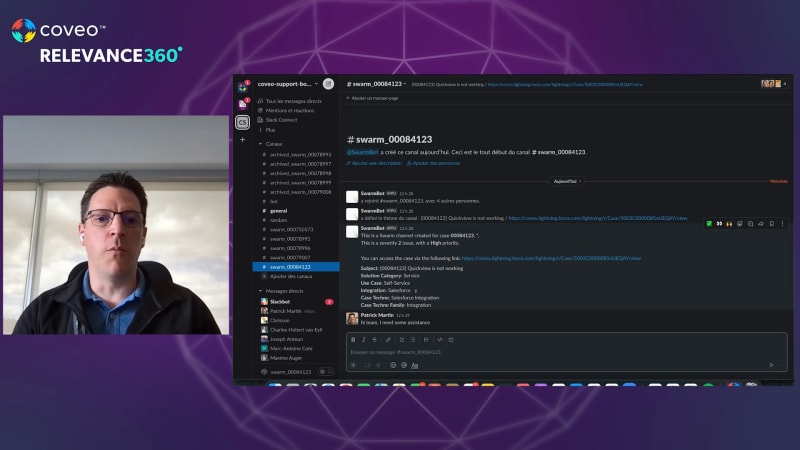
So here I am in a test environment. I am on a case. It's assigned to, our friend here, Pierre. We have our insight panel here, but let's say I need help. What I will do is I will click here on the swarm button. And as you can see here, I get a list of agents that can help me here. So there's, you know, a less a list of SMEs. There's the case owner. There's myself since I'm the one requesting the swarm, and there's a a product expert there as well. And if I click yes, what happens is it creates a Slack channel. You see the notification that the Slack channel has been created. We also add a comment in our in our case here that says, okay. You know, Patrick has just, created a Slack channel, which is somewhere here. This is, okay. I won't spend too much time on it, but, usually, that's what happens. And what we see here is I now I now have a new channel here that has been created for this case. We bring some of the case context here. We put the link for anybody who wants to collaborate on this, and I can just go in and say, hi, team. I need some assistance. And that just notifies everybody that has been brought into the swarm. This is lunch hour here in Quebec City, so they're probably all off right now. But, you know, it allows you to, to swarm, to collaborate. If we need to bring other people in, we can just add them. They will be brought in. And, at the same time, with the with the, the, Slack app, if we need help, all we need to do is go right here, say search Coveo. My problem is with pipelines. So I just do this, and I'm able to have access to all of our content right here in Slack as well. So it really helps the swarming team if they know that a document exists. If they wanna check out something, they can just do it here. They don't have to toggle between different systems. Everything is centralized in this area. So as we can see here, Pierre is starting to type, to try and and help me. And at the end of the swarm, all we need to do is do a quick and swarm command like this. And like that, you see that the, the channel will be labeled as archived. Okay. Sorry. So there's an error. This is just a test environment. But as you can see here, in our different different channels, they are labeled as archive, which allows them then to be indexed and be made available here where we can open in Slack. So if I were to open another case, which is a duplicate of this one in our insight panel here, We have the Slack conversations, but we also have other types of documents that we can refer to, and, you know, really closing the loop here.