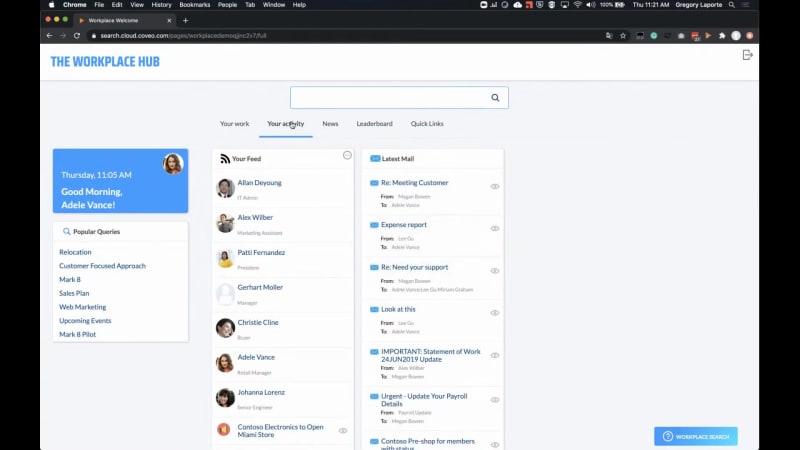
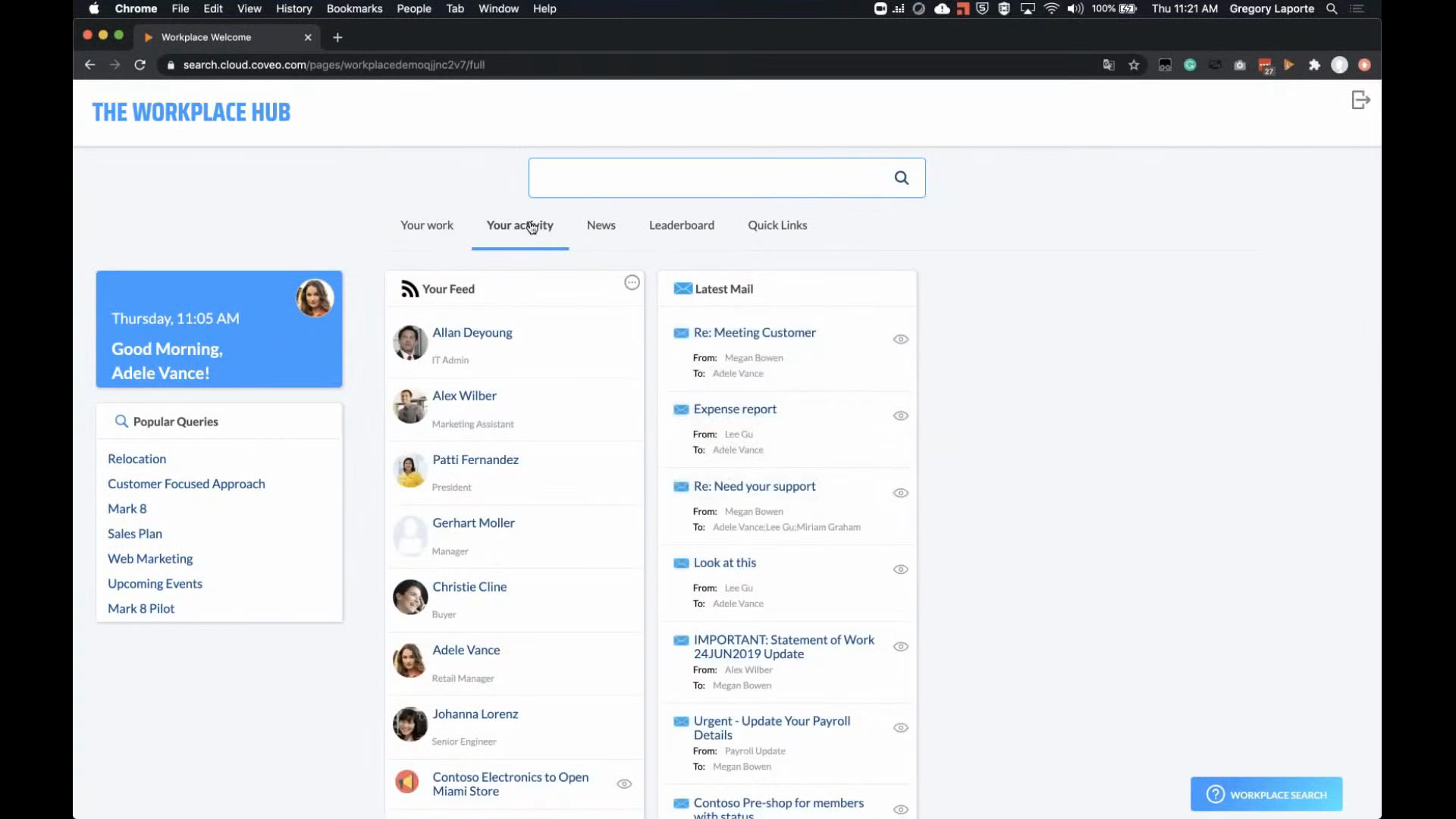
And thank you for, joining this partner enablement webinar. My name is Frederick Henine. I'll be your host today. I oversee our alliances with workplace partners here at Coveo. For those who do not know Coveo, we have been investing in AI and machine learning for over ten years with the goal of providing a user experience that is more relevant, more intelligent, especially when it comes to search and finding knowledge in the workplace. Today, I'm joined by Juanita O'Guine, senior product marketing manager, and Greg LaPorte, director of product management, who will both share their insights on the intelligent workplace and how Coveo plays a role in making that possible. Juanita will be providing an overview of Coveo's vision, of the intelligent workplace, and Greg will give you a preview of how the Coveo platform can be used either on its own or natively integrated into a chosen system of engagement, like an employee portal or ServiceNow, for instance, to provide the intelligence behind the workplace experience. So, if you haven't seen this interesting comic strip, at the time when the marketing team created it, most employees were still working in an office, and they did have something called portal fatigue, trying to find information, different portals. But times have changed. And now more than ever, millions of employees are working from home, and thousands of employers are scrambling to support them. This radical shift in the workplace has highlighted many weaknesses, especially in the ability to help remote workers remain productive. Simple tasks like trying to find relevant information across so many different applications and systems are challenging to say the least. More people than ever are calling in for support, even though many of these contact centers have been forced to send agents home to work virtually. Every business, hospital, school, institution is having to quickly adapt to this change in demand for knowledge, whether that's ramping up online storefronts, updating their intranets, or simply providing the right information to their employees. And that's why we believe that Coveo can help deliver a more intelligent workplace that uses AI and machine learning to deliver relevance and personalization at scale for the best possible employee experience. We've leveraged years of research and development in the field of AI and powered AI powered search to accompany employees along the journey from basically finding simple information to having an experience that is driven by relevance and intelligence. So we can help people self serve, or help agents help their customers and basically help employees who can become more efficient and productive in this new reality. So as we think of different ways of improving the employee experience, I would like to hand it over to Juanita, who will be providing an overview of Coveo's vision of the intelligent workplace. Juanita? Thanks, Fred. Thank you for that overview, and, excited to be here with everyone today. As a product marketer for the workplace solutions at Coveo, my my job is to help make sense of what we have to offer from the perspective of our buyer. So I'm going to actually take you through a few slides, and these are slides, as our partners that you could potentially use with your, end customers. So these are slides and a sort of narrative that we would take our own customers through, and I'll also cover, obviously, our workplace solutions and how how we view that. So based off of everything you heard from Fred, I think we can all agree that the workplace is largely digital. That's not necessarily a question. We know that there are a lot of applications in every enterprise. But what we're what we're really here to talk to you about and to our customers about is the fact that the workplace is largely digital, but it's not necessarily intelligent. And we know that to be the case when we see statistics and quotes such as the one you can see on the screen where employees are telling us that they're underutilized and uninformed, and they spend nearly a month, out of the year trying to search for information, trying to search for knowledge, and even, people expertise. And so when you think about that, you know, you you can't help but wonder why is this the case. What you see here is a chart from a recent CMS wire article, and the article was really about the the point that the the Internet the modern Internet still has a place and an important role to play in in today's digital workplace. But what this, article and this chart shows is that there are different kind of, there is a different role for all of the technologies that we're used to using. Right? So you we know web conferencing tools like Zoom. We know team messaging like Slack. Obviously, everyone uses email. And so you can't help but wonder, you know, companies are overloaded with all of these applications, but yet there's still a problem. Right? There's still something that's not working effectively. And we believe, you know, that's where Coverity really does come in to help free the data, to help free the knowledge from within these different systems and to provide that unified view so that employees can find what they need. When we think about our workplace solutions, we operate under the premise that, you know, employees don't really wanna search. They want to know. And, of course, search is the core of what we do. It's kind of where we have our roots back in two thousand and five. But we've we've advanced and the world has advanced to a point now where AI and ML exist so that employees don't have to search, but rather they can know, information and relevant knowledge based off of who they are. And so what we're seeing and finding is, obviously, employees want simplification and centralization. They want that proactive experience and proactive content and knowledge recommendations. Obviously, employers know a lot about their employees so they can personalize and use the information that they do have, to create really engaging experiences, whether that's, you know, on a web page, through a chatbot. And because there's so many transactions and interactions, companies can use this data to continuously improve the employee experience. Our belief is that the digital workplace of the future works for employees and not the other way around. And so for us, when we think about an intelligent workplace, there are sort of five key kinda capabilities and and what an intelligent workplace can do for its employees. And the first thing is that it's stitching data, right, providing that centralized, experience for employees. It's understanding an employee's journey and all of the different channels they're interacting with. It's using intelligent technology such as AI and machine learning to make personalized recommendations. It's ensuring that you can deliver the right content no matter where your employee is searching or no matter what type of device they're using, and it supports the existing design of your sites, your systems so that you have a consistent brand identity. That's an intelligent work place. And so at Coveo, we take the power of our platform and our capabilities and we structure it to, appeal to very specific buyers in the digital workplace. And so here I wanna talk a little bit more about how we, how we sell and actually the use cases that we sell to our prospects and customers. So, there's the use cases, and those are largely driven by the buyer and intent. So I'll take this one by one. So our first use case, which is still popular, we still have a lot of interest is intranets and portals. And that's really driven by the corporate communications teams who are really trying to manage how employees are getting informed within a company. Intranets, as you know, are targeted at all employees. It's general information. It's usually the go to place if done well, and it's a it's a way that employees can start their day. Then we get into the second use case, which we're seeing is employee self-service. This is more oriented towards HR, digital leaders, and enterprise application leaders. The intent here is for all employees again, but the reason we call it out separately is because there are kind of foundational HR and IT knowledge articles and how tos that employees need, especially when they join a company, but also ongoing to make sure that they're productive, they don't have system issues, you know, they can get access to the right information that they need. The third use case that you see here, we call departmental solutions or line of business solutions, and this is really, there's a lot of depth in this particular use case. We've seen things such as sales enablement, digital asset management, and even supply chain kind of content management that we're helping these very specific departments solve for. So when we get into this use case, it's not necessarily, you know, just search for all employees. Now we're getting into department specific systems, department specific needs and knowledge and kind of people expertise finder that we're helping companies solve for using our technology. And then lastly, the use case that we've, listed here is the internal help desk, which is really driven by service delivery leaders or your internal support leaders. This the whole, purpose of this group is to make sure that employees do have that positive experience. They can self serve when they need to, but in the event they need to contact the help desk, that the help desk also is intelligent and armed and equipped with the right information to solve for employee needs. So this is sort of how we bundle our use cases today. And on the next slide, what I what I wanted to show is, you know, these are sort of the use cases and areas that we're helping different business leaders, kind of improve upon. And the, you know, the lighter blue, items here that you see are what we're calling our features. And, for us, some of our features can work across any use case. So taking unified search as an example, obviously, search can work across many different systems. But then there's also features that may make sense to live only in an Internet portal. As an example, and you'll see here shortly from Greg, we have this leaderboard and leaderboards and leader badges. And so looking at leaderboards, that best lives in a centralized, Internet type of portal. And then, obviously, for, like, the intelligent help desk, you know, that type of feature and and those analytics and and AI powered insights would live within that realm and within that application. So I won't go too much in-depth into these features because Greg is actually gonna demonstrate a lot of these for you, but I just wanted to give you a sense that we're starting to map out where these different things, make sense by use case, and to solve for real needs that our buyers are sharing with us. So before I hand it over to Greg, I did wanna share kinda more anecdotal insights and things that we're recently hearing from, several different customers. And what we're finding is they're using us in many different ways, and it's really to solve for their knowledge and sort of content management needs. And so I'll cover four different points. So the first is when we think about companies that have an intranet, one of the most basic and popular ways that they're reaching out to us is to leverage Coveo to help with that unified search experience, but also to take advantage of the robust analytics that we have to offer. Many times, we know companies don't always have a benchmark. They don't know what employees are accessing. They don't know what they're searching for. And so this is a very kind of easy entry and win for us, and we know that our existing customers are really using the analytics to guide the content they're putting together and also to just improve the overall intranet or portal experience that they're providing. So that's kind of popular use case number one, I should say. And then what we're also hearing is, you know, for companies that do have very mature intranets and let's say they're already using us for their unified search and analytics, where they're starting to think about using us is as a second intranet or, more specifically, to use us as a team workspace where we're using the power of our AI and machine learning to provide role specific recommendations, people specific recommendations, and Greg will show you more of this, but it's really resonating and companies are really trying to develop a, you know, agile and modern and very highly relevant role specific experience for their different departments. The third use case is we we are we are actually meeting companies. These are maybe newer Barca ups or scale ups. So they may not actually have an intranet. And so they're starting to think about using Coveo and our kind of hosted search page solution, which you'll see shortly as as the actual intranet. And, again, this addresses the changing expectations, a more modern and social experience. And so we're seeing companies, reach out to us for that need as well. And then lastly, you know, we're really starting to, move into departmental specific needs from different customers. So we'll have the VP of sales or, as I mentioned before, the marketing media, digital asset management needs, and supply chain department. So we're really going department by department because, you know, these are specific groups that have their own funding, that have their own needs, that have their own systems, and so we're applying everything that we have to offer to solve for those specific needs. So with that, I'm going to hand it over to Greg so that he can show you, our sort of new approach to the workplace, solutions area and some of the features that our customers are really getting excited about. So, Greg, over to you. Thank you so much, Weta and Fred, for for setting the stage. I'm very excited today to, to talk about, and actually demo the intelligent workplace. Sorry about that. So, just as a recap, Juanita covered a large gamut of use cases. And and really that's, that's where Coveo strives. We can, across all the different use case that you've seen, whether it'd be an intranet, whether it'd be, employee self-service, even, internal help desk. Coveo can really cover all of those use cases, by indexing all these different content and making it available in in one single place. So, so today, what I'm gonna do is, I'm gonna show you the workplace of demo. And, really, what's interesting about, this demo is it is that it's totally stand alone. It runs into, the Coveo cloud hosted search pages, and it can be integrated, literally anywhere. So think about a CMS platform, something like Sitecore, for instance, or, Adobe, AEM. It can also be integrated in platforms such as Salesforce, ServiceNow. So so this is a really flexible platform that you can use to integrate, basically, any type of workplace use cases that Wayne mentioned earlier. So, what I wanna show you today is two things. So first of all, the the the overall demo and concept, and then secondly, how we can, how we integrate that natively into, a system of engagement like ServiceNow. So here, the the story that we, going to tell, the story of Adele. She's working in marketing, and, she's interested, about she's thinking about relocating, and she wants to know if this is something that the company supports. But before I go into that, I just wanna show you how, Coveo can help you, proactively recommend content. So so when you look at this homepage here, you're seeing three swim lanes of content like we call them. The first thing is, things that, my team has been working on. So based on, who's in my team, what type of documents they've been recently working on, as I log in to this portal, I already know, oh, I did some of my teammates is working on this project, etcetera. Maybe I can contribute. Other things are, like, relevant documents. So, some of my coworkers or in my departments are interested by those documents. So, those might be of interest to me. Or we can make them even more personalized. So specific to my skill set, what I've been looking at recently, my behavior on this side, what are some documents that that I may be interested in. Another very important piece of, information that we notice, people are are asking for and and what drives people to the Internet is all everything around the news. So, all the global news about the company, employees are usually very, curious about that. They wanna know what people are saying about the company they work for, but also all the HR news. So what are the new programs? Are there any interesting internal news that, that they would wanna learn about? And obviously, new people as well. So, as company grows, there's more and more people they wanna know, okay, who's joining and what's their profile, etcetera. So being able to show who joined today or who joined this week, is also a very important, aspect of, of the this whole intranet. But who says, if you have an intranet, you also need, to be able to engage people. And, and and to do that, you have to introduce some sort of gamification. And the problem with that typically is that you're limited to one system. So, so you can see who's contributing the most to a certain knowledge base, but you wouldn't know necessarily across the board. And that's where, Kovio comes into play. We can, index all the content across all the different sources, and then we can build leaderboards and and understand who's the top contributor across all the different systems. So it's more of a fair game, if you will. And and, employees can benchmark themselves, stack rank, whether it'd be, compared to their team or compared to the whole company, across different, time frames. So, obviously, more people contributing equals more engagement in the Internet, and and, ultimately, that's that's what you want. So the next piece is, is activities more specific to, to the user. So this is just an example, for instance, of the employees that I've been interacting the most with recently. So been working on different type of projects, and and these are the people, that they've been interacting with me, the most. But think about also, let's say, Google Drive. So what are the recent documents that I've been working on lately? And, and also, my my last emails. So just to give you an example here, if I open a quick view of the email, I don't have to open Outlook. I just can open it directly from here. And as you can see, in this case, Adele is is discussing, with her with her colleague, and and she's talking about, did you make sure to, to add the customer focus approach in the executive summary? So Adele is not very familiar with this concept. So she's wondering if she can learn more before the meeting. So so, what she's gonna do is, she she's just gonna come here and say, okay. I wanna search for a customer focused approach. And as you can see here, as soon as she start typing, we recommend queries that other, users have done before. So good indication that there might be content about that. So she goes ahead and and perform the query. And as you can see here, we're presenting, our, unified search experience, something that most of you must be familiar with. And and two things I wanna highlight before I I drill down to this. First of all, the speed at which the results come Barca. That's something we talk about a lot. It's it's super important in terms of engagement to deliver results very fast. People are expected, expecting Google speed. They're expecting that search is gonna work fast. If you're not delivering that, then people just don't engage and and and they don't use, your search experience. And that's only possible with unified search. So you can only do achieve these speeds when you have everything into one single index and and you're not dependent on all on the weakest link of all the systems you're federating. The other thing is, the facets on the left, obviously, another thing that you cannot do without, without a unified search, and this helps you navigate this helps the employee navigate and find the information they're looking for way more quickly. So here, what I'm gonna do is I'm gonna look at this document because it seems to be, talking about customer focused approach, and I wanna learn more about that. So, Ashley's clicking on the quick view, and the first thing she sees is an HTML representation of this document so she can easily navigate into it, and and find, where in this document they're talking about customer focus approach. Whether it be a thirty page document, etcetera, it's super easy for her to navigate and find the information more specifically. But but that's only one part of of what we can do. We can also recommend similar documents. So maybe that's not exactly what she was looking for. So based on the title of this document and based on what other documents, similar documents that have been seen by users, She will also, she will also be recommended, a similar similar documents. And also, related people. So who wrote this document, who typically engage with the people who wrote this document so she can learn more about, so so she can get in contact with them and potentially ask them questions about this concept. So what she's gonna do here, is, so Patty is president of the company. So she's wondering why is she involved in this. So she's gonna go ahead and click on that. And this is, what we call the people three sixty. In this specific view, she's gonna see all the contributions of of Patty, to the to to the different documentation, etcetera. So you can see here, these are the document that she worked on recently. There's all those are also, documents that her team recently worked on. We can see that she's active in in some specific sources like HR news, and, and and she typically works on development guides, etcetera. What I see here is that there is no, related email. So I don't have a connection with Patty. She's president. Maybe, like, I'm I never had, any any, work with her. So so, basically, looking at the related team documents here, I'm seeing that, that Lee is in, is in Patty's team. And I I remembered exchanging some emails with Lee in the past. So what I'm gonna do is I'm gonna go here and navigate into this, org chart to find, to find Lee. So as I open Lee here, I can see again, everything that Lee has been contributing to. But I can also see that I did exchange emails with, Lee as early as as June, this this year. So I so I can engage with Lee and say, look, Lee, I have questions about customer focused approach, and I would like you to to help me on that. So, back to, the original intent. As we said, Adele wanted to, to to relocate, and she wants to know, if it's possible, what are the, HR policies about that. So the first thing she's gonna do is she's gonna come here and search for relocation. So as you can see, there's already a featured result. So, so she's happy to see that there is a relocation program, so she can quick view that and look at the information. So this is a very eye level overview. This is not exactly what she was looking for. She's more, curious about what are the expenses, what is covered, etcetera. So what she's gonna do is, she's gonna go ahead and, and and try to open a ticket. So here, as she clicks on help me, she can say she can open a ticket for relocation with human resource and ask more specifically for expenses. So as you can see, as she types, Prio proactively recommends content on the right side that might be relevant to what she's looking for. So she's seeing a more specific, article here that's boosted by machine learning that might be, that might respond to her problems. So she opens that. And then here, it talks more specifically about the covered expense, the the maximum amount, etcetera. So now she's happy that it answered her question, and, and she doesn't have to contact HR, just right now. So, hopefully, this, gave you a good overview of, what can be done of and all of this, again, is stand alone. It can be hosted in in any system, but how Coveo can unify all the sources and and provide a unified experience in one place for employees. So the next thing I'd like to talk about is Coveo for ServiceNow. Just before, I get into that, I wanna talk a bit about ServiceNow. For those of you who are less familiar, ServiceNow is a massive tech company. They're three point two billion in subscription revenues. They're I'm not sure an established player, but most importantly, specifically for the use the workplace use case, ServiceNow has more than fifty percent of the ITSM market share. So, so that means that most of the customer you're probably interacting with, likely have ServiceNow already. And they're an absolute leader in the magic quadrant, and they have super high retention rates. So everyone loves them, and they're pretty much everywhere. So so when you talk about workplace, it's a very good partner to to think about. So just just a bit about the relationship between, between Coveo and ServiceNow. We started working together in August, twenty eighteen. We started with a customer service product. And, and last year, we launched, more, employee focused IT and HR product. Multiple customer wins and deals in play, strong partnership, and and this whole story of, making ServiceNow a window to the enterprise is, is really resonating, for workplace use cases. So as you can see here, the main value, that we bring within ServiceNow is, first of all, to bring all of this external content. So ServiceNow is good at ticketing their good knowledge base, but they don't have, they're not SharePoint. They they don't have all the data sources, the confluence, etcetera. So there's so much content sitting outside that needs to be integrated right within ServiceNow. So, and and the the other thing is delivering, personalized experience, directly within within ServiceNow. So based on the profile information, based on, all the the context that you have in ServiceNow, being able to personalize the experience and and remove the need to to to, manually curate all the content. And last but not least, measuring success and better understanding what people are searching for. So enough slides where, I wanna get into into the product and show you, basically, a similar view to the workplace experience, but now integrated right within ServiceNow. So here, I'm logged in as Nick. Nick is a new employee. Just started today. And I'm logged in into an employee service center. So that is, ServiceNow's version of of a portal where you can ask question about IT, HR, etcetera. So so the first thing you see is, obviously, the big search box there. If you have a question, you go ahead and you can type it. But, also, all of these recommendations here are powered by Kvayo. So based on my my position here, so based on the fact that, Nick is in the support team, he's gonna see different results. Also, the fact that it's his first day. We can compare with other users who just started and what type of document they're typically clicking on, and we are able to, to recommend that right here. We're also able to do that based on the location. So Nick is based in San Diego, so might be interested in some location specific content. And even, wellness is a big team now in the workplace. So how we make sure that employees are staying healthy and and how they can meet with our customers, other certain employees and and and be happy at work. So also involving some of the, the interest, port activities, right within the Internet portal is also a big team. So as you can see here, so bowling if they look bowling or running or cycling, there can be all sorts of clubs that can be created within the company. So, obviously, there there's a there's still a search integration here. So, in this case, Nick is looking for a tuition reimbursement. So, he wants to know if if he can get tuition reimbursed for an MBA. So as you can see, it's not the first time this question get asked. It got asked by someone else before. So as you start typing, they'll, recommends a query. If I go ahead and I perform the search, you see again I'm getting redirected to a full search page. I don't wanna get into too much details because that's a bit redundant with what I showed earlier. But, again, this page is natively integrated in in ServiceNow. It's a drag and drop widget that anyone can deploy pretty easily. Now one thing that we're seeing more and more, is, interacting with, through other channels. So, chat and chatbot being, one very popular one. So if you look, here, there's a small icon to trigger ServiceNow virtual agent. And what's great with ServiceNow virtual agent is you can configure all sorts of topics, and flows for each of those topics. So as I'm looking here, I can see different type of options. I can create a case, change request, reset my password, etcetera. So typically, the IT and HR team will cover a certain amount of very frequent requests. The reality is there's a ton of other requests, that they haven't thought about or that would be too costly to, to implement. So so for that, Coveo, plays an important role. So if I go here and I click on something else, this means that I I didn't find what I was looking for in the menu of topics, so I really have to, to figure out, to to find for myself what I'm looking for. So in this case, Nick is looking, to do an MBA. So I would like to do an MBA, and I get my tuition reimbursed. So, Nick is typing in natural language. It could be a very long form text, etcetera. And what Coveo does is it uses machine learning and text analytics to be able to extract the most important keywords and find, the most important content that might resolve this issue. So perhaps, Nick wasn't aware of all these resource that are available. He's gonna read that and maybe doesn't need to talk to HR just yet. So, so again, a way to, to help people find they're looking for by themselves and and keep the HR and IT team working on, what what they need to innovate and bring new ideas. So, so that shows, a bit of the options within ServiceNow. Another very, important thing within ServiceNow is all the catalogs and and, being able to create requests. So in this case, Nick have a question. He have an issue with his the VPN connection. So he's gonna go here, and, he wants to create an incident with IT. So as he start typing, so as you start typing, I can connect to the VPN. Coveo, searches the hold the knowledge base from SharePoint, from Confluence, from ServiceNow, and recommends relevant content that might help Nick find what he's looking for. So as you can see here, there's all sorts of connection guide for the VPN. So perhaps he's gonna find what he's looking for and doesn't have to open a ticket. So, again, cost savings from an IT perspective, and, and IT teams can work on innovation instead of, spending time solving, incidents that can be self solved. So, hopefully, that was a a good overview of of the two platform. The real takeaway here is that, Twilio can be integrated in any of those systems. And we can really augment, the the experience by bringing all this external content and by making it intelligent with intelligent recommendations. So, and the other takeaway really is if you have customers using ServiceNow today, there there might be a good opportunity here, to deploy Coveo and and make their, make their their Internet portal or their HR portal, way more intelligent and, and be able to span across these different use cases that Juanita showed earlier. So thank you, for listening. Back to Fred. Alright. Alright. Just making sure you guys see my screen. All good? Yep. Awesome. Thank you. Alright. Well, thank you, Greg. This is that was a great demo, and thank you for showing us the art of the possible. I wanna take these next few minutes to mention a couple of things before we we, go towards the end of the session. So Greg showed us how we can deploy Coveo as a standalone solution, or with an engagement layer like, ServiceNow. But that also, you know, could apply to another engagement layer. It could be Zendesk, it could be Salesforce, Sitecore. So, you know, as many companies, shift from a work from home to a work from anywhere model, the intelligent workplace will be the only way to help employees better manage their time and help them be more productive. Now, you know, we've we've we know that employees have way too many challenges finding the information they need and do the work. We know because we're we're we're speaking to customers every day, and and they they've expressed those pain points to us. And and employees and and and, you know, the administrators, everybody are are demanding a better experience, right, which is basically defined by better relevance, better personalization, and overall better recommendations. So whether you're an existing partner or considering becoming one, let's work to include the Coveo platform in your solution offering. Take advantage Let's take advantage of our deep understanding of AI, our native integrations to core systems like ServiceNow, Salesforce, Sitecore, to build expertise around employee experience and workplace solutions. Let's work together to help expand your reach as a partner and grow your services portfolio. Even though today's webinar was focused primarily on the intelligent workplace, I think it's important to highlight that the Coveo platform can be, the intelligence behind many use cases from websites and commerce and ecommerce to customer, agent, and employee services. So together, we can help solve many challenges, right, that occur in the workplace and and beyond, right, so whether that is employee productivity, or efficiency to reducing employee turnover, unifying access to content, and so on and so on. We'd love to work with your teams, to help you find and qualify new opportunities, whether that's cross selling, you know, for workplace, building a ServiceNow practice, or even creating the most intelligent Internet portals. For partners who aren't yet familiar with the program, you know, here's a really quick view of the partner program. You know, we offer a tiered program that pays back referral fees on qualified opportunities as well as a partner portal to track all of that. And, you know, more importantly, we see, a very large addressable market. We've been going through tremendous amount of growth, and so I think we we see an opportunity here for our partners to grow services revenue by implementing Coveo, leveraging the platform to expand your own footprint and drive net new engagements. So thanks. Thanks to everyone for joining us today. I hope that, you found this partner enablement webinar valuable. If you have any questions, we'll stay on the line and answer them in the chat window. Or if you prefer, contact the partner team after the session so we can discuss how to best work together to include Coveo in your solution offerings.
Help Your Customers Create the Intelligent Workplace of the Future