
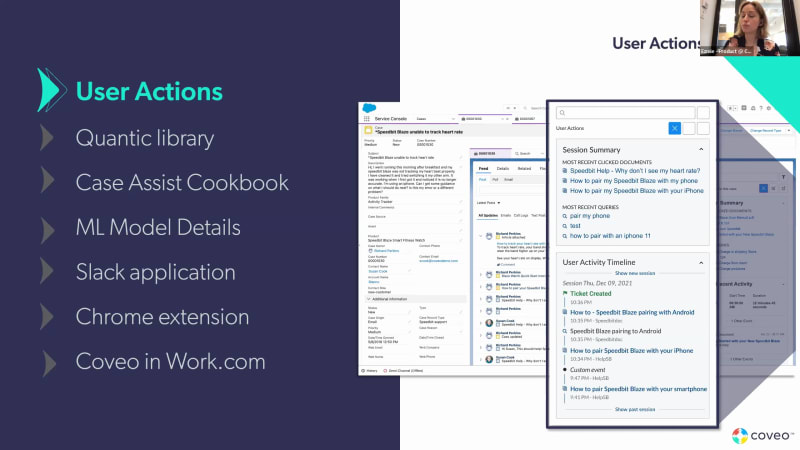
Hello, everyone, and welcome to the new incubation spring twenty two webinar. Thank you for joining us. My name is Bonnie Chase, and I'll be your host today. I'm on the product marketing here team here at Coveo, and I'm joined by two of our product managers, Esme Bouchard and Olivier Vanaut. And, today we'll be really doing a q and a with this team and and understanding what's what's part of our spring release. This webinar will be recorded, and we will send the recording within twenty four hours after the session. And as this is a q and a panel with our product management team, feel free to add in any questions in the q and a portion at the bottom of the screen, and I'll be monitoring the chat as well. So we'll either answer questions as we move throughout the presentation and or we can, we'll also save some time at the end to get through the rest of those questions. Alright. To get us kicked off here, really, you know, the theme of this spring launch and what we're really focused on doing is continuing to create those effortless experiences, unboxing AI, and expanding the connectivity across Coveo. So, you know, the these are the the main themes of the release. And what we'll do is we'll take a take a walk through each of these key features and capabilities that are coming out, and have a discussion with the product management team. So let's get started. The first the first, piece of this release is really enhancements to our user actions panel. So, Esme, why don't you take a minute to, remind us about what user actions is and what are some of the changes that we made? Of course. So first of all, hi, everyone. Thank you so much for joining. So I I'm Esme, a product manager on our Coveo for service line of business, more specifically. So, I'll be covering the the four first, items that we wanna share with you, today. And and, yes, Bonnie. Sorry to get back to your question. Just to to kinda kick things off, what are user actions? They're actually a feature that's been available, in Coveo for Salesforce for, for quite a while now, over a year. I just wanted to reshare some context about why this feature, exists in the first place and where where it kinda comes from. Basically ever since, you know, Coveo moved to the cloud years ago, we've been collecting analytics about user your users interactions with Coveo content across all the different channels where you have a Coveo interface in place. And we collect that data for reporting purposes and also to to train our machine learning models so that they can learn and improve experiences. So we're collecting that data already. Right? So when you implement Coveo, that's all kind of built in into our interfaces, into all of our solutions. And there's a lot of rich information there that we realized we thought made sense to display to agents as well. And so because we already have the data, it was just a question of tapping into this information based on so looking at who created a case and just retrieving the the profile and the action the actions history of that person and then exposing it to agents. So it was something that that we thought was easy to to set up and that we thought would bring value to agents, give them more insight about what happened just before a case was created, a little bit more insight into what kind of customer this is. Do they search a lot? Did they click on any documents before they submitted their case? So that's kind of the idea, around user actions as a feature in general. K. And then the enhancements that came as part of as part of today's release, can you kind of talk through some of those? Yeah. Absolutely. So, so we we really created a a first version of, of the feature when we when we first kicked it off. And then today, what we're really announcing is, several improvements that we've made based on how we noticed agents were actually using the feature once it was implemented for them. So I just wanna walk you through a couple of them. So first of all, the way it was set up before that, you know, the timeline was essentially upside down, so we fixed that. The the latest or the newest events and interactions are at the top of the timeline now in an order that makes more sense, for agents. So we got that feedback. Next, we also realized that agents, are really the most interested in interactions that happened immediately before a case was submitted. Whereas customers maybe interacted with Coveo several times, you know, before and after, maybe weeks before the case was created sometimes. So, we wanted to really focus on the time the case was created and make it really easy to identify where that event was in the timeline. So you see it here on the screenshot. It's really highlighted in green. When we load the component, that's what you're gonna see first as well as the five events preceding the case creation. So it makes a lot easier to for for agents to focus on the information that they're actually looking for. Another thing to help, agents, you know, find the the the information that they really need and make sure that it's valuable to them. We we've added a, an option on the lightning component itself to exclude any events that might not be relevant for agents. So you might be sending custom events to Coveo that makes sense for reporting, that might make sense for training machine learning, but aren't really valuable to agents. So now it's really easy to, to exclude those and make the timeline a little bit less clogged, cluttered. So really overall, we want to make all these kind of UX improvements, if you will, to make user actions easier to use, easier to focus in on, and and, pull value from. And I just wanna wrap this up to, and mention that, user actions is actually a feature that's really easy to enable. If you're already leveraging the Coveo lightning insight panel in your service console, There's no additional license that's required. You're already collecting the data that we expose here. So it's just really a question of a few quick steps to go through that are outlined in our documentation, to start leveraging this. And, the improvements that I just mentioned are available in the latest, package on on AppExchange. Some of great. Thank you so much for that overview, Esme. And and if any of you, watching have any questions, feel free to to drop those in. So let's see here. We did get one question. What did the before look like? So I think you you kind of answered part of that where the timeline was kind of flipped on its side. There there wasn't really the ticket created event wasn't highlighted as as clearly. Did you have did we have the, the location of where that activity occurred prior to this? Yeah. That's actually a good point, Bonnie, that I, jumped over actually today. But, there's a we we reorganized a little bit how each event is is presented, just so it's easier to extract value from it. So, yeah, the highlighting the case creation was one of the major pieces of feedback. The order of the timeline, we, we made everything a little bit more compact so that it was easier to see, all the information in one view instead of having to scroll, to get to where what we needed. And as you mentioned, Bonnie, we now have the the information about the search hub where an event took place. So if you have a user who interacted with Coveo across different interfaces, you'll be able to see that that they maybe interacted with your chatbot and then your search page when they clicked on a recommendation. And then they went to the case creation form. You'd be able to easily see that, which was harder to decipher, in the older version. Great. Thank you so much. Yeah. And feel free to add more questions, and we can we can come back to additional questions at the end. Alright. The next piece is Quantic Library. So, I mean, at the very outset, if you say Quantic Library, it makes me think, you know, what is this? You know, tell tell me more about this, you and how how are we using it today? Yeah. Absolutely. So, for those who follow, the latest Salesforce innovation closely, or even not closely necessarily, you may have heard a lot about, LWC in the last year or two. So LWC being lightning web components. Salesforce has been making a lot of noise about that. So what we wanted to do is make sure that we were, we were building for the future and keep keeping up with the latest technology available, in Salesforce. And so that's what we did. Our first major step towards that is it was to make sure, that we had all the components to build a Coveo search page using that latest technology, which is LWC. I make sure that that's easily available to all of our customers if they were ready to make that move to the latest, UI framework available. So we named that library of components Coveo Quantic. So that's where that's coming from. And, it's available on GitHub now as an unlocked package for all of our customers to start using or experimenting with, up to you depending on on where you are in your journey, on that front. And, we actually even threw in some bonus components that we didn't have, in our earlier framework, for really personalizing search pages. So you can see on our screenshot here on the right hand side, components like your recent searches, your recent documents makes it, easy to refer back to, to anything recent, for a specific user. Right. And, you know, you gave a little bit of an overview about LWC and really, you know, Salesforce is kinda moved from using the aura framework to LWC. What are some of the benefits for for actually implementing use using LWC versus aura? Yeah. So LWC is really right now the most advanced UI framework available for building Salesforce experiences. It was really built based on the latest developer, you know, development principles. It was really made to be dev friendly and, more in line with how modern UI frameworks function are and are architected. So, all that contributes to making it a good experience for your tech you know, your IT teams, your developer teams to work with. But it's also built to be faster and not a lot more flexible than Aura. So so that's definitely a net advantage. And Salesforce has made it really clear that this is where all new innovation is going to happen moving forward. So so, you know, it just makes sense for us to invest in this as early as possible, and make sure that, that customers who are ready to go there have all the pieces that they need. And, for those who aren't aware, you know, LWC works in, in all Salesforce lightning environments. So whether that's communities or Salesforce app, like the service console. Great. And, you know, we we did get a question. You know, what if what if somebody is not in Salesforce? What what do we offer there? Is there a library they can take advantage of, say, if they're in Sitecore, for example? Yes. For sure. So, if if you're familiar with, so if you've been a Salesforce sorry. A Coveo customer for for a while, you may know about our our search UI framework, which is which has been kind of the the go to, framework for building Coveo interfaces. We've actually ourselves also moved on to a new paradigm and a new framework for building interfaces, to be able to support a wider variety of of use cases for building Coveo interfaces. That framework is called Coveo headless. And it supports all of the same, use cases and components, same capabilities as our search UI did. But again, it's kind of a same same idea as LWC. It's it's the future, more dev friendly, more in line with where modern UI frameworks are going. And so, this Quantic framework is actually built based on that or built on top of that headless framework. And Quantic is specific to Salesforce, but we also have a sister library to Quantic. It's called, Atomic, and it's also built on headless. And so that's available for all the same capabilities for all, environments outside of Salesforce. Okay. Great. Yeah. That's a great overview. So thinking about it in terms of, you know, Coveo headless general use for Salesforce specific, we have this Quantic library that combines headless with lightning web components to make it easier to build in a lightning environment. Great. Thank you. Alright. Let's see what's next. The case assist cookbook. So we did announce, case assist last year. So now we have a cookbook available for it. Before we dig into the cookbook, can you just do a brief overview of what case assist is? Yeah. Great. Yeah. So just as a reminder, case assist is a solution that we launched, about a year ago, and it's, is really focused on optimizing and streamlining the case creation experience through a web form. And that that goes, you know, that's for any environment, Salesforce, or others. And the Kaleo platform exposes two features, through this solution via API. So one is for case classification. So for creating making sure we create accurate complete cases, and also at the same time making customers' lives easier when they are submitting those cases. And then the second feature is for document suggestions, which is really focused on maximizing case deflection in those case creation, experiences, making sure we're displaying the right content to users, try to avoid them creating cases if we can. So I'd say that's that's an overview of cases for those who weren't necessarily familiar. Great. Great. And so the cookbook that that we've put together, this is really to kind of help build that experience. Can you provide more details there? Yeah. Absolutely. So, what happened, is that so a few months, few weeks after launching, you know, our initial launch of case assist, we actually ran some research, some UX research to validate what really are the best practices, for the end user experience, for when when when we're building a case creation experience, basically. What's the what's the optimal flow? What what order should, should the steps be in? Things like that. And so what we do is we build several prototypes with different configurations of case forms and flows. And then we expose those prototypes to user testing. And we made some really interesting findings. So for example, as I mentioned, you know, what what's the best order to show the different steps of a process? What, what are the best practices for designing the copy in those experiences. And and things that are very specifically like, the fact that exposing what content was useful to other users, has a really big influence on whether users will pay attention to, case deflection content. Right? So we we put all those best practices into a blog into a blog post, which I believe we'll be sharing after this webinar with everybody. But we thought let's let's go a step further and really build out this, you know, all these best practices into an example flow and make it available to customers. So, so that's what we did. We really built kind of the ideal flow for case creation. We built it on LWC available for Salesforce. And all of the Coveo case assist, features are built in. All of the analytics for reporting and for machine learning training are built in as well. And so all of the components, for that are available on GitHub once again in an unlocked package, built on LWC and Kubera headless as, as I mentioned earlier. And so really on the latest, technology available, and is really, available as an example for you, to start building this yourself. Right. So if if, you know, you're using Salesforce and you're wanting to take advantage of case assist, you know, get using the cookbook will help you jump start that, getting that implemented. Exactly. Yeah. Alright. Then here's another screen of just that case deflection piece. So even through case assist, there's still that opportunity to deflect cases. Yep. Okay. Alright. And finally, for service, we have machine learning model details. So so, Esme, what what is this, and and why did we why did we why did we do this? Yep. Absolutely. So, again, a little bit of context. We've been really hard at work in the past year, to provide our customers with a really a brand new type of machine learning model, that learns directly from your content that we have indexed in Coveo. So directly from knowledge articles or cases that you have in Coveo stored in Coveo, not only from interactions with those with that content, which we've done up until now. So you might be familiar with these models already. There's they are smart snippets for answer extraction and case classification for for helping to classify cases, ahead of their their submission. And when we first released these models, they they were released essentially as really black box models. We got some feedback that it would be nice to have a little bit more insight into how, you know, how do these models learn, how are they performing, and that kind of thing. So what we're announcing today is, as Bonnie mentioned, machine learning model details and statistics that are available through the Kaveo admin console. We see, a screenshot of that here, on screen. And the idea here is to give you insight into how each of these models is performing and also into the data set that went into training it. So you get to see details about the distribution, the distribution of classification values on your cases for case classification models, for example, and how accurate that case classification model is likely to be for future cases, based on some testing that we do automatically when the when that model trains. So we're able to expose that in in a way that's comprehensive and that can be useful for you guys. And then on the content snippet side, we're we're able to to extract things like how many content snippets were learned and extracted, thanks to that model. So it can give some insight into how well it's going to perform as well. So the the goal here is really to be a lot more transparent about, what these models learned and how well we expect them to perform accordingly to to those datasets. Great. Now before we move on to workplace, there we do have a couple more questions about user actions. The first one being, what's the connection between session summary and user timeline? Yeah. So the session history at the top is sure. Is, you can see it really as, a different way of displaying the timeline, if you will. What what it shows is really the three, documents that were clicked on most recently by the customer who opened the case that is actively being worked on or that's, that's active in the service console. And, and then the most recent queries is the same as the three most recent queries in the timeline. Whereas the timeline is going to open directly into when the case was created. So if a user continued to interact with content, to search, to try to self serve after they created a case that would show up in in the session, summary. Great. Thank you. One more question. Are the user actions panel is are they tied to a specific case? Yeah. That's a great question. So the the user actions is actually tied to a user, so to one identity. Typically, that identity is associated with an email, and that's how we retrieve, their actions history. So it's not tied to a case specifically. We're gonna get their entire actions history across perhaps several sessions across, perhaps several different interfaces as well. We're gonna get all of their of their actions all stitched together. However, to help with associating, you know, which events are really related to a case and maybe really in the session where the case was submitted, That's why we've made the change to really focus on the case submission event, highlight it, and really load the component with that, you know, being prominent. K. And so from the user activity timeline perspective, we we can see that, you know, for for this session, these are the five activities that happened prior to ticket creation. But if we wanna see beyond that, there's the opportunity to to see more history with other sessions if we, you know, showed more results. Exactly. You have the option to open, more sessions before and after the case case submission if, if we wanna get more context, if if or if that's of interest to the agent, it's it's available there to to load. Alright. Awesome. As far as customizability goes, you know, is is this something can can can user activity timeline, for example, be renamed, or is that kind of, as is? That's a good question. So right now, that's not something that is customizable. That's, how the the component is built. Since it's an aura component, it's quite straightforward. If you if you wanna wrap the component and and then, customize it as as you want, that is possible. Right now we haven't exposed that option, though. Great. Thank you, Esme. Alright. So we're gonna move on to workplace and chat with Olivier. We'll start with talking about our new Slack application. Now we we've announced, you know, a a Slack connector previously. So, Olivier, why don't you tell us you know, give us a little bit of background around our Slack connector and and what's different about this new Slack application. Yes. Yeah. Thank you, Bonnie. Thank you, Izmi, for for the great presentation. So yeah. So for regarding Slack, just so so so we start with a bit of context again here. You know, Coveo for workplace is another line of business just like service that the that that that is taken care of. I'm the product manager for Coveo for workplace and in which, as we we might all known, Slack is scarred to a new workplace. You know? The digitalization of the workplace now kind of shifted kind of the tools and the way we interact with coworkers, and Slack is core of that. So, basically, to answer your question here, last year, we we released our Slack connector, basically. That was, kind of the first step inside or Slack and you know? Or or the the whole Slack initiative, basically, it was a mean for for how do you how do you get, Slack content inside the cover platform. And, again, that was a way for us to again, we do not want to index everything that that reside inside inside Slack, but from a self-service, from an employee perspective or service perspective, we we think that there is great value and great knowledge inside specific Slack channels such as, you know, IT, HR, support center, that kind of things. So, basically, that was what we've been, building last year and that we released a a thing around the the September, time frame. So, basically, it was for us a way to bring Slack content and, and expose it in other touchpoint, in which Cavio was involved. So that was last year. So this spring, what we're actually planning to release is our own Cavio application inside for Slack, basically, inside Slack. So which mean that, basically, it's you bring external content inside the Slack application. So, really, this is another it's it's the other side of the story. You know? It's we index Slack, so we get Slack content inside, and let's bring external content inside Slack in the flow of work. So, really, it's it's really for us, or three sixty degree integration in Slack. So, this is something I'm very excited about. We're just around the corner to release this new application. Oh, very exciting. And and so, you know, to kind of reframe and and summarize what what you said, the Slack app the the Slack connector that we released allowed us to bring Slack conversations into, you know, whether it was your agent workspace, your employee self-service portal. Now if you're working in Slack and you want a better search experience in Slack, we can go the other way and bring bring your enterprise content results into Slack. So that's that three sixty that you're talking about. That's really great. So if somebody wants to get started using this and they're they're a Coveo customer, can you walk us through what that looks like? Yeah. I mean, really here, we we we really want to streamline the process, how does the company gonna, you know, deploy the site application. So, basically, it will be installed either with a direct install link that gonna be available, right, right, on a website, and we will also be listed on the Slack application directory in which just the install process is even easier easier. Just a couple of clicks, and you're all, all all set. Basically, from a user perspective, from an employee's perspective, there is no configuration to be done. It just you install it. It just gonna work. From a Slack works a Slack workplace, they call that the Slack workspace administrator. This guy will actually do a quick connection comment to actually to connect the Slack application of your enterprise to the associated Coveo platform, organization. So once that connection is being done, any employees that gonna use the Slack, Coveo the the Coveo Slack application, they're just gonna use a slash comment and start searching inside their you know, they're all a digital, enterprise workplace, content, and, that's gonna be seamless. There is no specific configuration whatsoever. It's really a couple of clicks, and you're you're good to go. Great. So if you're already a Coveo customer, you can set this up. Yep. You know, the organization can access it from the marketplace. Nobody else can access it. It's personal to to to your organizations. Yeah. Exactly. Since the the connection process being being done by the administrator, actually, your certification will be bind to the authentication service of the Cavill platform. So, I mean, you're gonna need to to use or, you know, your your current credential to actually access your your your content. So, all of that is already, endo. So but it's, of course, it's it's fully it's fully secure. It's just like accessing content to the Cavio API. It just it's being done within Slack this time. Great. Thank you. Right. The next piece that we wanna talk about is But I think yeah. But one last thing on on the Slack application, Bonnie. I just I just want to cover, the kind of use cases because sometime, people imagine that, you know, just going to Slack to search document. And, really, the way I would like to frame that, it's not like we are not replacing Slack search in any way again. Here, the Slack application, it's really see that, like, how can you bring, relevant content in the flow of work? So imagine and here, I I see very two two different two very interesting use cases, in which just, like, application makes sense. So imagine you are in a discussion with a coworker on a very specific project, and at some point, you just want to quickly, you know, get that last PowerPoint where and where, you know, discussing together. So just within Slack in the flow of the conversation with a quick slash comment, you can actually just get that document, share it in the channel, share it in the DM with that person. So you just keep being involved. It's just you do not need to to switch context and open another tab and search it and copy Barca. You're just searching it right inside Slack. So from a workplace, from an employee's experience, it's really, like, streamlining the process of interacting with people and content. One other another very interesting use case is everything around customer care in which, you know, like, it's more a service use case in which, you know, agent are not, agent service agent are, are not are not interacting through Slack with customers or patient. You know? So you're getting an issue with your printer or something like that. So you might be, Slack gonna become kind of the main interface in which agent and and client again actually solve issue together. So an age from an agent perspective, in the discussion, they can quickly pull up the right content, answer a question, better understand an issue, and but really do it in the flow of solving the issue with the that customer or or patient. You know? All of that being done inside Slack, so the Cognio Slack application, in that case, could be configured to actually bring that kind of knowledge. So dynamically, very quickly, the the the the customer agent can actually just solve the problem, share the answer right in the conversation. So really, we're trying to tap into kind of that, bringing better, better support experience and helping agent to be more proficient in their, you know, in their work. So there is many different many interesting use case and why would you bring your content inside Slack. Yeah. That makes sense. Thanks for sharing those use cases. And we did get a question about this. Is this use applicable to Salesforce where not all users are agents, and they predominantly use the Salesforce search rather than a Coveo dedicated search? I mean, is this use I'm sorry if I get the, if I do get the question right, but I'm not sure, I'm getting the the question right. Yeah. So I I think I can answer this one. Yeah. And if I if I if I miss the if I miss the question, let me know. But but, basically, you know, we're providing options based on, you know, customer preference, employee preference. So if you're using the search in Salesforce and Coveo's indexing content there, we can bring those Slack, conversations into Salesforce so that, you know, whoever may be in Salesforce searching for information, they they can access it there. And then if they're not using Salesforce or if they're using Salesforce and Slack and they they they prefer searching in Slack, then we make the the content available there. So really just enabling, enabling your employees to to to, you know, find information wherever that may be that they're searching for it. So I hope that answers the question. If not, feel free to to add a clarifying question and we can jump back to that. Alright. So moving on to Chrome extension. So can you tell us a little bit more about the Chrome extension and and why it makes sense for the digital workplace? Yeah. I mean, the Chrome extension is like it's similar to the cover with Slack application, in a sense that the Chrome extension main goal is to get the content to employees, in the flow of work. So, as I mean, I'm sure everyone on on that webinar, Google Chrome, is our main entry point, you know, in many tool that we use daily, you know, to do our work. Basically, we write documents in Google Doc. We draft ideas in in miro. We track progress in Jira. We, you know, we make we build project in conference, etcetera, and the list goes on. You know? So, basically, since Chrome is our main entry point and this is where people work in some way to to really do things happen, the Chrome extension, it's to really make sure that we expose any other kind of content in the inside Chrome and expose it in context to any employees. So let's say that I'm writing a document in Google in Google Doc just on that screenshot here. Maybe I would like to to look on that, for a specific Jira task or a conference article to actually help me fulfill what I'm actually doing. So with Coveo for Workplace, since we are already indexing your old intranet content, we do have access to everything else, so as far as content or any other sources that you can imagine. So and we just bring that in a very easy way to to to digest in the flow of work. So, again, here, the story line, it's really to minimize the the context switching, and make sure that any employee's gonna have the same great search experience no matter where they are in in their journey, in their day. You know? If they are in Slack, they can use the Slack application. If they're working in Chrome, they do have the Chrome extension. If they are using a community portal that's in Salesforce or or something on that matter, I mean, that's gonna be a bigger cover interface. But all of these different touchpoints are linked together. So, really, the Chrome extension is just another easy to use touch point to make sure that we bring the right content to the employees, highly with with a high degree of context of being used here. Great. And and for me personally, the thing that I think about with my Chrome is the millions of tabs that I have, like, open. So if I don't have to open a new tab to find information and do another search in another tab, super helpful there. We do have a few questions coming through the chat. I'll circle back to those, at at the end of the presentation, because we do just have one more piece to talk about, which is, you know, getting Coveo into Work dot com. So, Ollie, can you tell us a little bit about how we how we complement Work dot com and and what we're doing there? Yeah. Totally. Yeah. For Work dot com so most of, you know, I mean, people on the call know. I mean, Work dot com is the new Salesforce kind of Internet platform. So Cavio, I mean and, and you can tell that by his presentation, you know, Cavio already has a long history with Salesforce, and our integration with them is very mature, or Salesforce package has been list on the AppExchange for many years. So having an integration in work dot com, it's kind of a natural evolution for us, Barca Calvo for Workplace. So, basically, out of the box for work dot com, we will offer, you I mean, any integration you're gonna have, have access to our, you know, our everything, or machine learning stack caps to offer or an or analytics platform for reporting or wide connectivity stack, or index and much more. So, basically, everything that Kavio can offer will be accessible to, the word dot com platform. So this way, we we we really help elevate the content strategy of word dot com, user to the next level. So if we take everything we just discussed with Slack and Chrome, so if we can so now we can imagine having a solution where the main portal will be built on top of word dot com. Conversation in Slack will be augmented with the Slack application, and the Chrome extension will bring content in the flow of work. So all of these different interaction will be driven by the same Kavio platform that you guys can configure and make sure that the right content go at the right place. And, actually, everywhere in your enterprise, any employee can have, access in a seamless fashion to the best content and, you know, without, like, having different experiences and all of that driven by the same by by by the same platform. So this is something I think adds a lot of value, even more with the digital the digitalization of the workplace. This is something that is speeding up. So, you know, the more we can connect all of these touch points together to make the employees' life better, the better, in my opinion. So, really, that that's wrapped up, like, the Slack application, the Chrome extension, the work dot com integration, all of that altogether, provide a better, workplace experience. Great. So we've got a few questions. The first one, let's go back to the Slack application. There is a question here. Will there be a command line style function? So what will what is that, and what does that look like? Yeah. Totally. I mean, the the the way I mean, the Cognito Slack application, respect the the the Slack UI and UX requirements, of course, to which one of them is being we're gonna provide a slash comment. So you can inline already just type in slash search cardinality or whatever search term you want, and it will it will just launch that search and show you the result in the model just like you see on that screen. Also, you're gonna have what they call the Slack at home, the Slack application home, basically, which is kind of you know, on the left hand side, you're gonna have a Slack button in which you're gonna it just gonna open the old window as a Slack interface as a search interface inside Slack. So, really, you're gonna have, like, different option, different way to access. You know, really easily, you can either open the model, search with the Slack, the slash comment, etcetera. So, really, of course, like, avoiding the need to click everywhere and, like, you just you just type in. And that's that's one of the many ways to interact with with the with our integration. K. Great. Yeah. That answers that question. Let's see here. Are there any plans for a similar one for Discord? Yeah. I mean, that's a that's a very good question, actually. I totally understand, like, Discord use that, you know, provide the same kind of use case and connectivity amongst employees. And Discord being a very open minded kind of, of platform. This is we do not have, like, something in the short or medium term, but, definitely, this is something I'm sure, some of our engineer here might might think about if I put POC or something like that. But, yeah, exactly. I mean, Discord could be something that that we can look at, as well. Yeah. And and if anyone else on the call is also interested in Discord, you know, we'd love to see what kind of interest, you know, we have from our customer base on on this, and that can definitely inform, you know, our prioritization. Alright. Damien had a question about sending context for users, and I apologize, Damien, but I did not, catch which piece that question was for. So I don't know if you wanna add a clarifying note in there about sending context for users for the for the Slack application. Okay. Yeah. So, is there any way to send context there? Yeah. I mean, the the first version of our of our Slack, the the Slack application, we already gonna send context pretty much everything that the the everything that makes sense and that the Slack API provides us. So everything around, you know you know, user department, user channels, that kind of thing, we will send that in the context payload as well. So on one end, it will, help you, help machine learning to learn better what are the question being asked and what are the queries being made in specific channel, etcetera. And as well for you guys and, you know, Damien, Dave I know Damien, been working with him on different other project, but, basically, yeah, I mean, to configure your query pipeline to make rules and that kind of things, of course, we're gonna have as much as possible content in in the context payload for for customization and personalization. K. And so if if if they define it in the Slack profile, that will get sent over? Yeah. I mean, though those for the first version, maybe not that with that much flexibility, but this is definitely something that we're gonna carry on working on it, you know, over and over during the year. We're just about to release the first version of it. So, yeah, I mean, everything that makes sense to further personalize the search personalize the search, through context, this is something that we we will add, down the road, for sure. K. Great. So, you know, it sounds like there's some context in there. It may not be Yeah. You know, everything that somebody might want to add to the profile just yet, but we're continuing to develop this. So, you know, as as you're, you know, if you if you're using the Slack application, if you're interested in the Slack application and and there are certain things that that that you're looking for, you know, we'd love to hear about that so that we can continue to to include that in our in our plans. No. But very good comment by Damien here. We totally understand that context fetching and leveraging the the the knowledge that we have about the user really help to improve the experience. So this is something I I got on my radar for sure to really make sure that we can be be flexible in that front and be flexible for for from a user perspective so you guys can get the maximum of of the feature. Right. Great. So we have a couple of minutes left. And, you know, if if anyone else has any questions, feel free to drop it in the chat. We'll we'll we will be following up with the recording of the session and, the slides as well as some links to information, that can help you get started with understanding more about each of these capabilities. Alright. So I think that that's all the questions that we have, for today. So thank you so much, Esme and Olivier, for joining us and and answering all of these questions. Very excited about these new capabilities. And, thank you all for for joining and listening in. We really appreciate it. We'd love to hear your feedback. Any additional questions that you may have about these capabilities, feel free to reach out to your customer success manager. Alright. Thank you all. Have a good day. Thanks, everyone. Thank you. Bye bye.

New in Coveo Q2 2022

