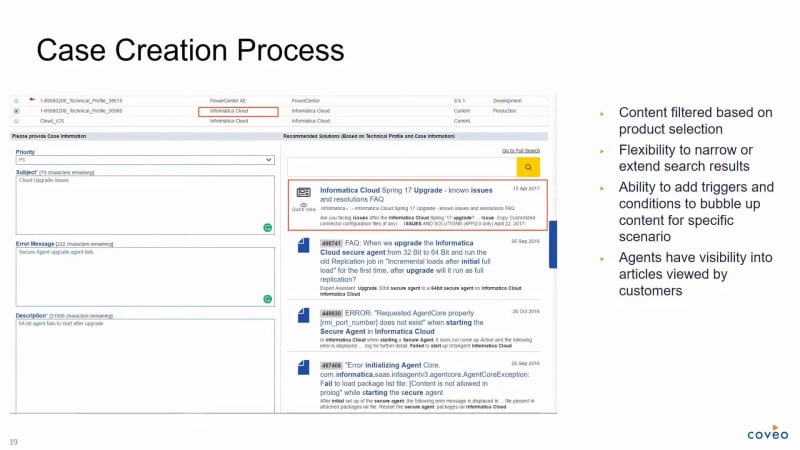
Hello everyone. Thanks for joining our webinar today on Informatica's journey to AI powered self-service support. My name is Rachel Bosley. I'll be your host. I work on the marketing team here at Coveo, and I'm really excited to be part of today's session. I'm also very pleased to introduce today's speakers. Our first speaker is Ben Hong. Ben is a director of customer success at Coveo. He comes to Coveo with fifteen plus years of experience, a progressive sorry. Fifteen years of progressive experience in customer success, support, knowledge management, and marketing automation. Our next speaker is Pattabhi Raman. Pattabhi is the associate director of global support infrastructure at Informatica where he has spent the last twelve plus years in various support and customer facing management roles. He is responsible for all technology initiatives for global support and Informatica University. Now before we begin, I have a couple of housekeeping items I'd like to cover really quickly. First, everyone is in listen only mode. However, we would love to hear from you during our presentation today. We'll be answering questions at the end of the session, so please feel free to send your questions along at any time using the Q and A section on your screen. The webinar today will be recorded and you will receive the presentation within twenty four hours of the conclusion of the event. Finally, there will be a brief survey at the end of the session, so please help us improve by providing your feedback on the webinar content and experience. For those of you just joining us, welcome to the webinar, Informatica's Journey to AI Powered Self-service Support. Now let's get started. Ben, I'm gonna hand it over to you. Ben, are you still on the line with us? Yeah. Sorry. Can you hear us? Yeah. We can hear you. I think they're right. Yeah. Okay. Were you muted? Perfect. Yeah. Okay. Yeah. Okay. So let's yeah. Let's dive in. Go ahead. Take it away, Ben. Alright. Hi, everyone, and thanks for joining us today. We'd like to explore how you can make successful service a self-service a reality for your customers, partners, and employees by using Coveo's intelligent self-service. So, again, I'm Ben Hong, and, thanks, Rachel, for the introduction. Again, I'm the director of customer success here at Coveo. And, yes, I have been in this space for about fifteen years. In fact, my, journey, in, self-service success started back in nineteen ninety nine. So I'm dating myself there. Thankfully, things are very different, are very different than they were in nineteen ninety nine, and we are very happy to have Pattabhi here to share Informatica's experience with you today. But before Pattabhi speaks to you about Informatica's journey, I'd like to share some insights and best practices that our team here at Coveo have learned. And, you know, the first thing I'll start with is that in support organizations, we're very accustomed to goals, key performance indicators, and we've got metrics for most, everything, if not all our operational activities and support centers. However, when it comes to self-service, there's been a real challenge. This includes uncertainty about what the right goals are, what we should look at, what the varying methods have as impacts on the customer experience, and ultimately determining what metrics matter. At Coveo, our belief is that metrics for your self-service program really need to be included as part of measuring the holistic customer experience. So when we set out to create a vision for customer experience, we want to deliver. The goal in designing those customer engagement systems is to provide access to knowledge with the least amount of effort for those who are seeking it. We want to deliver an experience on a platform that the customer chooses at the time that is right for them through an interface that is simple to use and provides them with the knowledge they need. And we know that designing such a system is not a trivial matter. So to deliver self-service in a way that minimizes the effort and maximize the success requires careful thought and planning. When we do it right, it's mutually beneficial for both the customer and the company. The benefits truly are huge. As you can see on the the slide that we're showing right now, first and foremost, it's important that customers, have a preference to self serve as they like to be able to do things when they want and on their own terms. You can see that the the the number for the the preference for self serve is actually fifty five percent. Second, it's cost effective. I think we all know that self-service is is cost effective. And last but not least, it improves overall employee satisfaction. For example, by reducing repetitive problems like password reset. The good news is that Google, YouTube, Bing, Amazon, and others have effectively trained your visitors on how to use intelligent search, and we can all take advantage of that. At Coveo, we believe that search is the intelligent navigation tool. Search is the mainstream. Search is proven to work in self-service customer experiences. But why is self-service so hard? It's largely attributed to four challenges that was as we can see on the slide there. It's largely attributed to the proliferation of apps and information silos. It's become the age of bring your own app. The flexibility of cloud based enterprise apps means that any department in a company is now able to get their own app for their specific use case. There's no one standardized enterprise app for all. For example, support will use Salesforce. Documentation uses Jira. Product uses SharePoint. This is this causes lack of insight into what's actually there. The lack of a baseline to measure progress against and a shortage of analytics and reporting have perpetuated the self-service waiting game. Over the last ten years, self-service has skyrocketed as we all know. Customers are empowered and want to solve issues on the on their own as we've talked about before. But many companies are finding that just turning on a self-service site isn't cutting it. They've noticed cases aren't dropping at the rate they projected. Agents are still solving routine tasks, and customers aren't finding what they're looking for and still have to call or email support. You're still waiting for that investment to pay off. And with no unified view of the customer experience, we don't know if we are possibly at content overload. The good news is everyone may be a knowledge worker and been tasked with content creation, but maybe we've invested in a knowledge base, but content is being added and added and added, but still customers can't find the content they need to solve the issue. I'm sure you've heard people overheard people say before, I know we've created something like this, we just can't find it. With all of this content creation also comes the issue of how do I know what content is working and not working? What's being used? What's not even being touched? Are we wasting time on content creation that no one uses? These are the challenges facing customer support leaders today. And it's no myth that measuring self-service success is a challenge. In fact, here we have data from the TSIA that illustrates the challenge and the predominant methods used to measure success. So while forty four percent of respondents said they employ useful, not useful prompts in the workflow, we know that this method is largely unreliable. Even still, post session survey rates are often low and on average less than eleven percent. And other methods likely have made too many assumptions for them to be valid or viable. So while the challenge to measure self-service success is clear, it's important to consider self-service metrics as part of your overall customer experience measurement framework. Failure to look at a self-service experience and assisted service experience holistically as your full customer experience may lead you to some incorrect conclusions because we know that your indicators and measures will change when you start to do self-service right. For example, as self-service deflection rates go up, you will find that time to resolution will also go up. This might seem as as it's a negative, metric in or performance in the support center, but it's to be expected as simple issues, as we said before, like password reset, are solved in self-service. The new and complex issues will pass through to assisted support channel. The shift, as a result, will initially lead to time to resolution increase, but the addition of knowledge management frameworks and practices like knowledge center service will help to address it over time. If you look at the overall customer experience, you'll find that KPIs like NPS and CSAT and productivity will also increase as well. So how do we measure success and what are the standards? Here are the definitions that TSIA TSIA has recommended that you should use as a baseline. These include self-service success and case deflection. I think the one we wanna focus on today is the case deflection measure, which is the rate that self-service resources eliminate a customer's need with live assistance. But it's important to remember what self-service success is, and that is the rate at which customers find the information they need on your self-service portal, which may or may not have required live assistance. A new source of confirmed signals on deflection now includes explicitly asking the customer if the answer we gave them prevented them from creating a ticket and getting hard usage analytics metrics directly from the case creation workflow. With Coveo, we have a new approach and one that is proving self-service success. And this new approach, is as follows. As customers visit the case creation page, they are automatically provided with relevant content to help them self serve. Based on the information they enter, what we track is how many cases are started, how many abandoned the form after clicking on recommended content. From the sample data we see to the right, when done right, you are maximizing case deflection by leveraging this last chance you have at solving their issues on your self serve portal. This is in fact part of Informatica's journey. So now is a good time to intro introduce Fatabi again who, will talk about and share his Informatica story. Ben, thank you so much. Very glad to be here, and, I'm absolutely excited to be sharing Informatica's journey in transforming our customers' search experience with with Covio. So before we dive in, just a quick introduction about Informatica. We are the world's number one provider of enterprise cloud data management solutions. So be it on the cloud, on prem, or a hybrid environment. We have it all. We have over seven thousand organizations across the world, who depend on Informatica for their data management solutions. Right? And but one thing that gives me absolute pride, is that we have been ranked as number one in customer loyalty for eleven years in a row. So this is an annual survey which goes out there where customers tell that, you know, the the support they receive, be it assisted support or an assisted support or the intent to rebuy from us is is at an all time high. Talking about the team of the of the support organization, we have over, three hundred and fifty support engineers, spread across the globe. Eleven centers, and we support our customers in ten different languages. And we have, ninety five percent upwards of ninety five percent, of customers who are happy with, with with the support that we provide. So these are through the transactional service post case closure. One thing that we, have done right is, you know, getting our customers to adapt to our self-service. So which means that, today, ninety four percent of the cases that comes into the support is coming through the web channel, which means that they are going through a self-service before opening a case. From a from a unassisted support standpoint, we have, over two hundred and fifty thousand, registered users on our support communities. We have, forty plus, different product, spaces which are being moderated by r and d, by support and professional services, and also by our customers. We have a wealth of content, over a hundred thousand, doc documents in the form of knowledge based articles or documentation, videos. In fact, talking about videos, our support videos are one of the most popular, content types. We have over a million views on on a on a yearly standpoint. And, we have a gap score. This is, eight percent. Eight percent is when, you know, gap score is nothing but when a customer tries to search something and they don't find any content. So that is at, at eight at eight percent. So talking about the knowledge, landscape itself. Right? So, we have we have content coming in from different content sources. I think we have over twenty different content sources that, that are currently being crawled, against Kovio. So we have different personas. We have support engineers who have access to almost all the content sources. We have customers, where we listed specific, content sources, and it's available only for internal engineers. And, we have, content writers who actually create the content along with the support engineers. So these are the different personas, and there are specific permissions and, access restrictions based on what what content comes in there. So we have over, over half a million searches that happen, on our public, knowledge based site on a on a monthly basis, and we have over a million unique visitors who visit our community portal. So, you know, supporting supporting such a huge organization, with, with so much of content written and with customers across the globe, how how does the technology stack look like? Right? So this is this is the stack which sort of helps us enable effective self-service. We have we have Okta, which is our service provider, and, we use SharePoint as our content management system. And, you can see that there are three very important systems in in in the diagram. Jive, which is our, customer community. We have we use Salesforce for our case management and, Covio for our search requirements. So one of the things, you know, the reason why Covio is very important in this, landscape is because it touches each and every touch point of a customer. Right? To be it on the community, to be it on the case deflection, there is a footprint of Covio in each and every, journey of the customer. And one thing that we know for sure based on the web analytics is that almost sixty percent of the traffic is generated, by, by search, right, by our content. And, the first thing that our customer does when they log into our portal or when they land on our portal is start their web journey through search. So that's the that's the first touch point. So the first touch point is search, and the last touch point before they open a case is also search. So it's it's it's very important for us to make sure that, you know, we provide them with the best search experience. And we obviously have a lot of analytics, you know, on on top of, all all the systems that, to track what our customers are doing, what are the accessing. We have real time analytics. We have flex we have, you know, web analytics. And we take all this data, that that comes in from different content of different technologies, and we put it onto our data lake, which is, which is an Informatica data lake. And we try to, you know, make more meaningful, decisions out of it and provide present content or, you know, provide a more personalized experience to our customers. So, when we started off with the with the COVID journey, so very similar to any project. You know, a project has a vision, specific success target. But I think for me, a vision is more of a journey. Yeah. You have specific milestones on a project, but it it has to be a long long term, an envision of what you want to achieve and beyond. Right? So for us, when when we kicked off our Covia project, we wanted to provide a seamless and personalized search search experience, for our customers. It had to be at the right time. It had to be on every interaction, and the information had to be right. It it could be coming from any content source. It had to be the right information at the right time to make sure their search experience is, is second to none. And we had very specific, success targets that were called out. Obviously, one of the biggest things is on the call deflection. So we wanted to improve the call deflection rates by fifteen percent. The content gap score, we wanted to bring it, down to six percent and, reduce the average research time for an engineer. So when they are when they have to troubleshoot an issue, when they're doing some research, most of their research is around searching for informations. So we want to reduce their average time to research and also, you know, improve the availability of the search performance. So, you know, obviously, I I'll I'll be talking about how this how, you know, Covio has helped us doing achieving these things and, you know, different strategies and tactics of how we could achieve those types of targets. So, before I dive into some of the things that we have done, I wanna talk about why did we need a change? So why did we actually have to look for a new, new search technology? So if you look at it, right, the different stakeholders like, you know, it could be either IT or the management or the business. They're all they're all talking the same language. Yeah. But, in in their own way, they, they said that when I when I when I went and spoke to the engineers, right, before we kicked off, we were doing some groundwork. And, when I when I interviewed some of the engineers, so every time a case is open, it requires research because ours is a complex product, and we have variety we have a huge, product portfolio. So, you know, engineers spend twenty percent of the time looking for information. Right? So, and fifty percent of the time, they are looking for content across for more than three content sources. So, obviously, knowledge based, previous cases, and documentation. So these are the most popular, but, most of the time, it's more than it's more than three content sources. And, when we started this journey, our content gap, score was at eighteen percent, which means eighteen percent of the times when the customer searched, they did not get the results. And that was a huge number when you talk about fifty thousand sorry, Five hundred thousand searches happening on a monthly basis. And our, our CSAT scores were at an all time low. We we do our annual, surveys, and we do our transactional surveys. And people and our customers were very verbal about the, about the bad search search technology that we had or the bad search experience that they had. And from a business, I wanted to make sure I mean, for me, it's all about we wanna make sure we get the best, experience to our customers. So, you know, the there was no, there's not much options for us to do innovation because, we did not know how our customers are using the system because the the the platform that we had then, did not have any analytics, associated with it. And, we had to pretty much for each and every, rollout, we had to wait for months together. Right? Because and all the all the different content sources, we had we had put in custom code to get, to crawl crawl content out of it. So it was it was obviously slowing down on the innovation front, and and we we add almost ten to twelve percent of x additional content, be it in the form of knowledge based articles, documentations, discussions, or videos. We add, ten to twelve percent extra, extra content year over year. So, obviously, the problem was growing, you know, as as a content point, as a content grew as well. And IT, IT, obviously, the you you don't want to maintain custom code and you want something which provides you out of the box functionality. And the vendor that we had, they did not have a very clear road map. The future of the technology, was very unclear from them, so we obviously had to take some decisions. And it was a posted solution because, you know, on prem solution. So the cost of handling the infrastructure and maintaining it was was very high. So and then I thought it was a no brainer that we had to look for, look for a different solution. So, we did we did have, multiple vendors, you know, when we did our we we had multi we we reviewed multiple vendors. Obviously, Google was was one of them because Google is known for search. Right? And, we had the Covio, and, we had Ativo. So these are the three vendors, whom we whom we reviewed as a part of our journey. And, you know, why did why did why did we finalize on Covio? What is the main reason that, you know, made to made us to take a decision on Covio? One thing is we know how our our customers, review us. Right? So whenever they have to make a decision, so we we are the leaders in the industry. Right? So similarly, Kovio was, or EELS, I should say, is is the industry leader when it comes to enterprise search. So at least when we were looking at it, back in twenty fourteen, beat Gartner's Magic Quadrant or Forrester's, quadrant, leader's quadrant. They were they were on the top of the list beating Google and all the other competition. So that was very promising for us. And we wanted to, you know, we wanted to go for a cloud solution and not something, on prem, and Kovio was the perfect fit for that. And, we had a lot of different content sources coming in. So we didn't want to, again, go back to custom coding, and we wanted a vendor who could provide out of the box connectors, which are developed and supported by them. So, I you know, Covio has over fifty different connectors to which which they develop and support. And, obviously, permissions, authentication, and authorization was a key thing for us, when when it comes to data privacy. And, the best thing that actually impressed me was the analytics side of things. So there are a lot of insight into the content and user behavior when we did our POC. So we were able to sort of do a lot of drill down on on on and we could, we came to know a lot. We discovered a lot of insights which we were not aware of earlier. And, we are not talking about artificial intelligence and machine learning capabilities. The Covio had just gone live with the reveal functionality. So I think, you know, with all these different things, it was just like a perfect fit for us, you know, just made for our made for our use case. So it it made our, decision much easier. So, what are some of the work that we have done, on, you know, using Covio? So this is, this is a screenshot from our, public knowledge base. So, like you can see, it goes across ten different content sources. It's it's providing a customer with a unified search, search experience across different content sources. So it also provides, customers with a with a feature to drill down, or narrow down the results based on product or versions or any other metadata that is associated with, some of it with the with the with the content. And, another key feature which I like a lot is, you know, especially when customers are, searching for discussions. You know, ours is a very vibrant community. We have a lot of, peer to peer collaboration which happens on our portal. So it's very important that, you know, content is not coming just from the support engineers, from Informatica, but there's also community, crowd sourced content which is getting created. And this is a perfect example to sort of, you know, motivate, folks to, on the on the community to to answer questions and also mark them as help and, correct. So Covio here, what it does is whenever I'm I'm looking for any information within the content, in the community content, it boosts, any discussions which have been marked as answered and helpful on the top. So it sort of helps helps a lot in that aspect. And, that this is something that we have, custom built, on, using Cavio. So I'm sure you must have, you must have heard of case deflection. So this is our discussion deflection. This is what we call it. So what we have done here is, every time a customer wants to create a discussion on the forum, we wanna make sure that, you know, there's no duplicate content that's being created. So very similar to how, you know, the content gets recommended, in case creation. So as the customer starts typing the title of the discussion and the, you know, the body of the discussion, we start recommending the relevant content. So this has helped a big deal in avoiding duplicate content creation for us. So this is, this is our case creation page, which is which is, which is done on Salesforce. So you can see that, you know, the first thing is that the customers have to select the select the product on for which they are opening a case. So as soon as the customer selects the product, all the content relevant to that particular product gets filtered out automatically. Right? And then you also have flexibility to either narrow down on the search or, you know, extend the search results. One thing that I really like, about about this, about the technology is, you know, you have a you have a flexibility to add triggers and conditions, to bubble up specific content for specific scenarios. Let me give you an example. We have a quarterly, cloud release, right, which happens. And, during that release, we have a living document on the community. Right? So where engineers keep updating it on a real time basis as the as the release happens, any issues that that they that they find that they discover from customer. So they keep updating the document. So what we do is as and when we, when we find that out, we know there are very specific scenarios where a where a customer we know are surely gonna hit a issue and does the article. So we go back in the back end and, you know, create results and conditions saying that, okay, if this particular search term or if relevant search terms are being used, present this particular document. So, I think we had one released last month. And within within twenty four hours of, the cloud release which happened over the weekend by within twenty four hours, we had deflected almost twenty twenty cases over the weekend with using this functionality, which which is a great you know, it provides you with the flexibility to sort of, tell you what what results needs to be posted up as well. And another beauty is that the complete journey of the customer of what content they have viewed, what content they have accessed is now visible to the agent. So one thing that you always very commonly hear from customers is, hey. I already looked at this knowledge based article. Why are you sending me the same thing? It has not helped me. So this feature provides the agents a visibility into what they have already looked at so that we don't send them back the same same content. So this sort of helps, you know, first thing is, obviously, the frustration level of the bring down the frustration level and, you know, cut down on the number of iterations that happens back and forth with the customer. So, talking about machine learning, obviously, there has been a lot of, improvement in in in our own metrics and numbers, with the use of machine learning. So machine learning is it's not just content recommendation. It's also query suggestions. So as you as you start typing based on what other sorts of it, you know, Covio recommends queries that, that might be helpful. And once once you once you use those queries, it also recommends content that is relevant to, that is relevant to those search queries. And, obviously, our click rank and click through, rates are much higher when when a customer, uses machine machine learning recommended content. And, it's been a it's been a month since we went live with dynamic recommendation to have to find similar content. Think of it, very similar to your Amazon, experience shopping experience. So when you're looking at a specific product, you get another, feature saying people who look this is also looked at similar content. So a very, specific functionality. So one thing that this, that this help is, we don't have to manually tag the content every time. So to before this, we used to manually tag recommended or related content, so we don't have to do that. The second thing is, customers don't have to go back and forth from the search, from the document page to the search results page. So it's it's avoiding one click. And, you know, over a period of time, it's you know, the model learns based on different, browsing patterns and page views from the customers. And, you know, we we have had almost, like, seventy to seventy five percent click through and over hundred thousand, documents which have been recommended by dynamic recommendations which customers have viewed just in one month's time. So that's a lot of, you know, benefit that you that you, get from machine learning. So talking about some of the results, so, you know, this this is a chart which compares how, the click through is, is, you know, seventy two percent higher when it is coming from a machine learning versus a non machine learning content. And so these are some of the very key metrics that we report back on a monthly basis to our management. And click rank is, you know, the the the order of ranking in your search results. So when whenever we use, machine or rather whenever the content is recommended by machine learning, the average click rank is true, which means that customers find the content that they need in the first two results itself. But whereas when it is not recommended by machine learning, where we we tend to get it somewhere between the seven and eight. So, next year sorry. Not next year. Apologies. June next month is when we will it'll be we'll be celebrating our first year anniversary of going live with Covio. So, you know, we have seen some staggering results, you know, very, very promising, numbers. First and foremost, CSAT scores have gone up by five percent. So I I know anybody in the service industry, if you have to move the needle even by one percent, we know how difficult it is. But, our scores on the knowledge, of the search satisfaction, we had we do our annual survey where we ask, you know, how how is your experience with so do you find all the content? So we we never went beyond seventy five. Last year was the first time that we hit eighty percent, and that has been the best course so far. And, I know we had set a target of fifteen percent increase in call deflection, but, you know, our call deflection numbers improved by one hundred and twenty percent. And, the content gap score, we before we started off with the COVID project, we were at around sixteen percent content gap score. Now we are at eight percent. So these are the call deflection numbers and, the content gap score is something that we report to our board on a on a on a monthly basis. So this is something that we track very closely. And, duplicate content creation on the discussion forum, it has reduced by fifty percent. We we have, like, we have, web analytics where we track how many people actually go and cancel this discussion creation after clicking on a content, so it has gone down by fifty percent. Finally, our search rank, is around the the average is around five, which is good, but, obviously, there's scope for improvement. Another area where we need improvement is around the click through rate. So this is where a customer, you know, searches for something, but they don't click on anything. So we are somewhere around twenty twenty eight percent, I believe. And the industry average is somewhere around fifty. So there's a lot of work that needs to be done. And, also, one area of improvement is from a agent standpoint, we this this use case is very specific to Informatica where, you know, we wanna improve the Salesforce case search experience, when when they're looking for cases or looking for content coming from Salesforce cases, we wanna sort of have a better experience. Right now we use our own custom way of doing it. But this is something that we are already working with with the Insomarica team. So, yeah, it's it's been a it's been a wonderful journey so far. So, obviously, there are things that work for us and a lot of lessons that we learned, as a part of the journey. So, and anybody who is in the phase of currently, implementing Curvio, I would strongly, you know, suggest, they look at these, or even someone who's planning to get into Curvio. Plan your document and query count, growth. Right? Because it's actually the model the licensing model is based on number of documents that you index and the number of queries. So you you better know how many queries have been done on your external search external portal so that you don't, you're you're not in for any surprises later. And, index only what you need. Covio can essentially find a needle from a haystack. It can it it will it will it will call each and every content, every every field. So you need to be absolutely sure what you want and what you don't want. So make sure you you you are you specify that in your requirement upfront. And if if at all you are you are planning to call Salesforce content, you know, cases, make sure you you give enough time because there's a lot of things that, it takes it takes a good amount of time based on the amount of cases that are there and how long back do you want or how now if you wanna crawl, like, two years or five years or ten years of cases. So make sure you have enough time plan plan for it. You know, as much as, the initial planning is important, UI is also equally important. Make sure, you know, you have planned your user experience upfront clearly. Call out what what should be authenticated versus what should not be, which is, you know, freely accessible. UI is something which will take a lot of time. So a thoughtful UI will obviously help you solve a lot of your business. It's there. You don't have to you don't have to do a lot of trial and error. So it's it's important that, you know, you understand your customer's behavior on the web and plan plan it accordingly. I would say test test often. You'll you'll be overwhelmed with the amount of data that the COVID will bring in once it starts calling the content. So make sure you're testing every time, you know, to especially to make sure that, there is no confidential data which is being exposed to the people who are not supposed to be, you know, viewing it. And, another great functionality, which I love the most is a b testing. So you have a functionality every time we we use this we use this almost for every release, every new feature that we roll out. We use a b testing where, you know, we roll it out only to to a certain amount of traffic that comes in. So the what it helps is it helps to give, early insight into whether people are liking it, whether they are adopting to it, and, you know, has it made the impact that you intend to make using that functionality. So, you know, I I strongly recommend using AB testing functionality whenever you're rolling out any, new features. If you are engaging with, the Covia professional services, they are a great team to work with, you know, highly knowledgeable and, you know, not just from a product standpoint, but also from an industry standpoint. So they will bring in a lot of knowledge for you. So and, obviously, they will they will, they'll help you. They will do let they'll let you do everything. Right? So get get your hands on, experience while while doing the setup and all those things. But, you know, you need to invest your time to to learn a lot, about. So I think these are all the good, lessons, that we learned. And, what are what are we doing next? So, obviously, we are not stopping here. It's it's been great, results so far. Obviously, you know, customers' needs, customer requirements keep changing, and we need to keep making, you know, innovating, the pace of flight. So, so there are a few things that that we have planned on the road map for right now. Obviously, first thing on the top was already the responsive UI and the mobile app for our assistant support for searching communities because not everybody want, rather not everybody, wants to be searching only from from the laptop. Right? So a lot of people might, use the use the search at their own convenience. And, we're also planning on integrating knowledge with our products. I have a few screenshots where, you know, our upcoming new product release has, content content integrated with it and not just content, but recommendations also integrated with it. And advanced personalization on communities. So here, we are sort of bringing in the power of Covio and the power of Informatica together. Right? Because you guys are good with search. You guys know what customers are looking at, and we guys are good with data. So we are bringing both data and this content together, and, we exactly know once a customer logs in. We know what they own, what are their interested in, you know, what phase of implementation life cycle they are. So based on this, we can very, you know, we can recommend very tailor made content to them, you know, because when you're talking about hundred thousand odd documents, there's there's a lot of noise out there. You are not you know, when you come in, you don't wanna be looking at all those things. You want very specific to your use cases based on the cases that you're logged based on the issues that you're running into. So, you know, this helps us sort of do that advanced personalization. And, we're also we have our own tool called as log analyzer when customers upload logs into the portal for case during case management. We we analyze the logs. And using the power of Covio, we are going to we're gonna make some searches searches within the log error messages and gonna do some knowledge intercept. So these are some of the things that that we have planned as a part of the journey. And, this is one screenshot. You know, this is the screenshot from our upcoming cloud release where, when the customer is is using the product, we are gonna bring in discussions and recommendations from a from a content standpoint, into them based on based on their use cases and based on the features and functionalities that they're using. And I was also talking about, advanced personalization. So here we are gonna bring in something like a recommended for you content, as one very similar to a Facebook feed. Once a customer logs in, since they know what they use and what they are interested in, we are gonna bring in recommended, content content for them. So, yeah, that's, that's very much what I had, you know, about about our journey and our future plan. What a what a great story. And thank you again, Pattabhi, for sharing your your incredible journey with us today. So now that you've heard about Informatica success, there's a great opportunity for you to get started on your own intelligent self-service journey as Coveo has newly democratized its solution to meet every business need. If you're running support activities on Salesforce, on the service cloud, community cloud, or app cloud platform, we have a Coveo for Salesforce solution for every need and budget. From free to enterprise, our different additions will allow you to add new AI powered search on top of your Salesforce content or to expand on top of all your enterprise source sources depending on your support organization's complexity. So for more information about features and pricing, you can visit our website. If you're using Salesforce community cloud or app cloud, you can leverage some of the Coveo capabilities Pattabhi talked about today for free. With our free edition, you get machine learning with a richer, search user interface with facets and custom result templates and a powerful search usage analytics on top of all your Salesforce content. You can add it to your community today. Simply install the solution at coveo dot com slash salesforce for free. Well, that's what we have to talk about today. Great. Thank you so much, Ben. And, Pattabhi, thank you very much for sharing your story with us today. So with that said, I just wanna mention that we have Paul Knight on the line with us who is one of Coveo's customer success managers, and he has worked very closely with Batavi. So he's very eager to answer some of the questions that have been coming rolling in. So, for those of you that are listening, you know, please keep sending your questions, and we'll try to get through as many as we can. So, let's start from the top here. So this is a question for Pattabhi. Can you give us a timeline idea of your implementation? So, you know, how long did it take you to deploy from vendor selection to go live? So, yeah, I think, we we we took almost a month to sort of finalize on the vendor, you know, because we had to we had a we we had a very bad experience in the past because we we had changed our search vendors almost, like, four times in the last eight years or something. So we wanted to make sure that we get it right to send. So we we spend a lot of time on a lot of fees, making sure we did use it and, you know, very specific to our use cases and stuff. So that took almost a month. But once we finalized I I I still remember we were on a call with the COVID sales guy on December thirty first at ten o'clock PST. Right? We're finalizing on some of those things. Yeah. Once once we did that, it took us around, I would say sixty sixty five days from start to finish, sixty five days for us to implement, and we went live with, with our customer, the external search with it on sixty fifth today. And And a week later, we went live with our agent, so so we we didn't go big banks. So we just did the customers first, and after the week, we went live with the with the engineers. Great. Thank you. So another question here. So you're using SharePoint as your knowledge manager. How do you store your articles in SharePoint? Are you storing them as a Word document, for example? So not not necessarily it's not necessarily a Word document. So they're all HTML files, which comes into, we have different content types. So we have videos. So, obviously, SharePoint, allows you to embed videos within it. And, we have different templates created for FAQs, how tos, error codes, and, other best practices. Right? So these are all in the form of, HTML. These are or rather ASPX, I would say, whether it comes from SharePoint. These are not Word documents. But, however, our product documentation, is, is all PDF, PDF files, but our knowledge base articles are all HTML. Okay. Thank you. And here's a question, for either for Paul or or Ben, if you'd like to answer this. Is machine learning the same thing as relevance? So I can take this. So machine learning helps to influence the relevance of the results that a user would see. So by using the history of previous searchers and previous click results and a myriad of other, secret sauce that Coveo applies, we can boost relevancy on certain articles or certain results so that when a user searches, they're getting the most relevant article at the time that they're searching. Wonderful. Thanks so much, Paul. So another question for for Pattabhi. How do you measure your gap score? Alright. That's a great question. I think a lot of people are interested about it. So, essentially, it it the the number is very simple. Right? So how many searches happen, on the portal? Right? So and how many of them result in failed search. When I say failed search, there's no content. Right? So that is called as a content gap for us. So if out of hundred searches that happen, if ten of them result in no no no content, that means we have a gap score of ten percent. So what we do is, I'll just add to what we do, what action do we we take on on the gap score as well. So once we, one every month, what we do is, we analyze a list of all the queries, which which result in zero, zero results. Right? And we do an internal analysis of okay. We we categorize it into different buckets. Are there any internal articles which could have, which could which which, which would have helped, yield the result? So if there is an internal article, then we talk to the respective content owners and ask them if this is something that we can expose it to customers. So that is one thing. And then the second thing that we do is, is there any, documentation that needs to be updated, any content that needs to be updated to address the suspect, issue that has been? If so, then, we we again go back to the stakeholders and update the content. The third thing is, is there is there any case that has already been created? It could be a new issue, and there could be a case that has been opened. So is there a case which is relevant to this particular issue? Then we pull it to that bucket. So we know that once the case is getting closed, there will be a new content will be created. And finally, there is, like, you know, really genuine, content which are not there for specific search terms. We go and, you know, talk to the respective product owners, the COE owners to, have those, content created. Or if there is any additional, if there are already articles which has which needs to be updated with some metadata or any additional information, we we take care of. So we sort of try to close the loop on these things and, and, obviously, you know, Covio has, with with with better search functionality, it has helped, sort of, you know, bring down the score, especially with lot of special characters and other other challenges that we had we had in the past. Okay. Wonderful. Thank you so much. We have, a few more questions rolling in. Thank you everybody that's participating. So another question here is, how did you resolve mismatched datasets between different systems? So the example that that was given here is, product catalog can be used with different names and tags between systems. Right. So maybe they should be talking to Informatica. So, it's a very typical it's a very typical problem. You know, we have, like I mentioned, we have different technologies, you know, SharePoint, communities, and Salesforce. Obviously, all these have their own hierarchy, but we, we did normalize on most of it. Right? And we created our own product hierarchy and created a mapping saying that, okay. If this is product a within, the community, it refers to product a and b within within knowledge base and in in Salesforce. So that is how we were able to using our own Barca end, Informatica tools, we were able to do that normalization and have been able to sort of provide a consistent search experience across different content sources. K. Thank you. So I have another question here and and Paul, I think you might wanna take this one. It's, an interesting one about how Coveo machine learning works. So is is the machine learning based on, the use of who is performing the search or is it more so based on the user, general user population as a whole? So machine learning can be driven by persona, in addition to many other factors, if that's what you're referring to. So, yes, if we can identify a persona or type of user, then a machine learning model can be used to differentiate between, say, engineers versus consumers versus a marketing type person. Sometimes it is hard to identify those users, or types of users unless they're logged in through a community or through some other type of portal or some other type of authenticated site. So generally speaking, a consumer site would be based upon all users, whereas an authenticated site, we could utilize the persona of that user or the classification of the users to build the machine learning model specific for that type of user. K. Thank you very much, Paul. Okay. So I see, two more questions here unless some more pop in. So, the next one I'll ask, can you search video content with Coveo? If that's a question for me, it depends, you know, if your if your video resides in where where your video resides, I I am sure, I I know for a fact that Coveo has connected us to YouTube. So if your video resides in YouTube, you can do that. But since we have it within SharePoint, you know, we use our SharePoint connectors which which goes against, that particular content. Maybe follow-up. Yeah. I, yeah, I can definitely add to that. So, you know, Caveo does not have, a deep learning engine, which I think is what you're referring to as, image recognition or video recognition. If the content is in a repository and has been tagged as a certain type of content, then definitely we can search those tags and present relevant, results based upon the tags. We do partner with several deep learning, engines where we can leverage, their searching of the content and their tagging of the content. So I would suggest that you reach out to to Coveo and reach out to us, and we can definitely have discussions on how we can help you with that. Okay. Thanks so much, you both. Okay. So next question here, and this is more for Pattabhi. What was the adoption like? What are some of the best practices for getting customers to move from picking up the phone to doing self-service? Alright. So this is, this is something that, you know, does not happen overnight, because I think if if I go back at least three, three and a half years, we were at somewhere around sixty to sixty five percent of only sixty five percent of the cases came in through the through the web and the remaining, thirty percent was through the phone. So, obviously, first and foremost, you need to absolutely make sure your experience on the web is very, very critical. Right? You need to provide the best experience on the web and not, not frustrate the user. I believe, what we had in the past, you know, the first thing that a customer does, when they come to a portal is do a search. And if you don't find what you're looking for, I think, you know, customers just pick up the phone and try calling you. So it it is it was phased approach of what all we did. You know, we we had to make a lot of UI changes onto our portal. We had to bring in personalization to make sure, customers, when they come in, they see relevant content. And, obviously, there was a lot of education also, enablement also, which was involved. So we made it a part of our customer onboarding to make sure that customers should be using, you know, web because they will find a lot of information instead of just calling support. And, you know, they could call support if there is a if there's a people, obviously, we actually recommend them to call support. But as a part of the customer onboarding, we make sure our CSMs deliver that message. And we also have put in a lot of, technology in place from customer adoption. If you could look at this particular slide when when I was talking about the technology which enables cell service, I have one specific technology called as guided help walk me. It this is more like a GPS for your website. So it it not only helps a customer, get to what they want to, but also helps you drive some of the things that you want a customer to do rather than, you know, they just roaming around on on your website. So it it it's not something that happens overnight. It it is it takes a while if if it is done right. I I hope I was able to answer that question. Yeah. Thank you so much. So I I don't see any more questions in the queue at the moment, so I think this might be a good time to wrap up. Just a couple of quick reminders, you will receive the recording of today's presentation within twenty four hours. And please remember to help us improve future webinars by completing the brief survey that will pop up at the end of the session. On behalf of Fatavi, Ben, and the rest of the team, I'd like to thank you all for attending our webinar on Informatica's journey to AI powered self-service support.